We just shipped Fluent Support 2.4.5, and it includes something we’ve been quietly using ourselves for a long time.
-
Remote Portal: Our own helpdesk runs on a separate site, but our customers never leave our main website. They open tickets, reply, and check status right there while your support agents can reply from the subdomain.
Today it’s available for everyone. Your customers see only their own tickets, and the ticket sidebar still shows WooCommerce and EDD order info. Setup takes 3 steps with a one-time connection key.
-
Smarter workflows: 4 new triggers: ticket reopened, agent response, agent assigned and customer feedback. Plus 4 new conditions, a loop guard so a workflow can’t trigger itself forever, and a “Last Run” time in the list.
-
Better email piping: Auto-replies and bounces no longer open new tickets. They go in as internal notes. Replies now thread correctly in Gmail and Outlook, even when the subject changes.
Also, lots of improvements
- Reply collision check. If a customer or another agent replies while you’re typing, we hold your reply so you can check first. No more awkward double answers.
- Keyboard shortcuts to jump between tickets and close them
- More bulk actions, and a filter by ticket source
- A new Ticket Stats widget with first response time, reply count and time to resolve
- A “Waiting for your reply” badge in the customer portal
- FluentAuth login and signup forms in the portal when FluentAuth is active
- A faster dashboard and ticket view
Plus new MCP tools for draft replies and bulk replies, and a bunch of fixes.
Full changelog: https://fluentsupport.com/fluent-support-2-4-5/
More cooking 🙌

MCP server: `reply-to-ticket` ignores the "Draft Reply" permission. Can a draft reply tool be added?
Hi team,
First, thanks for shipping the MCP server. I connected an AI agent to Fluent Support this week and the read tools work very well.
I ran into one thing I'd like to raise, plus a feature request.
Setup
- Fluent Support MCP Server 2.4.0 (as reported by
initialize) - A dedicated agent user for the AI, connected with an application password
- Agent permissions: View Dashboard, Manage Own / Unassigned / Others Tickets, Draft Reply
- Not granted: Approve Draft Reply
What I expected
Because the agent has "Draft Reply" but not "Approve Draft Reply", I expected a reply created through the MCP tool fluent-support-reply-to-ticket to be saved as a draft that waits for approval, the same way it works in the web interface.
What happens
The reply is sent to the customer immediately.
On a test ticket, the tool returned "Reply added to ticket #… and assigned to you". The response was stored with type: response and source: mcp, the ticket moved from new to active, the activity log shows response_added_by_agent … via mcp, and the customer email went out. No draft was created and nothing waited for approval.
Why it matters
With AI agents, a human approval step before anything reaches a customer is the whole point. Today the only safe setup is to hide the reply tool from the agent entirely, which means a human has to copy the text and send it by hand. The approval gate already exists in Fluent Support. It just isn't applied on the MCP route.
My questions
- Is it intended that
fluent-support-reply-to-ticketbypasses the "Draft Reply" permission, or is that a bug? - Could the tool respect that permission, so that an agent with "Draft Reply" and without "Approve Draft Reply" creates a draft instead of sending?
- Alternatively, could you add a separate tool, for example
fluent-support-create-draft-reply, that only ever creates a draft for a human to approve in the dashboard? A matching read tool that lists pending drafts would make it complete.
Option 3 would be my preference. An explicit "draft only" tool is easy to allow on its own, and it makes it impossible for a misconfigured agent to send by accident.
Steps to reproduce
- Create an agent with "Draft Reply" and without "Approve Draft Reply".
- Connect to the MCP endpoint as that agent.
- Call
fluent-support-reply-to-ticketwith aticket_idandcontenton a test ticket. - The reply is sent and emailed to the customer, not held as a draft.
Happy to test a build or share more detail if useful.
Thanks,
Hans

Hi team, I have two requests.
1. Customizable keyboard shortcuts
The shortcuts in the Tickets section are a great addition, but it would be very helpful to be able to customize them. Several default combinations clash with OS or browser shortcuts. On Windows in particular, many rely on the Win key, which the system often intercepts, so some shortcuts simply don't work. A settings panel where each agent can remap shortcuts (ideally per user, with a "reset to defaults" option) would solve this.
2. Integration with FluentCRM custom fields
It would be great if FluentSupport could work with FluentCRM contact custom fields. For example, agents could see and edit a contact's CRM custom fields directly in the ticket sidebar, ticket custom fields could map to CRM custom fields so the data stays in sync, and CRM custom fields could be used in ticket filters, workflows, and saved replies. Many of us use Support and CRM together, and right now customer data lives in two separate places.
Thanks for considering it!

In the latest version of Fluent Support, it looks like there's no longer a way to close (or close silently) a ticket when looking at it? I have to either reply and close, or go back to the ticket list and select the checkbox and then close from there? Or was that option just moved and I can't find it?

Hi all. I'm having trouble searching in Fluent Support and can't figure out what I'm doing wrong. this doesnt happen for every search. But it happens often.
What's happening
- I search for a ticket I know exists, by subject or sender, and get no results or wrong results.
- Searching by ticket number also fails. The ticket's page shows it as #1 (breadcrumb: All Tickets › #1). When I search
#1, I get one unrelated ticket instead.
Is anyone else having issues with search inside FluentSupport?

It would me nice if we could schedule an answer to a costumer. For example, right now its 4am in Argentina, I want to answer to a client in CR where its 1am and Im not going to do that, so I need to wait some hours to send the answer. It would be nice if I could just answer and schedule the message for another hour.
If you wanted to know which agent slowed down this month, or which product ate up most of your support hours, you exported data and worked it out yourself. Not anymore.
Advanced Reports
Six pages: Ticket Overview, Agent Performance, Product Insight, Business Boxes, Activity, and AI Ticket Audit. Date range filters on everything, with comparison charts so you can see this month against last.
Reporting data is also captured every six hours, so you can switch between Live and Snapshot and see where you were against where you are now.
AI Ticket Audit
Run your tickets through your AI provider (OpenAI, Gemini, or Anthropic, your own key) and you get a mood reading and a review of the conversation. Filter by sentiment and the unhappy threads come straight to the top, before that customer gives up and writes a review instead.
Per-user rate limits are there, so nobody burns through your API budget by accident.
Also in this release
- reCAPTCHA on portal ticket forms, v2 or v3. Spam protection only covered login and registration before
- Date range custom fields, start and end date in one field
- Knowledge base suggestions can be limited to the categories you pick
- Searchable product dropdowns, keyboard accessible ticket rows, better mobile, clearer permission names
- Fixes: product filtering, mailbox filters, agent performance math, timezone expiry issues, duplicate CC lines
Full changelog: https://fluentsupport.com/fluent-support-2-4-0/
Update, open Reports, and tell me what's missing. Would love to improve the reporting. If you have any feature requests, please share them in the comments.

Has anyone seen this before, seems to have started recently.
We use Fluent Support with email piping. Mail arrives at my emailaddress say support@mydomain.com (Google Workspace) and is forwarded to our mailbox address whatever@fluent.support.
Any sender whose domain publishes a strict SPF record (-all) is rejected. Confirmed in our Google Workspace email log:
rejected by route2.mx.cloudflare.net [2606:4700:f5::e] — 550 5.7.1 2607:f8b0:4864:20::1148 isn't allowed to send email for theclient@theirdomain.com
The cause is standard SPF breakage on forwarding: the forwarding hop preserves the original envelope sender, so your Cloudflare inbound checks the sender's SPF record against a Google IP and rejects. The sender gets a bounce; we never see the ticket.
I have the free version of fluent support. Is it possible to translate the email templates? My language mostly used is spanish and when I create a ticket for my clients, they receive an email in english which I cant translate with loco translate. Is there a way to change those?
FluentSupport Pro 2.3.2 is out. Normal maintenance mostly, but there is one change I wanted to talk about properly instead of burying it in a changelog line.
Updates are now signed
Until now, when your site updated FluentSupport Pro, it just downloaded the file and trusted it. No way to check it was really ours. That is how almost all commercial WordPress plugins still work.
Not anymore.
So now every release we publish gets signed with a key that lives offline. Not on our licensing servers. Not in our build pipeline. Not on the CDN. Your site checks that signature before WordPress downloads anything, and it checks four things:
- The signature is really ours
- The package is FluentSupport Pro and not some other plugin swapped in
- The file hash matches what we signed
Any check fails, the update stops. Nothing gets installed.
So even if someone took over our update infrastructure tomorrow, they could not produce an update your site would accept. There is nothing there to steal.
Nothing to configure. It is on by default.
This is going across all our premium plugins
We also publish per-file checksums for every release, so you can verify the files sitting on your server match what we shipped: https://checksums.wpmanageninja.com/
Also in 2.3.2
- WordPress 7.1 compatibility
- More security hardening from our ongoing audits
- Updated Gemini model list in AI Model Setup
- Fixed a missing FluentBoards documentation link
Next week, we are going to have a cool feature update release. 🙌

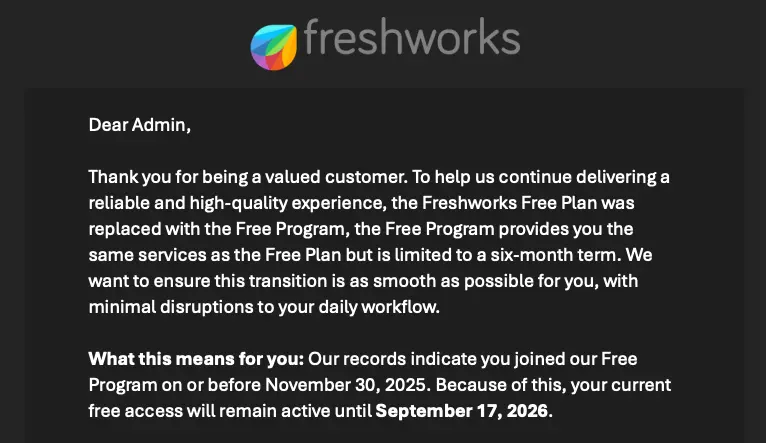
Just got an email this morning from Freshworks that the Free Plan that I've been using for the past 11 years will be coming to an end. They are offering a six-month term on their "Free Program" order to transition into a paid plan (or to something else).
I'll chalk that up to good timing that I just switched to FluentSupport over the past month!
They did seem to roll out a new data export feature (or unlock it for those on the free plan) as I don't recall seeing it before. That was one thing I had issues with in transferring my data to FluentSupport via the API. On the free plan I was rate limited on the API and made transferring data basically impossible so I just gave up and started from scratch thinking I'd just have to use FreskDesk as a read-only system for historical data.
Now I've got my data exported just in case I need it. It can be exported in XML or JSON formats and you can select what data you want to export together. I pulled down a few different bundles of data including a full export of everything in both XML and JSON.
I wouldn't import my old tickets at this point but it would be nice to be able import these files into FluentSupport. I just restarted from scratch with FluentSupport and restarted my ticket numbers back to 1 so I would have overlap but if I was to make the transition now I'd love to be able to import via a file instead of the API so I thought I'd mention it here.
I'm still adjusting to FluentSupport and have some kinks to work out but so far I'm happy I made the switch!