


Five days, five releases. Here’s the whole week in one place.
Monday, 1.8: Dynamic Pricing (Pro). Discounts and fees that follow rules you set, like buy 3, get 10% off, or a fee for a single payment method.
Tuesday, 1.9: On-page checkout (Pro). Your customers can buy right on your sales page, without going to a separate checkout.
Wednesday, 2.0: Multi Currency (Pro, beta). Customers see prices and pay in their own currency. You set the rates, and every order keeps the rate it was sold at. This was your most requested feature, so it got the 2.0 number on our first birthday.
Thursday, 2.1: Reports that add up. We went through every report and made the numbers match your actual orders. There’s also a new Compare report and a much deeper Products report.
Today, 2.2: After four big feature days, today was about making everything solid:
- Fixed receipt and email layout issues, like the tax breakdown overlapping and long store names wrapping
- Better checkout on narrow block themes like Twenty Twenty-Five
- Fixed the product popup in Elementor, Bricks, Divi and the customer portal
- Fixed an error some older stores hit after updating to 2.1
- Fixed a bug where adding a second coupon to an existing order removed the first one
- The usual round of security audits and hardening
Two smaller additions came with it. Your store now works right to left for Arabic, Hebrew, Persian and Urdu sites. Receipts can also show your company registration, VAT and tax IDs, which many countries require on invoices.
Today's release note: https://fluentcart.com/blog/fluentcart-2-2-0/
Year two starts now 🚀

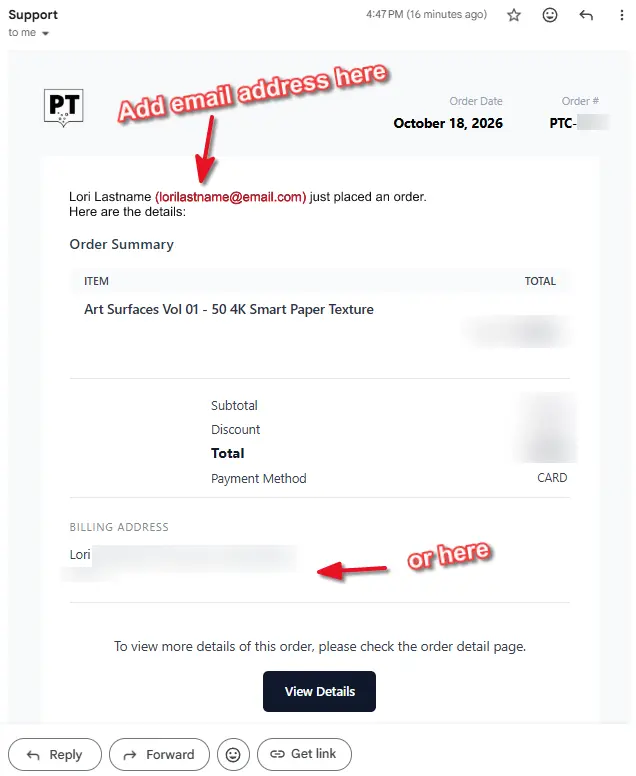
One thing I miss is having the customer email included in the purchase notification email.
I get emails from people and they say something about a purchase they made in the past and it's really useful to be able to search for their email address and find their previous purchases in Gmail rather than have to log in to Wordpress and search their name to find out what the bought when.
I can't do that with Fluent Cart as the email notifications don't include the customer's email address, just their name.
If their email address was on the notifaction they would be searchable in Gmail.
Maybe there is a good reason not to do this, but it's VERY useful.
Sometimes I want to give a user one of my products for free as a thank you (or an apology😬)
The way I do it now is to send them a coupon, which they like of course, but sometimes I wish it could just appear in their account.
Is there a way to do that?

Hi FluentCart Team,
I would like to suggest a collaboration between FluentCart and Blocksy to create an official eCommerce Starter Site powered by FluentCart, similar to what Blocksy has already done with FluentBooking.
Currently, Blocksy offers several beautiful eCommerce Starter Sites, but they are all built around WooCommerce.
As a user of Blocksy Pro and FluentCart Pro, I would love to see a ready-to-import Starter Site designed specifically for FluentCart, without requiring WooCommerce.
This would offer several benefits:
- Make FluentCart more accessible to beginners and WordPress users.
- Allow users to launch a complete online store in just a few clicks.
- Showcase FluentCart as a serious alternative to WooCommerce.
- Encourage adoption among Blocksy's existing user base.
- Strengthen the relationship between the Blocksy and WPManageNinja ecosystems.
My suggestion: Could the FluentCart team reach out to the Blocksy team to explore the possibility of creating at least one official FluentCart eCommerce Starter Site?
I believe this collaboration would be beneficial for both teams and their communities.
Thank you for considering this suggestion!
Best regards

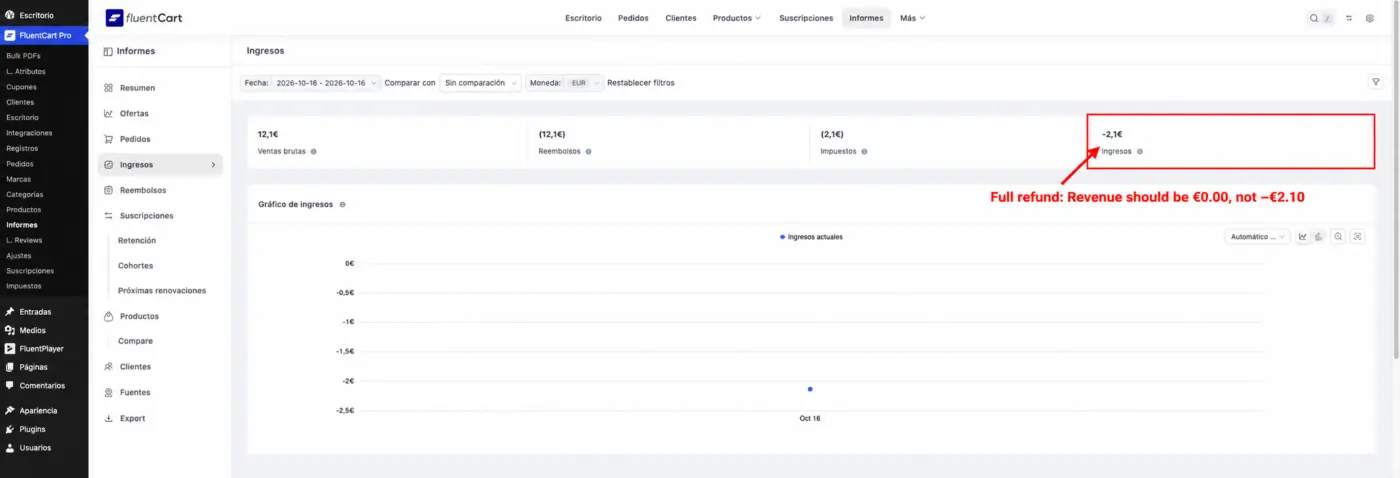
Thanks for this week's updates, especially the work on reporting in 2.1. We retested with Core + Pro 2.2.0, but one VAT/refund reporting issue remains.
TL;DR: A fully refunded native order leaves negative Revenue equal to its VAT, instead of zero.
Native staging reproduction (not imported data):
• Create a new order: EUR 10.00 base + EUR 2.10 VAT = EUR 12.10.
• Mark it paid via Offline Payment, then record a full EUR 12.10 refund on the same day.
• Filter Reports > Revenue to that day, with only this order.
Result: sales EUR 12.10, refunds EUR 12.10, taxes EUR 2.10, Revenue EUR -2.10. Expected Revenue: EUR 0.00.
Customer LTV correctly returns to zero, and the native Accounting Export correctly offsets both base and VAT. The Revenue report appears to subtract the gross refund while still deducting the original VAT.
A related UI issue also remains: with the item selected, the refund amount is capped at EUR 10.00 (base only). Removing the item selection allows the full EUR 12.10 transaction refund.
This was an isolated test with no real money moved. The offline gateway's inability to execute a bank refund is expected and is NOT the issue being reported. We have not reproduced this with Stripe yet.
Could you confirm whether this remaining Revenue calculation and the VAT cap are covered by an upcoming fix? Accurate reporting is important before migrating a service business. Happy to provide the reproduction details privately.

Hi, I am getting a 404 error when trying to access License Settings on my existing digital products. Looks like the free version is possibly not compiled properly and contains 2.0.0 assets?
Have reported it to support, but wanted to warn people just in case they are about to update 🙏

Has anyone expereinced this? This was just the update not settings or anything
WordPress database error: [Table 'xxxx_wp_xxxx.p5cfW_fct_retention_snapshots' doesn't exist]
DESCRIBE p5cfW_fct_retention_snapshots
WordPress database error: [Table 'xxxxx_wp_xxxxx.p5cfW_fct_retention_snapshots' doesn't exist]
ALTER TABLE p5cfW_fct_retention_snapshots ADD COLUMN currency VARCHAR(10) NOT NULL DEFAULT '' AFTER product_id;
WordPress database error: [Table 'xxxx_wp_xxxx.p5cfW_fct_retention_snapshots' doesn't exist]
SHOW INDEX FROM p5cfW_fct_retention_snapshots WHERE Key_name = 'p5cfW_fct_rs_cohort_period_product_currency_idx'
WordPress database error: [Table 'xxxxx_wp_xxxxx.p5cfW_fct_retention_snapshots' doesn't exist]
ALTER TABLE p5cfW_fct_retention_snapshots ADD UNIQUE INDEX p5cfW_fct_rs_cohort_period_product_currency_idx (cohort, period, product_id, currency);
WordPress database error: [Table 'xxxx_wp_xxxxx.p5cfW_fct_retention_snapshots' doesn't exist]
SHOW COLUMNS FROM p5cfW_fct_retention_snapshots LIKE 'currency'
WordPress database error: [Table 'xxxx_wp_xxxxx.p5cfW_fct_retention_snapshots' doesn't exist]
SHOW COLUMNS FROM p5cfW_fct_retention_snapshots LIKE 'currency'
Today’s release is about reports, and it’s one I care about a lot.
Reports are how you know what’s working. Which product sells, which price works, and whether people come back and renew. Before FluentCart, I pulled all of this into Google Sheets. A lot of store owners still pay for a separate tool like Metorik just to understand their own sales.
In FluentCart 2.1, we went through every report and made sure the numbers match your actual orders.
- Compare report (Pro): pick two or more products and see them side by side on one chart.
- Products report: now shows customers, discounts, top-selling variants, and units sold by period, with CSV export.
- Subscription reports: only count subscriptions that actually started. Retention and cohort numbers are fixed, and Future Renewals shows renewals by variant.
- Overview, Orders, Refunds and the digest email: now count order types they missed before.
If you’d rather just ask, connect your store to an AI assistant through our MCP. Ask something like “which product made the most profit last month?” and it answers from your own store data.
We also added new checkout field label styles (Docked, Floating, and Placeholder only) and fixed about 30 report bugs.
Full details: https://fluentcart.com/blog/fluentcart-2-1-0/
Tomorrow is the last day of the week.
One small ask. If FluentCart has been good to your store this year, a quick review on WordPress.org would mean a lot. 🙏
https://wordpress.org/support/plugin/fluent-cart/reviews/#new-post
Hi team, please fix this refund-dialog inconsistency, reproduced on staging with FluentCart Core and Pro 2.0.0, EUR, tax-exclusive pricing and 21% VAT. All payments were Stripe sandbox tests, not live charges.
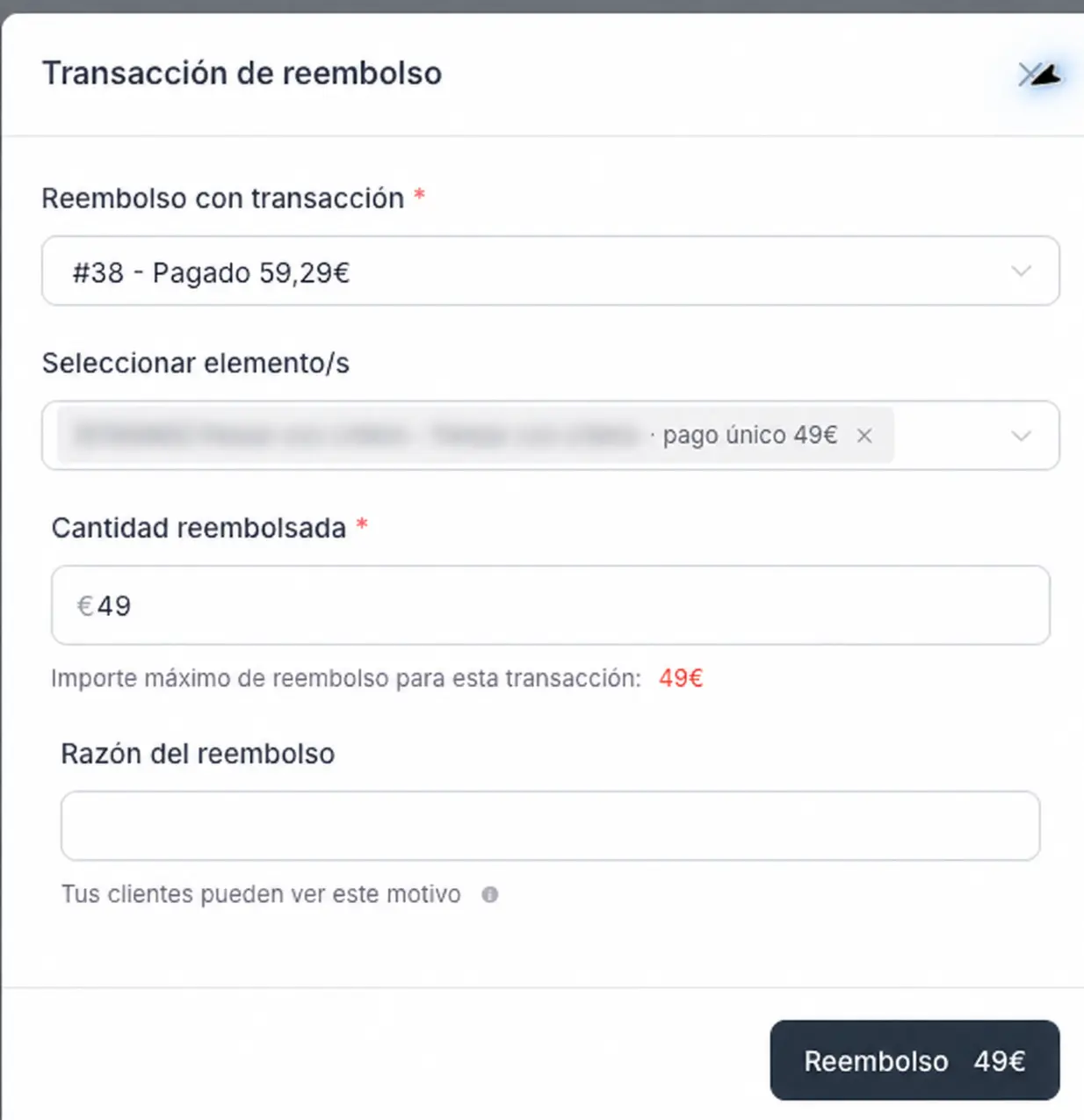
TL;DR: selecting the purchased item limits the refund to its pre-tax price, even though the selected transaction includes VAT.
Steps to reproduce:
- Buy one item for €49 + €10.29 VAT = €59.29 using Stripe test mode.
- Open the paid order and its refund dialog.
- Select the charge and the purchased item.
Actual result: the transaction shows €59.29 paid, but the maximum refundable amount and refund button show only €49. Entering €59.29 is clamped back to €49 (screenshot attached).
Expected result: a full refund of the selected item should include its associated VAT, up to the remaining refundable transaction amount. Partial refunds should handle the corresponding tax consistently too.
Important workaround: removing the item selection changes the maximum to €59.29. We then refunded the entire €59.29 in ONE operation and verified the full refund in Stripe. So this is not a Stripe limitation, and two refunds are not inherently required. We also reproduced the item-selected limit with an offline test order (€10 + €2.10 VAT).
Please make the item-selected refund calculation and validation consistent with the amount actually paid, including VAT. Otherwise, following the default item-selected flow can leave the customer under-refunded. Thank you!

Site: thehiddencause.com · WordPress 7.1.3 · PHP 8.4 · Base currency USD; GBP, EUR and CAD enabled
-
The exchange-rate provider can’t be changed from Manual in the admin UI
Settings → Multi-currency: the “Exchange rates from” selector (Manual / European Central Bank) sits inside the “Exchange rates” section. That section only displays when rate_provider is set and isn’t manual. With the provider on Manual, the section and its selector are both hidden, so there’s no way to switch to ECB. We had to change the setting in code; after that the section appeared and works.
Expected: the selector is visible in Manual mode. -
Customer::recountStats() throws a database error
QueryException: Unknown column 'total_order_count' in 'field list'. It runs UPDATE wp_fct_customers SET total_order_count = …, total_order_value = …, but neither column exists in wp_fct_customers on 2.0.0 (the columns are purchase_count, purchase_value, ltv, aov). Customer stats can’t be recounted. -
Reports quietly show only the base currency
When the date range includes orders in several currencies, reports default to the base currency. The only way to change it is a “Currency” option inside the filter menu, and there’s no sign that orders in other currencies are being left out. In our case the Products report showed 1 sale where there were 2 (one GBP, one USD).
Suggestion: a visible currency chip or picker whenever more than one currency is in range, plus a note such as “1 GBP order not shown”. -
Feature request: manual and API orders in a non-base currency
OrderController::store() runs unset($data['currency']) (commented “Admin orders in another currency are not released yet”), so admin-created and REST-created orders are always in the base currency. We need to record historical and offline orders in the currency they were actually paid in, with an optional exchange rate and original order date. Supporting currency, rate and created_at on create would cover it.
One year ago today, we pushed FluentCart live. Today, more than 9,000 stores run it. Thank you for trusting it. It means a lot.
Most of what we shipped this year started as your tickets and posts here, like the subscription engine that works with any gateway, proper EU VAT, the Woo and EDD migrators, and built-in reviews.
For the birthday, we decided to ship something new every day this week. Dynamic Pricing went out Monday, on-page checkout on Tuesday, and today is 2.0 with Multi Currency.
What it does:
- Your customers see prices, pay, and get their emails in their own currency.
- You set each exchange rate yourself. Nothing changes until you edit it.
- Every order remembers the rate it was sold at, so renewals and refunds stay correct.
- Reports work per currency or in your base currency, and there’s an accounting export for your VAT records.
2.0 details: https://fluentcart.com/blog/fluentcart-2-0-0/
The full year story: https://fluentcart.com/blog/fluentcart-1-year-anniversary/
One small ask. If FluentCart has been good to your store this year, a quick review on WordPress.org would mean a lot.
https://wordpress.org/support/plugin/fluent-cart/reviews/#new-post
Two more releases are scheduled for our birthday week!