


We shipped Fluent Forms 6.2.15 today. It's a regular update with some useful new features and a good set of fixes. Here's a quick overview.
What's new
- Apple Pay and Google Pay with Stripe. Your Stripe payment forms now show wallet buttons next to the card field, so customers can pay with Face ID, Touch ID or their Google account. The buttons only appear on devices that support them.
- Export from the Entries page. You can now export entries as CSV, Excel, ODS or JSON right from the Entries screen. The export uses whatever filters you've set, like read/unread, search or a date range.
- Duplicate integration feeds. Every feed now has a Duplicate button, so you don't have to redo all the field mapping for a similar feed.
- Browser autofill. There's a new Autocomplete setting under Advanced Options. Browsers can fill in name, email, address and phone for your visitors, and it helps with accessibility too.
- AI Agents (WebMCP) setting. This is optional and set per form. It describes your form to AI browsers so they fill it in correctly. They still can't submit it on their own.
Improvements
- CleverReach now has a Resubscribe option, and the list dropdown works properly on accounts with a lot of groups.
- The Salesforce connection is more reliable, and the "missing required code challenge" error is fixed.
- Added more security hardening across the free and Pro versions
- Some other fixes and improvements
Full details are here: https://fluentforms.com/fluent-forms-6-2-15/
Cheers. More cooking 🥳

I have 11 total forms that all function, send out emails using FluentSMTP, and logs all show the emails sending correctly without any alerts of the emails failing. Those forms all email correctly and show it correctly on activity logs.
But, I have 2 forms that gets used the most, that although I have the exact same email notification setup, have recently started not sending email notifications. 1 of the forms uses google sheets integration, the other simply just collects data and emails. The information from the form using the google sheet integration does end up on the google sheet, but the email notification is both of those forms has stopped sending emails.
On the forms that work and push email notifications, under the entry it shows the submission log as it should.:
info in EmailNotification (Email sending initiated) at 2026-10-08 15:52:57
On the 2 that don't send an email, it's blank, but the email notifications settings are exactly the same as the ones that DO work.
These forms used to send email notification until about a week ago around when I ran the recent plugin update, but that doesn't explain why the other 11 forms work and these 2 don't.
- If I use the "Resend notification" button on the entry that didn't send it does properly send one, but why isn't it sending it the first time all of a sudden?
What could cause 2 forms out of 12 to not function when it's setup the same way?

The heading / menu row of Forms > Editor | Settings & Integrations | Entries all show a small portion of the form name until you hover over it.
Also the Form ID is hidden until hover which slides it out as the shortcode with a Copy to Clipboard option.
To me those full name & ID should be prominently displayed ALWAYS.
I frequently have two forms open in two browser windows side by side (or dual monitors) to compare Field settings and layouts and constantly having to make sure I which form I am in by hovering over the name (e.g. "Artist Application 2027" and "Artist Application 2026" or may be same form with one in live site and other in testing site).
While you are at it, the left chevron "<" is very inconsistent in operation. If you open a form in Editor and click it, the app is closed and user returns to the Forms list. Same if you first click Settings. However, once you have moved from Editor to Settings or Settings to Editor then it starts acting like a back arrow instead of an Exit.
Or just add an obvious exit button that will return to the Forms List view.
But not nearly as frustrating as not having Form Name & ID either at top left or centered. Probably could even put Form ID / shortcode underneath form name.
As always, though, thanks for all the patience and quick responses to my questions!


I migrated a form from WS Form to FluentForms. There is one issue I could not yet solve: Ho can I populate the content of a dynamic field programmatically?
I added a dynamic field, set it to Multi-Select and retrieve the data from source Post. So the field now has all posts of a given post type available and stores the data as ID. Now I need to preselect certain posts where I already have the IDs of. How can I pre-select these in the field?
I tried to use default values. Get parameters is no option because there are already numerous params available (the page with the form uses facets). I tried default values from cookies, but they get cached, and once I open the page with the form the cookie gets read once and any further change is ignored.
Is there a hook that works with dynamic fields like fluentform/rendering_fielddata{$type}, then how does it work with dynamic fields?

I appreciate the ability to share from the quick menu, but if pretty URL is enabled it should be that link. Currently, you still need to go Forms → Settings → Landing Page → Share → Copy URL in order to get the pretty URL.

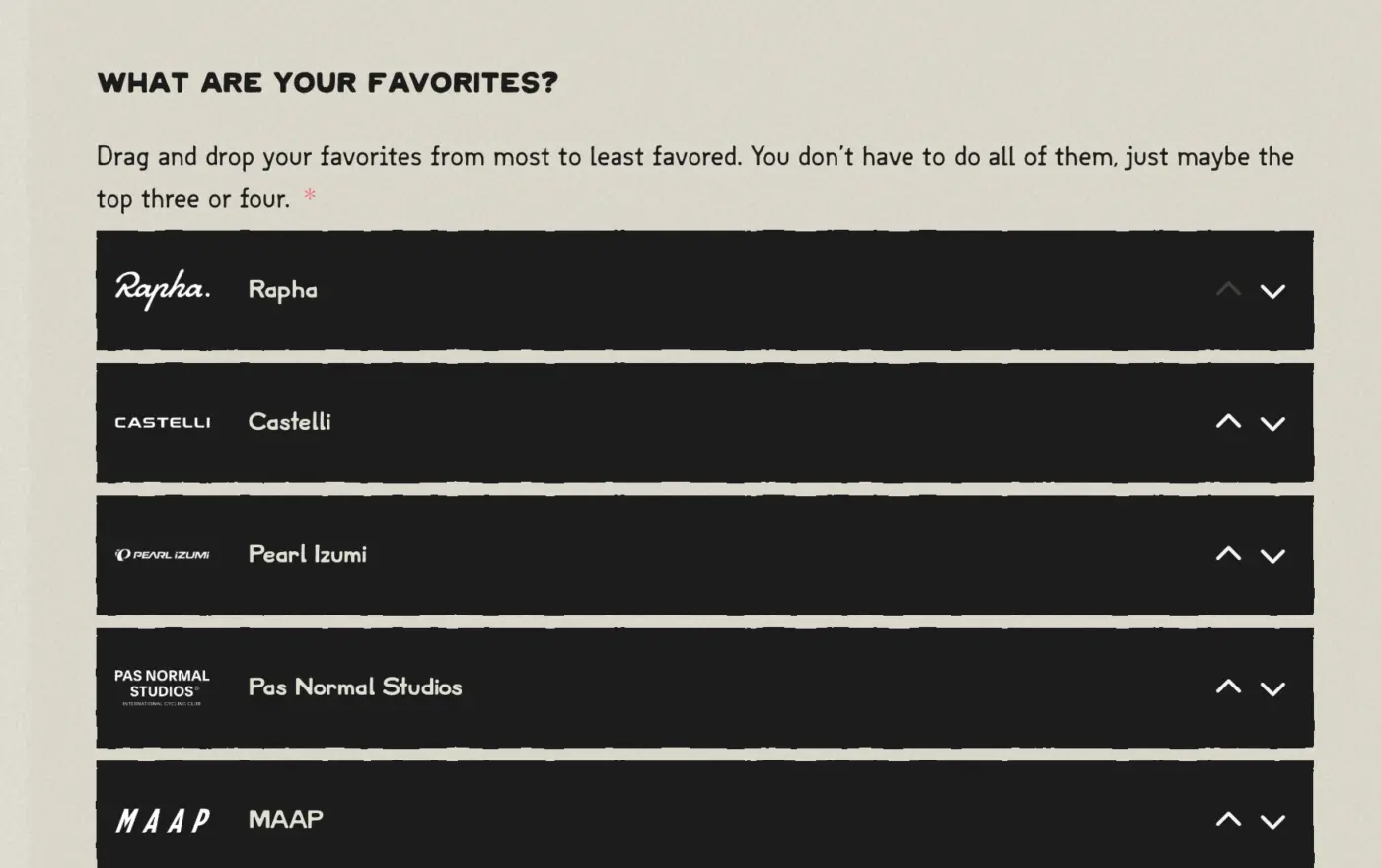
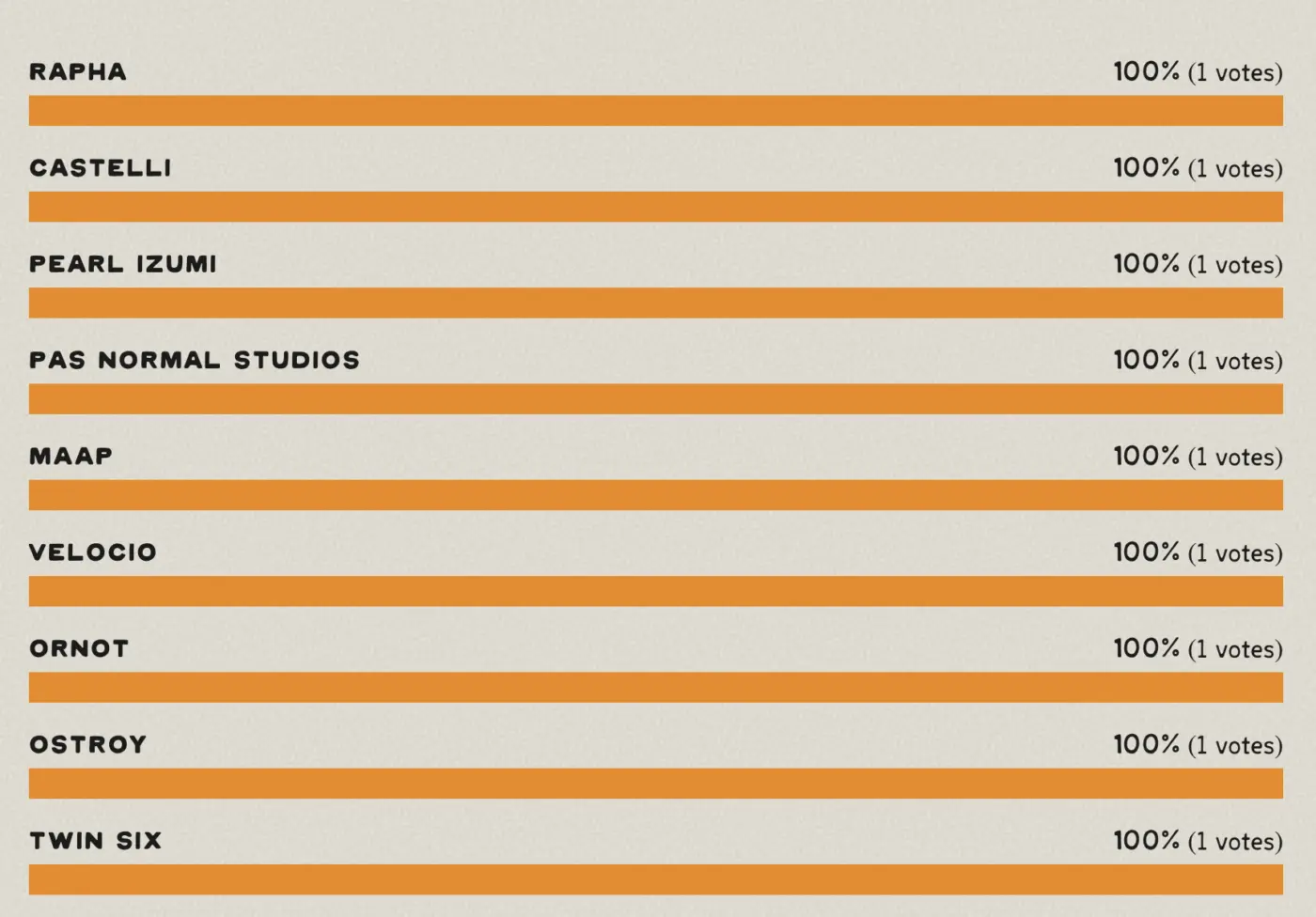
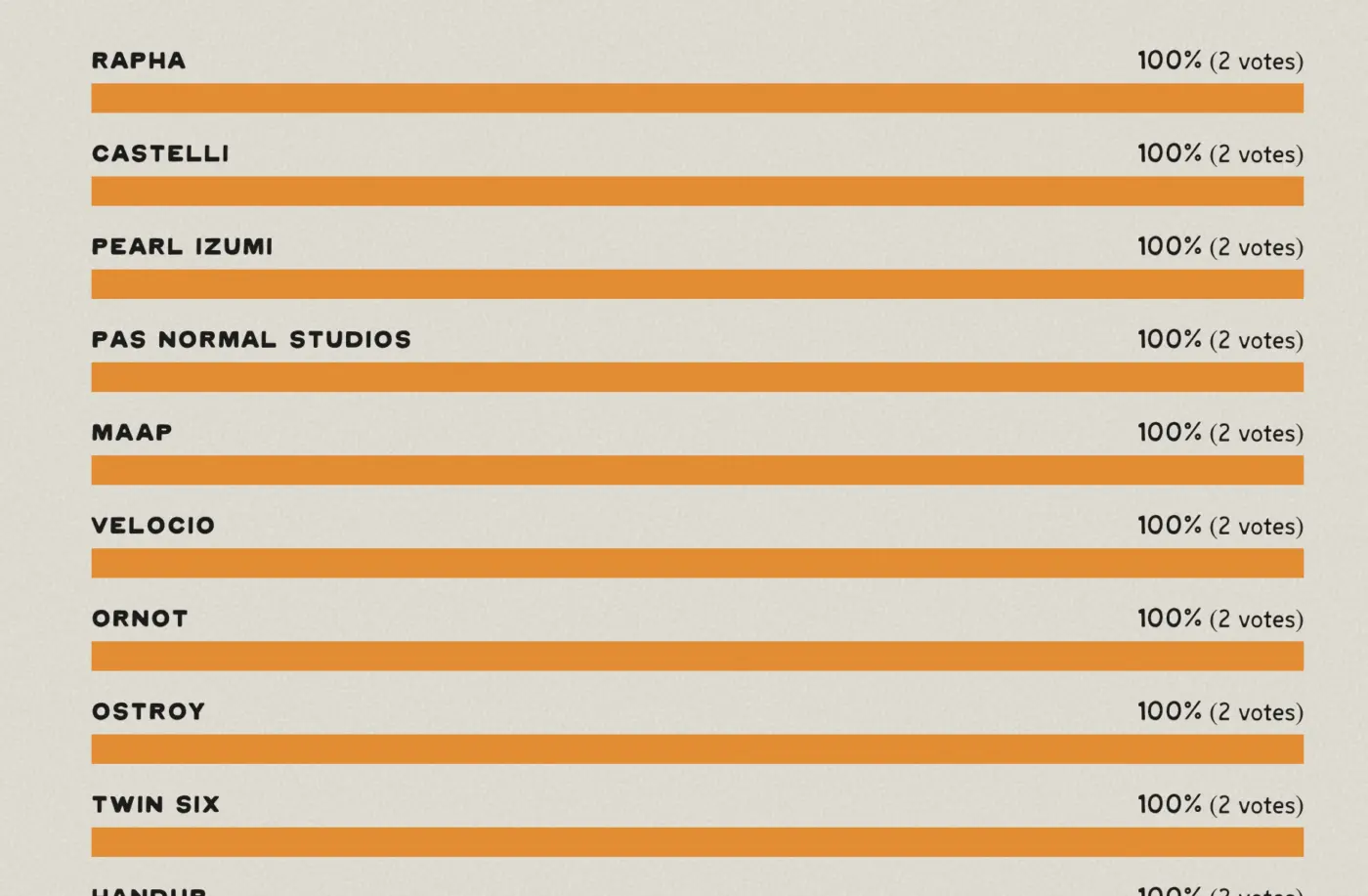
With the ranking field input, I would expect to see the input items ranked as chosen. Even after a couple of votes, every single value gets 100% instead of weighting against their rank over several votes. This essentially makes this input useless... Is this a bug or a feature?
Just discovered and created two forms using the Landing Page option which is a time saver and convenience over creating separate pages for sending form links in email campaigns.
And the Pretty URL option creates a slug that is much cleaner and easier to remember and share.
But also discovered ...
When the Pretty URL option is enabled the browser tab title is set to the site Posts Page title -- with a trailing dash added.
When off, the browser title is set to the Home Page title.
This may be by design
Ideally the browser tab title should be either:
-Home Page title regardless of the Pretty URL setting
-Same as Page Heading field in Landing Page
-Form name
-BEST OPTION - separate setting

Like the abandoned cart event, I would like to request something for when someone abandons a form.
In my client's case, there are two separate sites. Fluent Forms is on a marketing site, and FluentCRM (and other tools) are on a different site. The only way to get a webhook from Fluent Forms is on submit. Clearly, this doesn't work for an abandoned form.
We have the form using steps, and we set the first step to Save Per Step. If the first step includes contact info, I can create a feed to create a contact in FluentCRM, kick off an automation with a delay, and check to see if the form was submitted or not using a conditional block.
I'm not sure that I have a proposed solution, but the combined effects of not having a webhook until Submit and no dedicated event with FluentCRM seem like an opportunity missed to follow up with people who didn't complete the form.
Something I'd love to see implemented.

How to Require Users to Pay Per Blog Post With a Fluentforms Plugin or Fluentcart?
Hi. Can we do this with Fluentforms?
Do you want to accept sponsored posts on your site and let people pay per post with a WordPress plugin? With WPForms, monetizing your website with sponsored posts is easy. All you need to do is to create a blog post submission form and require users to pay to submit.
Allow writers, freelancers, and guest bloggers to submit content to your site through a simple WordPress form. Receive, review, and release with a few clicks..
WPForms makes it super easy to accept sponsored posts on your site. You don’t even have to offer login credentials to your WordPress site. Still, you can let users submit articles for review on your WordPress dashboard using our Post Submissions addon.
You can also take payments right from your WordPress form. This makes accepting, reviewing, and publishing sponsored post submissions quick and easy.
source: https://wpforms.com/how-to-require-users-to-pay-to-submit-a-post-in-wordpress/

My client wanted to know why she had to integrate separately with Stripe for Fluent Forms, Fluent Booking, Fluent Cart. I said "why indeed?" It's an excellent question.
I realize they are separate plugins, but maybe Fluent wants to create a shared set of truths for Address, payment integrations, and other common data items they all need?
Hi,
Since doing an update to 6.2.13 for Fluen Forms, the advanced date configuration settings I've had working and enabled for months using flatpickr no longer works. I use flatpickr to enable specific dates on a calendar and disable all others, and this is not functioning any more.
I can't imagine anything in flatpickr code changed, but my current advanced config is this, where all wednesday's are enabled plus specific Thursdays. The calendar instead is just enabling every single day and ignoring this config completely and I can't for the life of me figure out why.
Any help would be greatly appreciated
{
enable: [
// Specific extra dates
"08/27/2026", // Special Thursday
// Wednesdays except specific date
function(date) {
const isWednesday = date.getDay() === 3;
const isBlocked =
date.getFullYear() === 2026 &&
date.getMonth() === 4 && // May is 4, because months are 0-based
date.getDate() === 6;
return isWednesday && !isBlocked;
}
],
dateFormat: "m/d/Y",
showMonths: 1,
minDate: "today",
maxDate: new Date().fp_incr(60)
}