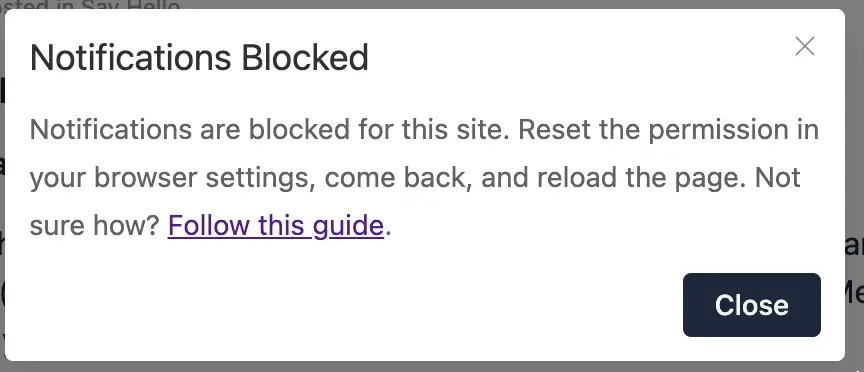
Shahjahan JewelΒ The notification only arrives when the app is Opened.

Nothing happens if the app is not opened

Hello guys! Our community has around 600 paid members but right now we want to open a "free trial" and hope to scale to 10.000 total members in a couple of weeks and also there will be maybe 5% concurrent users at most I guess (500 concurrent users).

So I would like to hear from community owners that have similar numbers (10k or more users) and how are they handling server/hosting and any advice that you please can share

Thanks a lot!

Since the update to 2.9, every video uploaded through the post editor shows up
as a generic link card – domain and file name, no player. YouTube embeds in the
same spaces are fine. This is not limited to old posts: a video uploaded today,
on 2.9.1, reproduces it immediately.

The cause is one clause added to isVideoMedia() in app.js; the section
When it started below has the version series it was measured against.

Environment

Three installations, all WordPress 7.1 / PHP 8.3:

FluentCommunity Pro FluentPlayer FluentPlayer Pro
test system 2.9.1 2.9.1 1.4.0 1.4.0
production A 2.9.1 2.9.1 1.4.0 not installed
production B 2.9.1 2.9.1 1.4.0 not installed

FluentMessaging 2.9.0 everywhere. The behaviour is identical on all three, with
and without FluentPlayer Pro.

All three store their media on Bunny.net, through FluentCommunity Pro's own
cloud storage module
– fluent-community-pro/app/Modules/CloudStorage/BunnyCDN/BunnyCdnDriver.php.
A video uploaded with the editor's video button therefore does not land in
wp-content/uploads; it goes to Bunny Storage and is served from the pull zone.
The row in <prefix>fcom_media_archive looks like this:

media_type : fluent_player
driver     : s3
media_path : bunny://storage.bunnycdn.com/<zone>/fluentcom-…-live-studio-ferienhaus.mp4
media_url  : https://cdn.example.com/fluentcom-…-live-studio-ferienhaus.mp4

getRemotePath() in that driver builds the bunny:// path (line 79). The
consequence for this report: media_preview.url and media_preview.settings.src
point at the CDN host, not at the site host.

We have no install that keeps its media locally, so we cannot say whether the
link card also appears with plain local uploads. If it does not, the CDN host is
the difference worth looking at first.

What you see

The media wrapper comes out as feed_media_meta_data:

<div class="feed_media feed_media_meta_data" is_preview="false">
  <a href="https://cdn.example.com/fluentcom-…-live-studio-ferienhaus.mp4"
     target="_blank" rel="noopener" class="feed_media_link">
    <div class="feed_media_content">
      <div class="media_domain">cdn.example.com</div>
      <div class="feed_media_title">live-studio-ferienhaus.mp4</div>

No <video>, no <media-player>, no FluentPlayer markup at all. Logged in and
logged out behave the same.

What is stored

The post meta written by the editor's own upload, taken from the database and
confirmed byte for byte against the REST response the Vue app receives:

'media_preview' => [
    'type'         => 'oembed',
    'url'          => 'https://cdn.example.com/fluentcom-…-live-studio-ferienhaus.mp4',
    'content_type' => 'video',
    'player'       => 'fluent_player',
    'provider'     => 'upload',
    'title'        => 'live-studio-ferienhaus.mp4',
    'media_id'     => 119,
    'settings'     => [
        'src'         => 'https://cdn.example.com/fluentcom-…-live-studio-ferienhaus.mp4',
        'title'       => 'live-studio-ferienhaus.mp4',
        'viewType'    => 'video',
        'crossorigin' => false,
    ],
]

There is no html key.

Why the player is skipped

From the shipped fluent-community/assets/app.js (2.9.1), the media component:

mediaWrapperType() {
    return this.media.type === "oembed" && !this.isVideoMedia ? "meta_data" : this.media.type
}

isVideoMedia() {
    return this.isYouTubePlaylistUrl(this.mediaSrcUrl) && !this.media.html
        || this.media.type === "oembed" && !/<(iframe|video)\b/i.test(this.media.html || "")
      ? false
      : ["oembed", "iframe_html", "video", "fluent_player"].includes(this.media.type)
}

For an uploaded video type is oembed and html is absent, so the second
clause makes isVideoMedia false, mediaWrapperType falls back to meta_data,
and the template renders the link branch. The player branch is never reached.

When it started

The clause is new in 2.9. We keep nightly file backups of one production
install, so this is measured rather than inferred – for each backup, the plugin
version and whether its app.js carries the iframe|video test:

backup FluentCommunity clause in isVideoMedia()
2026-07-26 … 2026-08-09 2.7.5 absent
2026-08-16 2.7.7 absent
2026-08-23 … 2026-09-03 2.8.1 absent
2026-09-04 2.9.1 present

In 2.8.1 the function read:

isVideoMedia() {
    return this.isYouTubePlaylistUrl(this.mediaSrcUrl) && !this.media.html
      ? false
      : ["oembed", "iframe_html", "video", "fluent_player"].includes(this.media.type)
}

An uploaded video passed, because its type is oembed and the YouTube
playlist clause did not apply. mediaWrapperType() is unchanged between the two
versions, so the whole difference is that one added clause.

We cannot separate 2.9.0 from 2.9.1: both were installed on the same evening,
between two nightly backups.

Why the stored shape has no html

The uploader emits html: "", and the save path drops it:

fluent-community/Modules/Integrations/FluentPlayer/Bootstrap.php:383 (and the
same call at :401)

$data['meta']['media_preview'] = array_filter(self::sanitizeMediaHtml($media));

array_filter() without a callback removes every falsy value, so the empty
string never reaches the database. The plugin therefore writes precisely the
shape its own renderer rejects.

Scope

On one production install 55 posts are affected, on a second 2 – every post
whose video came from the editor upload, going back to April 2026. YouTube
embeds are unaffected because their html carries an <iframe>, which
satisfies the regex.

Reproduction on a clean 2.9.1: create a post, upload an MP4 with the editor's
video button, save, open the post.

Suggested fix

Either would do it:

  • keep media_preview.html out of array_filter(), or set it to real markup on
    upload, or
  • let isVideoMedia() accept an oembed media that carries
    player: "fluent_player" (or provider: "upload") without requiring embed
    markup.

The second looks safer for existing content, since it also repairs the posts
already stored.

Happy to send a PR for either.

What we run in the meantime

A read-time filter, on all three installs. It supplies the missing markup and
writes nothing to the database; as soon as html carries a <video> tag,
isVideoMedia() is true again and the component takes its first branch, so the
FluentPlayer preview renders as it should.

add_filter('fluent_community/rendering_feed_model', function ($feed, $config = []) {
    $meta = $feed->meta;
    if (!is_array($meta) || empty($meta['media_preview']) || !is_array($meta['media_preview'])) {
        return $feed;
    }
    $media = $meta['media_preview'];
    if (
        !isset($media['player'], $media['type'], $media['provider'], $media['content_type'])
        || $media['player'] !== 'fluent_player'
        || $media['type'] !== 'oembed'
        || $media['provider'] !== 'upload'
        || $media['content_type'] !== 'video'
        || !empty($media['html'])
    ) {
        return $feed;
    }
    $src = !empty($media['settings']['src']) ? $media['settings']['src'] : (!empty($media['url']) ? $media['url'] : '');
    if (!$src || stripos($src, 'https://') !== 0) {
        return $feed;
    }
    $media['html'] = '<video src="' . esc_url($src) . '" controls playsinline preload="metadata"></video>';
    $meta['media_preview'] = $media;
    $feed->meta = $meta;
    return $feed;
}, 20, 2);

Two things we checked before settling on it: a <video src="…"> survives your
own oembed allowlist in RemoteUrlParser::sanitizeOembedHtml() unchanged
(wp_kses_allowed_html('post') plus iframe – note that <source> does not,
which is why the source sits on the video tag), and YouTube embeds are untouched
because they already carry an <iframe> in html and have provider: "youtube".

Posting it in case it is useful to other users while this is open. We would
rather drop it again than maintain it.

Side observation

With the branch repaired locally, the player renders and plays, but the browser
console reports:

FluentPlayer: Failed to fetch media data: Medium nicht gefunden

fluent-player.js posts action=fluent_player_get_media_data&media_id=<id> to
admin-ajax.php. The id comes from media_preview.media_id, which is a row in
<prefix>fcom_media_archive, while the handler resolves it against WordPress
posts:

fluent-player/app/Blocks/FluentCommunityMediaBlock.php:838

$media = Media::findVisible($mediaId);

with post_password_required($mediaId) and current_user_can('edit_post', $mediaId)
in the same function. On our installs the ids do not exist as posts at all
(fcom_media_archive 101, 102, 119 versus FluentPlayer media posts 40, 281,
292), so the lookup always fails.

It has no visible effect – the player already has its source from the
server-rendered markup and plays fine – so this is a note rather than a second
report.

Hi. I have been testing the new Push Notification and it is amazing thank you.

As an Admin, from time to time, it would very beneficial to be able to send a Push Notification Announcement to all members of a Space (that have chosen to receive them), like the way we can choose to spend a Post out as an Announcement via email.

Thank for the wonderful updates.

Stefan

1.00

PLEASE! Make 3 chats in TABS instead of showing them one under another. I am member of like 30 groups and I must always scroll down on personal messages. Not much work needed to make it more user friendly.

  • PERSONAL
  • SPACE
  • GROUP

These 3 tabs.

EDIT: Also "Edit message" feature would be nice.

1.00

I use the .pot file to create the fr_FR.po, but there are strings missing. For example, The push notifications options are in english, and the instructions for installing the app on mobile also.

There are strings that cannot be translated with the .po files There are strings that cannot be translated with the .po files

Hey guys,

This Monday, I got the chance to gather with Shahjahan JewelΒ for an interview!
For people that asked questions on my previous post, the answers are towards the end of the video! πŸ˜ƒ

Shahjahan JewelΒ Thank you so much for your time, it was great fun and I'm looking forward to our next video together!

In my opinion everything that goes as notification bell should go as push version aswell. I miss notifications for:

  • New message in chat
  • New post from member I follow
  • New post in space I am member of
  • Reaction (LIKE) on my post / comment
  • Digest weekly mail can be also handled by push
  • Global notification when you are creating post and check checkbox to send it via email to every space member

Thank you for the new version, however there are a few issues I have seen.

I have checked the FluentCommunity 2.9.0, PWA app version on an iPhone iOS, and also in desktop browser in mobile width.

In the PWA app version on an iPhone iOS, after scrolling down a Course Lesson page, the Lesson page cannot be scrolled back up, because in a Lesson page a swipe down anywhere on the page, triggers the app to refresh.

When a FluentPlayer element is in a Lesson page it is making the page wider than it should be, causing horizontal scrolling. This is happening in the PWA app version on an iPhone iOS and also in a desktop browser in mobile width view. This is most apparent with a video that has chapters Inline Scroll activated. This type of FluentPlayer is stuck at around 720px in width and does not go narrower.

On a Lesson page the FluentCommunity integrated Documents & Files:

1, In the PWA app version on an iPhone iOS, a document or a file like a PDF can open, however when it does open it takes up the full screen and it is not clear how to go back, a user needs to know they have to swipe right to go back.

2, If the download arrow is selected, a blank white screen appears and nothing happens. Here there is at least a X in the top left corner to go back to the lesson page. This also happened in the 2.8.0 version.

3, When a download link is added in a Lesson page, to download a media file like an audio file, this can be slow to open, and sometimes doesn't, and there is no indication something is taking time to open. When the audio file link opens, again there is no obvious way back, swiping right does not work, and there is no way to go back. The app needs to be closed and reopened.

When a download link is added in a Lesson page, to download a file like a PDF, the PDF opens and is visible to view, however there is no way to download it, which is what the link is specifically for.

Regarding closing and reopening the app, is there a way the app can remember where in the community the user was last and open that, instead of always opening up at the Feed? This is especially important is a user was in a lesson in a course, or even in a specific space.

From within the PWA app version on an iPhone iOS, if there is a link to a webpage outside of the community, this webpage appears full screen and there is no obvious way back to the community pages. A user needs to know they have to swipe right to do this, and depending on how many of the website pages are explored, each one needs to be swiped right to get back to the community. The external webpage has no refresh option, swiping down at the top of a page does not refresh it here. There were some advantages to how this was handled before, as it was clearer that an external webpage had been opened, and it was very easy to close it with the X to go back to the community, or use an arrow to navigate back.

It looks like this, and the other download link issues are happening due to the new "pages stay inside the app" approach. From memory, the way the 2.8.0 version opened downloads and non community webpages, had functionality that is actually necessary for these things to work.

Thank you.

Stefan

I was just playing with FluentNotify, and discovered that I can create a personal push notification from subscribers - send, this is awesome!
Can this please be added to the FluentCRM contact?

1.00