


We’re closing the FluentCart lifetime deal tonight. After that, it’s yearly only, and we won’t bring it back.
If you were planning to, don’t leave it for the last minute.
After tonight, FluentCart Pro is $199 every year. Lifetime is $249 once, and you get updates and support for life.
👉 $249 once for 1 site (5 / 15 / 50 sites with split payment available).
👉 60-day refund policy, no questions asked
https://fluentcart.com/discount-deal/
The last post about the FluentCart Lifetime Deal

Currently, as far as I understand, FluentCommunity lacks proper member offboarding features.
When a member of our association leaves the association, we also want to remove his/her access, optionally without deleting all related posts and replies.
Simply blocking the user is not a solution, because in that case all related posts and replies are deleted unconditionally. The same is true for deleting the user from WordPress.

I really like that members can search the community for keywords.
I’d love to have the same search in the course area.
My courses have many lessons, and members often remember a topic but not where it was explained.

Hi! 😊
I'm not sure where to ask about the Events add-on, so I hope it's okay to ask here.
I'm using the Events add-on, and I absolutely love it! However, the Duplicate function doesn't seem to be working.
When I click the Duplicate button, nothing happens. I've tried several times, but the event isn't duplicated.
Is this a known issue, or is there something I need to change in my settings?
Thanks so much for your help!


What are the plans for future notifications?
Is there an API, so we can add ourself?
Will private messages have notifications too? Dripped lessons?

Shahjahan Jewel A payout or bulk payout feature for FluentCommunity could be a valuable addition for community operators. It would be greatly appreciated if the system could support payouts for the following roles:
- Course Owners
- Course Admins
- Course Creators
- Community Admins
- Space Moderators
Ideally, the feature would support both individual and bulk payouts, along with configurable payout rules, transaction history, reporting, and payment tracking for each role.
Thank you for considering this enhancement. ✌️😎

Maybe the question is a typical beginner question.
The FC documentation says: Edit/Delete Group: To change the details of a group, click the Edit Info button next to the group. This will allow you to update the title, slug, description, or visibility settings.If you want to delete the group simply click on the Delete button next to the Group name.
If I try that I get a message"You cannot delete a group with spaces. Please move the spaces to a different group first."
Moving the spaces (that can only be completly deleted) leaves a group over that clutters the right sidebar.
What is the correct process?

Hi everyone 👋
The FC Extensions Directory just got its biggest update. It recommends, earns you more and works for you:
- your expert review on every listing, with your rating, your text, a video or an audio, open to everyone or reserved;
- offers you build for professionals and for your readers, with FluentCart payment in a window, without leaving the community;
- one-file import, webhooks and a fully redesigned admin.
It’s free, like every free extension ❤️
I’d love to hear your feedback! 🙏

Any plans to implement AMA's module with real time (live) sessions? Shahjahan Jewel

Nearly every social platform I see uses an overlapping + in a circle for profile pic and it overlaps the picture itself, kinda like the notification icon does on the right. The cloud with an arrow icon is unintuitive, too small, and should overlap the image. I don't see anywhere I can change that image. Is it hard coded?


Give your community members the freedom to express themselves without revealing their identities.
FluentCommunity Anonymous Posts empowers members to publish anonymous posts within selected community spaces. With customizable anonymous identities, generated pseudonyms, unique avatars, moderation workflows, rate limiting, and privacy-focused controls, it gives community owners complete control over anonymous participation.
About the Plugin
FluentCommunity Anonymous Posts is a powerful extension for FluentCommunity that introduces flexible anonymous posting capabilities to your online community.
Sometimes members have important questions, personal experiences, sensitive topics, or honest opinions they want to share without attaching their real identity. This plugin makes that possible.
Community administrators can enable anonymous posting on individual spaces, allowing members to choose whether to publish anonymously or automatically anonymizing every post in designated spaces.
Beyond simply hiding usernames, the plugin introduces an advanced anonymous persona system that generates unique pseudonyms and avatars, making anonymous discussions feel more natural and engaging.
With additional features such as post approval workflows, anonymous posting limits, customizable identities, email notifications, and translation support, FluentCommunity Anonymous Posts provides a comprehensive solution for communities that value privacy, openness, and meaningful participation.
Key Features
1. Flexible Anonymous Posting Modes
Control how anonymous posting works in each community space.
- Off: Disable anonymous posting completely.
- Optional: Allow members to choose whether to publish anonymously.
- Always: Automatically make every post in the selected space anonymous.
2. Advanced Anonymous Persona Builder
Give anonymous members customizable identities instead of displaying the same anonymous name everywhere.
Choose from four persona modes:
- Static Label: Display a consistent anonymous name configured by the administrator.
- Random Each Post: Generate a different pseudonym and avatar for every anonymous post.
- Consistent Per Member: Give each member a consistent anonymous identity within a space.
- Member Builds It: Allow members to customize their anonymous identity using available name and avatar styles.
3. Customizable Anonymous Names and Avatars
Create more engaging anonymous discussions with automatically generated identities.
Available name styles:
- Animal names (e.g., Curious Tiger).
- Secret names (e.g., Secret Member).
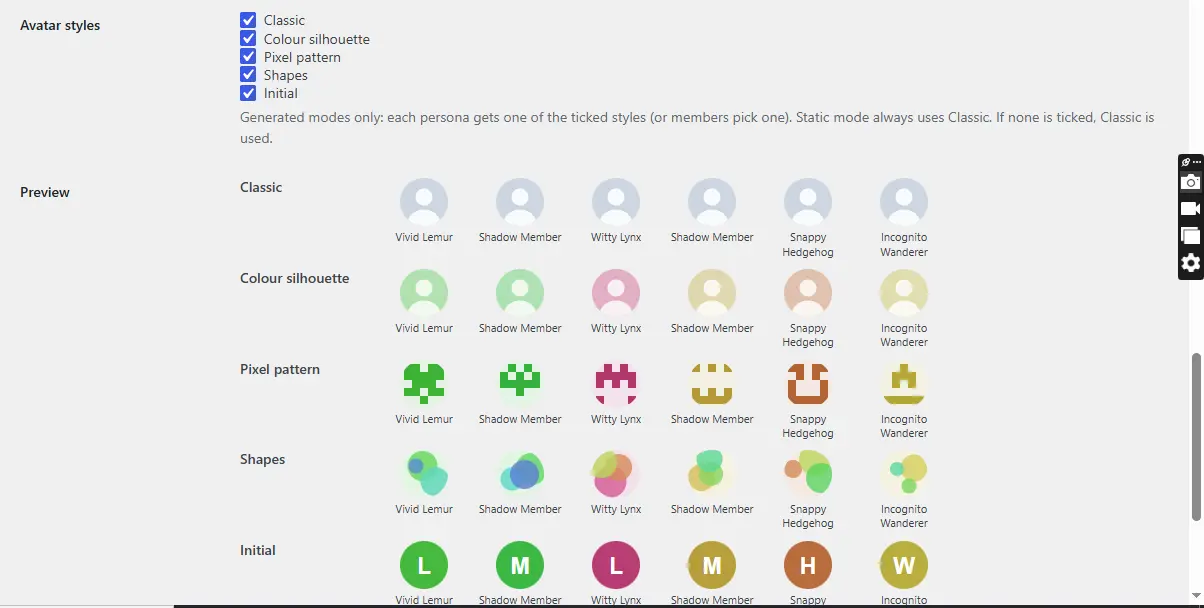
Available avatar styles:
- Classic.
- Colour Silhouette.
- Pixel Pattern.
- Shapes.
- Initial.
Administrators can choose which styles members are allowed to use.
4. Anonymous Post Approval Workflow
Maintain control over anonymous content before it becomes visible to the community.
- Automatically publish anonymous posts or require administrator approval.
- Review pending submissions from a dedicated moderation queue.
- Approve, reject, or unpublish submissions.
- Search posts by content or author.
- Filter submissions by status and community space.
- View the real author's identity in the administrator's review queue.
- Optionally exempt administrators and moderators from approval requirements.
5. Anonymous Posting Rate Limiting
Prevent spam and abuse by controlling how frequently members can publish anonymous posts.
Configure limits based on:
- Posts per hour.
- Posts per six hours.
- Posts per day.
- Posts per week.
- Minimum waiting time between anonymous posts.
Administrators and moderators can optionally be exempted.
6. Privacy-Focused Identity Protection
Designed to prevent accidental identity exposure across supported FluentCommunity interfaces.
- Hide the real author's name from other members.
- Display anonymous pseudonyms and avatars.
- Hide anonymous posts from the author's public profile feed.
- Disable profile links for anonymous identities.
- Mask anonymous authors in supported Trending Posts and Recent Activities displays.
- Protect supported weekly digest email displays.
- Give administrators and moderators access to the real author's identity, according to the privacy settings.
7. Anonymous Post Email Notifications
Configure email notifications for the moderation workflow.
- Notify administrators when anonymous posts require approval.
- Notify authors when their submissions are approved.
- Notify authors when their submissions are rejected.
- Customize sender name and email address.
- Enable or disable individual notification types.
- Configure a default rejection reason.
8. Rejection Reasons
Provide feedback when an anonymous submission is rejected.
Moderators can enter a custom rejection reason of up to 500 characters. The reason is displayed with the rejected status and included in the author's rejection email.
9. Anonymous Identity Management
Give administrators additional control over anonymous identities.
- Configure the anonymous display label.
- Enable or disable moderator access to real author identities.
- Reshuffle consistent anonymous identities.
- Configure available persona name and avatar styles.
- Preserve the identity assigned to a post after publication.
10. Translation Ready
Make your plugin accessible to international communities.
- Fully compatible with Loco Translate.
- Includes a POT translation template.
- Translation-ready settings pages.
- Translatable moderation interface.
- Translatable email notifications.
- Translatable anonymous personas and browser interface.
11. Dedicated Administration Dashboard
Manage the plugin through its own WordPress administration menu.
- General settings.
- Anonymous persona settings.
- Rate limiting settings.
- Approval workflows.
- Email notification settings.
- Illustrated plugin documentation.
12. Developer-Friendly
Includes developer hooks for extending and customizing functionality, including persona word lists, notification recipients, avatar URLs, and post review events.
Key Benefits
Encourage Honest Discussions
Members can comfortably discuss sensitive subjects, ask questions, and share opinions without worrying about exposing their identities.
Increase Community Engagement
Give quieter members the confidence to participate in discussions they might otherwise avoid.
Protect Member Privacy
Reduce accidental identity exposure by masking authors across supported community feeds and activity displays.
Maintain Content Quality
Use the approval workflow to review anonymous submissions before they appear in your community.
Prevent Anonymous Posting Abuse
Set posting limits and waiting periods to discourage spam and excessive anonymous submissions.
Create Better Anonymous Discussions
Generated pseudonyms and avatars make anonymous conversations easier to follow without displaying members' real identities.
Give Administrators Full Control
Choose which spaces allow anonymous posts, define identity rules, configure moderation, and manage notifications.
Reach an International Audience
Use translation tools to localize the plugin for different languages.
Who Is This Plugin For?
FluentCommunity Anonymous Posts is ideal for:
- Online communities and discussion forums.
- Educational communities and student platforms.
- Membership websites.
- Coaching and mentorship communities.
- Support and peer-help communities.
- Professional networking communities.
- Communities discussing sensitive subjects.
- Organizations that encourage open feedback and honest discussions.
Compatibility and Requirements
- Platform: WordPress.
- Required Plugin: FluentCommunity Free Core.
- Minimum FluentCommunity Version: 2.11.0.
- FluentCommunity Pro: Not required.
- Translation: Loco Translate compatible.
- Plugin Version: 1.8.0.
Important Privacy Notes
The plugin masks member identities across the FluentCommunity interfaces it supports. However, it does not make members completely untraceable.
The real author remains stored in the database and can be accessed by authorized administrators and moderators according to the configured settings. Certain third-party integrations, author-based searches, and unsupported interfaces may still access the original author information.
Anonymous post notifications that could expose the real author's identity are suppressed in supported FluentCommunity notification and email workflows.
Public spaces are blocked by default because FluentCommunity Pro SEO pre-rendering and JSON-LD output can expose the real author's identity.
Why Choose FluentCommunity Anonymous Posts?
Anonymous posting should be more than simply replacing a username with the word "Anonymous."
FluentCommunity Anonymous Posts combines privacy controls, customizable anonymous identities, moderation tools, posting restrictions, and notification management into one dedicated extension.
Whether you run a student community, membership platform, discussion forum, or professional network, this plugin gives your members more freedom to participate while giving administrators the tools to manage anonymous content responsibly.
Let your members speak freely. Keep your community engaging. Put privacy and control in your hands.
DOWNLOAD
YouTube video link(please set your video quality to 480 or 720, if YouTube sets your quality to auto 240) : https://youtu.be/lKJw9yoT8I0
For support, Join my community: Mpaddi.com
Some Screenshot, Image 1:
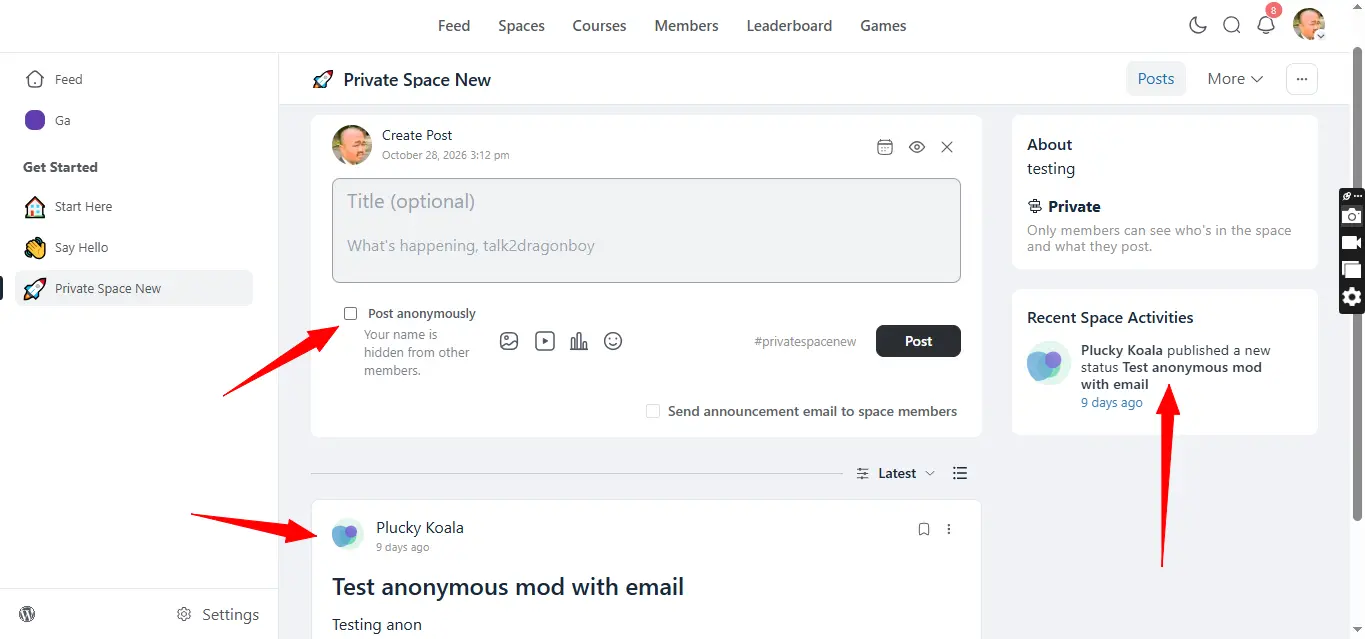
Image 2:
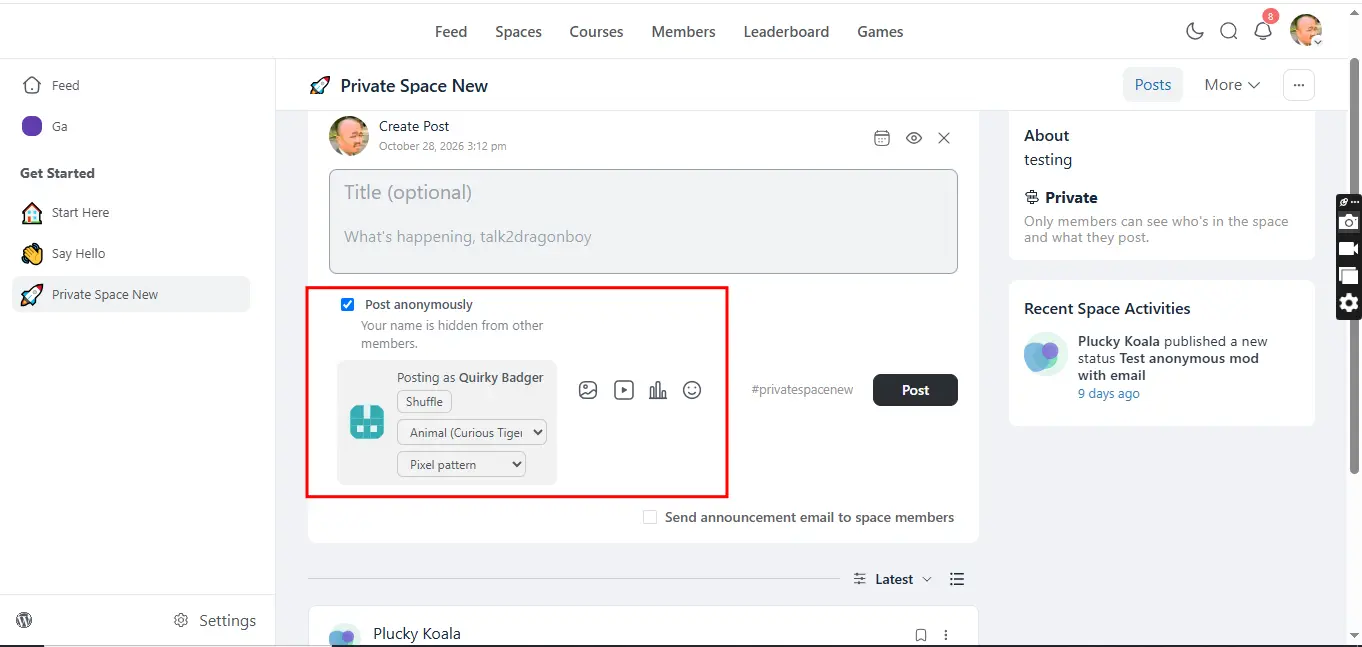
Image 3:
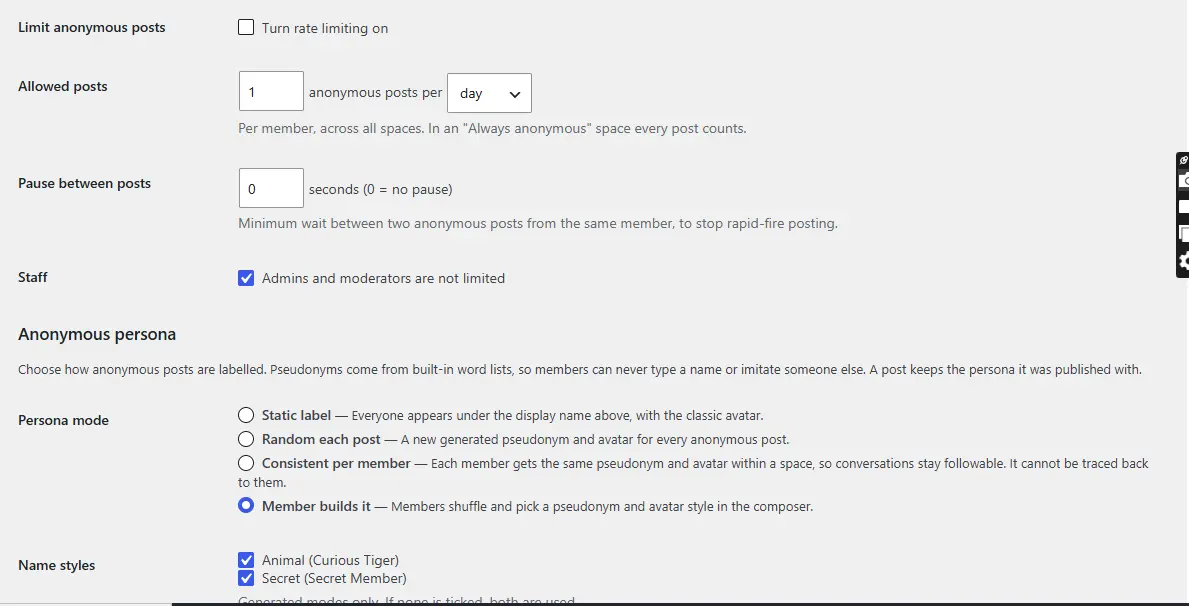
Image 4:
...