


Currenlty, we can not add internal notes on HTML.
This is so problematic because plain text, for large notes, is a nightmare.
Pretty much, unreadable...
Please, add the option to add HTML, so as we can format this notes.
_
Fluent CRM, Boards... have HTML. Please add this too to internal notes :)

I Tested Every WordPress Booking Plugin… Here Are the Only Ones Worth Using

Are there any other integrations on the cards? I see there is now also Nextcloud, but I have not found an easy way to use Nextcloud as a solopreneur. These days there are serious European parties on the market. Are you considering any of those (for those who want to move away from anything US)? Shahjahan Jewel

Love that recurring events are now an option, however, monthly recurring events only allow for the simple "every 15th of of the month" type set up. Given that the 15th could fall on a Saturday or what have you, it would be much more useful if it could be changed to "third Wednesdays" or similar, like I do on Google or Outlook calendars.
Furthermore, it would be great to have the ability to book based on that concept, rather than picking a singular date on the calendar. "2nd Tuesdays at 1:00 are available." I know this is more sophisticated than "every 15th" style but it would be very helpful IMO.

Hello FluentBooking Team,
I noticed an issue with the Google Calendar integration regarding notification settings.
In the booking settings, when “Enable Google Calendar Notification” is unchecked, I would expect that no email notifications are triggered to guests via Google Calendar.
However, in the Google Calendar API request for event creation/update, the URL still includes the parameter:
sendUpdates=all
This parameter instructs Google Calendar to send email notifications to all attendees, which seems to override the notification setting being turned off in FluentBooking.
Expected behavior:
-
When “Enable Google Calendar Notification” is unchecked, the API call should either:
- Omit
sendUpdates, or - Use
sendUpdates=none
- Omit
Current behavior:
sendUpdates=allis always included in the API URL, even when notifications are disabled.
This results in guests still receiving calendar email notifications despite the setting being turned off.
I’ve attached screenshots showing:
- Notification setting disabled in FluentBooking
- The API request URL including
sendUpdates=all
Please let me know if any additional logs or test cases are needed.


Hi FluentBooking Team,
I noticed a small usability issue in the Bookings screen (screenshot attached for reference).
Currently, when I select filters such as All Bookings and All Meetings, the selection resets back to the default Upcoming Bookings and My Meetings whenever I refresh the page or open the app in a new session. This requires reapplying the same filters repeatedly.
It would be very helpful if the application could remember the last selected filter state across page refreshes and user sessions. This would improve usability for users who frequently work with non-default filters.
Suggested implementation idea:
Store the selected filter values in localStorage / sessionStorage or in the user’s profile preferences, and restore them on page load.
This small enhancement would make daily navigation smoother.
Thanks for considering this request.

Hello FluentBooking Team,
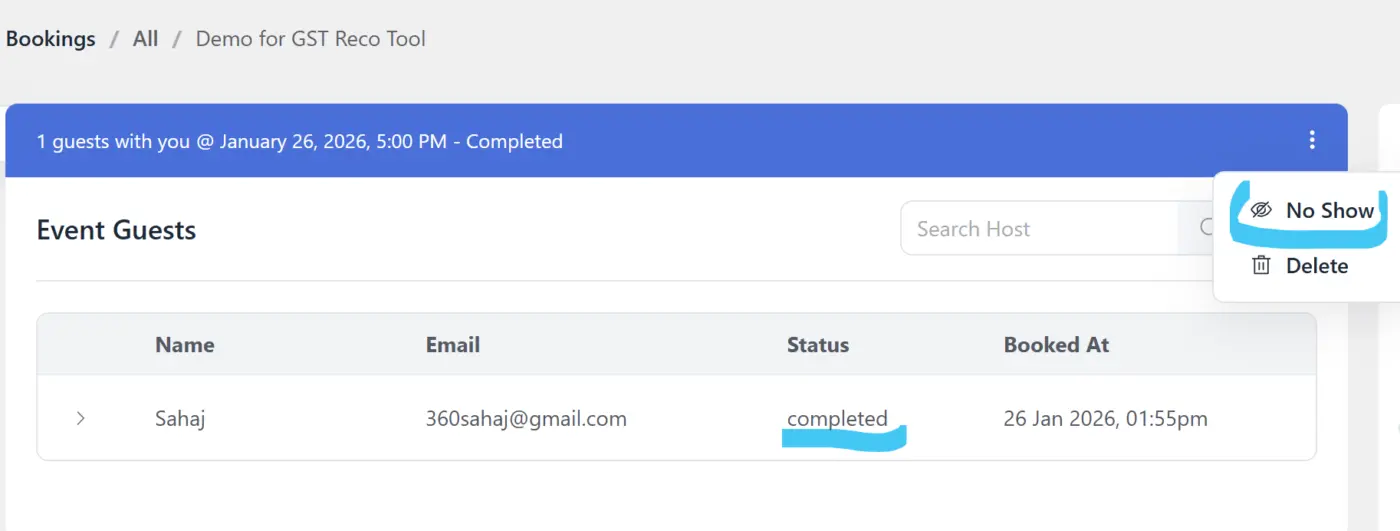
I noticed a limitation in how attendance status is handled for group bookings.
In the Event Guests screen, the “No Show” option is currently available only at the entire meeting level (top-right menu). This marks the whole meeting as no-show, even when a group booking has multiple guests.
For group sessions, we need the ability to mark attendance at the individual guest level, for example:
- Attended
- Not Attended / No-show
This is important because in group demos or training sessions, some guests may attend while others may not, and tracking attendance per guest is required for accurate reporting and follow-ups.
Currently, only meeting-level no-show is available, which does not cover this use case.
I’ve attached a screenshot for reference.
Hello FluentBooking Team,
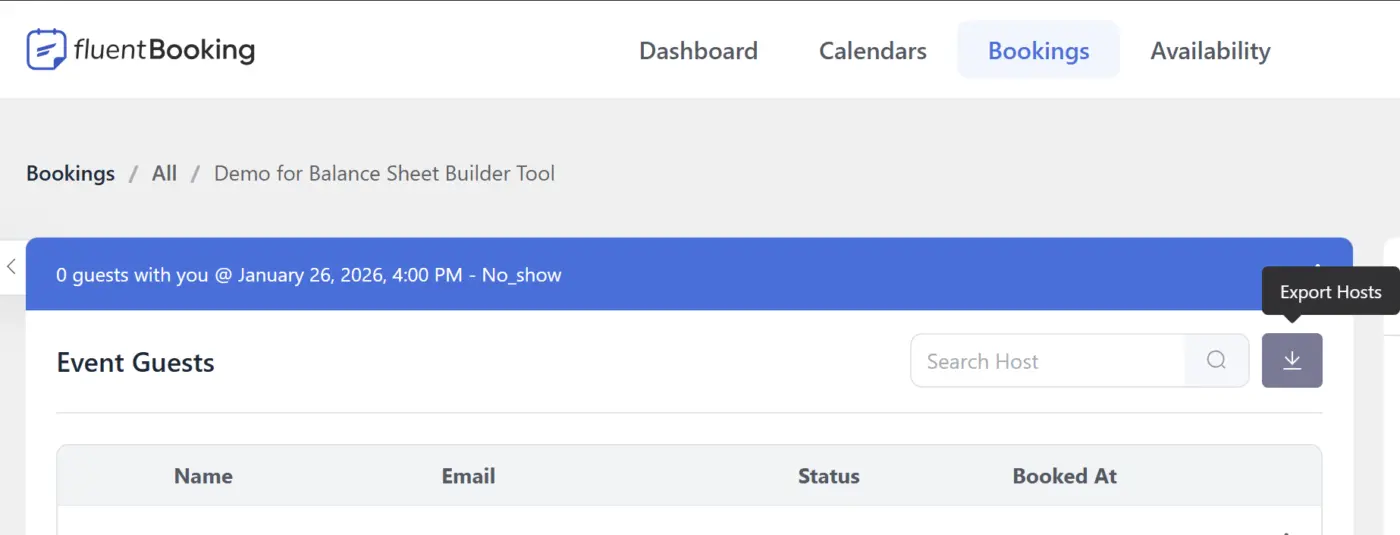
I noticed a small UI labeling issue in the Bookings → Event Guests section for group bookings.
In a group booking, there is one host and multiple guests. On this screen, the search field placeholder shows “Search Host” and the export button tooltip shows “Export Hosts”.
However, this page is displaying and exporting guests correctly — only the labels/keywords refer to “Host” instead of “Guest”.
Expected labels:
- Search Guest
- Export Guests
Current labels:
- Search Host
- Export Hosts
So the functionality is correct, but the wording seems mismatched for group bookings.
I’ve attached a screenshot for reference.

I’ve been waiting for a direct integration between FluentCommunity and the booking system for a long time. Essentially, I’m waiting for the ability to launch event or webinar booking directly from a post.
The ideal scenario is when an event card appears in the feed with:
- a registration counter,
- a countdown timer to the start,
- a preview and event description,
- information about who will participate and what the agenda is.
All of this in a clean, modern UX that follows the same logic and philosophy as FluentCommunity.
Why this matters for the user
A user may never visit the “Events” section at all. Moreover, they might simply dislike such sections and have no habit of browsing them.
But here, in the feed, in a soft and natural way, without the need to search or learn anything, the event just appears in the content stream. Almost like in a restaurant: there is a menu, but the decision is made based on mood and appetite in the moment.
If the emotion and motivation are strong enough, the user joins the event without having to browse through lists of all events.
And then the flow continues naturally:
- a nice email reminder via FluentCRM,
- if needed — a participant form or feedback form via FluentForms,
- then — an offer with a discount for a subscription, podcasts, or courses from this author via FluentCart and FluentCommunity.
All of this as a single, coherent user journey, not a set of disconnected plugins.

Im trying to make one of my calendars private so only my assistant can make appointments. I need that calendar to not appear on the "all calendars" landing page. People on that appointments need to go first with my assistant without having the possibility to make an apointment without that. Is that possible? I cant find a way to make a calendar private.