


If you open FluentBooking every morning to see who’s booked, I think you’ll like this update. We’ve made Calendars and Bookings easier to scan, and we’ve added something many of you asked for: a way to keep bots from grabbing appointment slots.
- Calendars now has a list view so you can find an event and see how many bookings are coming up. If you prefer the grid, you can switch back anytime.
- Bookings are easier to scan. You can see who’s booked, when they’re coming, and what’s still pending without reading the whole row.
- Dark mode can now follow your device. Pick System in the theme menu and FluentBooking will switch between light and dark automatically.
We also shipped Booking spam protection. Head to Settings → Spam Protection, choose Google reCAPTCHA or Cloudflare Turnstile, and use Verify Keys to test your setup.
We also tightened up permissions, fixed a rescheduling bug that could let bookings overlap, and kept meeting links hidden until guests pay online.
Read the full release note: https://fluentbooking.com/articles/fluentbooking-2-6-0/
Thanks to everyone who shared feedback with us. Please let us know in the comments what you think about this update and what we should ship next.

Syed Numan , now that FluentEvents officially launched, what will happen to FluentBooking one-off events? Will this be continued develloped/extended? Or will it fade away in favor of FluentEvents?

Hello Shahjahan Jewel
At the moment I have a single site life time license.
I saw the 5 site lifetime deal for 305 usd
I would like to upgrade, but when I checked, it's for the normal price without any black friday deal.
I asked your team but they could only give me a code for 30% discount, which would result me paying still 305 usd while I already paid for 1 license (so, it would be even more compared to the current black friday deal 305 for 5 vs 305 for 6 licenses.)
Although I really appreciate the current discounts, is there something you can do so that I can upgrade to the 5 site deal? (I only need 2 or 3 licenses so it's alreasy more than I need, and I def. don't need 6 so if I can do an upgrade with 4 licenses, it would be great)
If not, fair enough. Then I will search for other solutions. Thank you in advance!

Is there anyone here who uses FluentBooking for group classes like yoga, Pilates, etc.?
My friend is starting yoga classes and would like to use FluentBooking for them. I think the plugin is perfect for this.
I'd like to show her a few real-life websites that also offer group fitness classes using FluentBooking.

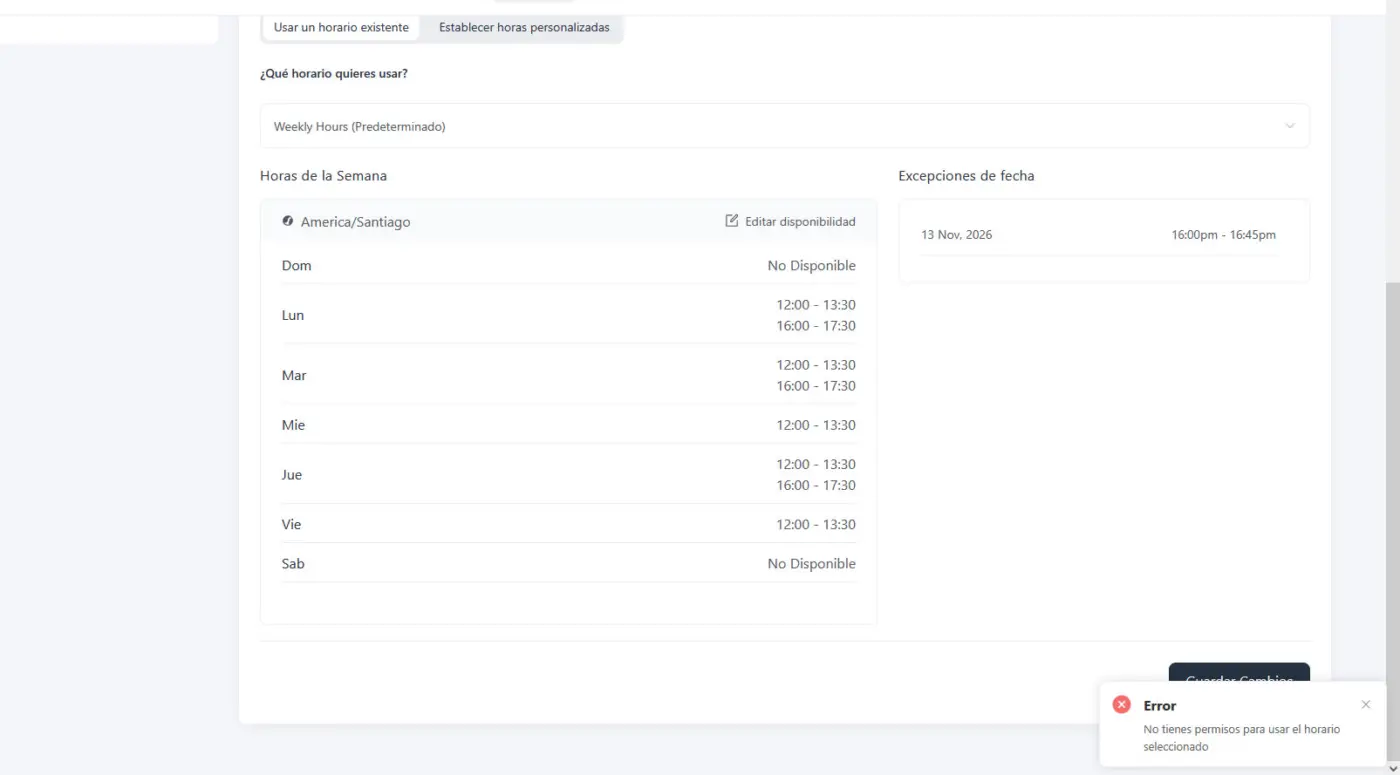
I want to edit this page: https://adhdroadmap.coach/?fluent-booking=calendar&host=body-doubling because I need to align the text under the title to the left and I want to add more detailed expectations under the products. Am I over complicating this or is there a simpler way to do it? I have Fluent Cart, so maybe that is what I should be looking at?

When I perform a minimal change it tells me I don't have permissions.... What? I am the administrator and host....

Shahjahan Jewel I have a suggestion to improve the overall booking flow and make it more effective for both visitors and our business.
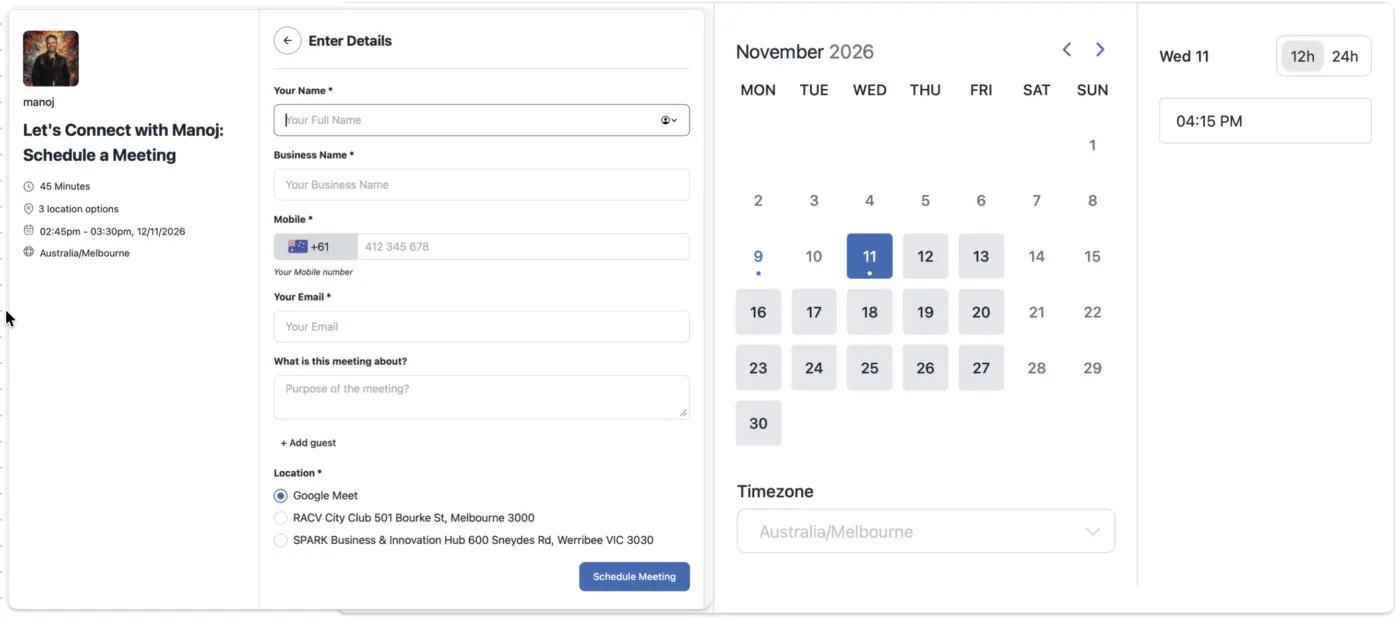
Instead of collecting contact information at the final step of the booking process, I think we should consider displaying the name, email, and other relevant contact fields alongside the calendar in the first step.
The idea is to create a smoother flow where visitors can easily select their preferred date and time while providing their basic details upfront.
More importantly, we should be able to capture and retain this information even if the visitor doesn’t complete the booking. This would allow us to follow up with potential customers via email, re-engage interested visitors, and encourage them to complete their bookings.
The goal is not just to change the order of the steps, but to design a smarter booking journey that improves the user experience, reduces drop-offs, and creates more opportunities to convert visitors into customers.
I believe this could be a valuable improvement to the current booking process.

I had claude whip up a script that allows me to confirm emails prior to booking. First they fill out a fluent form, then they get an email with a link to go to the booking page.
Now I don't have no-shows for my consultation calls. If the email is already verified, they go to the booking page directly.
I think this would be a great improvement to the plugin.
It seems like when I reschedule in the admin that the event itself is blocking possible times. If I have an one hour apointment at eleven and free time before, I can't reschedule at 10.30, the closest available spot is 9.30 (15 minutes limit time before and after).
My guess is that the system sees the event that I try to reschedule and thinks that the slot is taken.
I just noticed something strange. My settings for limits between meetings is 10 min before and 10 minutes after, and 15 min time slots
In the backend I could not book an appointment of 30 minutes where there was 60 minutes between the other bookings of the same type, but my client found it in the booking form.

For several months, I've heard that FluentBooking doesn't work with organizational accounts on M365 or Outlook.com. It's been a pain in the neck, but I have a client's M365 accounts working correctly.
I wanted to share how I resolved the Microsoft Outlook calendar integration issue when standard, non-admin Microsoft 365 users encounter the "Admin consent required" block.
Because FluentBooking is an unverified multi-tenant application, Microsoft Entra ID blocks standard users by default unless the tenant administrator configures specific permission classifications and application settings.
Here is the process that allows standard users to connect their Outlook calendars without needing administrative roles:
1: Add the required permissions to the low-impact classification list.
In the Microsoft Entra admin center, go to Identity, then Applications, then Enterprise applications, then Consent and permissions, and open Permission classifications.
Under the Low classification, add the delegated Microsoft Graph permissions that FluentBooking requests:
Calendars.ReadWrite
User.Read
offline_access
openid
profile
email
2: Grant initial tenant consent as an administrator.
An administrator must trigger the connection once from an admin account. When the Microsoft consent prompt appears, accept it so the FluentBooking service principal registers inside the tenant Enterprise applications list.
3: Adjust the enterprise application properties.
In Enterprise applications, select FluentBooking and open Properties. Set Assignment required to No and save. This prevents Entra ID from blocking users who do not have an explicit app role assigned.
4: Have standard users connect from a clean browser session.
After these tenant settings propagate, standard users must use a fresh private or incognito window to connect their calendar under FluentBooking Host Settings. This clears any cached token sessions that previously failed with error 90095.
Once completed, calendar sync, conflict detection, and automated event creation work reliably for standard users.
Hopefully this helps your team assist other customers running into Microsoft 365 tenant consent issues.