


FC Courses are definitely different than LearnDash courses in how they're architected. Currently in LearnDash we have Courses, Lessons, and Topics. Not much different than Courses, Sections, and Lessons, but enough difference that it's causing me a bit of confusion and I'm looking for some input on how you'd configure it.
Our environment is, for lack of a better description, multiple "learning domains". Each domain has courses, topics, and lessons under it. We're controlling the "Learning Domains" with BuddyBoss groups. On an Elementor Pro page you choose which learning domain you want and that is tied to a BuddyBoss Group and then LearnDash courses are associated with that group.
When I create a new Spaces Group in FC it asks me if this is a discussion group, a course group, or a link group. This is where my confusion is because within this group will be multiple distinct courses and I also want discussions attached to this learning domain (FC space group). If I choose Discussion I don't see a way to add courses. If I choose Course it directs me to add a course and I will need multiple courses under this group, not just one.
Is there a better way to architect this that I'm missing or is this a limitation of FC courses and groups I cannot get around?
I was really hoping to use FluentCart but it doesn't have a Pay What You Can/Name Your Price option, and that's a critical requirement for what we do, so I'm stuck with SureCart and SureMembers for now. It looks like my only choice is to enter someone into FluentCRM manually after they've signed up via the SureCart/SureMembers flow. Has anyone figured out a workaround for this?

Turn Your FluentCommunity Into an Engaging, Reward-Driven Community
FC Gamification brings a powerful, flexible points and leveling system to FluentCommunity, allowing you to reward the actions that matter most on your community, learning platform, membership site, or online academy.
Automatically reward members for registering, joining spaces, creating posts, commenting, reacting, enrolling in courses, completing lessons, finishing courses, passing quizzes, attending video calls, making tips, purchasing products, submitting forms, sharing content, earning certificates, and much more.
Create your own levels, point values, targeted bonuses, leaderboards, member progress displays, email notifications, and FluentCRM automations — all from your WordPress dashboard.
What Is FC Gamification?
FC Gamification is a dedicated gamification engine built specifically for FluentCommunity.
Instead of relying on FluentCommunity's built-in point calculations, FC Gamification maintains its own independent points ledger, giving administrators complete control over how points are earned, deducted, displayed, tracked, and automated.
You decide:
- What actions earn points
- How many points each action is worth
- Which actions can deduct points
- Which spaces or courses receive special bonuses
- How members progress through levels
- How leaderboards are displayed
- Which members should be excluded
- What emails members receive
- What FluentCRM automations should happen
- Whether companion add-ons contribute to the gamification system
The result is a flexible reward system that can grow with your community.
Key Features
🎯 Fully Customizable Point Rules
Choose exactly which member activities should earn or lose points.
Built-in rules cover:
- Registering / signing up
- Joining a space
- Requesting to join a private space
- Creating a space
- Deleting a space
- Enrolling in a course
- Completing a lesson
- Completing a course module/section
- Completing an entire course
- Creating a course
- Deleting a course
- Submitting a quiz
- Passing a quiz
- Creating a post
- Posting comments and replies
- Reacting to posts
- Receiving likes on posts
- Receiving likes on comments
Every rule can be individually enabled, disabled, and assigned its own point value.
🏆 Custom Levels & Progression
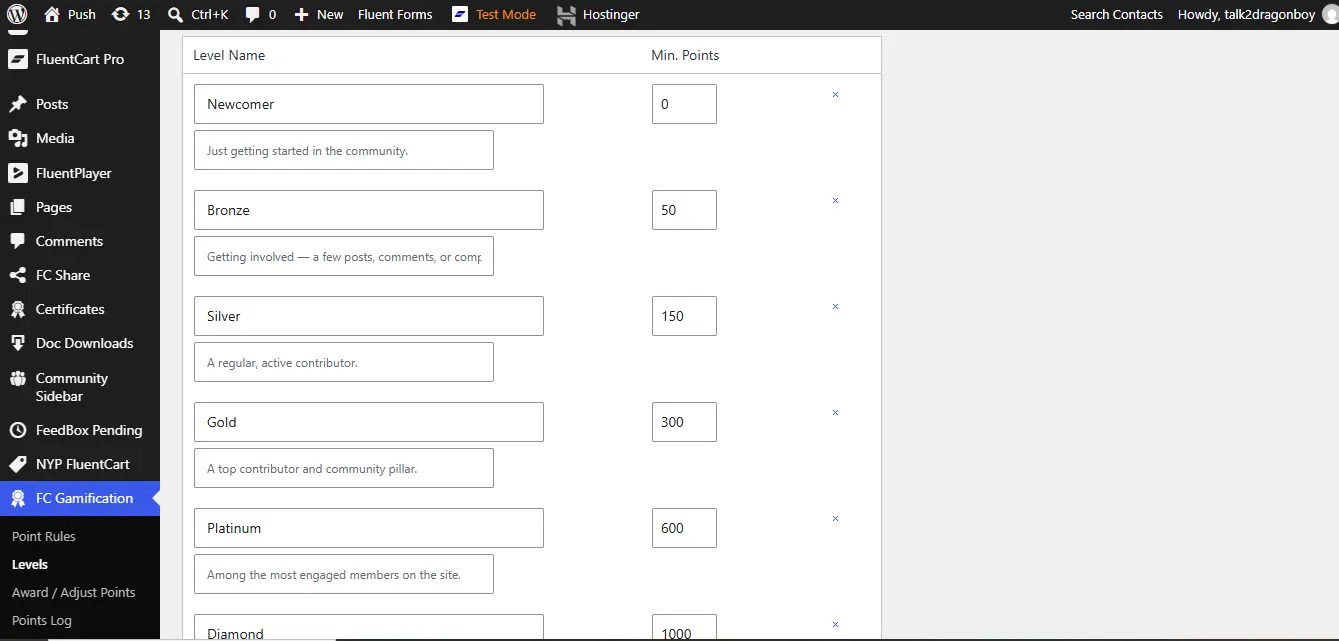
Create your own member progression system.
For example:
Newcomer → Bronze → Silver → Gold → Platinum → Diamond → Legend
Set the minimum number of points required for each level and optionally add descriptions for every level.
Members can see:
- Their current level
- Their current points
- Their next level
- How many points remain
- Their level progression
- Which levels they have unlocked
🎖️ Member Profile Gamification
Automatically display gamification information directly inside FluentCommunity member profiles.
The profile widget can show:
- Member points
- Current level
- Progress toward the next level
- Level information
- Configured level progression
No shortcode is required when the automatic profile widget is enabled.
🥇 Built-In Leaderboards
Give your members something to compete for.
FC Gamification includes leaderboard functionality that can display your top members based on their accumulated points.
Leaderboards support:
- Member rankings
- Points totals
- Current levels
- Profile information
- 7-day rankings
- 30-day rankings
- All-time rankings
- Configurable member exclusions
- "How points work" information
You can display the leaderboard using:
[fcpm_leaderboard]
📊 Sidebar Leaderboard Widget
Add a gamification card to the FluentCommunity portal sidebar.
Members can see:
- Their own points
- Their current level
- Top members
- Community rankings
The widget can be enabled or disabled from the plugin settings.
🎯 Specific Space & Course Bonuses
Reward members differently depending on where the activity happens.
Create targeted bonuses for:
- Joining a specific space
- Creating a post in a specific space
- Commenting in a specific space
- Deleting a comment in a specific space
- Deleting a specific space
- Completing a specific course
- Enrolling in a specific course
- Deleting a specific course
This lets you create special campaigns and incentives around individual spaces or courses.
🔒 Daily Point Caps
Prevent members from endlessly farming points from repetitive activities.
Point rules can use daily caps so you can control how many points a member can earn from a particular activity within a day.
This helps keep your gamification system balanced and fair.
🔄 Automatic Point Reversals
FC Gamification doesn't simply award points and forget about them.
When supported activities are reversed, the plugin can reverse the associated points.
For example:
- Removing a reaction can return the reaction points
- Deleting content can trigger deductions
- Leaving a space can reverse applicable points
- Course progress resets can reverse previously awarded points
This helps keep member balances accurate.
✉️ Automated Gamification Emails
Keep members informed about their progress with customizable email notifications.
FC Gamification supports emails for:
- Points awarded
- Points deducted
- Level up
Customize:
- Sender name
- Sender email
- Logo
- Footer
- Email template
- Subject
- Email content
You can also use dynamic placeholders such as:
{user_first}
{user_username}
{points}
{points_balance}
{level}
{label}
{site_title}
{site_link}
Preview emails and send test emails before putting them into production.
🤖 FluentCRM Automation Integration
Connect your gamification system to FluentCRM and build automated marketing journeys around member achievements.
FC Gamification adds automation triggers for:
- Points balance reaches a specified number after an award
- Points balance reaches a specified number after a deduction
- User attains a level
- User's level is revoked
This allows you to create automations such as:
Member reaches 500 points → Add FluentCRM tag → Send congratulations email → Enroll member into a campaign
or:
Member reaches Gold level → Send reward email → Add VIP tag
Powerful Add-On Integrations
FC Gamification can extend its point system into compatible Mpaddi/Fluent products.
🎥 FluentCommunity Video Calls
Reward members for:
- Successfully making a paid tip during a video call
- Joining a video call
- Completing a video call
- Leaving a video call
This creates an incentive for members to participate in live community events.
🎓 Course Certificates
Reward members when they complete a course and successfully receive their PDF completion certificate.
This makes certificates more meaningful while giving learners another reason to complete their courses.
🔗 Fluent Community Share
Reward members for successfully sharing:
- Feed posts
- Courses
- Lessons
Supported sharing activities include social platforms, messaging, email, and copy-link sharing.
🛒 FluentCart
Connect purchases and subscriptions to your community's gamification system.
Reward members for:
- Successfully purchasing a product
- Activating a subscription
You can also deduct points when:
- A subscription is canceled
- A subscription expires
This makes it possible to combine community engagement + learning + commerce into one reward ecosystem.
📝 Fluent Forms
Reward logged-in members when they successfully submit a Fluent Forms form.
This can be useful for:
- Surveys
- Applications
- Community forms
- Feedback
- Challenges
- Member activities
Manual Point Management
Administrators aren't limited to automatic rules.
Use Award / Adjust Points to manually:
- Award points
- Deduct points
- Reward individual members
- Adjust member balances
- Add an administrative note
- Award points to all registered users at once
This is useful for competitions, promotions, special achievements, corrections, giveaways, and community events.
Complete Points Ledger
Every point transaction is recorded in FC Gamification's own points ledger.
Track:
- Member
- Points awarded or deducted
- Rule responsible
- Related object
- Reference type
- Notes
- Administrator responsible for manual adjustments
- Date and time
This gives administrators a clear audit trail of how member balances were created.
Independent Gamification System
FC Gamification uses its own dedicated points system and database ledger.
This means your gamification data is managed independently rather than trying to modify FluentCommunity's internal leaderboard calculations.
You can therefore build your own:
- Point economy
- Levels
- Rewards
- Leaderboards
- Progress displays
- Automations
- Email notifications
around the activities that matter to your community.
Shortcodes
Display gamification information wherever you need it.
Display Points
[fcpm_points]
Display Member Level
[fcpm_level]
Display Leaderboard
[fcpm_leaderboard]
These can be placed in WordPress pages, posts, widgets, and other shortcode-compatible areas.
Backup & Restore
Protect your gamification data with built-in backup tools.
Export your:
- Point rules
- Settings
- Complete points log
as a backup file.
You can then restore the data later, including on a fresh installation.
The restore system also checks existing records to avoid unnecessarily creating duplicate ledger entries.
Diagnostics & Troubleshooting
FC Gamification includes its own diagnostics system to help administrators identify configuration problems.
It can check things such as:
- FluentCommunity detection
- Optional add-on detection
- Points ledger table
- Points engine hooks
- Enabled point rules
- Shortcodes
- FluentCRM integration
This makes troubleshooting much easier when running a larger FluentCommunity installation.
🎉 Launch Offer: Get it for just $35 Lifetime Deal(unlimited years, unlimited sites, 5 years full support and updates), if you're among the first 10 buyers. After that, the price increases.
https://www.youtube.com/watch?v=csYQrJbWVK4&t=84s
👇👇Grab yours now
Don't miss your chance to be one of the first 10!
For support: Mpaddi.com
Image 1:
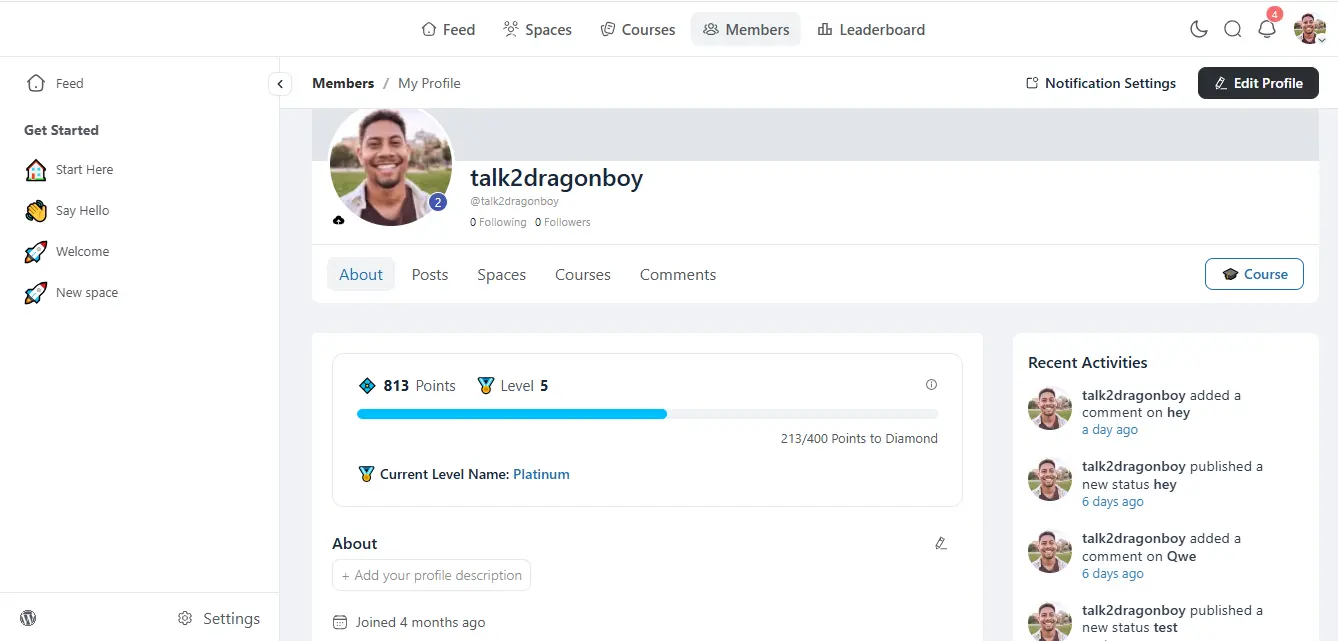
image 2:
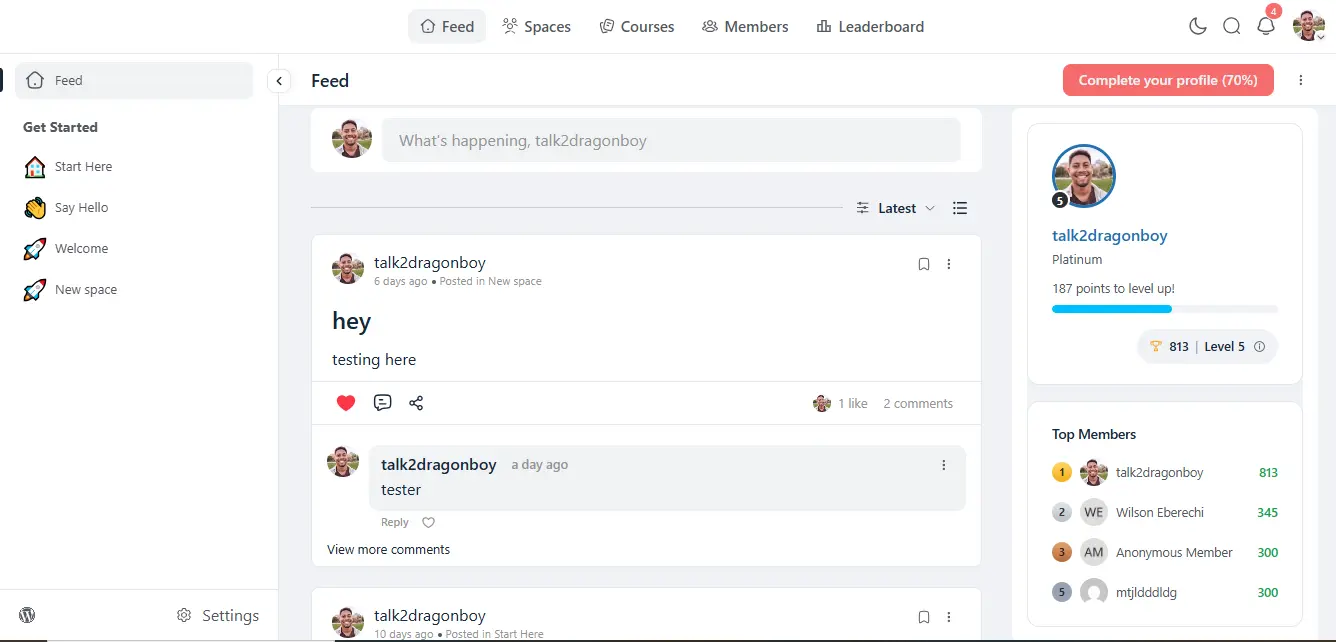
Image 3:
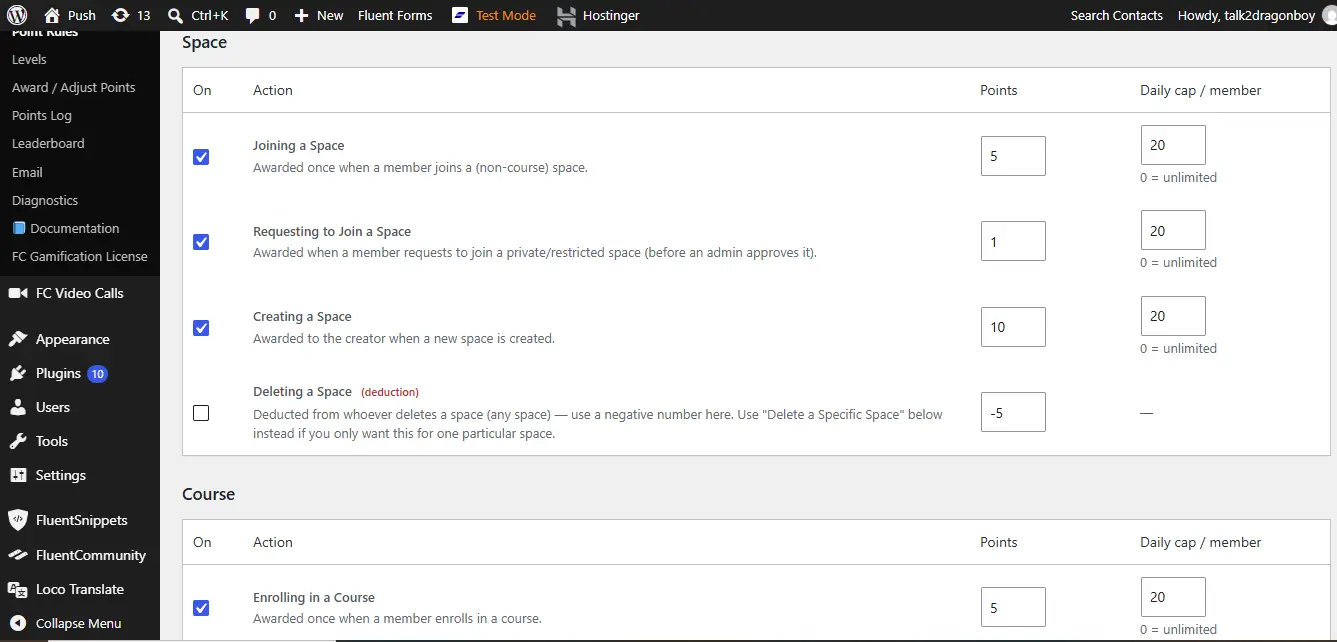
Image 4:
..
Why Use FC Gamification?
FluentCommunity gives you the foundation for building a community.
FC Gamification gives you a reason for members to keep coming back.
Instead of simply having members read, post, comment, learn, and leave, you can turn those activities into a progression system.
Members can:
Participate → Earn Points → Level Up → Compete → Achieve → Stay Engaged
Benefits
🚀 Increase Member Engagement
Give members tangible rewards for participating in your community.
🎓 Encourage Course Completion
Reward members for enrolling, completing lessons, finishing modules, passing quizzes, and completing entire courses.
💬 Encourage Community Participation
Reward posting, commenting, reacting, joining spaces, and contributing to discussions.
🏆 Create Healthy Competition
Leaderboards give members a visible reason to improve their participation.
📈 Build Long-Term Progression
Levels give members goals to work toward instead of one-time rewards.
🎯 Promote Important Spaces & Courses
Use specific-space and specific-course bonuses to direct attention toward the areas you want members to use.
💰 Connect Engagement With Commerce
Reward purchases and subscription activity through FluentCart integration.
🤖 Automate Member Journeys
Use FluentCRM triggers to automatically respond when members earn points or reach new levels.
🧩 Extend Your Ecosystem
Connect compatible FluentCommunity add-ons and turn more member activities into meaningful rewards.
🛡️ Maintain Control
Daily caps, deductions, reversals, an independent ledger, and manual adjustments give administrators control over the entire point economy.
Perfect For
FC Gamification is ideal for:
- Online communities
- Membership websites
- Online academies
- Course platforms
- Creator communities
- Coaching platforms
- Learning communities
- Paid communities
- Customer communities
- Professional networks
- Community-based stores
- Gamified membership programs
Example Gamification System
You could configure your community like this:
Register → +10 points
Join a Space → +5 points
Create a Post → +3 points
Comment → +2 points
Receive a Like → +1 point
Complete a Lesson → +5 points
Pass a Quiz → +15 points
Complete a Course → +50 points
Receive Certificate → +20 points
Join Video Call → +5 points
Complete Video Call → +15 points
Purchase Product → +10 points
Then create:
Newcomer — 0 points
Bronze — 100 points
Silver — 500 points
Gold — 1,000 points
Platinum — 2,500 points
Legend — 10,000 points
Your members now have a clear reason to participate, learn, contribute, and progress.
Requirements
- WordPress
- FluentCommunity
- PHP 7.4 or higher
FluentCRM is optional and only required if you want to use the FluentCRM automation triggers.
Additional integrations such as FluentCart, Fluent Forms, Video Calls, Course Certificates, and Fluent Community Share are optional and only activate their related gamification rules when the corresponding add-on is installed and active.
Important
FC Gamification is designed specifically for FluentCommunity and works alongside the FluentCommunity ecosystem.
Optional integrations do not have to be installed. The core gamification system continues to work with FluentCommunity alone.

I can see one big advantage Skool.com has over fluentcommunity is that you're quickly able to DM inactive members in your community. I don't mean innactive from the email opens/clicks etc. which you can do with FluentCRM, that's easy enough. I hope that Ninja team will fix this becuase its the best way to keep people engaged and paying their monthly membership fees, slowing down membership churn.

Hi beautiful people!
I'm launching a new mini-series called: How to Run a Client Agency 100% on WordPress with Fluent Suite
Part 1 just got released 💫
Enjoy!

I think there's a problem either in the features or the documentation connected to leaderboard.
On this page: https://docs.fluentcommunity.co/configuring-the-points-system
it says we can assign point values for various actions such as create a post, post a reply etc...
Then it says to assign that on the leaderboard page. But the leaderboard page does not have those specifications.
The very next documentation page https://docs.fluentcommunity.co/setting-up-leaderboards explains how to setup the leaderboard page and it indicates that this page is only used to define which leader level a person is at.
Do you see the confusion?
The problem is the features on the first page are not controlled by the leaderboard page. And I can not find where we assign those point values (which I would like to do).
Can you help clarify:
1) Can we assign specific point values to specific actions? If so, where do I do that?
2) If we can not do #1 then the documentation needs to be updated to clarify that we cannot do that feature.

Hi,
I believe I found a bug in the Require approval for first comment workflow.
I had a post with one actual published comment. After approving that user’s first comment, the post showed 2 comments, but when I opened the discussion, only 1 comment was visible.
I checked the database and found:
-
In
wpfc_fcom_posts, the affected post hadcomments_count = 2 -
In
wpfc_fcom_post_comments, that post had:- one row with
type = commentandstatus = published - one row with
type = reportandstatus = ignored - the report row was associated with
first_comment_approval
- one row with
I then ran a query comparing comments_count against the actual number of rows where:
type = 'comment' AND status = 'published'
The affected post was the only mismatch:
comments_count = 2
actual published comments = 1
After manually updating comments_count from 2 to 1, the displayed count was correct.
This suggests the first-comment moderation/approval flow is incrementing or preserving the cached comment count incorrectly, possibly counting the moderation/report record in addition to the published comment.
I just launched my site so its still early for things, but wanted to post and see if its an issue. Thanks.
-Daniel Garcia

While translating 2.10.01 to German I found two places in the new Space Page
editor that stay English no matter what the catalogue says. Both are small and
easy to fix.
1. The editor's post type labels are hard-coded
The block editor shows the post type label as the heading of the first sidebar
tab. All three labels are plain strings without __():
fluent-community/app/Hooks/Handlers/FluentBlockEditorHandler.php, in
register():'fcom-dummy' => ['label' => 'Lesson', …]and
'fcom-lockscreen' => ['label' => 'Lockscreen', …]fluent-community-pro/app/Modules/SpacePages/SpacePagesModule.php:92,
inregisterEditorPostType():'label' => 'Space Page'
So a German site shows "Space Page" (or "Lesson") above an otherwise German
sidebar. Wrapping them would fix it:
'label' => __('Space Page', 'fluent-community-pro'),Lesson and Lock Screen already exist in the fluent-community catalogue, so
those two would be translated immediately.
2. "Enable comments" is missing from the editor's i18n map
The editor bundle (Modules/Gutenberg/editor/index.js) takes its strings from
window.fcomEditorI18n, built in FluentBlockEditorHandler::getEditorI18nStrings().
The Space Page sidebar asks for Enable comments (lowercase c), but the map only
contains Enable Comments (capital C, used by lessons). Anything not in the map
is shown in English, even though Enable comments is translated in the
catalogue via TransStrings.php.
I checked all 40 strings the bundle requests against the map – this is the only
one missing. The fix is one line in getEditorI18nStrings():
'Enable comments' => __('Enable comments', 'fluent-community'),Until then I am patching both through the existing filters
(fluent_community/block_editor_post_types and
fluent_community/editor_i18n_strings), so nothing urgent – but it would be
nice to drop the workaround.
Thanks for the quick fixes last time!
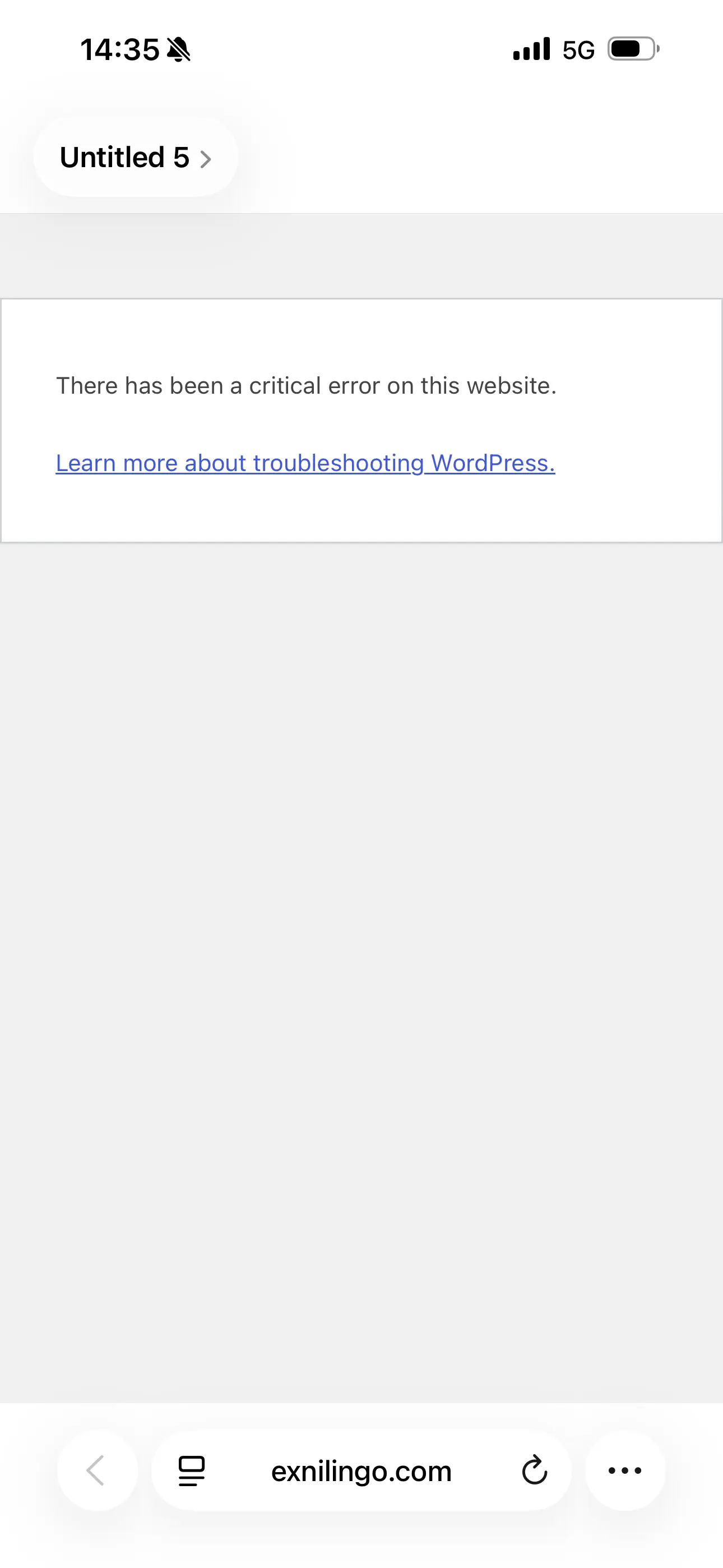
This is the error message I got from uploading the last version of fluent community. I lost access to Wordpress instantly after uploading.
I have contacted FC support that told me what to ask Hostinger support, which is a mere AI bot. I confirmed all the steps it offered to do (such as deactivating several plugins), to no avail. It’s a catastrophe. I don’t know what to do.
Does anyone know what may have happened?!

Is it possible to change the default page people see when they log in through the app?
I run a yoga membership, and instead of members seeing the Feed first, I’d like them to land directly on a specific page — in my case, the video catalogue.
Ideally, when they open the app, the video catalogue would be the first thing they see, with the Feed as a secondary option.
Is there a way to change the default landing page from the Feed to another page?