


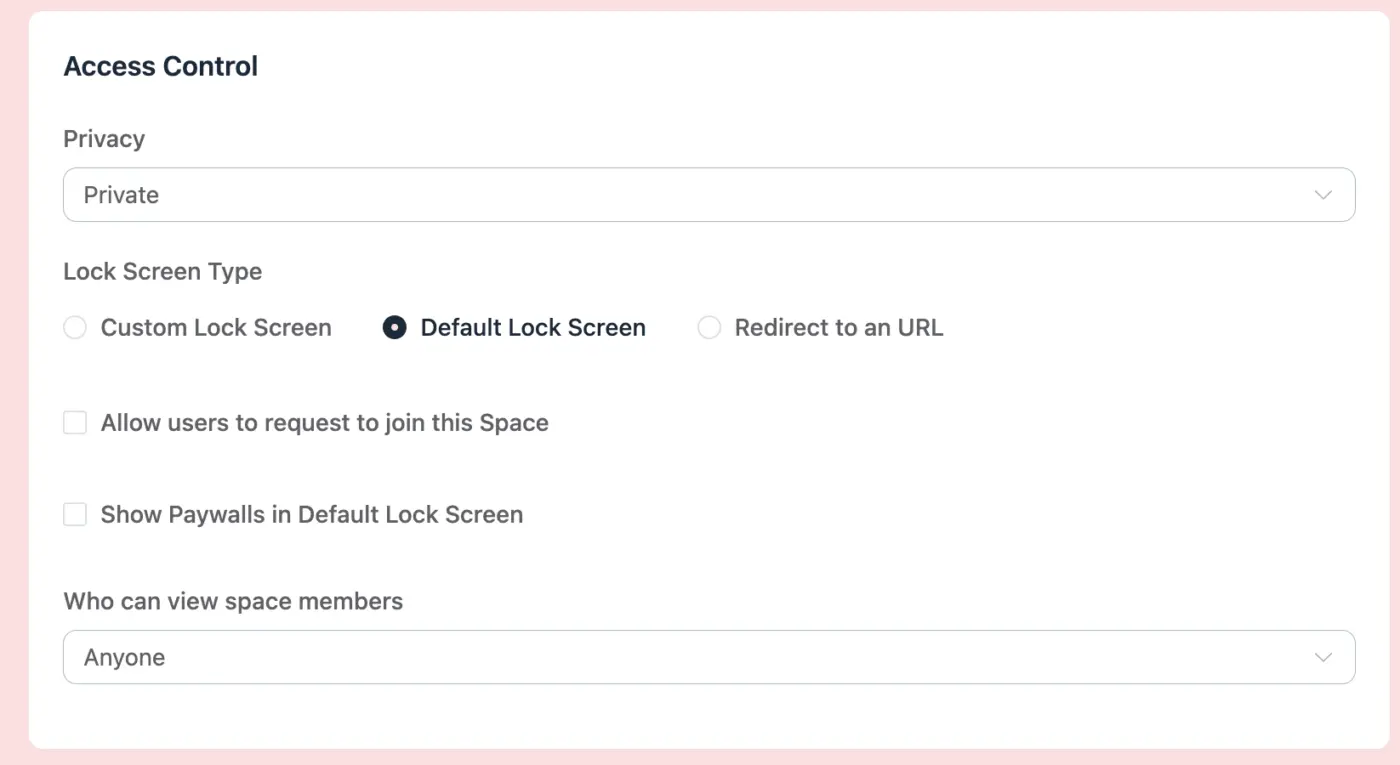
We have private spaces that require approval to join. But we would like anyone that hasn't joined to see the members that are part of that space. There is a checkbox that looks like it would make members viewable to anyone but it doesn't do anything when you set it to Anyone or Logged in Users.
Is the "Who can view space members" intended to allow members outside of the space to view members in the space? If so, can this be fixed so that it works.

Hi, I suddenly find myself bombarded with work requests, some projects all mine, others where I just bill by the hour. I'm wondering if I could make FluentCommunity into my own Basecamp-like communication tool.
Do you use it for client communication?
Also open to any recommendations :)

I am a teacher developing a website for my school lessons.
The site includes a plugin with a login form that allows students to select their school class and enter a class code. The plugin then automatically assigns each student to the appropriate group using CRM tags.
If a group does not yet exist, the plugin can create it automatically, set up the standard spaces, and copy a predefined selection of courses into the group folder.
There is also a manual collection mode. This allows me to gather students first and then assign them in bulk to groups and/or FluentBoards.
The project is still under heavy development, but once it is stable, I plan to publish it on GitHub.

How do you edit what shows up there? If it cannot be edited, how do you remove it entirely?
I'm open to hacking code and 3rd party plugins to do it.

I installed FluentCommunity on a subdomain and moved it from /portal/ to / (root). That worked fine. Great!
Then, I set the Portal Access Settings from "Everyone" to "Only Logged In Users", and once a public user gets onto the root (community.example.com) they were presented with the default login screen. Great!
However, I want a custom login, so I set the "Custom Login/Signup Form Type" to "Use Custom Login Page" and entered my URL: sso.example.com/login. This always redirects to community.example.com/wp-login.php?redirect_to=https%3A%2F%2Fcommunity.example.com%2Fwp-admin%2F&reauth=1
Any "custom" URL on the same domain works fine, but as soon as I enter an URL with a different domain (here a different subdomain), it falls back to the above aka not working.
If there is not a real good reason for that, can you please fix that?

Hi everyone,
When creating a post and adding an external link, Fluent Community provides an option to "remove preview" if we don't want the link card to appear.
However, when linking to another internal community post, the system automatically embeds/previews the entire post, and there is currently no option to remove or disable this preview. This leaves a large preview card underneath, which isn't always ideal when you just want to include a simple hyperlink.
Could we please get an option to disable/remove previews for internal post links as well, just like with external links?
Thanks!

Some of you already use FluentAuth. Some of you haven't heard of it. So let me give you a quick intro.
FluentAuth is one of my personal open-source projects, same as FluentSMTP. I built it myself. Over the last few months, I sat down and rewrote the whole thing from scratch. A whole new admin and a new site.
Why FluentAuth? Because I still think login security is something WordPress core should give you and doesn't. Two-factor. Brute-force limits. A log of who signed in. That's basic stuff. Instead, you get a bloated security suite that slows your site down.
So I built the thing I wanted to use, and it's free.
What's in 3.0
- Passkeys: Sign in with Touch ID, Windows Hello, or a security key. No password at all.
- 2FA by role: Passkeys, authenticator apps, or email codes. You choose who needs what.
- Brute-force limits per IP and per account. Leaked passwords sprayed from many IPs get caught too.
- IP block and allow lists. Lock admin logins to your office or VPN if you want.
- Security checklist. Finds PHP in uploads, stray mu-plugins, backups in the web root, dormant admins. Tells you what to do about each.
- File monitoring for core, plugins, and themes against the official WordPress.org copies. Diff a file, restore a file.
- A "Been Hacked?" screen. Sign everyone out, revoke app passwords, reinstall clean packages, force password resets.
- Social login, Google One Tap, magic links, login page designer, redirects. All still there.
- A brand new admin. Dark mode too.
It's super lightweight
It doesn't intercept every request like other security plugins. It hooks into the login WordPress already has, adds a check before the password and one after, and that's it. Logs user-dedicated custom database tables.
No firewall by design. Your host or Cloudflare does that better.
Price: $0. Unlimited sites. Maybe a Pro someday, but nothing you see today will ever move behind a paywall.
Take a look here: https://fluentauth.com
Full Source Code: https://github.com/WPManageNinja/fluent-security
Using it, please write a review: https://wordpress.org/support/plugin/fluent-security/reviews/
Try it. Break it. Tell me what you'd change, or do you like this update?

How can normal fluent community member (without access to /wp-admin/) set up Passkey method if you must do it directly in backend wp-users? Will it be one day avaible on user profiles on frontend on edit profile page?
Btw, awesome feature. Glad you developed it.

The registration form allows users to register with their first and last name and also provide a nickname. It would be useful to let users decide which name should be displayed publicly — their first and last name or their nickname.
Nowadays, more and more users prefer to use a nickname online, while from a business perspective, having the user's real first and last name is still necessary.
Therefore, it would be great if users could choose whether their public name is displayed as their real name or their nickname, while the first and last name remain available for business and administrative purposes.

I went live with my community tonight and for the most part it was well received! However, there's one UX issue that seems to be a problem. New users don't understand the "posting in: SPACE" aspect. They seem to think they should create a post and it should just post to the feed, which I tend to agree with. I selected this prference "enable global posts status" but it still requires an action to select a space. how could we create a default space, either direct to the profile, or even a default space such as "town square" that generic posts could go to?
