


I've visited the docs and am trying to figure out the right kinds of workflows to manage the SMS Subscribed status. Everywhere there's bulk management of Status it doesn't specify if its the SMS or email status - How do I manage that via bulk actions AND via automations?

Hi everyone!
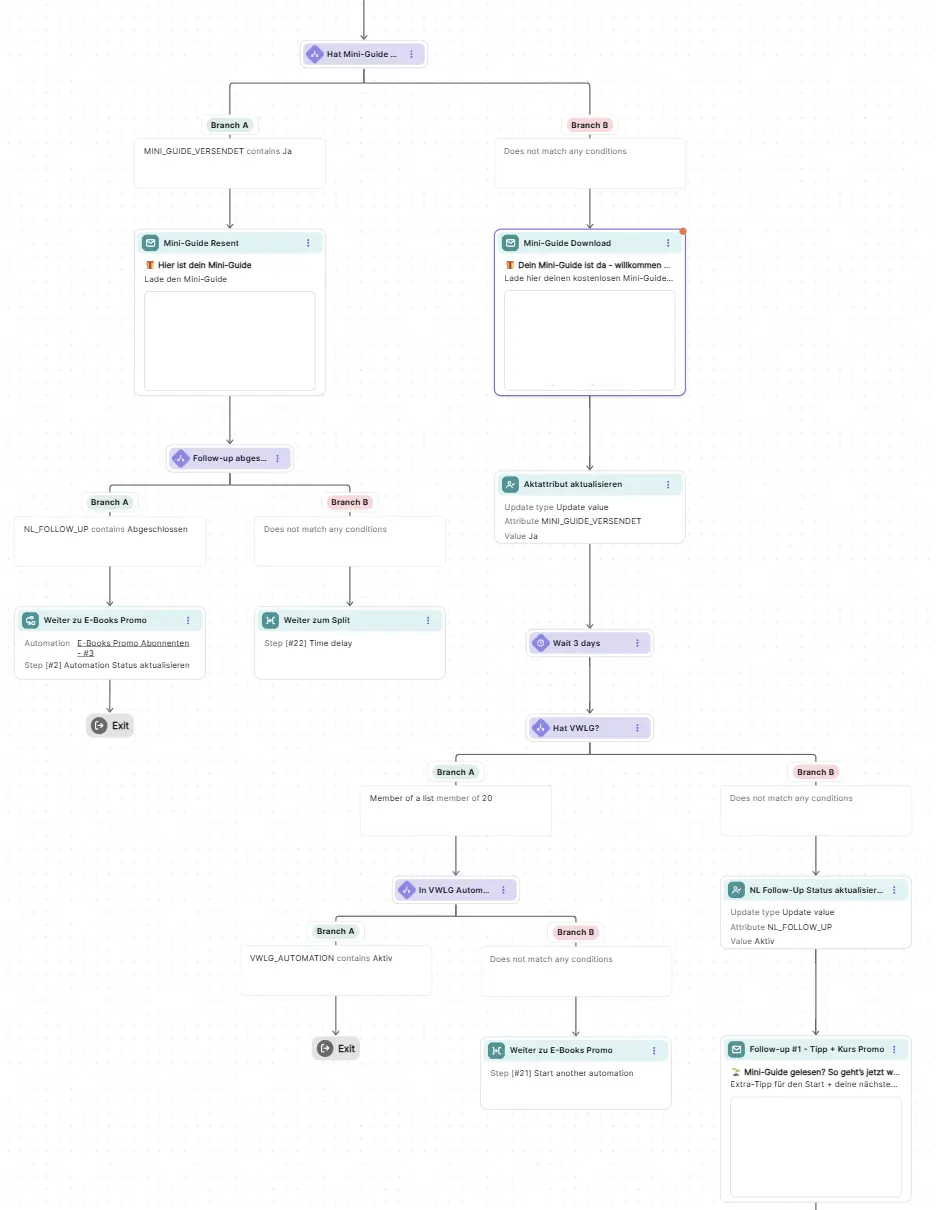
I want to move from Brevo to FluentCRM, but I can't find a way to replicate this kind of nested Conditional Actions.
The Conditional Actions in FluentCRM have a common endpoint for both the Yes and No paths. I need separate paths where I can keep adding Conditional Actions to each path independently.
Shahjahan Jewel Ashim Shil Is this a limitation of FluentCRM, or is there a way to set up Conditional Actions like this?
Thanks in advance!

FluentCRM is a fantastic product. The feature set and maturity, like all Fluent / WPManageNinja apps (even when in beta which amazes me). But...it is really not a CRM. To get to that point, I think you really need these functions: Lead Management, Opportunity Management, Sales Pipeline Tracking, Forecasting, Lead Scoring, NBD assignments, Sales team assignments, etc etc
Reporting & Dashboards. Any insights as to when these critical functions come live to move the product from a Marketing Automation Platform to CRM?

Hello everyone. I have a question that might sound dumb.
If I schedule a campaign including a list which include for eg. 50 people, but then in the meantime other 10 people subscribe to that list, the campaign is sent to the fist 50 or also to the new subscribed ones, so 60 in total?

What is the worldwide state of dark mode "compatibility" in email campaigns? Is it (even) possible (yet) using FluentCRM's Gutenberg email builder (which I like), to create campaigns that honor the user's device "system dark mode" setting? (white background turns dark, darker fonts turn light)
I understand this likely isn't a fluentCRM-specific issue and more of an email HTML limitation with "antiquated" email applications.

Just checking in – any plans on allowing phone numbers as the primary identifier when an email is missing?

Currently, we have a FluentCRM Board for 'Client Acquisition'. Within this, we have:
- the Stages 'Started', 'Contacted', 'In Progress', 'Waiting For Payment' and 'Closed'
- each potential client has a task created from a template task with subtask groups 'Scoped', 'Interested - Draft', 'Interested - Pending Signature and Deposit' and 'Onboard'.
- within the potential client's task, subtasks are used to track where, within the sales pipeline, they are.
This requires manual updating of the subtasks completion status, and then the next subtasks assignment and due date manually added. The current 'Stage Changed' action does not work for this work for this workflow, as it would end up with duplicate tasks for a single contact.
In future, 'When a subtask is completed' (Trigger) within of these groups is completed, it would be good to be able to have 'Create a new subtask' (Action) and configure the new subtasks:
- subtask group
- assign the CRM contact responsible
- set how many days later the due date should be.
Currently there is no way to automate access to a Fluent Board, or link a Fluent Board to a company without a Company Custom Field. Currently, when we onboard a client, we:
-
Create a Fluent Board
-
Copy the Fluent Board Shortcode link and then paste it into a Fluent CRM Company custom field
-
On the client's contact we add them to the list 'Customer - User Account', and this triggers the automation that:
- creates their WP User account
- send them an email to reset their password
In future, it would be create to automate their access to a Fluent Board too by having an Fluent CRM action available to give them access to a companies board.

Environment : FluentCRM Pro + WooCommerce, variable product with 3 variations.
Setup : I have a variable product, with 3 variations : Standard, custom, custom ++.
I want a post-purchase automation that sends a customization fluent form email only when the customer buys the "customized" or "customized ++" variation.
Expected behavior : When a customer purchases the Standard variation → no email. When they purchase customized / customized ++ → send the customization form email.
What I'm running into — none of the native tools can target "the variation of the current order" :
- Trigger ("New Order – Processing") only lets me select the parent product via "Target Products" — variations are not selectable.
- Condition "Woo Order / Products in Order" references the current order but only lists the parent product, not its variations.
- Condition "Woo Variations / Purchased Product Variations" matches on the customer's full purchase history, not the current order. Consequence : a customer who bought a "customized" last year but a "Standard" today still matches "yes" → the form email goes out wrongly.
- WooCommerce product editor → FluentCRM tab : I can set purchase tags on the parent product, but not per variation.
What I need : a way to match the variation of the current order (the one that triggered the automation) — e.g. a field like "Woo Order / Variation purchased" or allowing variations in the trigger's "Target Products", or per-variation purchase tags.
Is there a native way I'm missing, or is this a known limitation? If so, is there an official workaround?

I'm starting this topic because I imagine many people here will be talking about it. Since yesterday, a new CRM has been launched on WordPress. I had never heard of this company, but I just discovered that they have several plugins, though with few active installs — notably a Bit Form plugin, Bit SMTP, Bit Social, etc. (none of them exceeds 10K installs).
And since yesterday: a CRM. This new CRM is called Bit CRM: https://bit-crm.com/
I discovered its release through this video: https://www.youtube.com/watch?v=mRp3ymZy39Y
They even made a page comparing it with FluentCRM: https://bit-crm.com/compare/fluentcrm-vs-bit-crm/
Basically, they've done what some of us have been recommending on FluentCRM: a real CRM. Because until now, FluentCRM has been more of an (and best in class) emailing and marketing automation tool rather than a complete CRM — as it's missing some features like lead management, deals/sales pipeline, company management and contacts organized by company, etc. Bit CRM has done it. FluentCRM can do it too 👍
Bit CRM looks well built. I haven't tested it, but the demo video is quite thorough. I think Bit CRM is a good model to follow. They even include management of products, meetings, calls, etc. I like the dashboard home displaying leads / contacts / companies / deals, deals pipeline, leads by source...
The current limitation of Bit CRM is that it only connects with WooCommerce, but their roadmap indicates they'll soon be integrated with FluentCart, SureCart, etc.
FluentCRM needs to catch up and become a complete CRM.
A CRM needs to manage and display the complete flow: capture leads (with FluentForms), manage leads / contacts / companies, manage deals via kanban / list view, manage products / services, manage invoices.
Bit CRM even includes standalone products / invoices management (outside any ecommerce plugin), but I think FluentCRM should be deeply integrated with FluentCart to show directly on a company profile: who the associated contacts are, what the company's invoices are, what total revenue has been billed to that company — and the ability to invoice directly from the company profile.
Two possible modes need to be distinguished: B2C and B2B. Those who only have B2C customers won't activate the B2B mode. But everyone who works with professional clients, agencies, etc. needs the B2B mode. You don't invoice a contact, you invoice a company.
What do you think?