
Description:
Environment:
- FluentCRM 3.1.10
- Campaign created through the FluentCRM MCP
- Open and click tracking enabled
When a campaign is created through the MCP, the campaign settings are stored as:
open_tracker: "yes"
click_tracker: "yes"
These are strings rather than JSON booleans. The campaign report interface appears to require the strict boolean value true when determining whether tracking is enabled.
As a result, the report incorrectly states that open and click tracking were disabled for the campaign and hides or disables the View, Click and Unopened filters. However, tracking itself remains operational and open and click events continue to be recorded.
Steps to reproduce:
- Create a campaign through the MCP with open and click tracking enabled.
- Send the campaign and open its report.
- Observe the “tracking disabled” warning and the unavailable report filters.
- Inspect the campaign settings and confirm that both tracker values are stored as the string "yes".
- Change only those two values to the boolean true through the REST API.
- Reload the report.
Actual result:
The MCP stores string values. The report treats tracking as disabled, despite tracking events being recorded.
Expected result:
The MCP should store boolean values, consistently with the format expected by FluentCRM, or FluentCRM should normalize supported string values before evaluating them.
Verified workaround:
Changing only open_tracker and click_tracker from "yes" to true removes the warning and restores the report filters. It does not resend the campaign or alter its recipients, sent emails, opens, clicks or existing metrics.
I think there’s a need for updating the MCP schema or serializer to send JSON booleans for these fields. As an additional compatibility measure, FluentCRM could normalize "yes"/"no" values when loading campaign settings.

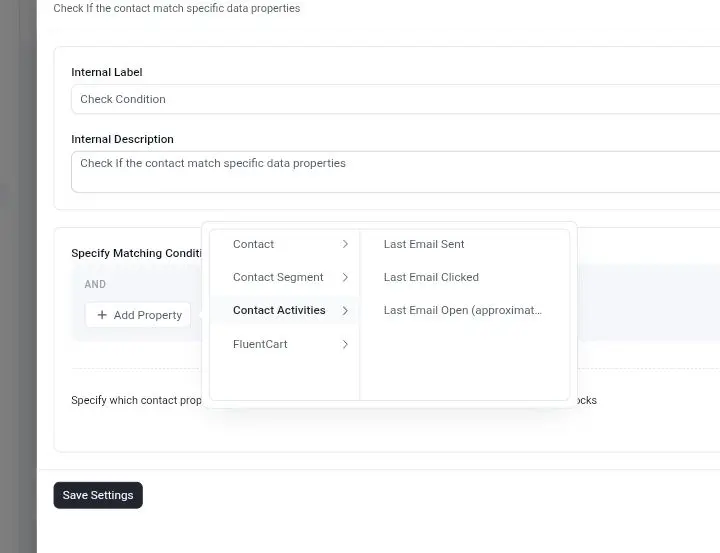
Would like to see SMS based data properties to help trigger condition similar to how emails do, especially with the contact activities properties like shown in the screenshot.

Has anyone examined using WPVibe.ai (or similar) as an MCP interface? The promise is that it will do everything that the Fluent MCP connections will do, along with interfacing with all the rest of the ai-aware plugins on the site.
On the surface it seems like a good abstraction layer across the entire site, minimizing the need to connect to each Fluent product MCP.

Is there any advantage to configure a direct connexion in Codex when the connection managed by wp works? I have a hard time configuring direct.

I’ve been reviewing the recent tutorial “Sync Fluent Forms with FluentCRM on a Different Domain Using Webhooks,” and while digging deeper into multisite support, I’ve come across something that needs clear confirmation from the FluentCRM team or anyone who has implemented this at scale.
Some other sources state that FluentCRM offers a dedicated FluentCRM Multisite plugin that must be installed and activated at the network admin level. Once active, it introduces a Multisite settings section inside FluentCRM, including an “Enable Multisite Integration” checkbox, and allows individual subsites to connect their own FluentCRM instances to the network‑level CRM.
This discovery raises an important architectural question.
My current design assumes that ONE centralized FluentCRM instance—paired with WP Fusion—can manage all subdomains through role‑based and tag‑based segmentation, ensuring that each subdomain remains isolated while still benefiting from a unified CRM. In other words, the entire multisite network would rely on a single FluentCRM database, with tags/roles acting as the insulation layer between subdomains.
Before proceeding, I urgently need confirmation on whether FluentCRM Multisite actually supports this model.
Specifically:
- Does FluentCRM Multisite allow one CRM instance to serve the entire network, with subsites simply feeding data into it? OR
- Does the architecture require separate FluentCRM instances per subsite, with the multisite plugin acting only as a synchronization or coordination layer?
This distinction is critical. My deployment strategy—and the way roles, tags, and WP Fusion are structured—depends entirely on whether FluentCRM can operate as a single, centralized CRM in a multisite environment.
Any authoritative clarification or real‑world experience would be greatly appreciated.

Hi everyone,
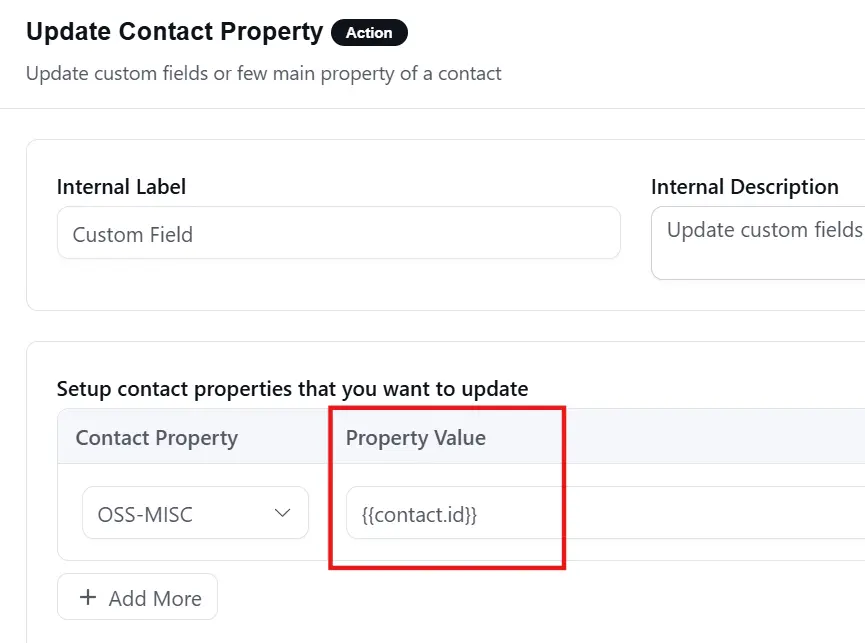
In a FluentCRM automation, I’m trying to update a contact property using a SmartCode {{contact.id}}. Unfortunately, the SmartCode's value is not being resolved, so the contact property is set to the literal text {{contact.id}} instead.
Shahjahan Jewel Is this a bug, or is this the expected behavior of this action?
I’m using WordPress 7.0.2 and FluentCRM 3.1.9.

Currently, a FluentCRM contact can only have one email address.
It would be useful to be able to have a 'Custom Field' 'Field Type' of 'Email', and then the ability to change the label if the new Custom Field is 'Work' or 'Secondary' etc.
In non-profits, the use case that would helpful with, would be if a contact could have an email that they use for 'work' purposes, but then they could also have a 'personal' email that we'd like to send volunteering and fundraising asks to.
If this is possible, the ability to merge a second contact into a primary contact, and then the second email address would go into the second custom field with the field type of 'email'.
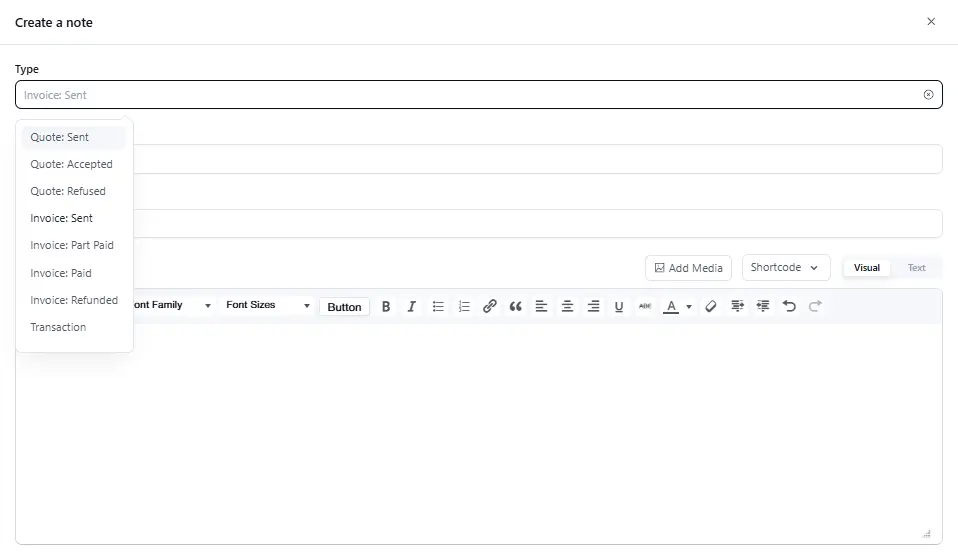
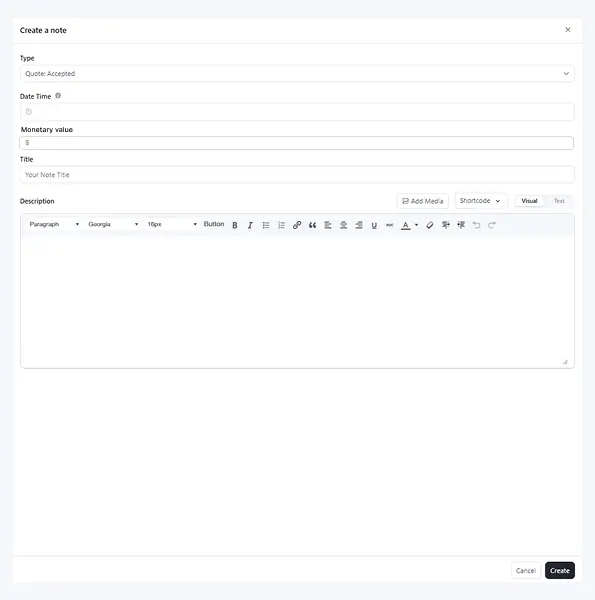
Currently, in Fluent CRM, the 'Notes & Activities' 'Create a note' function allows you to use the 'Type' dropdown to track if a 'Company' or 'Contact' has contributed monetary value through the 'Quote', 'Invoice' and 'Transaction' options.
It would be useful that if one of the 'Quote', 'Invoice' or 'Transaction' options are selected from the 'Type' dropdown, that a numeric field of 'Value' is then displayed that allows you to enter how much $$ the 'Quote', 'Invoice' or 'Transaction' is worth.
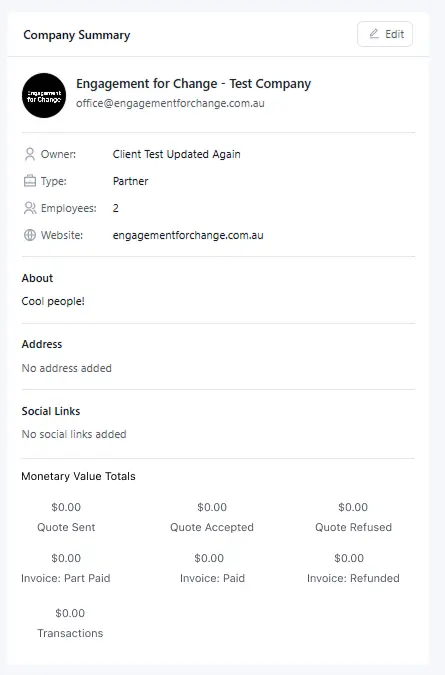
Then if within the 'Company Summary' and 'Contact Profile Header', if there are summary fields of total monetary value that is associated with 'Quote: Sent', 'Quote: Accepted', 'Quote: Refused', 'Invoice: Sent', 'Invoice: Part Paid', 'Invoice: Paid', 'Invoice Refunded' or 'Transaction'.
From a non-profit point of view, this would allow me to track my major donors, or high-value partners. If this could be linked to Automation as well, so that if a 'Company' has a Monetary value of 'Invoice: Paid' over $X value as a trigger, that'd be amazing.