We just released FluentCRM 3.3, it's mainly an improvements release over the different internal codebase + some new features and more reporting.
- Campaign Calendar: see all your email, SMS and WhatsApp campaigns on one calendar, drafts and recurring ones too. It’s under Reports.
- Emails & Actions tab: pick recipients from any campaign, then tag them, export them, or resend the campaign.
- Tracking per campaign: set opens and clicks to Tracked, Anonymous or Off for each campaign.
- SMS and WhatsApp reports: see what was sent, delivered, and who unsubscribed.
- FluentCart, closer to your contacts: open a contact’s FluentCart order from their profile, and use FluentCart smartcodes in campaigns too.
Also in this release
- Large automations send faster, no settings to change
- A full Integrations page with every free, Pro, and Fluent integrations
- Filters for company custom fields, and one click to clear all filters
- Last name is now optional on the preferences form
- Security hardening across the board
Full release notes: https://fluentcrm.com/blog/fluentcrm-3-3/
We are rewriting the Automation Builder, and that will be dope and super feature-rich. More info next week!
P.S. FluentCart lifetime deal is ending tomorrow. This is the last chance to get a lifetime license: https://fluentcart.com/discount-deal/

I had the honor of giving a presentation on email marketing solutions at the WordPress Meetup in Potsdam, Germany. 
The meetup was held in German, so the slides and other materials are in German too.  But AI can easily help you translate them!
FluentCRM played a significant role in my presentation, of course. 

The issue is not happening when rolling back to FluentCRM 3.2.6 and FluentCRM Pro 3.2.6.

- super simple way to resend campaigns to non openers without tagging and in tagging them
- Save sections/elements/designs with the Gutenberg editor as patterns directly from any email editing instance
- Add font weight support for more email fonts
- Allow images in Global background and content background
- Clickable tabs, sliders (like mailerlite manages to do 🥺)

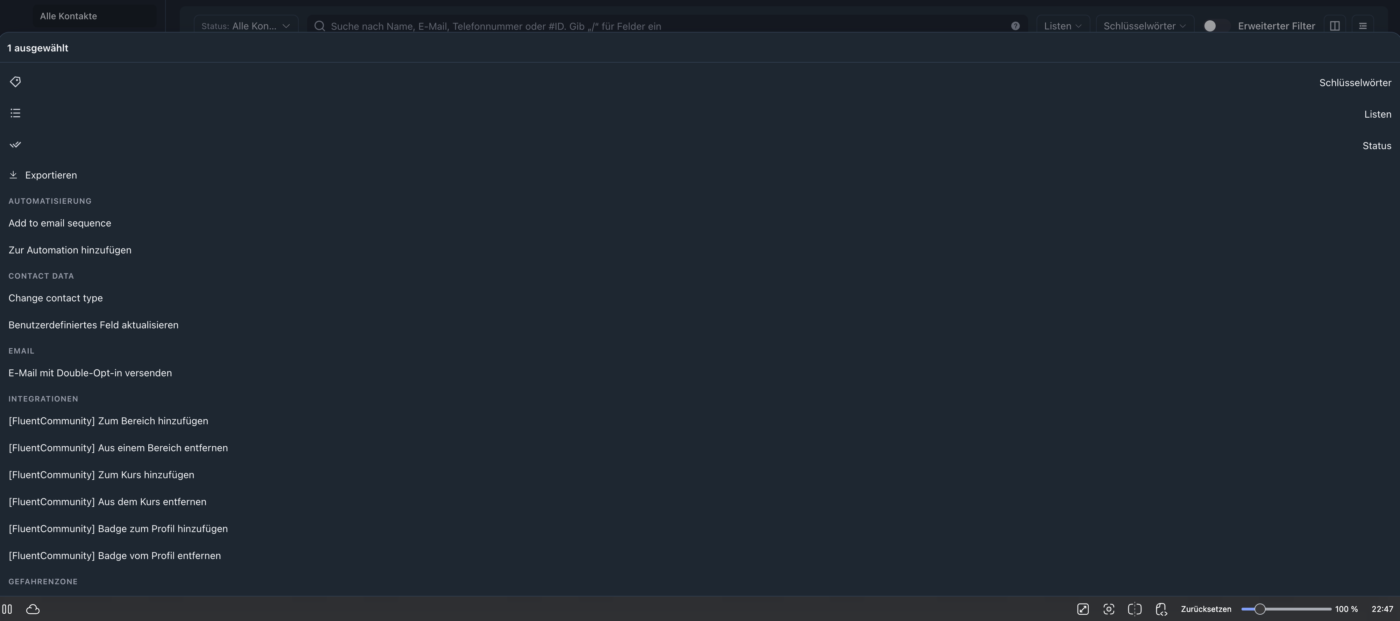
should this bulk action dropdown look like this (100%width) or is this a bug?

Hi folks,
For what what FluentCRM provides it does it well, however it is specific to a use case/persona. And I need something between and a really lightweight Sales tracker/forecasting capability, I am trying to gauge if this is also something others would look for as maybe FluentCRM is not the right product for me if not. As I don't want to have lots of custom code that breaks on FluentCRM updates, or that eventually later becomes part of the product when I have paid a premium for custom Dev work.
Let me know your thoughts on the poll bellow

Hi team! I am using FluentCRM 3.2.6 with FluentCart abandoned-cart recovery and would like to clarify the intended unsubscribe flow.
A contact may want to stop abandoned-checkout reminders while remaining subscribed to our newsletter. The standard ##crm.unsubscribe_url## link appears to change the contact’s overall status to Unsubscribed, rather than opting them out of recovery emails only.
I reviewed the Abandoned Cart Settings and FluentCart Abandon Cart Automation documentation, but could not find a dedicated recovery-email opt-out SmartCode or built-in preference for this. I understand that the checkout GDPR/opt-out notice is a separate mechanism; I am asking specifically about a link inside a recovery email.
Is there already a native SmartCode or setting for this that I have missed? If so, please point me to it and clarify whether it stops only the current cart sequence or all future recovery reminders.
If not, please consider this a feature request: a dedicated recovery opt-out link that stops pending reminders, preserves the contact’s newsletter status and list memberships, and records the recovery preference natively. Ideally, its scope (current cart vs. future reminders) would be clear/configurable.
A Smart Link + exclusion tag + automation goal/condition can provide a workaround, but it adds configuration to maintain. We would prefer a purpose-built option without extra automation logic or custom PHP.
Docs reviewed:
https://docs.fluentcrm.com/abandoned-cart-settings
https://docs.fluentcrm.com/fluentcart-abandon-cart-automation
Thanks!

My subscription page uses both First Name and Last Name in Fluent Forms. Only the first name is required (as is the email address).
When I set up Editable Primary Fields in FluentCRM Global Email Settings, both name fields are required. If someone didn't provide a last name when subscribing and doesn't want to provide one just to manage their preferences, they're stuck.
For now, my only option was to uncheck the last name field. It would help to have control over which fields are required when managing preferences.

I'm a FluentCRM newbie - so apologies for potentially stupid questions. We are a Non-Profit organisation. Part of that requires regularly updating documentation.
In essence, I want to email the directors every 90 days; the existing documents (in google drive) are automatically moved to an archive, and they submit new documentation.
1) Is this possible?
2) I would prefer to move away from Google Drive. Is it possible to restrict viewing of those submissions to only a group of certain people?

I have been using EmailIt for my SMTP service for over a year now. It works fantastic. My only complaint has been that there was no built in bounce handling for FluentCRM. So I built it. I structured this in a way that other smtp services can be added in the future, but EmailIt was my priority since that is what I use. If anyone wants to use it, it is free. You can find it here: https://forgejo.webactive.dev/webactive/bounce-bridge-for-fluentcrm/releases/latest
Be sure to download the bounce-bridge-for-fluentcrm-x.x.x.zip file, in order to add this to your site.

Hi @FluentCRM Team! The new interface and search redesign look very clean, but using them in daily operations reveals three friction points that would make the workflow much smoother if addressed:
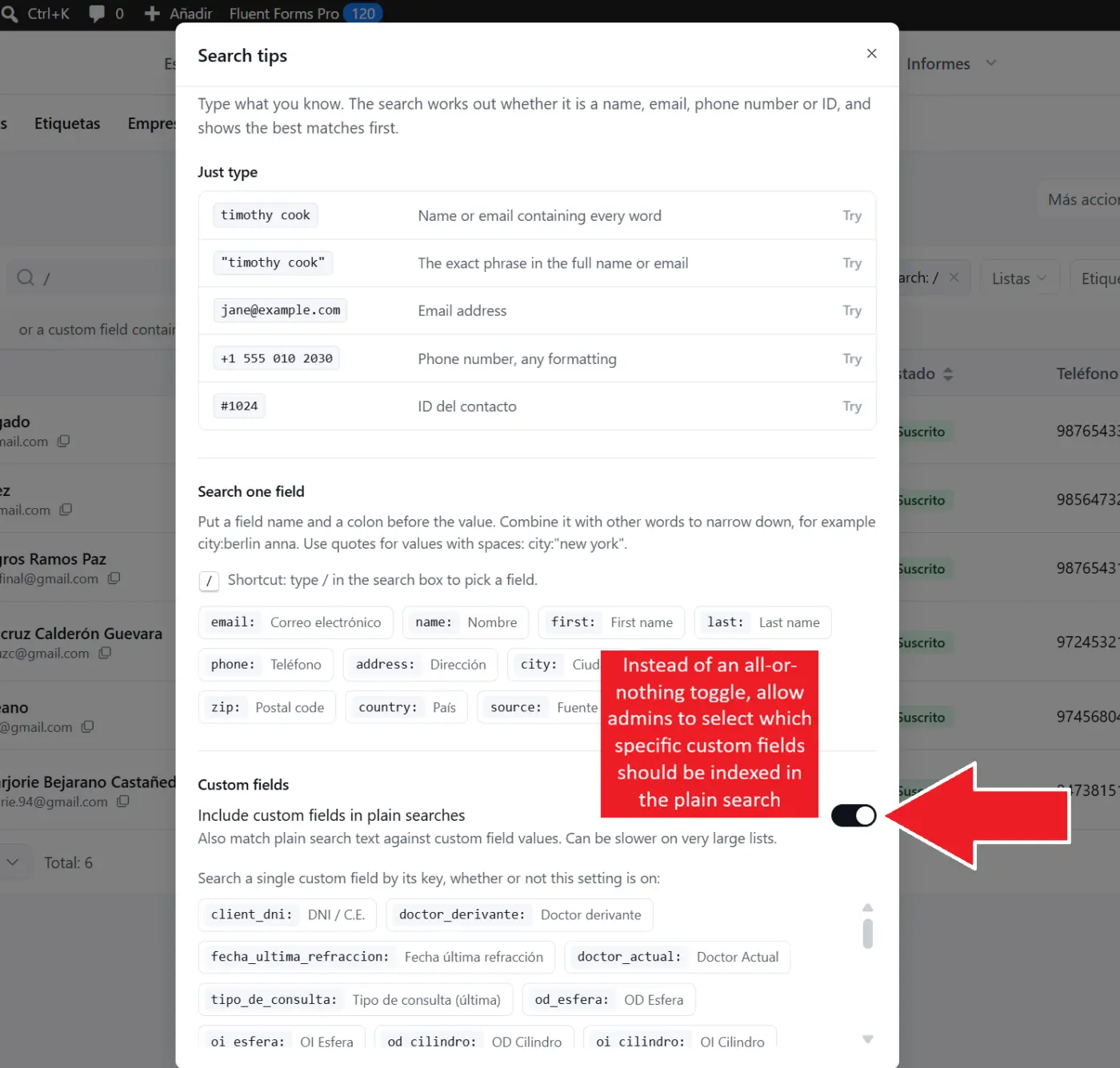
1. Selective indexing for Plain Searches (Performance & Usability)
Under Search Tips, the new toggle "Include custom fields in plain searches" warns that it “can be slower on very large lists”. This makes sense because it forces the database to scan across every single custom field on every keystroke.
- Suggestion: Instead of an all-or-nothing toggle, allow admins to select which specific custom fields should be indexed in the plain search. For instance, in many countries, looking up contacts by National ID (DNI / Tax ID) is standard procedure dozens of times a day. Allowing us to index just the National ID while excluding long text or secondary parameters keeps instant plain search fast, even on large databases!
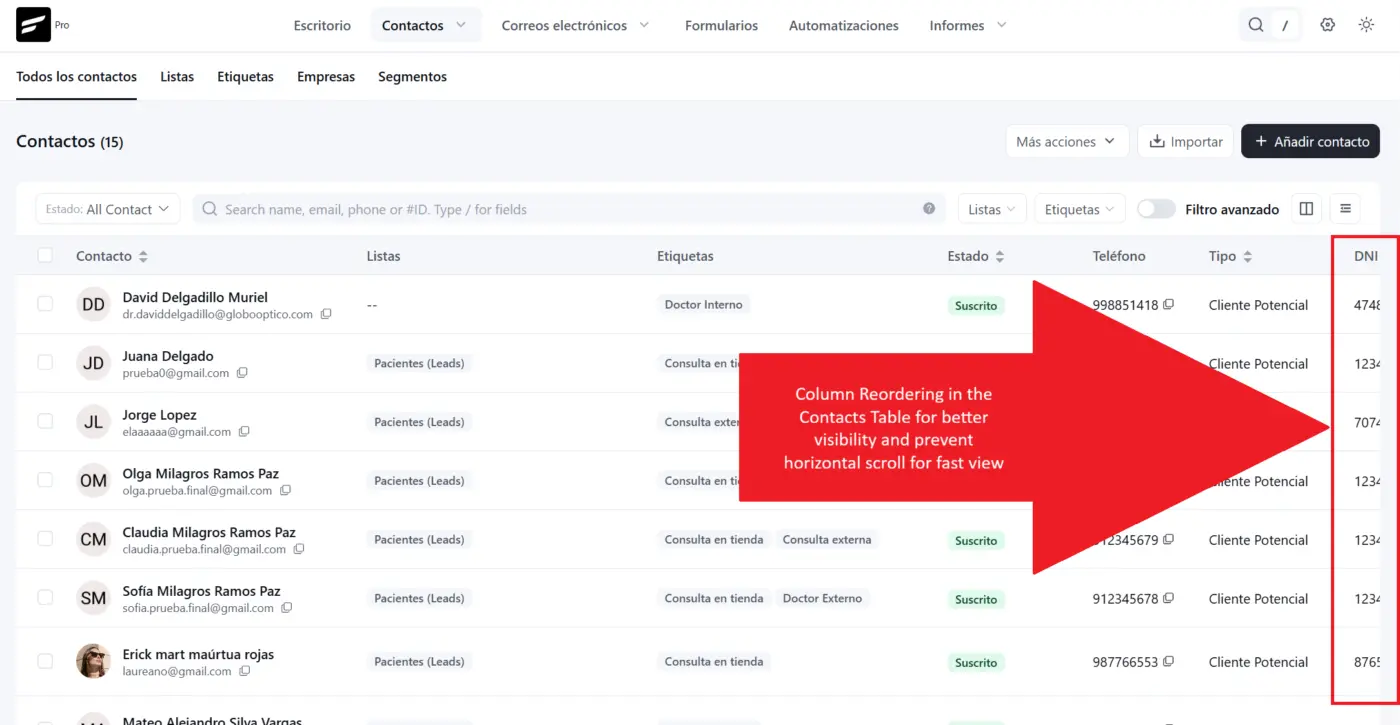
2. Column Reordering in the Contacts Table
Custom fields currently appear at the far right of the table, requiring continuous horizontal scrolling to inspect primary data.
- Suggestion: Add column reordering (via drag-and-drop headers or a reorderable list inside the column visibility menu) so we can position key identifiers right next to the Contact Name within the first few visible columns.
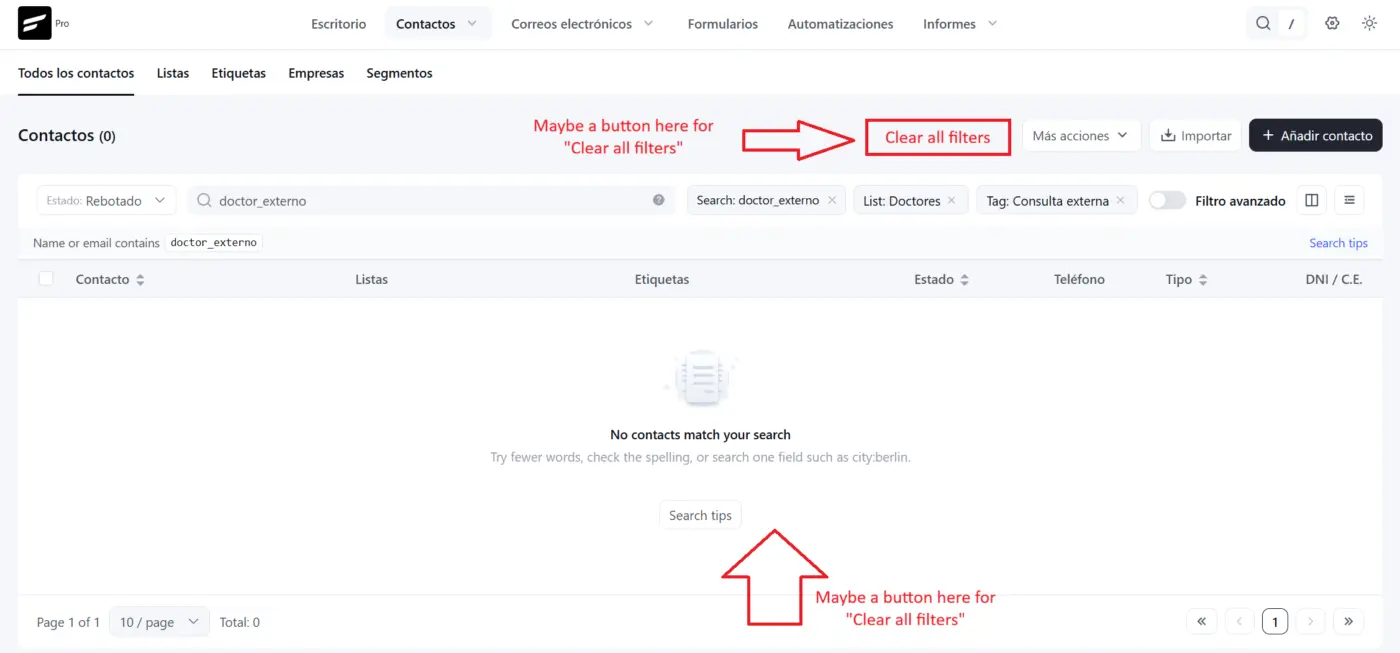
3. One-Click "Clear All Filters / Reset" Action
When multiple search tags, lists, tags, and status dropdowns are applied (or when a search returns "No contacts match your search"), resetting the table requires manually clicking the "x" on every individual chip and resetting dropdowns one by one. (The current "Reset table preferences" option only resets view settings, not active filters).
- Suggestion: Add a simple "Clear all filters" text button next to the active filter pills, as well as a primary action button inside the empty state container to return to the default contact list in a single click.
Attached are screenshots showing the current search settings warning, the far-right column layout, and the multi-filter state without a quick reset. Hope this feedback helps in upcoming refinement releases! 🚀