


I think there is an interesting opportunity for FluentCart that could also integrate beautifully with FluentCommunity.
The problem
Many of us don't only sell products: we sell services.
Consultants, coaches, agencies, lawyers, accountants, therapists, mentors... we all have clients who need to complete different steps throughout the lifecycle of a service.
Today those reminders usually happen via email, Slack or manually, but they're easy to miss.
Proposed feature
Introduce Service Notifications (or Action Center) as part of FluentCart.
The idea is to allow store owners to create persistent notifications that are assigned to one or more customers.
These notifications would remain visible until the customer completes the requested action or the business manually dismisses them.
Examples:
- Upload the requested documents.
- Book your onboarding session.
- Complete your intake questionnaire.
- Review the draft contract.
- Pay the remaining balance.
- Schedule your next coaching session.
- Sign the proposal.
Unlike emails, these would always be visible whenever the customer logs into their account.
Why FluentCart?
Some time ago I suggested introducing a Service product/category inside FluentCart (similar to ideas discussed around "Fluent Services" and Nelson's Services for SureCart addon - incredible plugin by Nelson Miller).
This feature would fit perfectly into that vision.
Each purchased service could have:
- Current status (Pending, Waiting for Client, In Progress, Review, Completed...)
- Assigned notifications
- Required customer actions
- Internal notes
- Service milestones
That would turn FluentCart into a much stronger platform for selling professional services, not only digital products.
Optional FluentCommunity integration
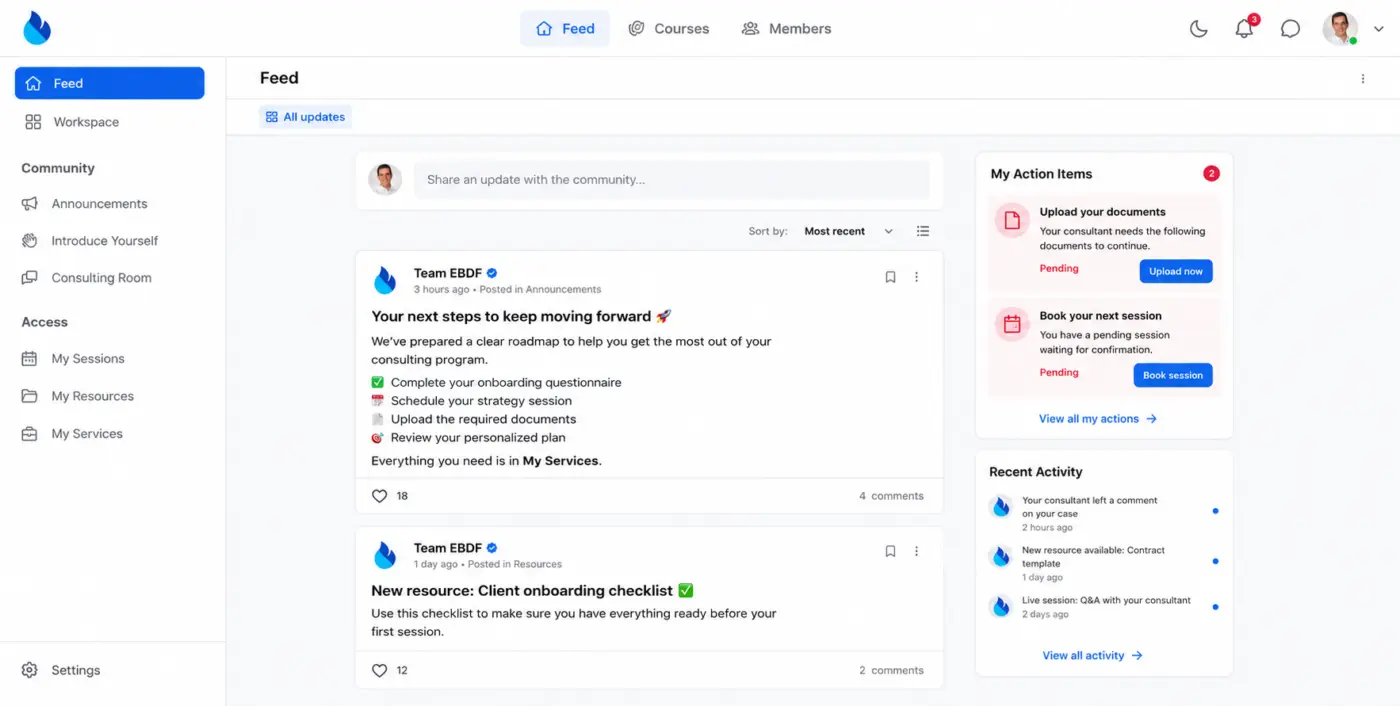
If FluentCommunity is installed, these notifications could automatically appear inside the Community notification center.
That means businesses wouldn't need another interface.
Customers would simply see:
🔔 "Your consultant is waiting for you to upload your documents."
🔔 "Please schedule your strategy session."
🔔 "Your contract is ready for review."
Because the notifications already exist inside Community, it feels like a very natural integration.
Why this matters
For service businesses, the biggest bottleneck is often client responsiveness, not payment.
Anything that reduces forgotten emails, missed steps and onboarding delays improves both customer experience and operational efficiency.
And this will also stop things like: Hey, what should I do next?
This would also make FluentCommunity much more useful for private client portals, coaching programs, agencies, legal firms and similar businesses where communication happens over weeks or months.
I believe this could become one of those features that differentiates the Fluent ecosystem from traditional ecommerce plugins by making it a true client management platform, not just a checkout solution.

In the Netherlands, invoice numbers must be unique and sequential.
FluentCart currently appears to base invoice numbers on order numbers. Since abandoned or incomplete orders do not generate invoices, this creates gaps in the invoice number sequence. That is not desirable for Dutch VAT administration.
Is there a way to generate invoice numbers from a separate sequential invoice-only counter, assigned only when an order is successfully paid, at which point an invoice is actually created?

I have a product. This one has 2 integrations:
- FluentCRM
- webhook
They are failing regularly. From 22 orders, it's failing 3 times, no FluentCRM creation and no webhook trigger.
Order is placed, client is created, and the subscription is created, but in 3 cases from 22 sales, no contact in FCRM, no Webhook.
I guess the system should have some sort of verification to validate that the integrations worked, and in case of failure, retry or at least send an alert to the user to know that this is happening.
In this case, the only thing I think we can do users, is create an automation with the sales FluentCart trigger make a second validation ourselves. However, I think this should be built in the product.

WPTuts ( Paul C ) just dropped a great walkthrough on one of our favorite recent additions: Advanced Variations, now available in the completely free version of FluentCart. No paywall, no add-on maze.
If you sell products that come in multiple combinations (think colors and sizes and materials), this one's for you. Paul takes you through the whole process:
- Converting a simple product into advanced variations
- Combining multiple options (colors × sizes) to auto-generate every variant
- Adding per-variation pricing, compare-at prices, images, and SKU codes (with auto-generate)
- Managing stock and inventory per variant
- Direct checkout links for individual variations
- A look at the front-end experience, with real-time price updates as customers pick their options
Big thanks to Paul for the thorough review and the thoughtful feedback. A few of his suggestions around editable fields in the inventory view are already on our radar. 👍
Got products with lots of variations? Give it a try and let us know how it goes in the comments!

Is it possible to automatically apply a coupon in a url parameter? (something like producturl&coupon=20offtuesday)
I thought it was but I can't find anything in the docs.

Dear Fluent Team,
I am posting for 3rd time in the group. I have multiple customers with fluent cart pro installed. They have digital subscription products. The payment gateway is stripe. The subscription time is monthly.
The person subscribe for a product. The payment is successful. After that stripe does deduct money from clients account but doesnt update the subscription status- Which results in following
Next date is not updated and subscriptions get cancelled. I have to update the next billing date manually in db. And set status to active. This is furstrating and since we had many customers in first month of marketing its not easy to move to woocommerce.
Kindly solve this issue asap. This is very basic feature and need to be addressed as soon as possible. IDK why it is this difficult to fix the ship for this problem. I am not the only one facing this problem. On my last problem other people also commented with the same issue.
If its not possible in near future, i would like to know if there is any script or easier way to move subscriptions to woocommerce subscriptions.
This is not the only problem that we faced with stripe + fluent cart. On this site when we moved site from test enviroment to live. The stripe was not connecting. I had to reset in db I have posted that in group as well. And some of the other people were having same problem and used that to solve their problem

I've used FluentCart for a while to sell some community access and courses, but now I'm selling a digital file (a zip with a PDF & spreadsheet) for the first time. I'm not clear on how the zip file gets delivered.
It's set up with AWS S3 and I presume there is a download link after checkout. However, I don't see a way to test a transaction at the product level; only the store level.
Are we expected to purchase our own products to make sure the download works correctly? I presume it does, but nothing I've researched on digital files addresses the download after the sale.
How and when is the buyer prompted to download? Is it automatic after the transaction is complete?
Thanks.

We were promised Bricks integration, and I bought an LTD on day one...yet, I have not been able to use it because what is offered is little more than a short code. We need elemental control of all pages, layouts, components, and elements. Is this on the road map? Any word on progress with this?
I don't mean to complain, but there's been so many other improvements with other Fluent offerings. I feel like you're missing a huge portion of your customer base here.

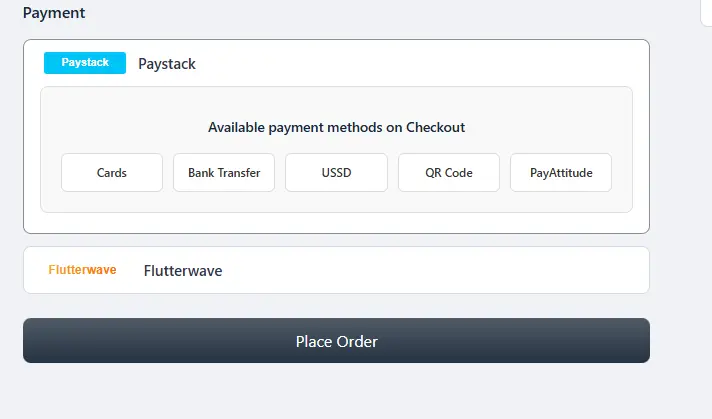
Shahjahan Jewel, it looks like the Paystack & Flutterwave payment system is no longer working.
When the "Place Order" button is clicked, it says - order processing, and nothing happens.
It was working fine on my site, but recently, not anymore

Hi beautiful people,
I know that many of us have been taken by surprise with this new EU Right of Withdrawal directive, and while browsing different social media, there was a lot of confusion on why/what/how. That's why I asked Robert Babić (Legal Consultant) to explain us exactly what it meant!
Luckily, if you own Fluent Cart, you are safe! Shahjahan Jewel and his team have already implemented it, but it's always important to know what it's about!
Check it out! 👇🏼