


Working in a sandbox at the moment, do I need to upgrade to change logo size? If I can get this going, I have 4 websites I am ready to purchase pro for.

I am trying to set up my Community so that when a person registers for an account, it will give them very limited access to the entire Community until they follow a specific step-by-step procedure in order to get full access to the whole entire Community once all of the steps are completed.
For example, when they fill out and submit the "Registration", the system sends them the Account Activation email with the 2FA Code that they have to enter, and once they do this, they are now logged into the Community.
I want it to block access to all but a few spaces, for example the "Start Here" space and the "Say Hello" space. The "Start Here" space is where they can read the instructions on how to gain full access to the Community which entails that they complete their whole profile filling in all of the information, uploading a profile pic, and a cover pic.
Then they will need to go to the "Say Hello" space and make a post introducing themselves to the rest of the Community. Once this is done, they'll then get the "Member" badge and the system will automatically send them an email with a link to click to get "Verified". Once they click this link, it will log them back into the Community and add the blue "Verified" badge.
And now, once this entire process is complete, they will be granted full access to the whole Community.
Is this something that someone has accomplished already and can help guide me through the process of how to get this done as soon as possible, please?
I'm using FluentCommunity Pro, FluentCRM Pro, and FluentForms Pro with a few other plugins, so I'm thinking there must be a way to do this with all of these "Pro" Fluent plugins, and especially with the FluentCRM "automations", I'm just not sure how to get it done.
Thanks for any advise or help with this. 😀

I thought it was just a problem with my site, but I checked the videos here in the community and they're not loading either.
Is anyone else experiencing this, and what could be causing it?

I thought FluentPlayer Pro was supposed to be released at the end of March. It's almost May and haven't heard anything about it yet. Waiting list is still up at https://fluentplayer.com.
We are still waiting for native audio player support in Fluent Community and was hoping that FluentPlayer would solve this.
Any updates?
I have FluentTablesPro and FluentFormsPro and work through them just fine. I wanted to purchase FluentCommunity but it doesn't create a homepage so no one can join. It doesn't list groups, it doesn't interface with FluentCRM and list members, it doesn't give sample or demos I can modify. At least BuddyPress gets you halfway there and you can figure out the rest, FluentCommunity...it just doesn't guide you along. Is this normal when I download the free plugin for testing?

My first project for Fluentcart, for the past 2 weeks I have been working on this, since I am using fluentcart.
FluentCart Mpaddi-Style Reviews is a modern, mobile-first customer review system designed specifically for FluentCart-powered eCommerce stores. Inspired by the engaging and highly visual review experience, this plugin transforms traditional product reviews into an interactive, and conversion-focused component.
It enables customers to leave detailed feedback with star ratings, while giving store owners powerful moderation tools and real-time insights through a REST API-driven architecture.
Key Features
⭐ Advanced Rating System
- 5-star rating with visual summary
- Rating distribution bars
- Clickable filters for each rating level
🎯 Smart Review Filtering
-
Filter by:
- All reviews
- Star ratings (1–5 stars)
-
Improves user navigation and trust
👤 Privacy-Focused Display
- Automatically masks reviewer names (e.g., *John D***)
- Protects user identity while maintaining authenticity
👍 Helpful Voting System
- Users can mark reviews as helpful
- Prevents duplicate votes using localStorage
- Surfaces the most useful reviews
✍️ Inline Review Submission
- Seamless form integrated into the product page
- Star rating picker UI
- No page reload required
🔄 AJAX Pagination (Load More)
- Smooth “Load More” functionality
- No page refresh needed
- Improves performance and UX
🛡️ Admin Moderation Panel
- Approve, mark as spam, or trash reviews
- Full control over user-generated content
- Clean and intuitive admin interface
🔌 FluentCart Integration
- Shortcode support for flexible placement
- Designed specifically for FluentCart workflows
🌐 Full REST API
-
Headless-ready architecture
-
Endpoints for:
- Fetching reviews
- Submitting reviews
- Rating stats
- Moderation actions
Benefits
🚀 Boosts Conversion Rates
Modern, visual reviews increase buyer confidence and influence purchase decisions.
📱 Mobile-First Experience
Optimized for mobile users, aligning with how most shoppers browse today.
⚡ Fast & Dynamic UI
AJAX-powered interactions ensure a smooth, app-like experience.
🔐 User Trust & Privacy
Masked identities strike a balance between transparency and privacy.
🧩 Developer-Friendly
REST API allows easy integration with:
- Headless frontends
- Mobile apps
- Custom dashboards
🛠️ Easy to Use
- Simple shortcode integration
- Minimal setup required
Core Functional Modules
1. Review Management System
Handles:
- Review creation
- Storage
- Retrieval
- Status updates
2. Database Layer
Custom database handling for:
- Reviews
- Ratings
- Metadata
- Performance optimization
3. REST API Layer
Provides endpoints for:
- Frontend interaction
- External integrations
4. Frontend UI Components
- Reviews widget
- Filters and rating bars
- Submission form
5. Admin Dashboard
- Review moderation tools
- Settings configuration
Technical Highlights
-
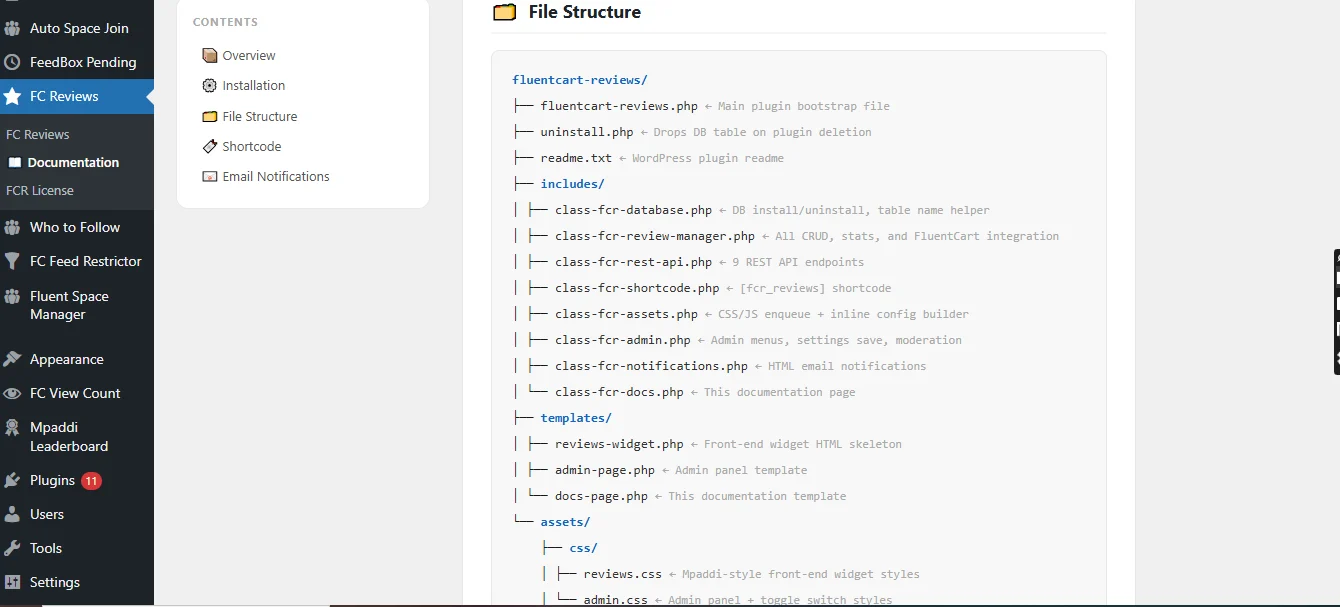
Built as a WordPress plugin
-
Compatible with FluentCart
-
Uses:
- PHP (backend logic)
- JavaScript (AJAX interactions)
- CSS (modern UI styling)
-
Follows modular OOP architecture
-
RESTful API design (
/wp-json/fcr/v1)
Use Cases
- 🛒 eCommerce stores using FluentCart
- 📱 Mobile-first online shops
- 🎯 Brands focused on social proof
- 🎥 Products that benefit from visual reviews (fashion, gadgets, beauty, etc.)
Why This Project Stands Out
Most review systems are static and text-heavy. This plugin:
- Mimics social commerce experiences
- Prioritizes visual storytelling
- Combines UX + performance + scalability
image 1:
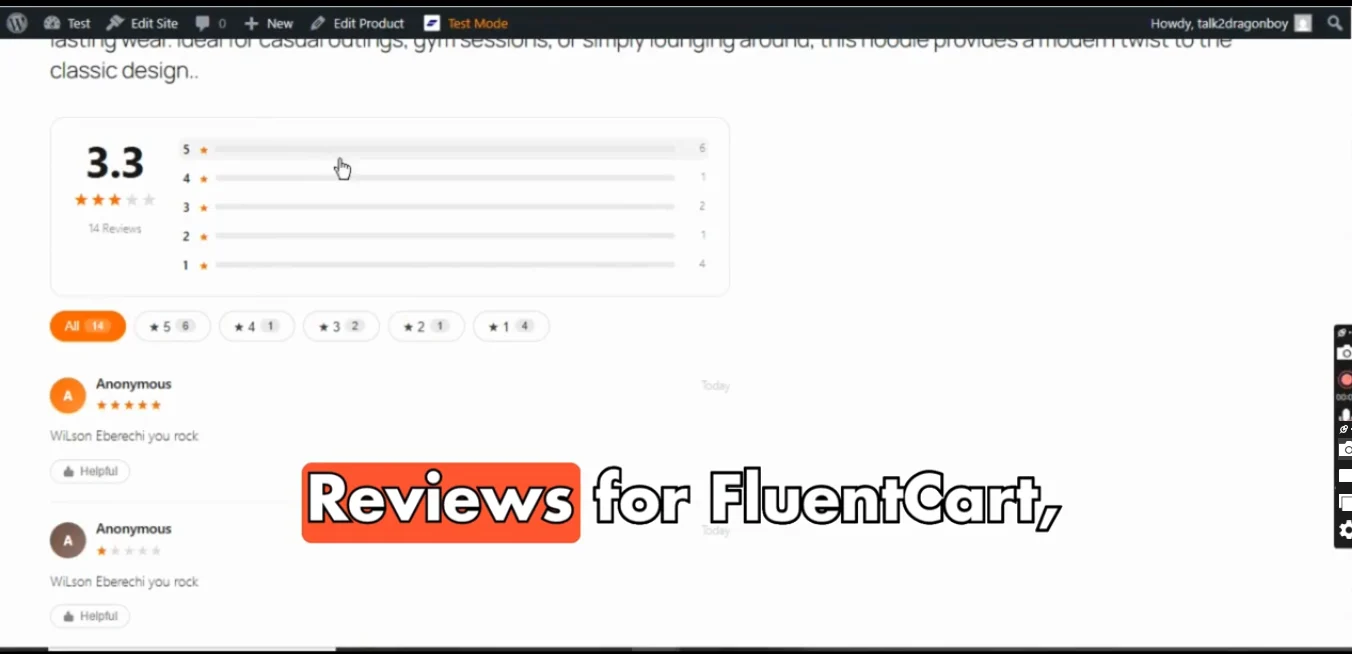
image 2:
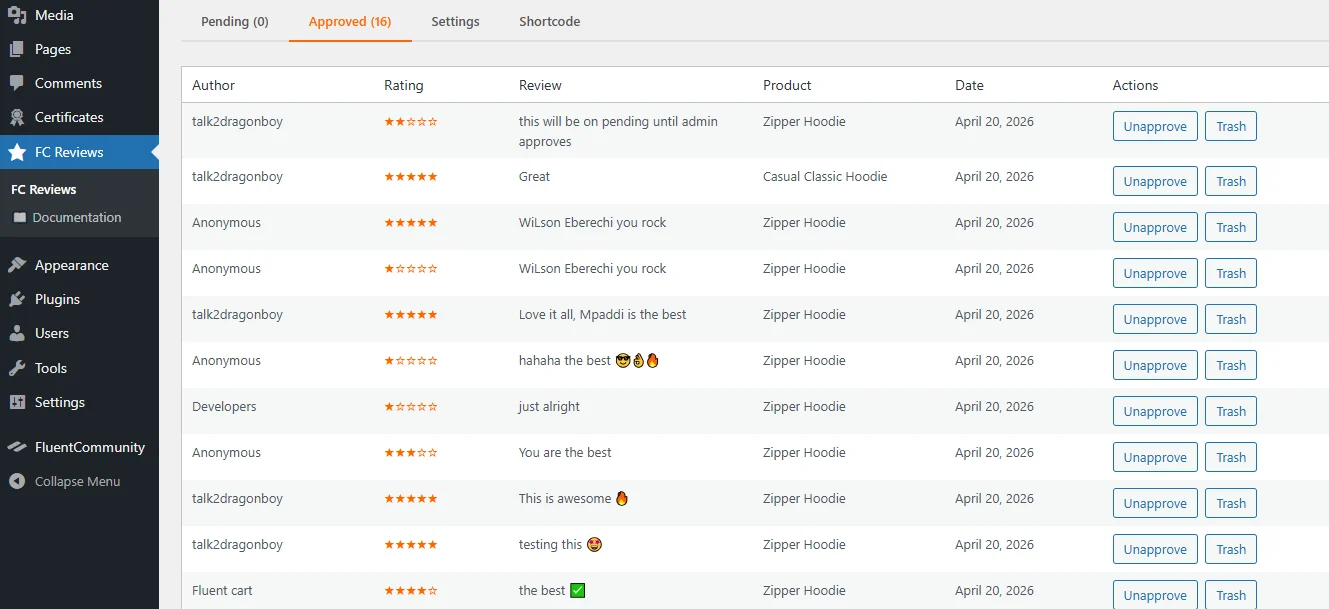
image 3:
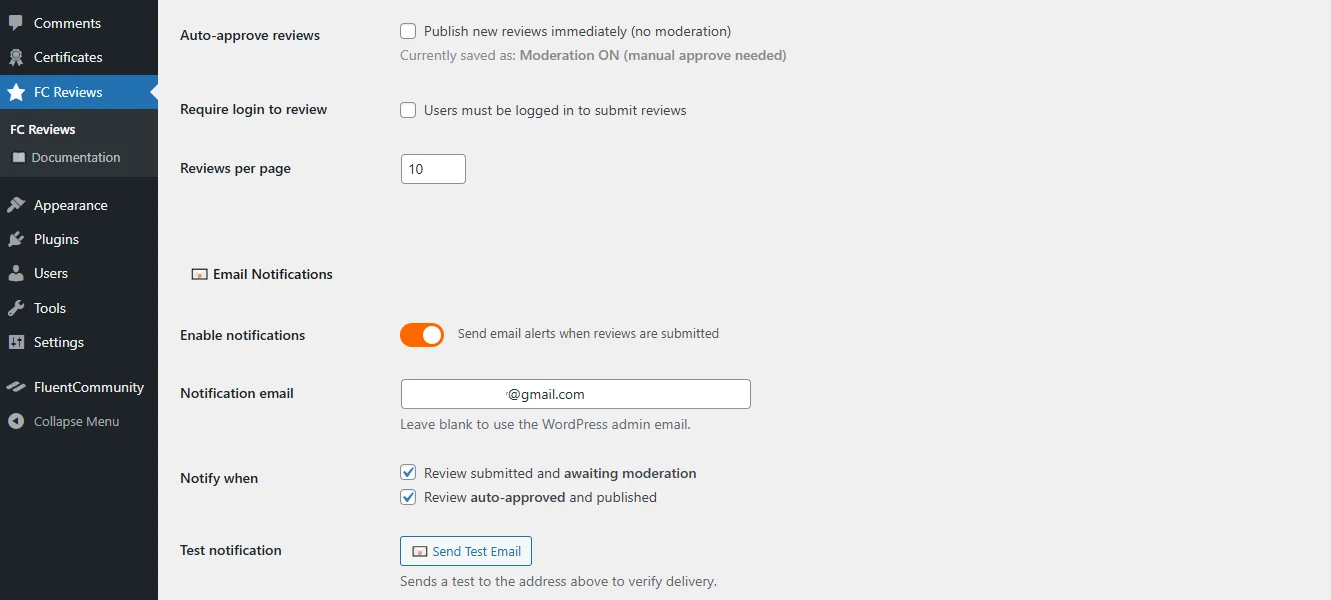
image 4:
Video Tutorial/Explanation:
https://www.youtube.com/watch?v=CmvigF8cG9w
For support visit: Mpaddi.com

Hello FC Team,
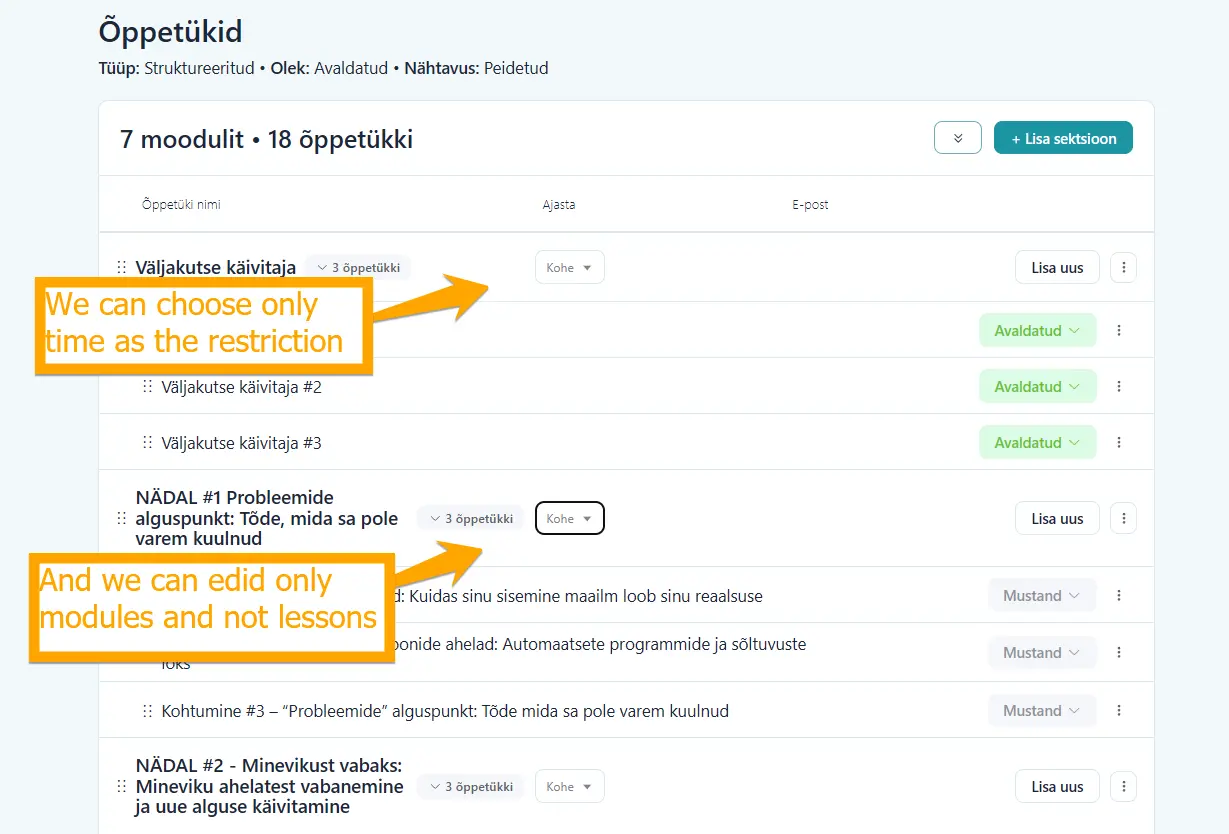
Is there any timeline for when we can expect a standard drip content feature for courses in Fluent Community?
At the moment, it’s only possible to set time-based restrictions, where modules are unlocked on specific days. However, I need a setup where users cannot access the next lesson before completing the previous one.
My courses are often structured in a way that each lesson builds on the previous one. If someone skips a lesson, it can easily create confusion and may even lead them to drop out entirely.
Additionally, the current scheduling options only apply to modules, not individual lessons.
These are quite essential features for a course platform, so I’m a bit surprised they’ve taken this long to implement.
Or is it possible that I’ve misunderstood something, and this functionality is already available? If so, I would really appreciate any guidance on how to set it up. 🙂
Thank you!

Hello everyone,
I built a WordPress plugin to connect Claude Desktop directly to FluentCommunity, over the MCP protocol.
What it does
Once installed and configured, Claude sees your FC installation as a set of tools. The plugin exposes 28 capabilities, each of which can be toggled on or off individually from the settings page.
Examples:
Type to Claude:
- "Connect to FluentCommunity, look at course XXX and tell me if it needs updating."
- "Connect to FluentCommunity, create a course about building the Eiffel Tower. No more than 3 or 4 lessons, no technical jargon, high-school level, and remember to mark the spots where an illustration should be inserted."
You get the idea. Claude becomes the assistant that saves you a lot, a lot, a lot of time.
In detail, Fcom AI Connect lets Claude:
Courses
- List courses
- Get a course's details
- Get a course by its slug
- Create a new course
- Update a course
- Duplicate a course
Sections
- List the sections of a course
- Get a section's details
- Create a new section
- Update a section
- Copy a section into another course
- Reorder sections
Lessons
- List the lessons of a course or section
- Get a lesson's details
- Create a new lesson
- Update a lesson
- Move a lesson into another section
- Reorder lessons
Quizzes
- Create a quiz on a lesson
- Update a quiz's questions and answers
- Update a quiz's settings
- List student submissions for a quiz
- Get the details of a submission
- Manually update a submission
- Export quiz results as CSV
Students
- List a course's enrolled students
- Enroll a student in a course
- Unenroll a student
Ready for international use
The plugin is fully internationalized. It ships with five built-in locales in addition to English: French, Spanish, German, Italian, and Portuguese (Brazil). Further languages can be added via .po files.
What Fcom AI Connect does not do (on purpose)
A few limits, chosen rather than suffered.
No deletion.
Deletion, for example of a course, is not possible. Only the admin retains that power.
No access to WordPress itself.
No managing posts, pages, media, plugins or themes. The AI stays inside the FluentCommunity perimeter.
No destructive actions by default.
Anything that is hard to reverse is blocked unless explicitly enabled in the settings. One switch per operation, that you flip on if you need it.
No access to human identity.
Claude runs under a dedicated bot account (fcom-aic-bot), created at install time, with only the capabilities it needs. It cannot log in interactively, and its account cannot be used to reach the WordPress admin.
Tech stack (for those who care)
- Protocol: MCP Streamable HTTP (Anthropic's official spec)
- Authentication: Bearer token, one per configured AI provider
- Key encryption: libsodium (XSalsa20-Poly1305), key derived from your
AUTH_KEY/AUTH_SALT - Audit log: dedicated table, every line signed with HMAC
- Updates: Ed25519 signature verified before install
1-year license: €59 instead of €89
Lifetime license: €159 (limited-time offer)
Shop 👉https://comprendre.ai/item/fcom-ai-connect/
Questions welcome. 😉

I’m exploring how to onboard an external group (e.g., a local community of professionals that meet in person) into a private space within my platform, and I’m trying to better understand the real value from the member’s perspective.
If you’ve done this, I’d love to learn:
- How are members actually using the private space day-to-day?
- What makes it compelling enough for them to engage beyond in-person events or Slack?
- What kind of content or interactions work best (discussions, resources, events, etc.)?
- How do you position/market the value of the private space to the group?
- What outcomes have you seen (engagement, retention, collaboration)?
I’m especially interested in real examples or use cases that will help me frame the value prop and actual use case that will benefit the users.
Appreciate any insights you can share, thanks in advance.

I am building forms with fluentforms and have made an android-app to load the website via webview.
The page where the forms are is loaded correctly. However, the form can not be interacted with or submitted. The logic is broken somehow and I have no idea why.
Do anyone have experience with webview and forms in this way?
Cheers!
Gabe