

Anyone found a way to make courses have prerequisite courses?

Hi there,
Could you write me how can I translate these three strings?
Thanks!


I would like to know if the prototype I’ve made can be easily done with a snippet or if that would require heavy tech work. The point would be to replace the topics list as it exists today in the space. NB) an arrow to deploy the topics is missing
A noob question for sure! But I’d like to change the way topics are presented and in my community, each space calls for many topics

Just dropping this here in case anyone else needs it 👇
Coming from BuddyBoss, role-based messaging was one of the features we really missed. We had a real problem with bots signing up and immediately DMing our members — catfishing, spam, the whole mess. So I built TBC Message Roles to fix it for our community, and figured I'd release it free for anyone running Fluent Community.
What it does is let you decide who can actually start conversations. You can gate 1:1 DMs and space chat by WordPress role, Fluent role, or space-level role. So instead of everyone-can-message-everyone the second they sign up, you choose which roles unlock it.
Our setup looks like this: we have an "About Us" course built on Fluent Community Courses. When a new member finishes it, they auto-get the Member role — and that's what unlocks DMs on the site. Bots never make it that far. Honestly the use cases are kind of endless once you start thinking about it.
For the devs curious how it's done — it's all native, zero core edits:
- It hooks Fluent Messaging's own permission filters (
fluent_messaging/can_initiate_messageandcan_send_community_message). We're not patching or forking anything — Fluent already exposes the decision point, we just answer it based on roles. - Role checks run across three tiers: WordPress roles, Fluent Community global roles (Admin/Moderator), and space-level roles (Space Admin/Mod) pulled straight from Fluent's own models. Admins and FC moderators always bypass.
- The friendly "you can't message yet" wording is the neat part — instead of hardcoding UI, it filters Fluent's own translation strings (
gettext_fluent-messaging) and only swaps them for users our rules actually block. Everyone else sees Fluent's normal text. Because the string is served from the backend, the same custom message shows up in the web chat AND our mobile app with no app update needed — the app just renders whatever the server hands it. - Fail-open by default — configure nothing and everyone can still message, so it's safe to install and lock down gradually.
It's lightweight, free, no config overload. Grab it here 👉 https://www.twobirdscode.com/shop/ — scroll down to the Freebies section and look for TBC – Message Roles. While you're on the site you'll also see the community app we built on top of all this 📱

This update focuses on smoother management, better compatibility, and cleaner workflows for larger glossaries. Please note that WP has finally decided to implement safeguards against instant availability of a plugin update via dashboard whenever a dev pushes their update to the Repo. They now require a 24 wait for review on all updates, so you should see an update notice tomorrow this time.
What’s new:
- Optional SEO fields in Term Studio, with support for SEO title, meta description, Open Graph title/description, and social image.
- SEO plugin detection for Yoast SEO, Rank Math, SEOPress, and All in One SEO.
- Duplicate term detection when creating new terms or importing terms, with duplicates saved as drafts for review.
- Faster admin workflows with AJAX-style filtering/search and pagination for Term Manager and heavier Terms Engine screens.
- New optional compatibility fields for placing shortcode/content before or after the definition and metadata areas on single term pages.
- Better import/export handling, including SEO fields and compatibility placement fields.
- Improved CSV/XML downloads and export handling for larger glossaries.
- More performance polish around Terms Engine, relationship data, and optional module loading.
Clever Linked Terms is free on WordPress.org:
https://wordpress.org/plugins/clever-linked-terms/
User Manual:
https://jeffbrigman.com/clever-linked-terms-user-manual/
Change Log:
https://jeffbrigman.com/clt-change-log/
Join the community:

We want to publish our FluentCommunity (with FluentCart for payments) website into a mobile app for Android and iOS. Has anybody done this? or is this on the dev timeline Shahjahan Jewel ?

After months of development, testing, and refinement, the next version of Community Sponsored Ads Global for FluentCommunity is almost ready.
The plugin has been designed to help community owners create new revenue opportunities directly inside their communities without relying entirely on external advertising platforms.
✨ Upcoming Features Include:
📢 Sponsored Ads in Community Feeds
🚀 Promote Any Existing Post
🎥 Video Advertisement Campaigns
⏩ Skippable Ads Before Video Content
🛒 Affiliate Product Promotions
🧩 Custom HTML Advertisements
💰 Revenue Dashboard
📈 Campaign-Level Revenue Tracking
👤 Dedicated Advertiser Dashboard
🌍 Multi-Currency Support
💳 Stripe Integration
💳 PayPal Integration
💳 Razorpay Integration
🚫 Ad-Free Subscription Options
The update is currently in the final testing and fine-tuning stage and is expected to be released very soon.
👉 If you could add one monetization feature to your community, what would it be?
Stay tuned. The next version is almost here. 🔥

Will you be adding events to the plugin?

Dear Shahjahan Jewel and team.
Thank you for the great work done indeed. I'm wondering do you have any plans of implementing such a feature in FC?
Thank You
Clever Linked Terms v1.1.0 is coming soon.
This is the biggest release yet for Clever Linked Terms, and it marks a major step forward from a glossary/linking plugin into a full semantic linking and relationship engine for WordPress, FluentCommunity, and content-heavy websites.
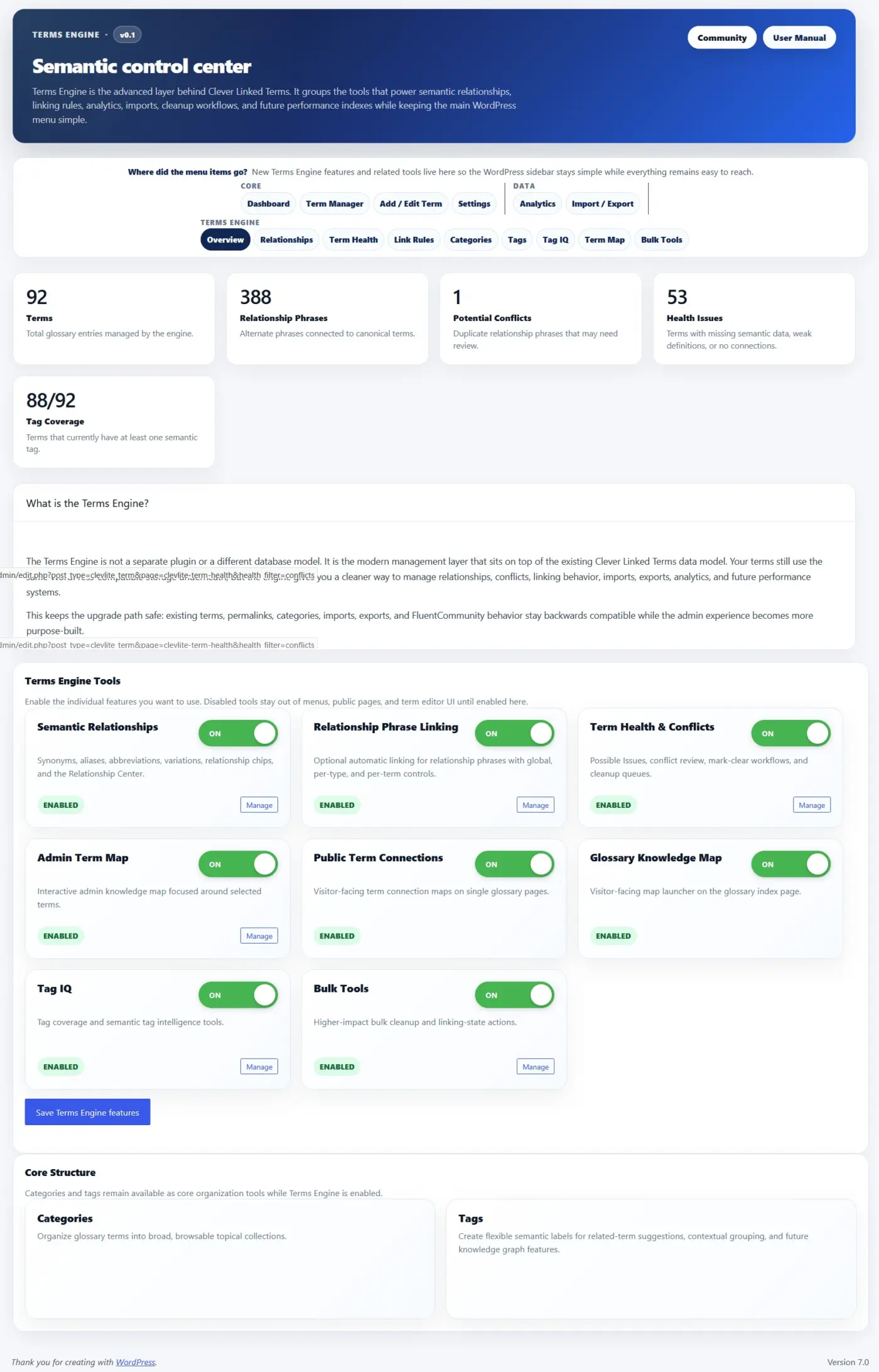
The heart of this release is the new Terms Engine.
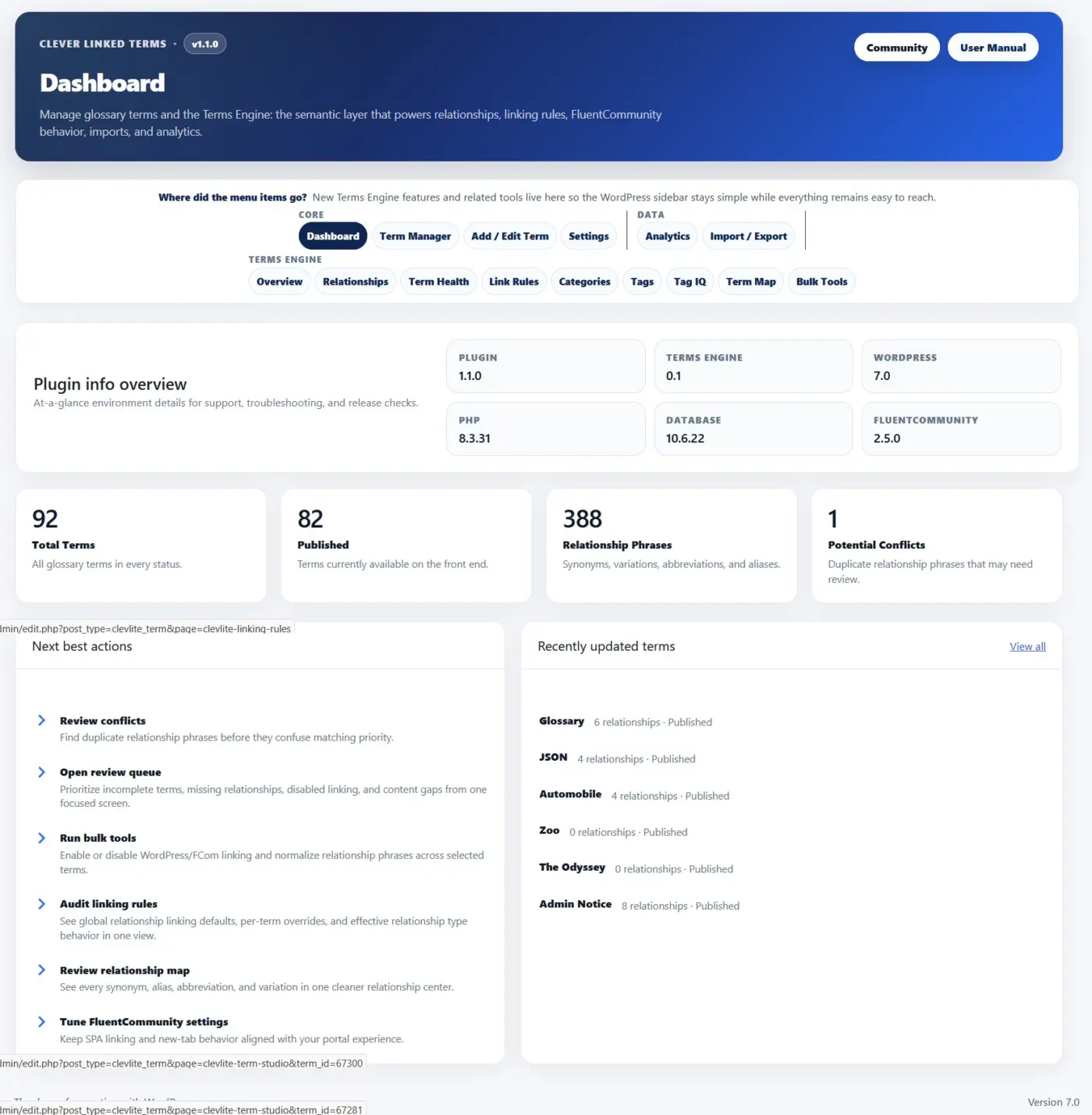
Terms Engine gives you a dedicated control center for managing relationships, term health, link rules, maps, tags, conflicts, and semantic structure. It is optional, modular, and can be enabled only when your site needs those deeper tools.
Here is what is new in v1.1.0:
- Terms Engine. A new semantic control center for relationships, term health, link rules, categories, tags, Tag IQ, term maps, and bulk tools.
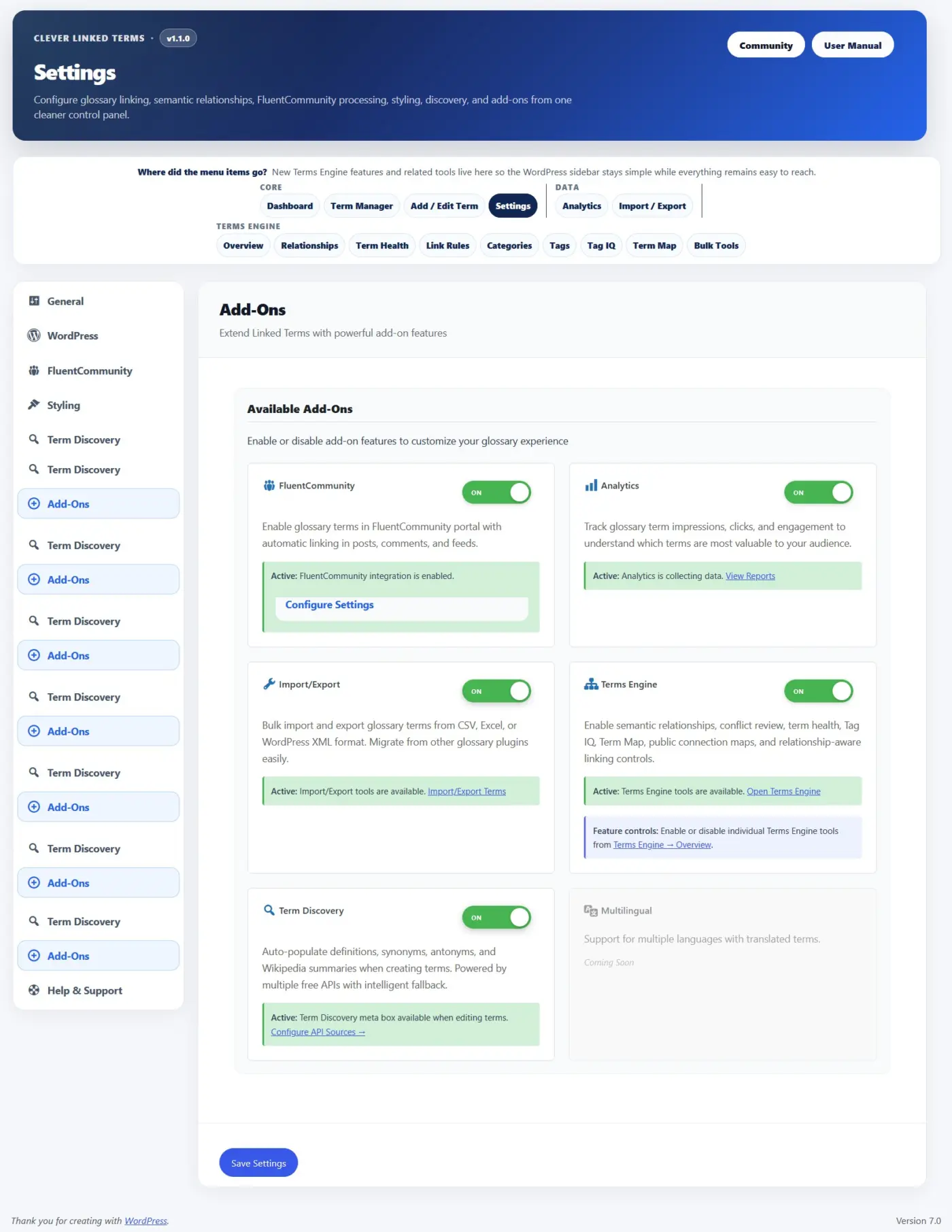
- Modular Feature Controls. Terms Engine can be enabled as an add-on, and individual tools can be turned on or off from the Terms Engine Overview. This keeps smaller glossary sites clean while giving larger sites room to grow.
- Semantic Relationships. Glossary terms now support synonyms, aliases, abbreviations, and variations so different words or phrases can point back to the correct canonical term.
- Relationship Phrase Linking. Relationship phrases can optionally link back to their parent term, with global settings, per-type controls, and per-term overrides.
- Term Health. A new review area helps identify possible issues, relationship conflicts, duplicate phrases, and terms that may need editorial cleanup.
- Admin Term Map. Explore how terms connect through shared tags, shared categories, and semantic relationships. Clicking a term can refocus the map without reloading the page.
- Public Term Connections. Single term pages can show visitor-facing relationship maps so readers can explore related concepts.
- Glossary Knowledge Map. Glossary index pages can now include a larger visitor-facing map behind a smooth “View glossary map” launcher, so it is available without taking over the page.
- Term Studio. A cleaner term editing experience for titles, slugs, statuses, scheduled terms, tooltip summaries, WYSIWYG definitions, sources, categories, tags, exclusions, and Terms Engine fields.
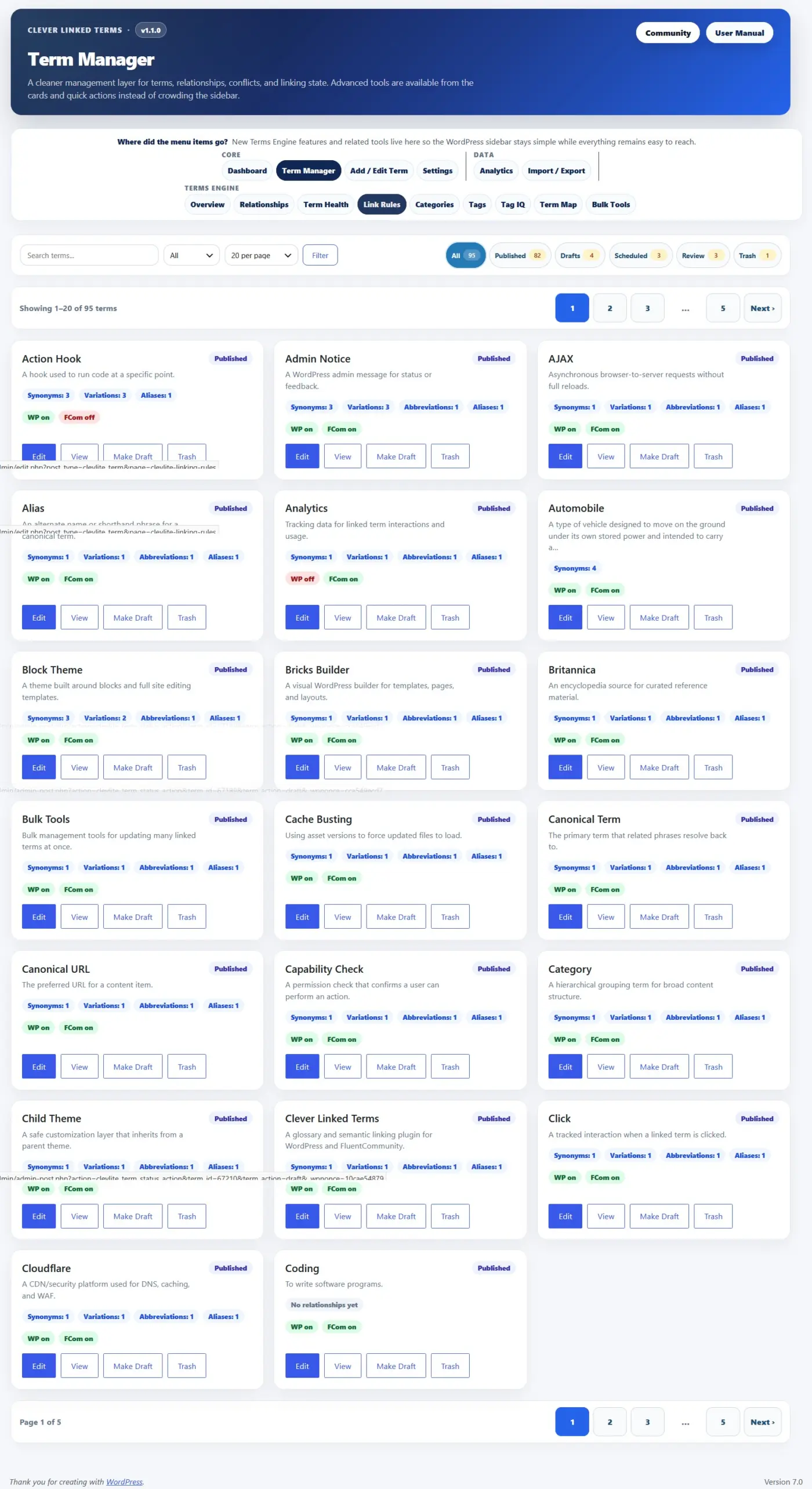
- Term Manager Improvements. The term manager now includes a card-based interface, better filters, status chips, pagination, and a terms-per-page selector for large glossaries.
- Glossary Index Improvements. You can now set both the glossary index slug and title, choose from multiple layouts, control whether index content is auto-linked, ignore leading words like “a,” “an,” and “the” for sorting, and adjust sticky header behavior.
- Single Term Page Improvements. New layout options, better source/tag/category display, public connection maps, and “Back to [Index Title]” buttons that use your actual glossary title.
- Term Discovery Improvements. Fetched definitions and summaries now preserve editor formatting better, sources are routed into the Sources field, and synonyms are normalized into separate values instead of one long line.
- Import/Export Updates. CSV/XML workflows now support v1.1.0 fields including sources, tags, relationships, exclusions, scheduled status, and relationship linking controls.
- Analytics Add-On. Optional analytics can track impressions, clicks, matched phrases, relationship types, context, and FluentCommunity-aware activity.
- FluentCommunity Support. SPA-aware processing helps glossary links and tooltips continue working after FluentCommunity portal navigation and feed updates.
- aOS/AdminOS Compatibility. Clever Linked Terms can now register as an app inside aOS/AdminOS when available, with routes for Dashboard, Terms, New Term, and Settings.
- Performance Improvements. Public maps and glossary knowledge maps use lazy-loading and cached rendering patterns so heavier visual tools do not slow down the initial page load.
- This release also includes WordPress 7.0 compatibility metadata, Plugin Check cleanup, stronger sanitization/escaping, improved readme content, and a lot of release hardening for the WordPress.org plugin directory.
Clever Linked Terms is free and available on WordPress.org.
Download/update here:
https://wordpress.org/plugins/clever-linked-terms/
User Manual:
https://jeffbrigman.com/clever-linked-terms-user-manual/
Join the community:
https://jeffbrigman.com/community/space/linked-terms/home