


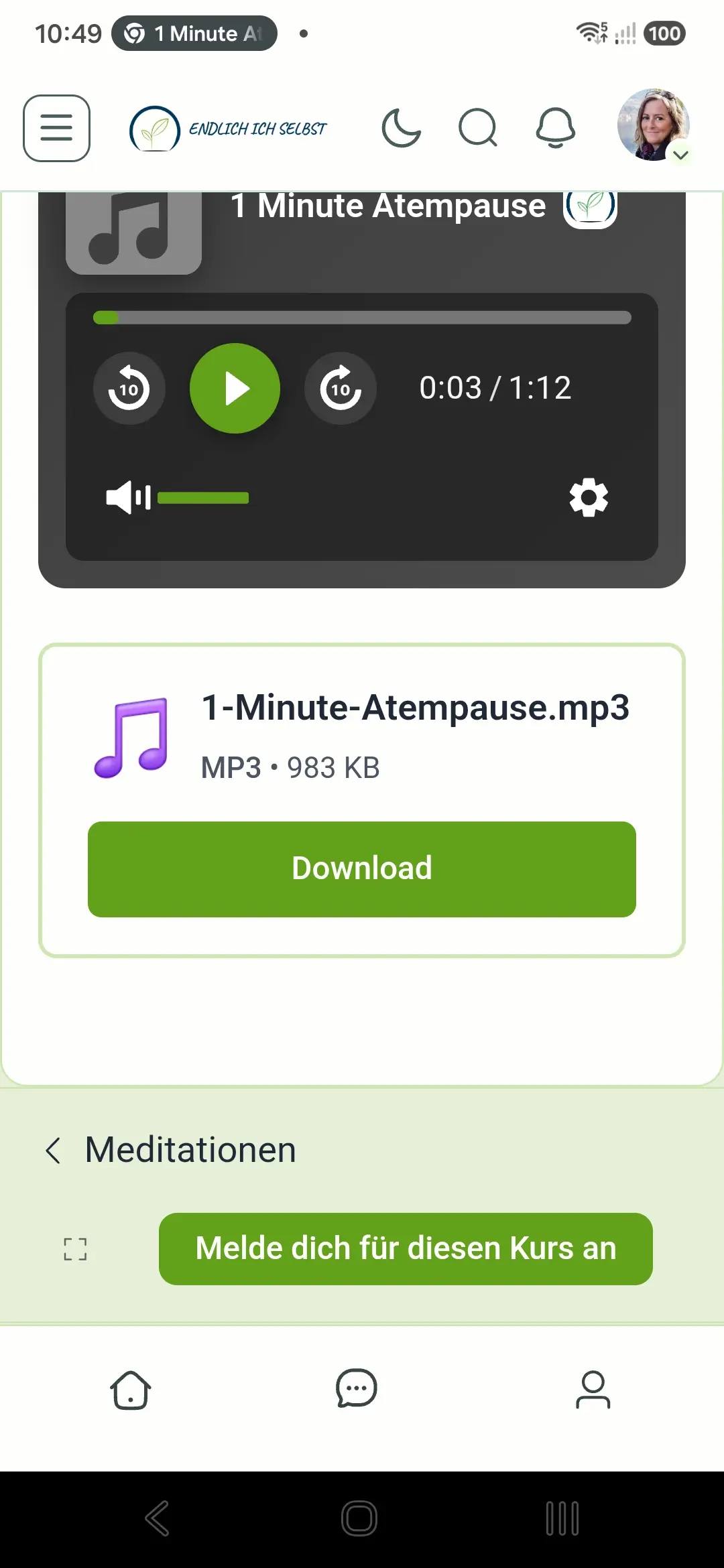
How can I remove the banner on a course lesson page that says the user has to register for the course although he already accessed the lesson? In my settings I allowed users to access the lesson without registering, but the user still sees the prompt to register.

Hi team,
Currently, when an admin or moderator edits, pins, or unpins a post, FluentCommunity automatically bumps it to the top of the feed and space.
This creates an issue for old posts. For example, when we unpin a 4-month-old post, it immediately pops back to the top of the feed as if it were brand new content, which confuses members.
Could you please add an option or logic so that admin/moderator actions (like editing, pinning, or unpinning) do not trigger a feed bump?
Thank you!

I am experiencing an issue with FluentNotify push notifications on FluentCommunity.
Environment:
- FluentCommunity 2.9.1
- FluentCommunity Pro 2.9.1
- FluentNotify 1.0.2
Some Community Comment push notifications are sent normally, while others are skipped.
The skipped notifications show this error:
Token, title, and body are required to send a notification.
What is unusual is that this does not happen to every notification. It seems to affect only some notifications containing Greek text.
For example, in one affected notification the recipient, device, icon and action URL were all available, but the notification was skipped and no send attempt was made.
Other Community Comment notifications sent around the same time worked normally.
This makes the issue intermittent and difficult to predict.
I have confirmed that the related post, comment and notification route are valid, so the problem does not appear to be related to the post URL, slug or Firebase configuration.
Could you please check whether there is an issue with FluentNotify handling Greek / UTF-8 notification content?
Hi everyone,
Has anyone else encountered an issue with scheduled posts recently in FluentCommunity?
When attempting to schedule a post as an administrator, the editor displays:
"Scheduled for Invalid Date at Invalid Date"
And when trying to save or schedule it, the following error pops up:
"Erreur An internal error occurred."
My WordPress timezone settings are properly configured (Brussels / Europe timezone, not a fixed UTC offset).
I'm trying to determine if this is a bug introduced in a recent update or an isolated conflict. Is anyone else seeing this behavior?
Thanks for your feedback!
I have a handful of pages that will have to be gutenberg pages. This raises two issues I see that I could use some guidance or creative workarounds on.
-
Staying inside the FC theme (for lack of a better term). Within FC there is a top nav and side nav, when you render different FC pages they stay inside of that theme, retaining the nav. I need to create some gutenberg pages which will be linked in the top nav, how do I get them to render inside the FC theme rather than opening a separate wordpress page, losing the top/side nav?
-
light/dark mode - I want to offer the light/dark mode switch for users, but for the pages outside of FC, the gutenberg pages, this breaks. Even with a Gutenberg theme with dark mode it would require a user to click in two places to enable it. Any workarounds here?
Deploying away from BB, Elementor Pro, and Learndash this weekend, appreciate how helpful this community has been.

When creating a post containing a link to a webpage, the link preview is not generated before the post is published. After the post is published, the link preview is displayed correctly.
It is unclear whether this is a bug or whether the link preview feature is simply not available before publishing. I had not noticed this behavior previously, so I cannot determine whether it has been present from the beginning.

Why does a post with an uploaded image also display the featured image from an article linked in the post? Initially, only the article image is shown, but after clicking "Show More," both images appear. If I upload an image to the post, I want only that image to be displayed.

Almost 10 months ago, I thought building a proper app for our FluentCommunity might be impossible. Today, my community is live on the App Store.
For almost ten months, I was trying to find the right way to turn our FluentCommunity platform into a proper mobile experience for our members.
I run Kidnest, a Greek parenting education platform for parents of young children. Our community is at the heart of the platform: parents share real questions, access guides and courses, save helpful material, and feel less alone in the hard moments of parenting.
At first, we used a PWA. It worked well: it was fast, had notifications, and gave parents an easy way to access the community. But I kept feeling that, for the kind of experience we wanted to offer, we needed a real native app, something simple, fast, familiar, and trustworthy for a parent who may already feel overwhelmed.
The difficult part was not simply “making an app.” It was making sure that FluentCommunity’s structure, Spaces, groups, courses, feed, saved content, messaging and navigation ,could become genuinely easy to use on mobile without making the platform feel confusing or fragmented.
That is where James Elrod and Two Birds Code made a real difference.
James did not just hand over a generic app wrapper. He spent serious time listening to the way Kidnest works, looking at the real issues we found during testing, and improving the app step by step.
From native navigation and deep linking, to courses inside groups, login details, messaging behaviour, app review requirements, and all the small things users notice but rarely mention he was consistently present and willing to work through them.
Today, the Kidnest app is officially live on the Apple App Store. We are now waiting for the final Google Play production approval, and then Android will follow as well.
It has been a long process, but I am genuinely proud of where we got to. More importantly, I am excited because Greek parents will now be able to carry their Kidnest community, guidance, courses and support with them in a much simpler way.
A big thank you to the FluentCommunity ecosystem for making this possible, and especially to James at Two Birds Code for the patience, care, technical work, and genuine commitment he put into this project.
If anyone here is trying to move a FluentCommunity platform from PWA to a native mobile app, I am happy to share what I learned along the way.

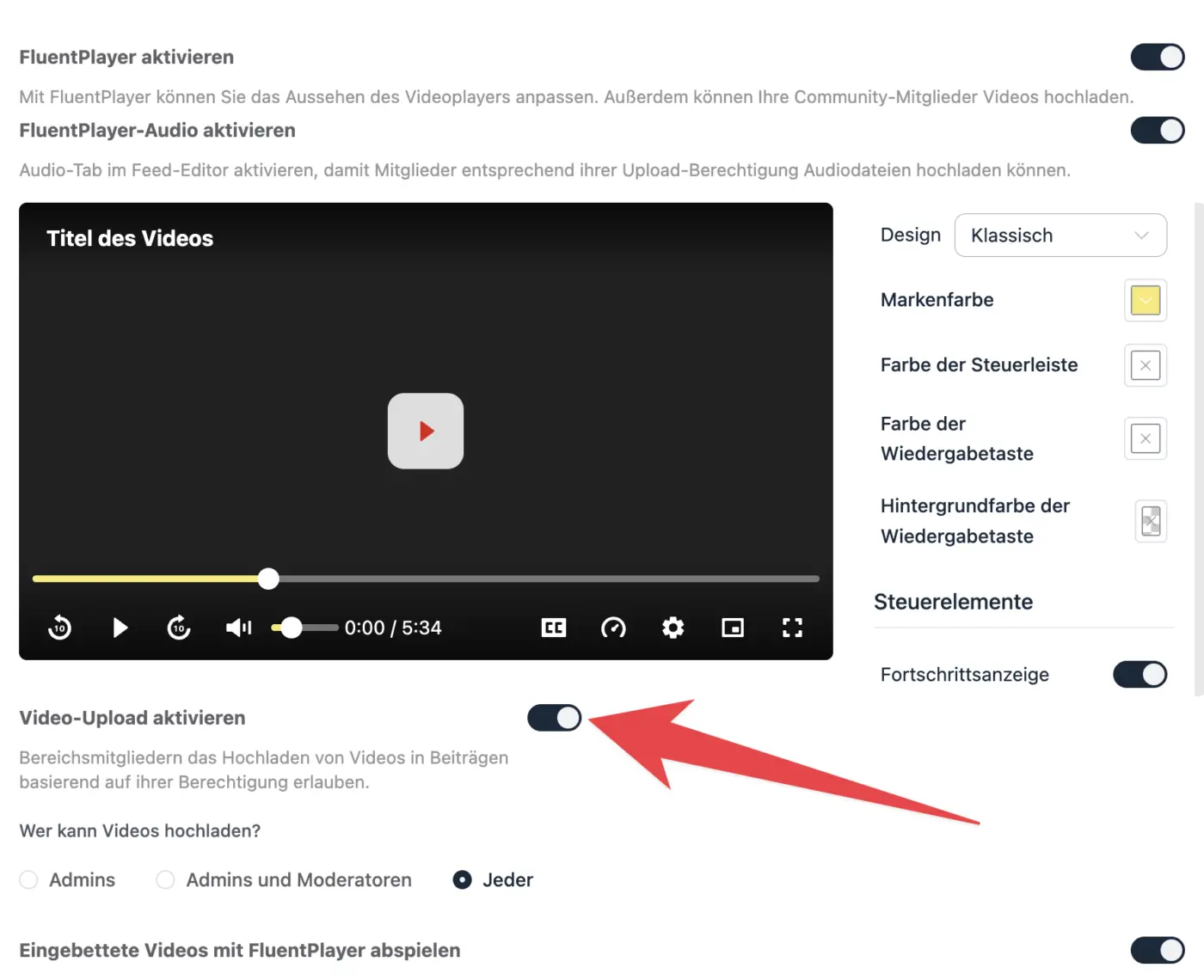
Seems like audio-files can't be uploaded to the community, when "video-upload" in fluent-player-settings is deactivated.
If you try - the audio-upload icon is still shown - an error-message "you can't upload videos.." is shown in the right corner, as soon as you choose a file and click on upload.
Bug or on purpose?
Hi Fluent Community team,
I would like to propose a feature request regarding content retention when a user's membership or subscription expires.
Currently, if a user's subscription lapses and they lose access to the community, any posts or discussions they started can become inaccessible or hidden. This can unintentionally erase valuable community discussions, threads, and the time other members spent replying to them.
Suggested Feature: Introduce a setting or behavior where:
- Revoking a user's access due to an expired subscription blocks the user from logging in or participating.
- Their historical posts, threads, and comments remain visible on the platform as archived content so that valuable discussions and community knowledge aren't lost.
This would help keep community archives rich and prevent valuable troubleshooting or conversational threads from disappearing entirely when a user leaves.
What do you think? Would love to see this considered for a future update!