


1.4.0 just went live. This one has a bunch of things you asked for in this space.
Inline chapter strip. Chapters can now show as a horizontal scroll strip under the player, with titles and start times. Click one and it seeks. The active chapter follows playback. @Wendy Perkins Shoef this is your request from the Chapter View/Scroll thread. Set it in Chapters display > Inline scroll.
Muted Preview autoplay. The video auto-plays silently and in a loop, with a "Play with sound" overlay on top. Click, Enter, or Space converts it to normal playback with sound. Nothing is tracked until the viewer actually converts, so analytics, milestones, and Resume Playback stay off during the loop. Your view counts stay honest. Pro adds captions during the loop, a preview range, overlays, and continue-from-preview-position.
Modal playback (Pro). Open any media in a lightbox from text, a button, an image, a thumbnail, or an icon.
[fluentplayer_modal id="123"]Watch now[/fluentplayer_modal]Good for hero sections, course previews, product demos and media cards where a full inline player is too heavy.
Better Vimeo. Quality and speed menus, chapters in the editor, caption import in Pro, and privacy-enhanced mode on by default.
Single Playback. When one player starts, the others pause. On by default. Nicolai, if you want two ambient players running at once, turn off "Pause other players when one starts" in General settings.
Fixes you reported. Grid playlists are responsive on narrow screens now ( Itachi Sensei , Peng Xie ). Resume Playback saves on pause, tab switch and navigation. Duplicate placements work as separate players. YouTube Shorts keep portrait framing. FluentCommunity gets the full player runtime back. Private Cloudflare Stream videos over an hour no longer cut off.
There is also a consent hook, fluent_player/defer_player, so YouTube and Vimeo stay uninitialized until your consent tool says go.
We also implemented signed updates for the pro plugin which is the most secure way to distribute premium plugins.
Full details here: https://fluentplayer.com/fluentplayer-1-4-0-muted-preview-modal-playback-inline-chapters/
More cooking 🙌

I've recently seen that the feature of allowing "in-player" purchases will be coming soon.
*Seen on X
Is there any ETA?
I am currently developing a review directory and I find this feature like a really nice opportunity!

Can you add a video resolution picker or force 720p quality as minimum by default?
YouTube videos do not load higher quality properly and are pixelated. This makes hard to watch them.

Hello!
I have a question about updating existing media in FluentPlayer.
Once I create a media, I can't find a way to replace its video source with a newer version.
Since the same media can be embedded across multiple pages and courses, I'd like to update the source without having to create a new media and manually replace it everywhere.
Is there already a way to do this that I'm missing?
If this isn't currently possible, I'd like to suggest it as a feature request: the ability to replace the video or audio source of an existing media while keeping its ID, URL, settings and existing embeds intact.
Thanks for your help!

Hi team,
I have a video already uploaded to FluentPlayer on the same WordPress website as FluentCommunity. I’d like to add that existing video to a community timeline post, keeping its thumbnail and player settings.
The FluentPlayer integration and video uploads are enabled. However, the “Attach Media” window only shows Oembed, HTML code, and Upload Video. I can’t find an option to select an existing video from my FluentPlayer library.
Is there a supported way to embed an existing FluentPlayer media item in a community post, using its ID, shortcode, or URL?
Uploading the same video again on the same website seems unnecessary and creates duplicate files. Ideally, I’d expect a “Select from FluentPlayer library” option.
Am I missing something, or is this functionality not available yet? If not, please consider this a feature request.
Thank you!

I've upgraded to FP Pro in order to fetch subtitles from my Vimeo videos. However, no matter the settings on the video, the plugin is telling me that Vimeo returned to captions. I even set the video to public (which I obviously don't want to do) to no avail. Has anyone had any luck and can point me in the right direction?
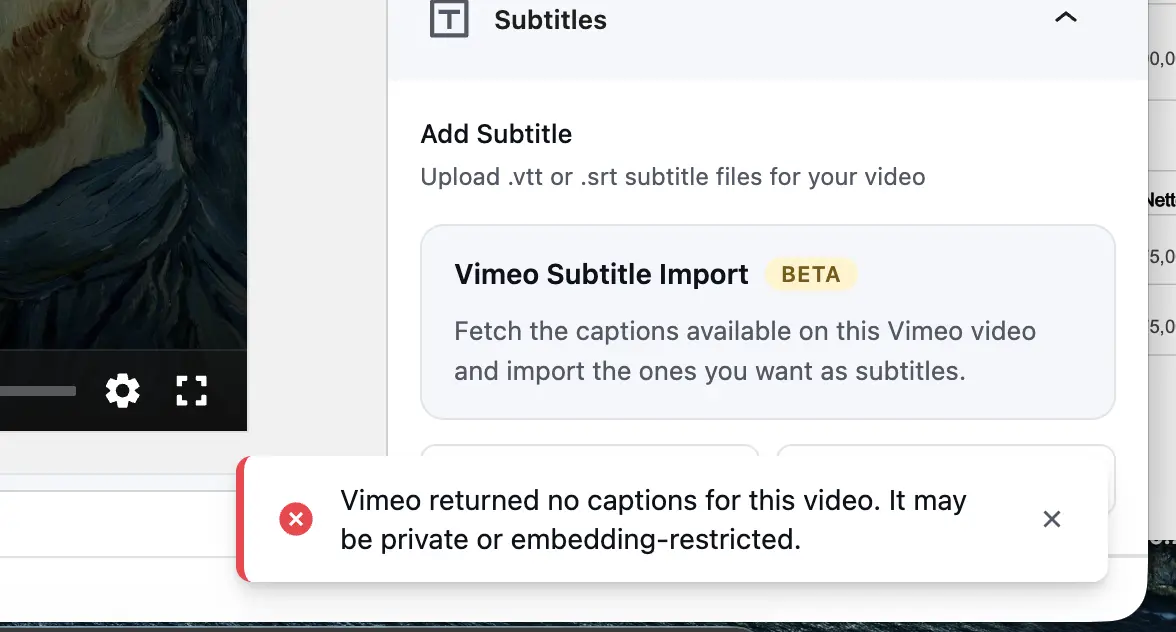

I would love to request a feature for FluentPlayer to support video embedding from Livid, which is increasingly being used as a privacy-friendly or cost-effective alternative to Vimeo.
Currently, FluentPlayer works great with YouTube, Vimeo, and self-hosted options. Adding Livid to the supported multi-source embed list would be amazing for creators moving away from Vimeo.
Thank you for considering this!

Not able to select the playlist, Ninja team have a look and fix it .
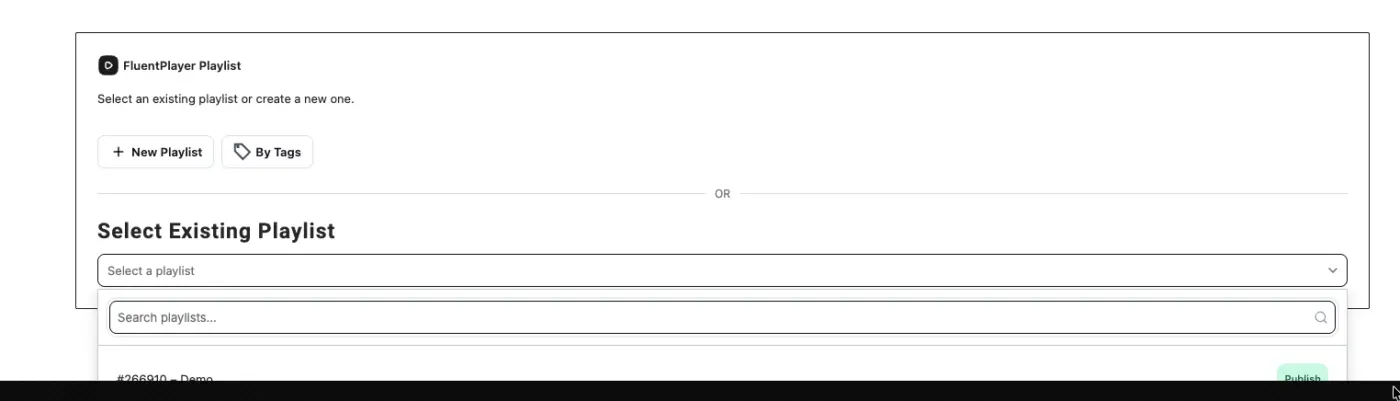
I am super happy to see that the welcome banner allows you to finally, add a video teaser.
BUT, I would love to see a Fluent Player integration there: Currently, you can only add direct URL.

The question is basically:
Will the Fluent Player Short Code work in a sortable Nona Table? I do have a library of Music tracks which I provide for my students.
It would be a hell of a game changer if that works!
I haven't seen any development or updates in a month. What's happening, guys?