Since an update a few days ago, our course pages (the fluent cart product pages) are messed up, see the screenshot attached.
Please help, this is super urgent!
I've raised a support ticket
Anyone have this issue?


One year already! 🎂
It feels like just yesterday we were talking about FluentCart, and now we're approaching its first birthday!
What makes this milestone even more exciting is that the Fluent team is kicking off a special 5 Over 5 update week, starting tomorrow, Monday, and running through Friday.
Five days. Five exciting updates. And a whole lot to look forward to! 🔥
As someone building an online business with WordPress, I love seeing tools in this ecosystem grow, improve, and make it easier for entrepreneurs to run their businesses.
A big congratulations to the entire WPManageNinja team on this milestone! 🥳
Here's to more innovation, better features, and an even brighter future for FluentCart!
Now, I'm curious about something… 👇
If you've been following FluentCart, what feature or improvement would you most love to see in its second year?
And if you're already using it, what's your favorite thing about FluentCart so far?
Let's celebrate this milestone together! 🎉


Hello FluentCart Support,
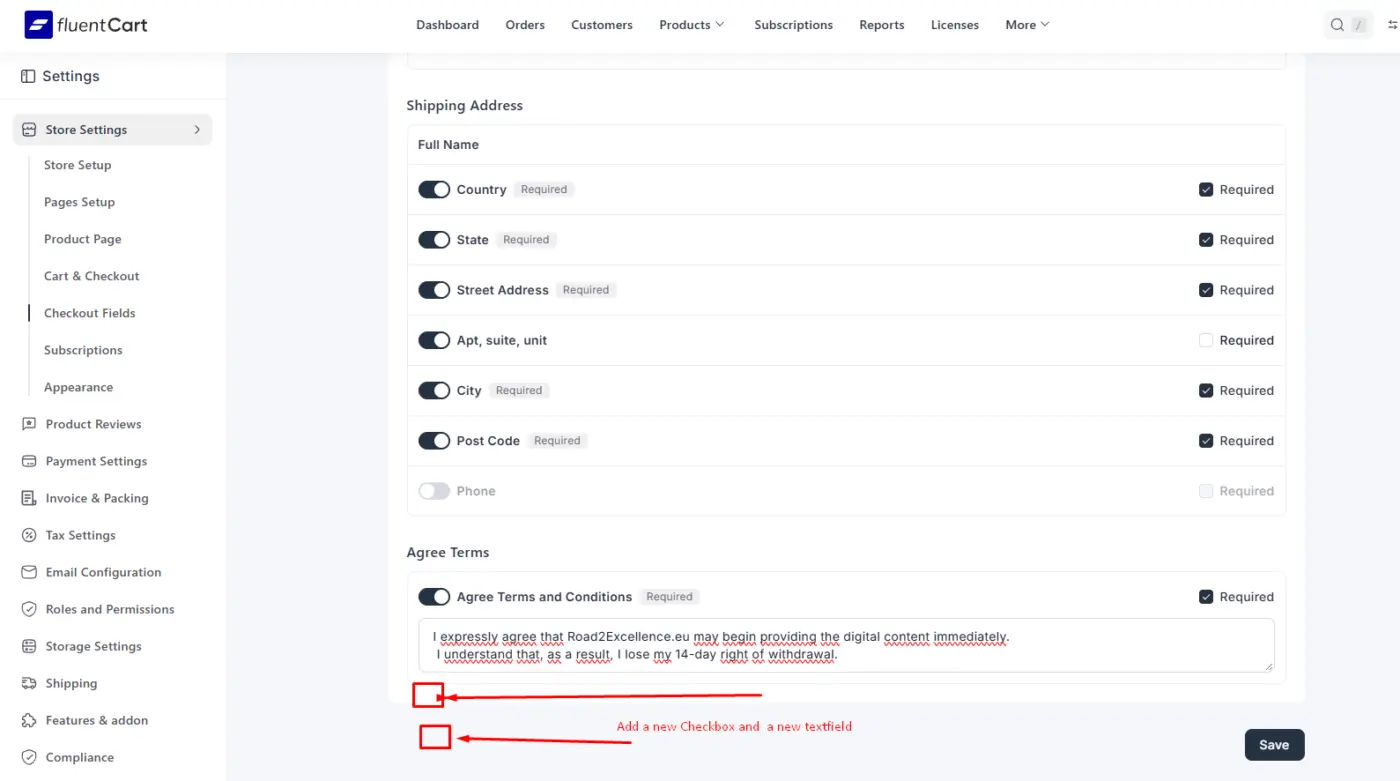
I’m using FluentCart for my online store, where I sell digital products. In Settings → Store Settings → Checkout Fields → Agree Terms, I can currently add only one “Agree Terms and Conditions” checkbox.
Could you please add the option to create multiple separate checkbox fields in this section? I would also like to be able to add a separate text field, if possible.
I need this because I want customers to confirm different terms separately at checkout, for example:
- Acceptance of the Terms and Conditions
- Consent to receive the digital content immediately and acknowledgment that the withdrawal right will be lost
It would be helpful if each checkbox could have its own text and could be set as required or optional. Ideally, these fields could also be enabled only for selected digital products.
Could you let me know whether this feature is available or could be added in a future update?
Thank you for your help.
Best regards,
Martin

Hey guys, I decided to make the Pro version of the plug-in completely free all custom-made fields for the product page and the checkout page are now included in the free plug-in. No paid features all free. https://upfluent.io/fluentcart-custom-meta-fields
Let me know what you think. Or if there are any features you’d like to see

I tried to edit the download for a digital product...
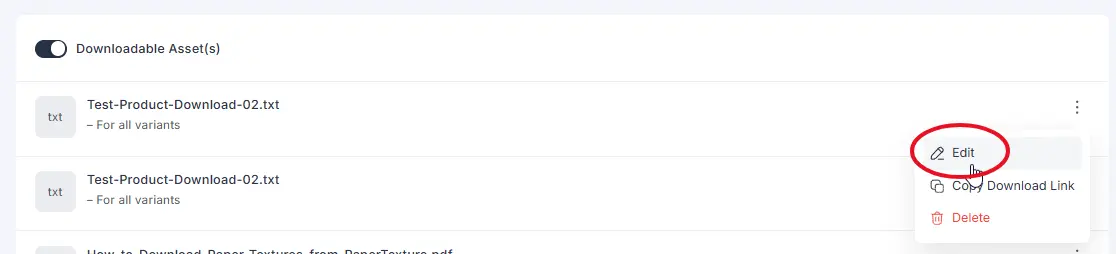
...But I get an error when I try to save / update it.
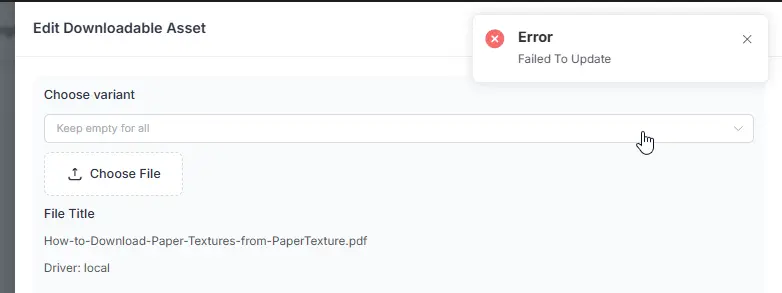
I tried a PDF and a TXT file in case the file type was the problem. Both failed.
The workaround is to delete the file and add the modified file as a new download. Beware: This will break the download link in the customer's email.
Also, if you have multiple downloads in a product, this will change the order.
So if you have
File 01
File 02
File 03
So if you delete File 01 to add a new, updated verion of File 01:
A) the customer will not be able to download File 01 from the email, they will have to go to their account. In their downloads tab and B) they will see them out of order like this:
File 02
File 03
File 01
FYI for anyone wondering....YES! You can add files to a product and previous purchasers will be able to download them in their downloads tab.

🚀 New FluentCart Plugin: Payment Methods by Product PRO!
Hey FluentCart community! 👋
I'm excited to share another plugin developed by CAYGRI specifically for FluentCart!
💜 FluentCart Payment Methods by Product PRO gives you complete control over which payment gateways are available for each product in your store.
Ever wanted to disable GoCardless for a specific product while keeping Stripe and PayPal available? Or restrict bank transfers for certain products without changing your global payment settings?
Now you can do it in just a few clicks!
✨ Key Features
✅ Per-Product Payment Rules – Enable or disable payment gateways individually for each product.
✅ All Methods Enabled by Default – Simply uncheck the payment methods you don't want to offer.
✅ Direct Product Editor Integration – Manage payment restrictions directly from the FluentCart product editing screen.
✅ Smart Mixed-Cart Support – Automatically displays only payment methods allowed for every product in the cart.
✅ Server-Side Checkout Validation – Prevents restricted payment gateways from being used during checkout.
✅ Multiple Gateway Support – Works with supported FluentCart payment gateways, including Stripe, PayPal, GoCardless, Bank Transfer, and more.
✅ Easy Setup – No coding or complicated configuration required!
💡 How Does It Work?
Imagine you're selling two products:
Product A – WordPress Plugin
- ✅ Stripe
- ✅ PayPal
- ❌ GoCardless
Product B – Professional Service
- ✅ Stripe
- ❌ PayPal
- ✅ GoCardless
If a customer adds both products to their cart, only Stripe will be available at checkout.
Simple, automatic, and fully controlled by the store owner!
🎯 Perfect For
🛒 Digital product stores
💻 Software and plugin sellers
🔄 Subscription businesses
🏢 B2B eCommerce
🎓 Online courses
💰 High-value products
🌍 Stores offering multiple payment gateways
💎 Special Launch Price
€39/year – Single Site License
Includes:
✅ All PRO features
✅ 12 months of updates
✅ 12 months of technical support
✅ Software license management
No additional transaction fees from the plugin.
💜 Built Specifically for FluentCart
No WooCommerce dependency. No complicated workarounds.
Just a lightweight extension that gives FluentCart store owners more flexibility and control over their checkout.
More Control. Smarter Checkout. Better Payment Flexibility.
🚀 FluentCart Payment Methods by Product PRO – Available for €39/year!
Developed by CAYGRI | FluentCart Extensions
💬 I'd love your feedback!
Would product-specific payment gateway restrictions be useful for your FluentCart store?
What other FluentCart features would you like to see in future plugins?
👇 Let me know in the comments!
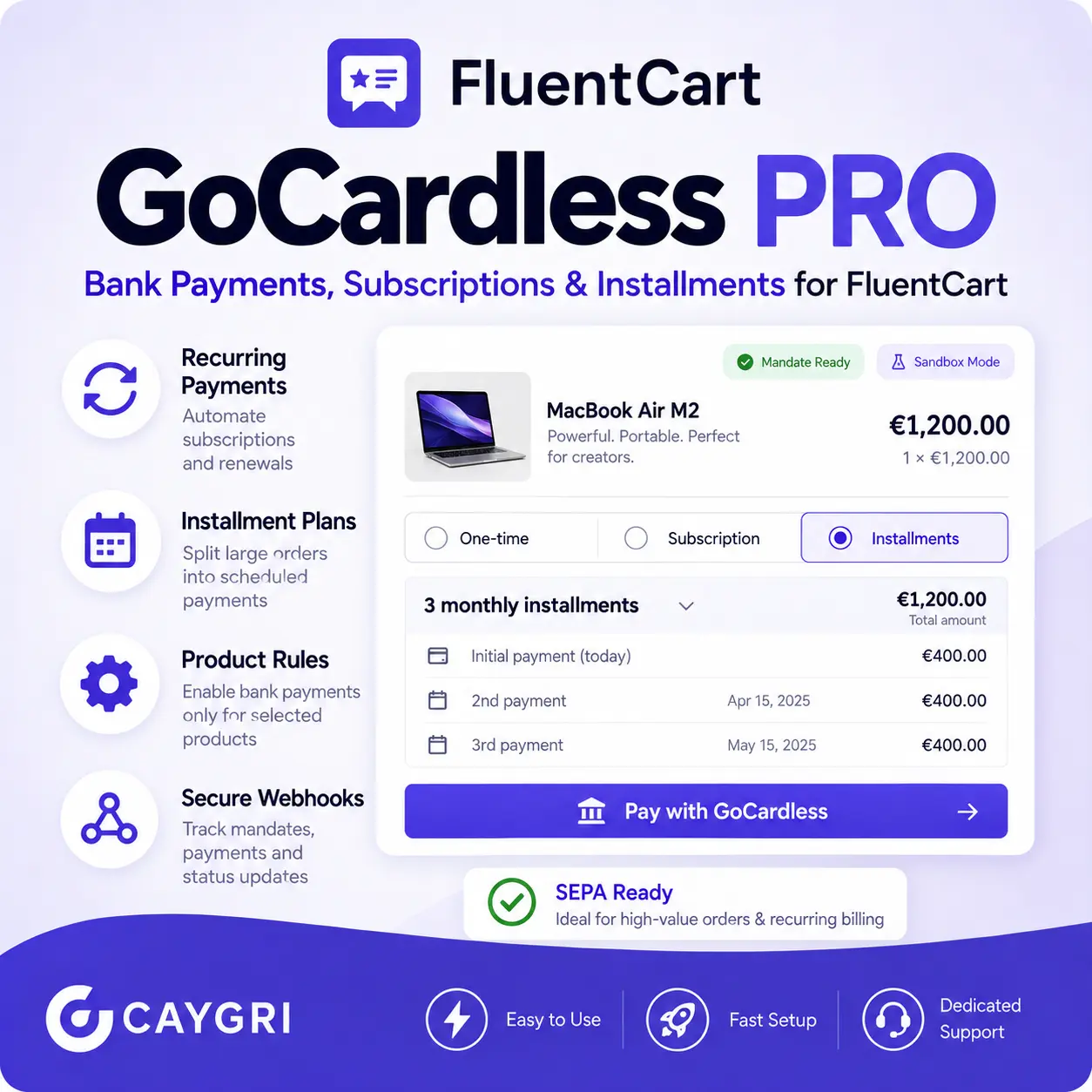
🚀 Introducing FluentCart GoCardless Payments & Installments PRO – Now €99/year!
💜 Accept Bank Payments, Automate Subscriptions & Offer Flexible Installment Plans with FluentCart!
We're excited to introduce FluentCart GoCardless Payments & Installments PRO, a powerful payment gateway extension developed by CAYGRI specifically for the FluentCart ecosystem.
Want to accept bank payments, automate recurring subscriptions, or allow customers to split high-value purchases into manageable installments?
Now you can manage it all directly from your WordPress dashboard!
✨ Powerful Features
🏦 GoCardless Payment Gateway
Integrate GoCardless with FluentCart to accept bank payments without relying exclusively on traditional card payment gateways.
🔄 Recurring Payments & Subscriptions
Automate recurring billing for memberships, SaaS products, subscriptions, and ongoing services.
💰 Flexible Installment Plans (2–36 Payments)
Allow customers to split larger purchases into multiple payments, with schedules controlled by the store owner.
⚙️ Full Merchant Control
You decide which products are eligible for installment payments, how many installments customers can choose, and how frequently payments are collected.
🎯 Product-Specific Payment Rules
Enable or restrict GoCardless payments based on selected products and minimum order values.
📅 Custom Deposits & Payment Schedules
Configure upfront deposits, installment frequency, and payment schedules to suit your business model.
🔐 Secure Payment Management
Support for signed webhooks, payment status tracking, and automated reconciliation.
📊 Transaction Dashboard
Monitor payments, subscriptions, installment schedules, and transaction activity directly from WordPress.
🌍 Sandbox & Live Modes
Configure and test GoCardless integration before moving to production.
💡 Example: Sell a €2,400 Product with Installments
Instead of requiring the full payment upfront, offer your customers flexible options:
- Pay in full: €2,400
- 3 monthly installments: €800/month
- 6 monthly installments: €400/month
- 12 monthly installments: €200/month
The best part? You control which installment options are available for each eligible product.
These are illustrative payment plans, subject to merchant configuration and supported GoCardless capabilities.
🎯 Who Is This Plugin For?
Perfect for FluentCart stores selling:
✅ Software & SaaS subscriptions
✅ Online courses and educational programs
✅ Professional and consulting services
✅ High-value products
✅ B2B services
✅ Memberships and recurring services
✅ Subscription-based products
💎 Simple, Transparent Pricing
FluentCart GoCardless Payments & Installments PRO
🔥 €99/year – Single Site License
Your annual license includes:
✅ Use on one WordPress website
✅ Plugin updates for 12 months
✅ Technical support for 12 months
✅ Access to supported payment and installment features
GoCardless transaction fees are separate and depend on your GoCardless account.
🚀 Release Status: 1.0.0 RC1
The plugin is currently in its final integration testing phase. Sandbox testing is available, while the stable release for production payment processing is being finalized.
Interested in early access?
We're looking for FluentCart users who would like to test the integration and share feedback before the official stable release.
💜 More Payment Flexibility. Better Customer Experience. More Sales Opportunities.
Developed by CAYGRI – FluentCart Extensions
💬 What do you think? Would you use GoCardless to manage subscriptions or installment payments in your FluentCart store?
Let us know in the comments!
https://lab.caygri.com/item/fluentcart-gocardless-payments-installments-pro/
Hey FluentCart Community! 👋
We're excited to announce the release of FluentCart Extra Fields PRO 2.0, our biggest update yet!
We've taken checkout customization to a whole new level. Now you can do much more than simply add custom fields — you can create dynamic checkout experiences, collect customer information, automate workflows, and integrate everything with FluentCRM.
And the best part? All PRO features for just €69! 🎉
🔥 What's New in Version 2.0?
✅ Advanced Field Mapping – Connect checkout fields to FluentCart Order Meta, Customer Meta, and FluentCRM.
✅ Customer Profile Memory – Automatically save and prefill information for returning customers.
✅ Conditional Logic PRO+ – Show or hide fields based on products, categories, cart amounts, customer login status, and AND/OR rules.
✅ Secure File Uploads – Let customers upload documents and images during checkout, with encrypted storage and restricted access.
✅ FluentCRM Smart Sync & Automation – Synchronize customer information, manage conditional tags, and trigger post-purchase workflows while respecting double opt-in.
✅ Advanced Date Picker – Set minimum and maximum dates, excluded weekdays, and age validation.
✅ CSV Export – Export orders and custom checkout data for reporting and analysis.
💜 Plus All the Features You Already Love!
- Custom checkout fields: Text, Email, Phone, Number, Textarea, Select, Radio, Checkbox, and Date.
- Native FluentCRM Birthday (
date_of_birth) synchronization. - Custom fields saved to FluentCart orders.
- Checkout shortcode support.
- Advanced field visibility rules.
- Automatic plugin updates and license management.
💰 Special Price: Just €69
Get the complete FluentCart Extra Fields PRO 2.0 package for only €69.
No need to combine multiple plugins just to customize your checkout and manage additional customer data.
🛒 Get It Here
👉 https://lab.caygri.com/item/fluentcart-extra-fields-pro/
Built specifically for FluentCart. Developed by Caygri Lab.
⚠️ Version 2.0 is a major release targeting FluentCart 1.7.1. We recommend testing it on a staging website before using it in production.
💬 We'd Love Your Feedback!
What additional checkout features would you like to see in future releases?
We're actively developing our FluentCart plugins and always appreciate feedback from the community.
Thanks for supporting independent FluentCart development! ❤️
Caygri Lab Team
#FluentCart #WordPress #FluentCRM #WooCommerceAlternative #CheckoutCustomization #WordPressPlugins #CaygriLab
Hey FluentCart community! 👋💜
We're excited to announce FluentCart Reviews PRO 2.0, a major update that takes our plugin in a completely new direction!
With the introduction of native product reviews in FluentCart 1.7.x, we decided to do something different.
Instead of competing with FluentCart's built-in review system, why not make it even more powerful?
That's exactly what we've been working on! 🚀
⭐ FluentCart collects reviews. We help turn them into repeat customers.
Product reviews are fantastic for building trust, but what if they could also help you increase customer retention and encourage repeat purchases?
That's where FluentCart Reviews PRO comes in.
🎁 Review Rewards – Reward Your Customers
Encourage genuine customer feedback by offering discounts for eligible verified reviews.
Imagine this customer journey:
🛒 Purchase → ⭐ Verified Review → 🎁 Discount Reward → 🔄 Next Purchase
With Review Rewards, you can configure:
✅ Percentage discounts (e.g. 10% OFF)
✅ Fixed-value rewards (e.g. €5.50 OFF)
✅ Single-use coupons
✅ Customer email restrictions
✅ Coupon expiration dates
✅ Stackable or non-stackable discounts
✅ Optional reward notification emails
✅ Duplicate reward protection
Rewards are offered for submitting an eligible verified review, regardless of the star rating.
The Native Rewards Bridge is an optional integration that requires compatibility verification before activation.
🔥 What's New in Version 2.0?
We've redesigned Reviews PRO around FluentCart's new native review functionality.
✨ Native Reviews Integration
Designed to complement the built-in FluentCart 1.7.x product review system, helping avoid unnecessary duplicate review interfaces.
🎁 Review Rewards
Extend product feedback with customer incentives and loyalty opportunities.
🔄 FluentCRM Integration
Connect eligible review activity with FluentCRM contact tags and customer engagement workflows.
🛡 Smart Compatibility Mode
Automatically selects native or legacy review mode, helping prevent overlapping functionality.
📦 Legacy Review Protection
Already using an older version of Reviews PRO? Your existing reviews are preserved, with CSV export available.
🔧 Diagnostic & Compatibility Tools
Built-in tools help verify native review integration before enabling advanced features.
💜 Built with Community Feedback
Some of our best ideas have come directly from discussions here in the FluentCart community.
In fact, Review Rewards was originally inspired by a suggestion from a community member!
We loved the idea so much that we implemented it, and it has now become one of the core features of Reviews PRO.
That's exactly how we want to keep developing our plugins: listening to real users and building tools that solve real problems.
🎉 Special Launch Offer – €69 Lifetime!
To celebrate Reviews PRO 2.0, we're offering a special introductory price:
💜 FluentCart Reviews PRO – Lifetime License: €69
✅ One-time payment
✅ No recurring subscription
✅ 1 WordPress website
✅ FluentCart Reviews integration
✅ Review Rewards & loyalty features
✅ FluentCRM integration
Pay once. Keep building customer loyalty.
👉 Get FluentCart Reviews PRO 2.0: https://lab.caygri.com/item/fluentcart-review-pro/
🚀 What's Next?
We're also exploring new features for upcoming releases:
- AI-powered review insights
- Advanced review automation
- Review conversion analytics
- WhatsApp review requests
- More FluentCRM automation possibilities
We'd love to hear your thoughts!
What would you like to see next in FluentCart Reviews PRO?
Thanks again to everyone supporting our development and sharing feedback. 💜
Let's build something great for the FluentCart ecosystem!
— Elena | Caygri Lab

Hello great people!
You already know a lot about what we did in Q3. 12 Total releases covering a lot of features that were must haves.
Understandably, not everyone of you went through the Release Notes and Emails.
So here's a round up if you want a refresher on what's now possible with FluentCart.
That being said, we're looking forward to the last quarter of this year and what we can bring that truly benefits your stores and workkflows.
We sent out a request for reviews and we got an overwhelming response. Nothing makes our day better than to see you're benefiting from FluentCart.
But now we also need to know what's holding you back from unlocking the true potential of your store with FluentCart.
One thing we know for sure, is that a lot of you are waiting on the official shipping platform integration. We've noted 33 (out of nearly 3000) support tickets specifically requesting Shipping integration.
Trust us when we say we are aware of the need and are working towards bringing the shipping solution as soon as possible.
If there's anything else that you need to improve your experience or something that is preventing you from moving into FluentCart we want to know about it. Try to keep the requests rooted in your daily needs. Swamping us with a lot of Nice-to-haves won't be helpful in this regard. Tell us what you "NEED" RIGHT NOW!
We humbly request your cooperation in making the future of eCommerce on WordPress smoother and even more comprehensive.
FluentCart turns 1yo next week, and we want you to know that it's come this far in this short time only because you've been part of the process. FluentCart is meant to be a product with the community at the center. We appreciate every single on of you that took the time to send us your reviews and feedback. This also includes any bugs/issues you've reported.
Looking forward to an awesome Q4 and best wishes for your stores and ventures.
Rasel Siddiqe.