

Can't Update ('Edit') Download on Digital Product
I tried to edit the download for a digital product...
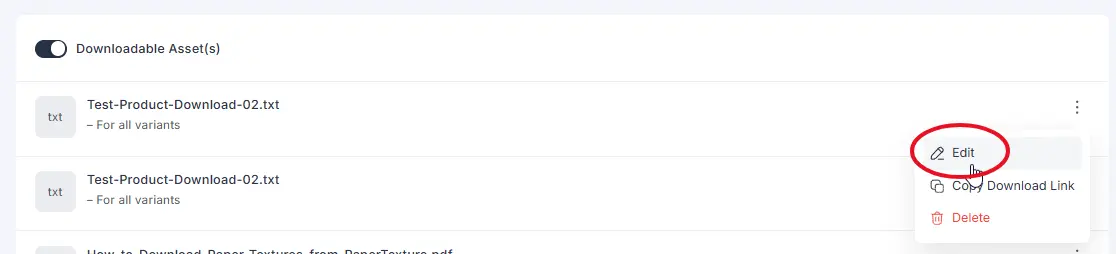
...But I get an error when I try to save / update it.
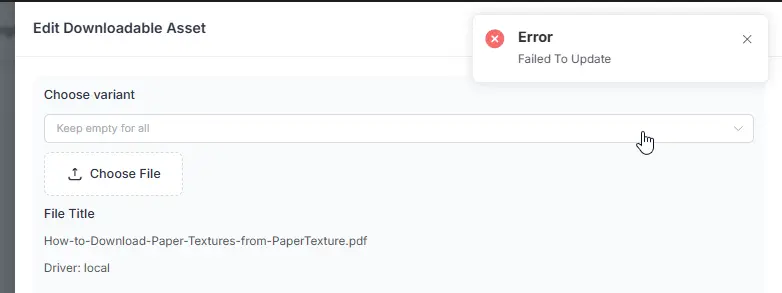
I tried a PDF and a TXT file in case the file type was the problem. Both failed.
The workaround is to delete the file and add the modified file as a new download. Beware: This will break the download link in the customer's email.
Also, if you have multiple downloads in a product, this will change the order.
So if you have
File 01
File 02
File 03
So if you delete File 01 to add a new, updated verion of File 01:
A) the customer will not be able to download File 01 from the email, they will have to go to their account. In their downloads tab and B) they will see them out of order like this:
File 02
File 03
File 01
FYI for anyone wondering....YES! You can add files to a product and previous purchasers will be able to download them in their downloads tab.

Thanks for sharing the details and workaround. Could you confirm which storage provider you’re using for the download Local, Amazon S3, or Cloudflare R2?
Also, when you try editing it again, please also share any errors from your browser’s Console tab and the failed request details from the Network tab, including its response.

Will do next time Sujoy Chandra Das
For these tests I was using the local Wordpress storage. I tried both uploading to the site when I edited and also selecting an existing file from the picker.