


Hello everyone, I need some help. Is there a way to allow customers to edit their profile, email, or password directly from their fluentcart dashboard

Hi everyone,
Quick question — whenever I add a new product, I want to make sure it plays nicely with my CRM and Community integrations before going live with it.
But from what I can tell, flipping on Test Mode seems to affect the entire store… meaning customers can't actually buy anything while I'm testing?
So every time I tweak something (like adding a product) and want to test it, does my store basically have to "pause" for everyone?
Curious how you all deal with this — is there a smarter way?
Thanks!

Does the Page History module work correctly when added from the FluentCart dashboard? For me it caused a fatal error and created a duplicate of FluentCart Pro. Couldn't activate Pro plugin until I deleted the page history module first. What's up with that?

Hi everyone,
I wanted to ask whether there are already concrete plans to support the new EU withdrawal button requirement in FluentCart.
As far as I understand it, from 19 June 2026, online businesses selling to consumers in the EU will need to provide an electronic withdrawal function for distance contracts concluded online. This seems to apply not only to physical products, but also to digital products and services where consumers have a statutory right of withdrawal.
This is not just about adding a generic contact form somewhere. The process needs to allow customers to withdraw from a contract online in a clear and simple way, without being forced to log in and without having to provide a reason. After submitting the withdrawal, the customer also needs to receive an electronic confirmation without undue delay, including the date and time of receipt.
So my question to the FluentCart team is:
Are you planning to implement a legally compliant withdrawal function for EU sellers?
And if yes, is there already a concrete timeline for when this will be available?
I think this is a pretty important topic for everyone using FluentCart to sell to consumers in the EU, because once the requirement applies, sellers may not be able to operate safely without such a feature.
Thanks in advance for any update on this.

Is it possible to give discounts per user? like if someone is loyal buyer he should get 5% off on all products etc?
If not yet supported how to give discount programmatically?

Hey, How can I change this: 9.000,00 UAH
To this: 9 000 грн.
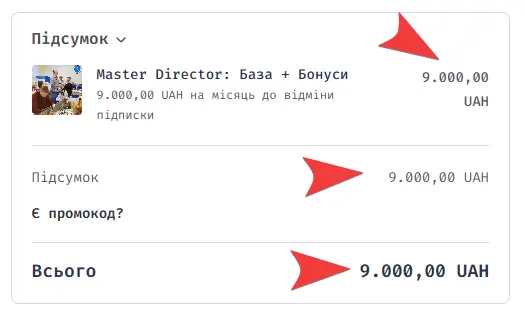
Is there anyone selling digital subscription products with fluentcart? its so problematic. It cuts the customer money on time via stripe but it doesnt update the next payment date in database which results in fluent cart thinking that the subscription is not renewed and it deactivates the subscription.
Shahjahan Jewel kindly solve this i cannot proactically move all my stores back to woo. Its alot of work. We have already roll backed 50% of our client stores to woo since my last complain but this month we are on square 1 updating all subscription manually. We dont need new feature at least basic features like this should work stabely. Please solve it ASAP

Hello Top team! How are you?
I know there are manny ways to do a calculation, but let me explain. We have yoga bussines with cards to buy with lesson credits. And when user buys card for exampe 5 credits and they have still 2 credits left it would be useful Fluetn Cart could calculate it. So it maps 7 credits to the user.
Also was trying with Fluent Crm Pro,
For the moment i have to stick on Uncanny automator.
Thank you and have a great day.



How do you guys handle gift cards? There needs to be a way to add some fields like personal message, and special sending options physical to own address, physical to other address, local pick up and download.
Especially the physical/download for the same product seems a challenge...
Any help?