I'd like to report a separate issue I ran into regarding the Stripe webhook URL,
as a follow-up to my earlier post:
https://community.wpmanageninja.com/portal/space/fluent-cart/post/renewal-charges-2nd-payment-onward-not
For context, I run my WordPress site with the WordPress Address (URL) and Site Address (URL) set to different values:
- WordPress Address (URL):
https://example.com/wp - Site Address (URL):
https://example.com
The issue was the webhook URL displayed in FluentCart's Stripe settings.
The URL shown is:
https://example.com/wp?fluent-cart=fct_payment_listener_ipn&method=stripe
But this URL was being 301-redirected, and Stripe does not follow redirects.
Adding a trailing slash before the query string fixed it:
https://example.com/wp/?fluent-cart=fct_payment_listener_ipn&method=stripe
After updating the webhook URL in Stripe to include the trailing slash,
new renewal payments are now reflected in FluentCart properly.
Hopefully this helps anyone hitting the same issue, and might be worth
considering as a small fix on FluentCart's side.
Thanks!

Hello, is there any documentation available to explain the use and full capabilities of the FluentCart + Fluent Forms integration? New to FluentCart and seem to be having issues finding the options. Both plugins are updated to latest versions and FluentCart shows the Fluent Forms integration as "Enabled" but I don't see any options to utilize it in either plugin.
Thank you!

What happens to subscriptions at renewal time if they signed up with a gateway that you have removed after they subscribed?
I currently accept Stripe, but would like to try adding others to see if I get a better conversion rate. If I don't, I'd like to go back to using Stripe only, but I don't know what will happened to the subscribers who signed up with the old gateway.
Any idea?

Hi, I would like to know if such functionality would make sense to any of you who already use FluentCart/FluentCommunity.
Definition
The required functionality concerns the possibility of creating a subscription product, membership or subscription, the validity of which is not calculated individually from the date of purchase, but is tied to a fixed calendar period.
Example:
The operator creates an annual membership for the period from 01.01.2026 to 31.12.2026 with a price of, for example, €50.
The customer can purchase this membership at any time during the year 2026. If he purchases it on, for example, 15.05.2026, his access will be activated from the date of purchase, but the membership will always expire on 31.12.2026. The membership will therefore not be extended until 15.05.2027, as is the case with a classic annual subscription calculated from the date of purchase.
From the system's perspective, this is a membership tied to the current calendar period, not an individual period of 12 months from the date of purchase.
Price setting
The product should allow you to set the method of calculating the price when purchasing during an already ongoing period.
The operator could choose one of the options:
-
Fixed price for the entire period
The customer pays the full price regardless of the purchase date. If the price of an annual membership is €50, the customer pays €50 even if they purchase the membership in, for example, May, September or December.
-
Proportional price reduction
The price is automatically calculated based on the remaining part of the current period. If the customer purchases an annual membership during an already ongoing year, the system calculates the price only for the remaining period until the end of the set cycle.
This option should be configurable at the level of a specific product.
Membership renewal settings
After the end of the period, for example after 12/31/2026, the system should allow the renewal of the membership or the purchase of a membership for a new period, for example from 01/01/2027 to 12/31/2027.
The renewal method should be configurable by the product operator.
Possible renewal modes:
-
Manual renewal
If the operator sets up manual renewal, the customer must purchase a new membership manually after the end of the period. The system can notify the customer before or after the end of the period that a new membership period is available.
-
Automatic renewal allowed by the operator
If the operator allows automatic renewal, the customer could choose when purchasing whether they want:
- automatic renewal for the next period,
- or manual renewal.
Automatic renewal should therefore not be forced on the customer unless they decide for it themselves.
If the operator does not allow automatic renewal, the customer will only have manual renewal available.
Required functionality options
The functionality should allow in particular:
- to set a fixed start and end date for the calendar period,
- to sell the product even during an already ongoing period,
- to activate the customer's access from the date of purchase,
- to always end the access on a fixed end date of the period,
- to prevent the validity from being calculated as 12 months from the date of purchase,
- to choose a fixed price or a proportional reduction of the price according to the remaining period,
- to set manual or automatic renewal,
- to allow the customer to choose automatic renewal only if the operator has enabled it.
This functionality would be suitable for calendar annual memberships, monthly memberships, club fees, seasonal accesses, annual licenses, professional associations or community portals, where all members belong to the same billing or membership period regardless of the registration date.

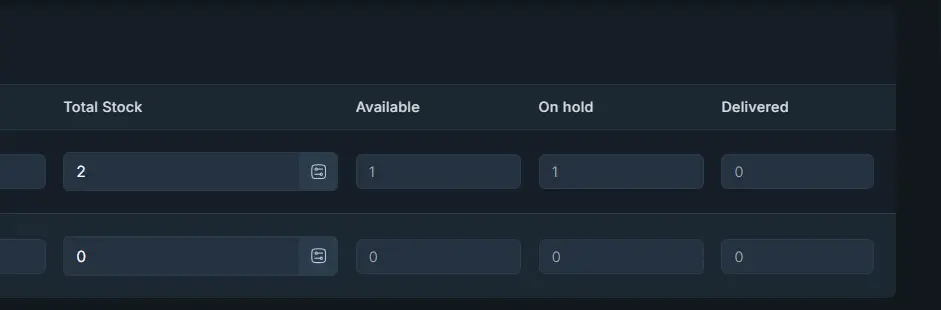
I don't understand why fluentcart puts items "On Hold" I THINK it's because some items are not "SHIPPED" some are bought in person maybe? I think this is a serious bug because it shows it like there is stock, when there isn't. and sometimes the other way round...
Can we address this, or at least put a way to ADJUST the "ON HOLD" Values. Or evenbetter just REMOVE ON HOLD all together.. its useless.
Stock Available > Previous Stock makes a lot more sense...

UPDATE:
Problem: Safari is blocking the iframe for paypal when customer enables prevent cross site tracking on their safari browser.
Solution: They provided me with a Beta Copy of FluentCart. So if you are running into the same issue please contact them. Hopefully they will post and update soon.
Result: Now, even if the option prevent cross site tracking is enabled, it FluentCart will check manual verification and order will be completed.
I Trust this helps.
--------------------------------------
Hi Shahjahan Jewel,
I have been getting tickets where customers are unable to make a purchase. They keep getting the message “Security check failed”. Even after refreshing the page, the PayPal and Credit Card links still does not work.
Now here is the kicker. I was able to make a purchase from my Chrome and Microsoft Edge browser.
However if try to use the SAFARI BROWER, IT FAILS. You get hit with "Security check failed".
This is really concerning. Has anyone had this issue before?

Hi I have a website and it's live I want to add fleuntcart to it. Other than taking a copy of the site and developing it locally and then uploading when complete. Is there a settings on the plugin to put the store showing coming soon / updating page?

I now use Docker for testing and creating. But i have manny Fluent license. How can ik use that? Thank you. Its new for me

💰 Name Your Price for FluentCart 🛒is a powerful WordPress plugin that gives your customers the freedom to choose what they pay for your products. Built specifically for FluentCart, it seamlessly adds a "Name Your Price" experience — complete with preset amounts, a minimum price floor, a quantity selector, and a smooth modal checkout — directly into your shop pages and product pages, without disrupting any other part of your store. This Plugin is FREE.
Whether you run a digital downloads shop, a tip jar, a pay-what-you-can donation product, a community support offering, or a premium product where you want to let loyal customers decide their value — this plugin gives you the tools to do it elegantly.
Image 1:
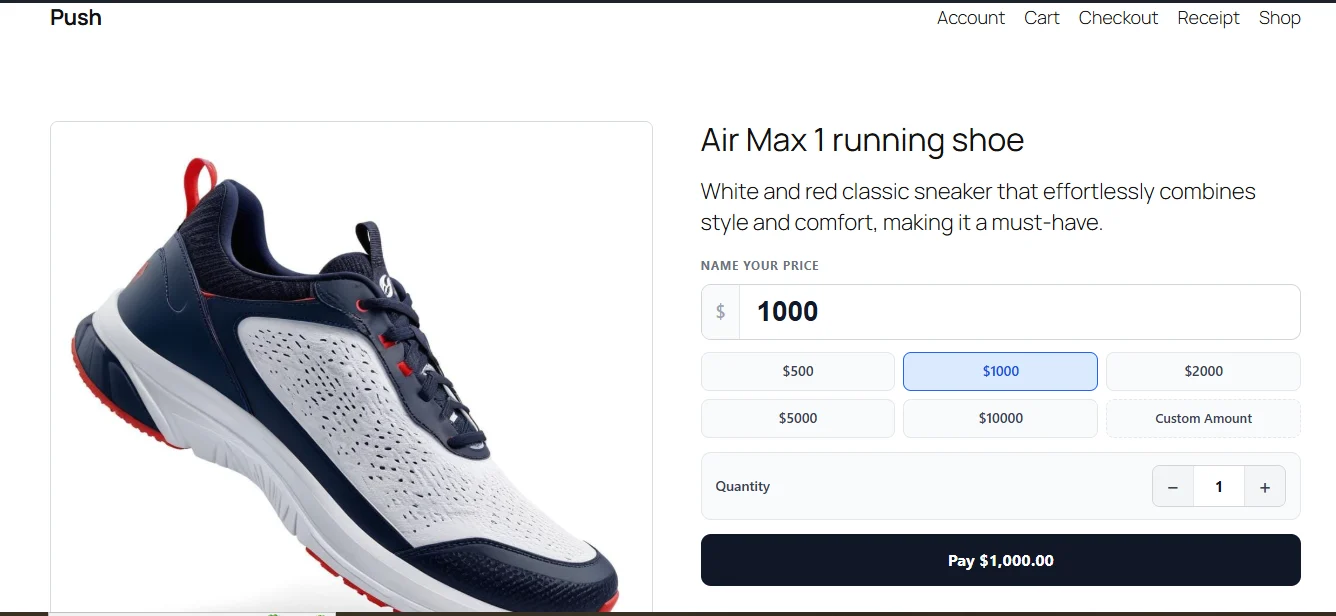
Most e-commerce plugins lock your pricing in stone. Name Your Price for FluentCart breaks that mould. With a simple toggle inside any FluentCart product's editor, you can instantly transform a fixed-price product into a flexible, customer-driven pricing experience.
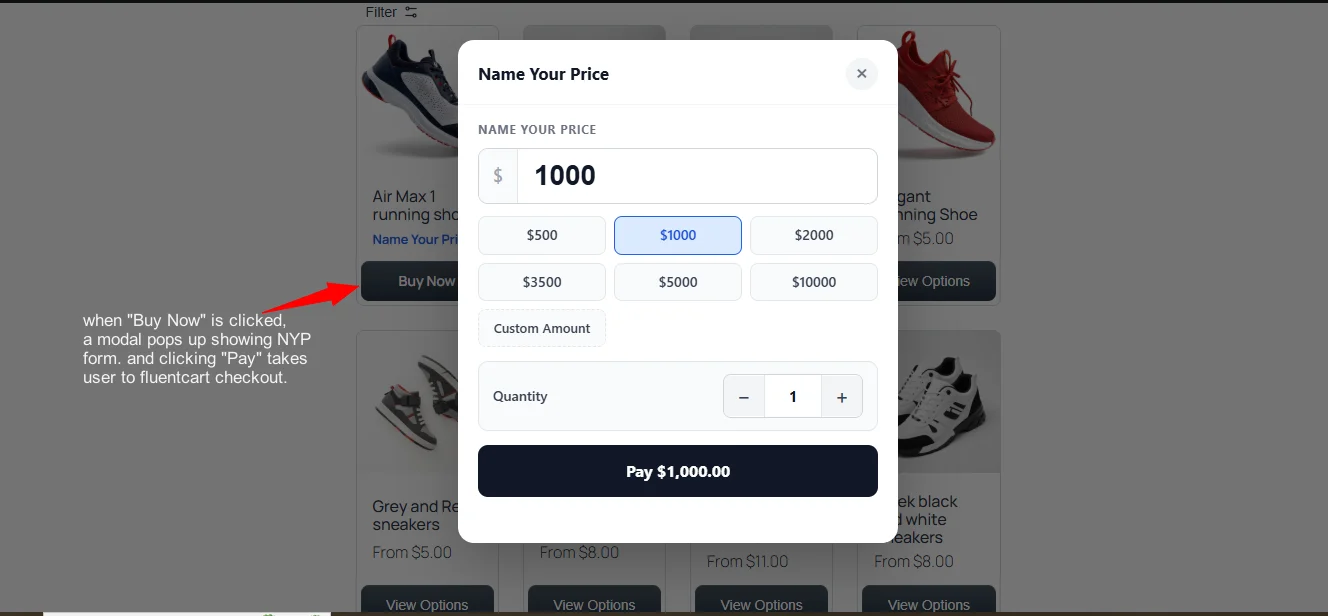
On the shop/archive page, NYP-enabled products display "Name Your Price" instead of the fixed price, and the "Add To Cart" button is replaced with a "Buy Now" button. When clicked, a polished modal slides open right on the page — no navigation away, no page reload — presenting customers with the full pricing form: their amount input, quick-select preset buttons, a quantity control, and a pay button that updates live as they type.
On the single product page, the standard FluentCart price and cart section is replaced with the same intuitive NYP form, giving customers a focused, distraction-free pricing experience.
Everything integrates tightly with FluentCart — currency symbols, decimal separators, thousands separators, and checkout URLs are all read directly from your FluentCart settings, so the experience is always on-brand and consistent.
Key Features
🏷️ Per-Product Name Your Price Toggle
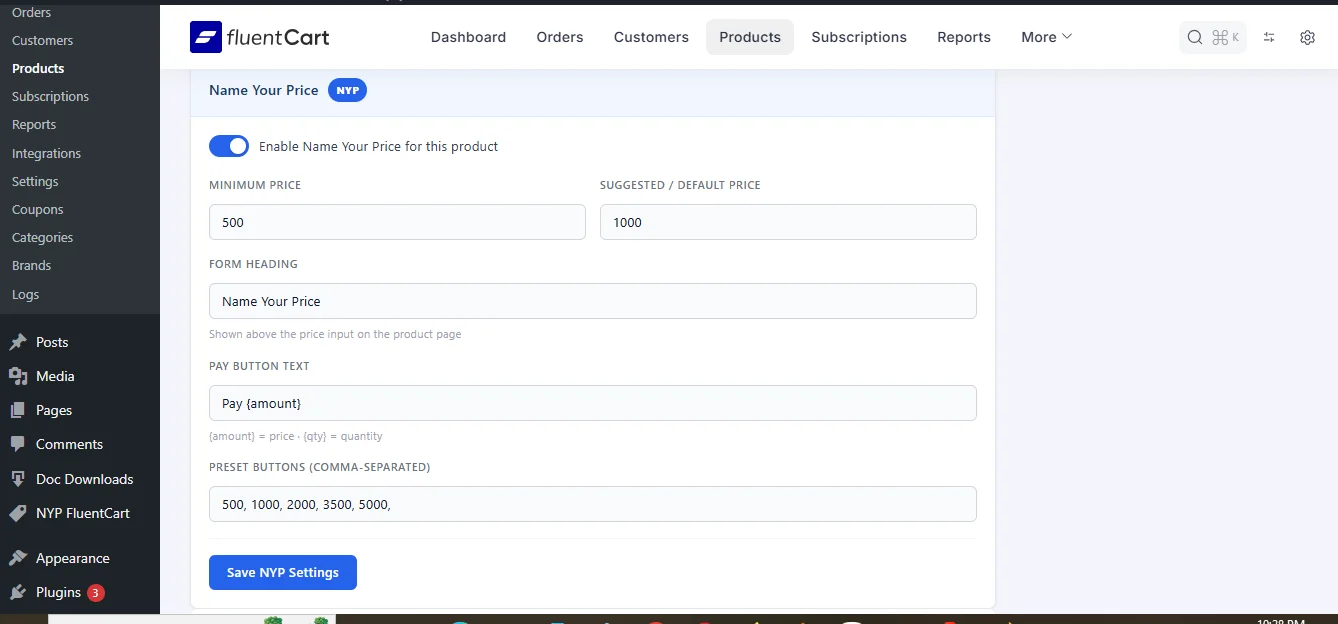
Enable or disable NYP on any individual product without affecting the rest of your catalogue. Each product has its own dedicated settings panel inside the FluentCart product editor, giving you full control.
💰 Minimum Price Protection
Set a minimum amount customers must pay. If a customer tries to enter a value below the floor, the form instantly shows a clear error message and blocks checkout — protecting your revenue without frustrating the user.
⭐ Suggested / Default Price
Pre-fill the amount input with a suggested price when the form loads. This is the "anchor" price — customers can go higher, lower (subject to minimum), or choose a preset. A smart default reduces decision fatigue and increases conversions.
🎯 Quick-Select Preset Buttons
Offer customers a set of one-click preset amounts (e.g. ₦1,000 · ₦2,500 · ₦5,000 · Custom Amount). Presets are fully configurable per product via a simple comma-separated field. Selecting a preset highlights it, fills the input, and updates the pay button in real time. A "Custom Amount" option is always automatically appended.
🛒 Shop Card Integration
On shop and archive pages, NYP-enabled products automatically display:
- "Name Your Price" label (in place of the fixed price)
- "Buy Now" button (in place of "Add To Cart")
No theme modifications required. The plugin targets FluentCart's own card structure and injects changes non-destructively — the original button is hidden (not removed), preserving FluentCart's internal state.
🪟 Buy Now Modal
Clicking "Buy Now" on a shop card opens a sleek, accessible modal overlay containing the full NYP form. The modal:
- Locks background scroll
- Focuses the amount input automatically
- Closes via the ✕ button, backdrop click, or Escape key
- Uses a single shared modal instance (performance-friendly)
- Is fully keyboard-navigable
No page navigation required — the entire pricing interaction happens inline.
📄 Single Product Page Form
On a product's individual page, the plugin replaces the default FluentCart price/cart area with the full NYP form — amount input, presets, quantity selector, and pay button — giving the customer a focused and premium pricing experience.
🔢 Quantity Selector
Every NYP form (both modal and single product page) includes a quantity selector with +/− controls. The pay button label updates dynamically to reflect the total based on chosen amount × quantity.
🔘 Configurable Pay Button Label
The pay button text is fully customizable per product. Use the {amount} placeholder to dynamically insert the formatted price the customer has entered — e.g. "Pay ₦2,500.00", "Donate {amount}", "Support with {amount}", or simply "Checkout".
🌍 Full Currency Awareness
The plugin reads all currency formatting settings directly from FluentCart:
- Currency symbol and position (before or after amount)
- Decimal separator (dot or comma)
- Thousands separator
- Zero-decimal currencies
All amounts displayed throughout the form and button label are formatted consistently with the rest of your store.
⚡ Direct Instant Checkout
On form submit, the plugin passes the chosen price, quantity, product ID, nonce, and a tamper-proof HMAC signature directly to FluentCart's instant checkout endpoint — bypassing the cart entirely for a fast, frictionless checkout experience.
🔒 Secure Checkout Parameters
Each checkout request is signed with an HMAC hash using WordPress's wp_salt(), validated by FluentCart's integration class. This prevents price tampering or manipulation of checkout parameters from the browser.
🎨 Zero-Config Styling
The plugin ships with clean, modern styles for every component — shop price label, Buy Now button, modal overlay, modal box, amount input, preset buttons, quantity controls, pay button, and error messages. All styles are scoped and isolated — they will not bleed into your theme or FluentCart's default styles.
📚 Built-In Documentation Page
A dedicated NYP FluentCart menu appears in the WordPress admin sidebar (with a Documentation), providing:
- Feature overview cards
- Step-by-step setup guide
- Full settings field reference table
- Notes and warnings
No need to visit an external site to understand the plugin.
Image 2:
Benefits
For Store Owners
Increase revenue flexibility. Fixed prices leave money on the table when some customers would happily pay more. Name Your Price lets enthusiastic customers express their value — and pay it.
Support pay-what-you-can products. Perfect for digital downloads, community resources, e-books, presets, templates, music, and art where accessibility matters but you still need income.
Reduce cart abandonment. The modal form keeps customers on the shop page. They don't navigate away to decide — the decision happens right where their buying intent is highest.
Set a safety net. The minimum price feature means you never sell below cost. You get flexibility without risk.
Presets drive decisions. Psychological research consistently shows that preset options anchor decisions. Customers are more likely to pick a suggested amount than to enter a number from scratch.
Non-destructive integration. NYP is opt-in per product. Your existing products, prices, and FluentCart configuration are completely untouched.
For Customers
Empowerment. Customers feel respected when asked what something is worth to them — not just told what to pay. This builds trust and loyalty.
Speed. One-click presets and the instant modal checkout make the buying process faster than a standard cart flow.
Transparency. The live-updating pay button shows exactly what they'll be charged — no surprises at checkout.
Flexibility. They can pay more on a good day or less when budget is tight — and they can set their own quantity too.
Image 3:
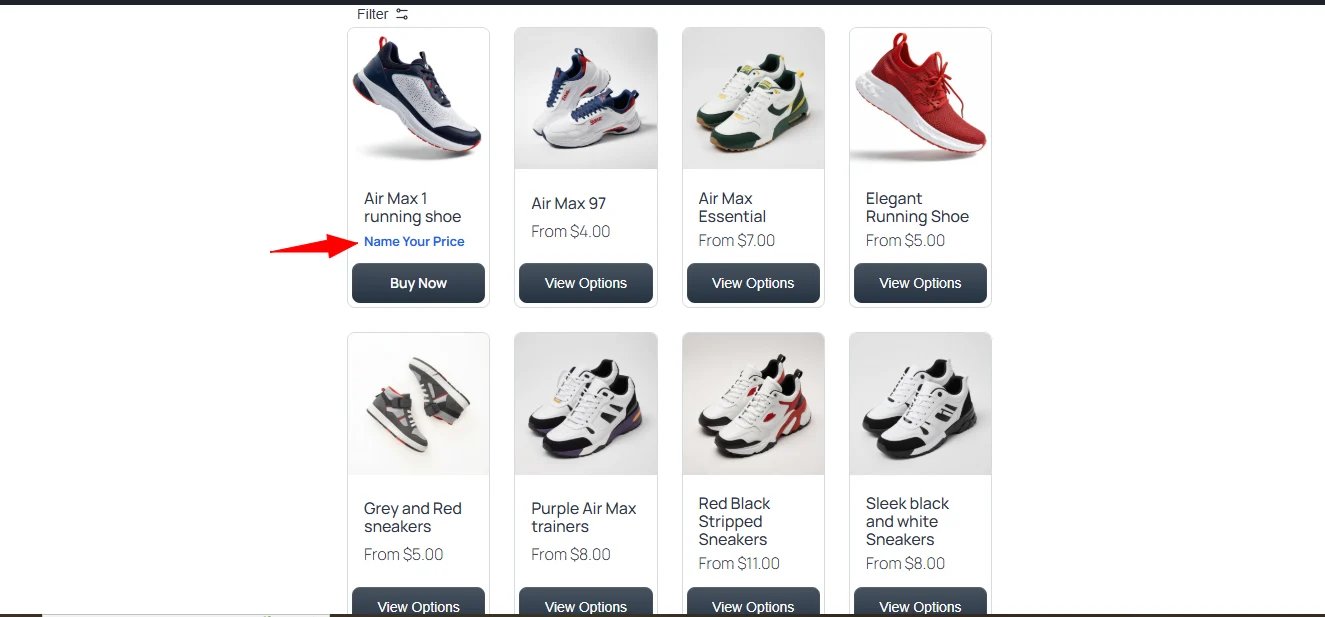
Image 4:
...
Use Cases
Digital downloads (plugins, software, apps, fonts, presets, templates)
Let fans pay what they feel the work is worth.
E-books and guides
Offer a minimum price, suggest a fair value, and allow readers to pay more as support.
Music and audio
Enable pay-what-you-can album or audio downloads with optional preset tiers.
Online courses
Allow early supporters to choose their own price before switching to a fixed launch price.
Donations and community support
Accept flexible one-time contributions with optional preset amounts.
Tip jar products
Create simple products with no minimum price where customers can enter any amount.
Charity / NGO storefronts
Receive variable donations directly through FluentCart.
Community memberships
Allow members to decide their own contribution level.
Get this plugin for free at mpaddi.com
Made with Love ❤️ by WiLson Eberechi (Samuuraii⚔︎⛩️)
This was originally meant to drop on May 15 as part of my birthday celebration, but hey, better late than never!
Name Your Price for FluentCart — because the customer knows the value. Let them show you.