


FluentCart 1.3.18 - Minor Release
This update brings a few improvements behind the scenes, including better permission checks for the “Save as Views” filter, more flexibility for managing specific emails, smoother PDF downloads on the receipt page, and improved Turnstile CAPTCHA handling.
We also fixed a handful of issues across checkout, licensing, subscriptions, payment gateway settings, and order parsing, plus a couple of annoying UI bugs that should just stay gone.
Full Changelog:
- Adds Permission checks for the “Save as Views” filter
- Adds Filter hooks to manage specific emails
- Fixes the loading animation issue across all pages
- Fixes License expiration handling issue
- Fixes Mollie subscription issues
- Fixes Paddle email notification compliance issue
- Fixes Deprecated timezone alias handling in OrderParser
- Fixes the issue where an empty SKU string is used instead of null
- Fixes the Modal checkout visibility toggle issue
- Fixes Typos and other issues in payment gateway settings
- Improves PDF download functionality on the receipt page
- Improves Turnstile CAPTCHA handling
- Internal Security Audit and Improvements
A surprise feature release will happen in the next few days. I am personally excited for that. Watch out!

Thanks for adding all the fixes

Sounds good! We all like surprise feature releases :) Thanks for fixing the Paddle email notification compliance issue. Does that mean that we can now disable invoices/receipts sent by FluentCart, as this should be done by Paddle, not by FluentCart?

Screenplay Unlimited yes it is now under control by hook
Sarkar Ripon Brilliant, thanks again!
Sarkar Ripon I've done some tests with 1.3.18, and this doesn't seem to be working. If I purchase a product (monthly subscription) with Paddle, FluentCart is still incorrectly offering to the user to download a receipt from the order confirmation page (next to the view order). FluentCart is also sending a receipt that is always incorrect because 1) we are not the invoicing party from an accounting POV, it's Paddle, as they are the Merchant of Record and 2) It doesn't takes taxes, VAT etc into account. The only valid invoice is the one sent from Paddle. Please could you correct this ASAP? Thanks!
Screenplay Unlimited Did you use the hook?
Sarkar Ripon no, I would need some instructions to do that. [EDIT: to clarify, I use the webhook as per step 3 in the instructions here https://docs.fluentcart.com/guide/payments-checkout/connecting-payment-gateways/paddle-settings but I am not using a specific hook for the purpose of not getting the invoices from FluentCart.]
Sarkar Ripon Hi Sarkar, I have done quite a bit of testing with FC and Paddle and reported issues in FluentCart ticket #2247. Shahjahan Jewel , any update re the surprise feature?

Wow! That’s great to hear. You and your team always surprise us with such valuable features in FluentCart. Thank you for your continuous efforts. We hope you will also release the next update for the Divi Theme Builder—we are eagerly waiting for it. Thanks again!
Hope you will work on it and bring the Divi feature soon. Great work—keep it up!

Shahjahan Jewel just tested the PDF invoice template, but STILL NO VAT number available in from and in bill to.
This is crucial for invoices.
Invoices usually are for B2B, B2C a receipt is usually sufficient, but for an invoice VAT numbers for both seller and customer are needed.
Also, for compliance, tax should be labled: 21% over amount (or other percentage) Also, splitted when there are more than one tax percentage in an order.
I really love the PDF template builder, but for invoices it is still useless 😭
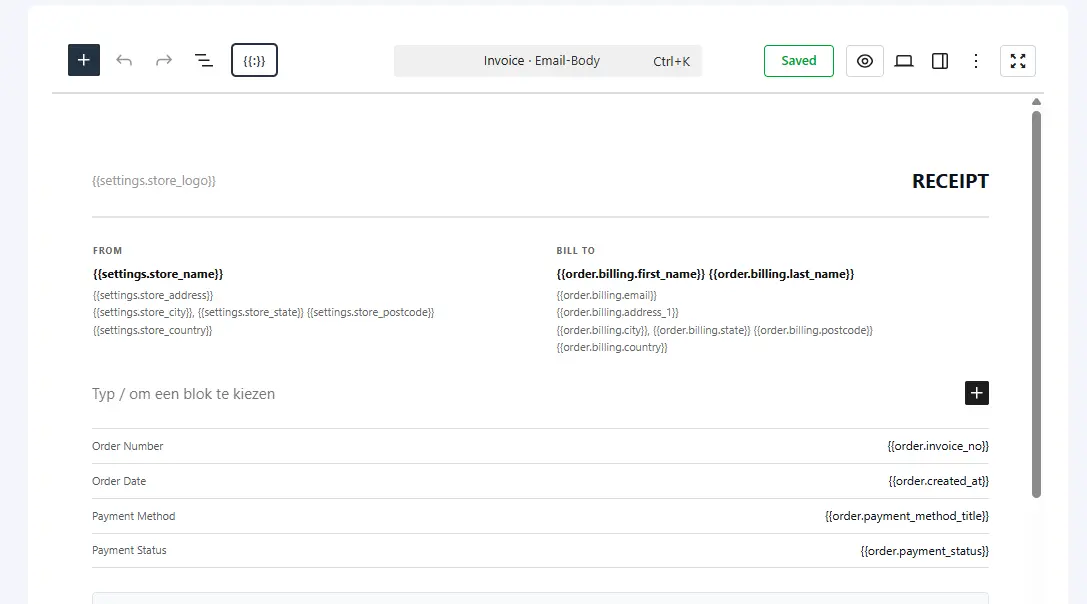

Natascha Vantuykom & Shahjahan Jewel For B2B, it is necessary, essential to have the data of the company Legal Registration ID, TAX ID, VAT ID on the seller's side (if he is a VAT payer, this must be set when setting up the e-shop, all this data is necessary) and on the buyer's side, if we are only talking about B2B, all three fields of company Legal Registration ID, TAX ID, VAT ID are also necessary (only fill in if he is a VAT payer).
For example our company in EU have:
Legal/Billing company name: plexcore s.r.o.
Legal/Billing street: Kopčianska 1226/78
Legal/Billing city: Bratislava
Legal/Billing postcode: 85101
Legal/Billing country: Slovensko
Legal Registration ID (In Slovak = IČO or CIN in English): 47159235
TAX ID (In Slovak = DIČ or TIN in English): 2023769319
VAT ID (In Slovak = IČ DPH): SK2023769319 - this is combination Country code SK & TAXI
This information is essential on PDF documents, both for the seller and for the buyer if it is a company.
Juraj Hudák 🙂exactly

Shahjahan Jewel thanks for addressing the license expiration issue so quickly!
Follow-up: License zero-date root cause still present in FluentCart 1.3.18
Thanks for the fast response with 1.3.18 — the new fixZeroDateLicenses() method in LicenseSchedulerHandler.php does work as intended and keeps the user-facing symptom from persisting. The hourly cleanup runs, zero-dates get nulled, licenses come back to active. Verified on our production environment.
However, the underlying save pipeline is still writing zero-date instead of NULL. The new cleanup is a mop, not a patch on the leak.
What we verified (FluentCart 1.3.18)
Environment: MySQL 8.0.45 on Ubuntu 22.04 with default (permissive) sql_mode — no STRICT_TRANS_TABLES, no NO_ZERO_DATE. Same environment where the original bug reproduced.
Test 1 — save pipeline:
Starting state:  id=5, expiration_date = '2029-04-01 00:00:00'
Action:          $license->extendValidity('lifetime')
                 // internally: $this->expiration_date = null; $this->save();
Result:          id=5, expiration_date = '0000-00-00 00:00:00'   ← still zero-date, not NULL
The model's intent is clear ($this->expiration_date = null; $this->save();), but the null-to-empty-string coercion in the WPFluent save path still happens, and non-strict MySQL silently lands it as zero-date.
Test 2 — cleanup cron (your new fix):
Starting state:  id=5, expiration_date = '0000-00-00 00:00:00'  (from test 1)
Action:          do_action('fluent_cart/scheduler/hourly_tasks')
Result:          id=5, expiration_date = NULL                   ← janitor works
Why a root-cause fix still matters
With 1.3.18, the customer-visible symptom is resolved within the hourly tick. But a few risks remain:
- 0–60 minute window between purchase and cleanup — during that time, any code path that reads raw DB (integrations, custom reports, third-party tools, REST API calls that bypass the
Licenseaccessor) sees the inconsistent zero-date state. - Depends on WP cron running — on low-traffic sites or sites with misconfigured cron, the cleanup can delay indefinitely. If it does,
expireOldLicenses()can still flip zero-dates toexpiredbecause itswhereNotNullguard doesn't catch zero-date values. - New code paths that write zero-date won't be caught by the cleanup unless they also target the licenses table — the current scan is licenses-only. If other models gain similar patterns, each needs its own janitor.
Suggested root-cause fixes (reference only — full code in the original report)
Fix A (preferred): add a setExpirationDateAttribute mutator on the License model that normalizes null / empty string / zero-date → SQL NULL before save. Pairs symmetrically with the existing getExpirationDateAttribute accessor. Environment-independent, works on both strict and non-strict MySQL.
Fix B (defense in depth): add ->where('expiration_date', '!=', '0000-00-00 00:00:00') to LicenseSchedulerHandler::expireOldLicenses(). Makes the expire query itself robust even if the cleanup doesn't run first.
Either alone resolves the risks above. Both together give defense in depth.

Jeff Mapes Thank you so much for the detailed follow-up and for verifying the issue in your production environment.
You’re absolutely right that the fixZeroDateLicenses() cleanup in 1.3.18 was intended as a recovery measure, not a complete root-cause fix. We prioritized restoring affected licenses quickly, and the deeper fix for the write path has already been completed and will be included in the next release.
Regarding Fix A, your approach was very close in principle, but normalizing the value to PHP null in a mutator alone wasn't sufficient. The value still passed through the WordPress database binding layer during the save process, where it could be transformed before reaching MySQL. In non-strict environments, this still allowed zero-date values to persist.
We also really appreciate your suggestion for Fix B (hardening the expiration query against zero-date values). It’s a solid defense-in-depth measure, and we’re definitely considering it.
Thanks again for your thorough investigation and for sharing detailed report.