


A customer requested a refund under my 14-day money-back guarantee. I processed the refund through FluentCart/Stripe. This was the only product the customer had ever purchased from me.
After the refund, I noticed that:
- The contact was removed from FluentCRM.
- The customer was removed from FluentCommunity (so they no longer have access there).
However, I can still see them as a WordPress Subscriber under Users.
I expected FluentCart to remove the user completely, including the WordPress user account. Is this normal behavior?
My questions are:
- Why does the WordPress user still exist after the refund?
- Can the customer still log in with that account?
- If they can log in, what can they actually access or see?
- Is there any additional step I should take to fully revoke access after issuing a refund?
I just want to make sure refunded customers no longer have access to any paid content.
Thanks in advance for your help :)

Would be great to get PayFast as a payment processor for South African brands/business to use as sometimes most people use PayFast as their preferred way to pay and majority of the service providers and businesses use it.
https://payfast.io

These past weeks, I've barely looked up: I listened to your feedback, opened the hood, and added the bricks many of you had been asking for. The thread running through this release is simple — take manual work off your plate (collecting payments, unlocking steps, chasing deadlines, tracking dates) without ever moving your data off your own server. It's by far the biggest update since 2.0.
Here are the highlights, plainly:
- A journey step unlocks after a purchase. The client pays right inside the step, and it opens on its own. No more confirming payments by hand.
- A shop built into the journey. A per-journey product showcase, the client's purchases, and an "unlocks step X" badge on the product page: content, sales and progress finally in one place.
- A fully redesigned journey. Cards that take on your journey's color, an icon and color per step, collapsible sessions, and a sliding schedule that gives each client their own pace.
- A real calendar inside the vault. Due dates and expiry dates on all your content, a calendar synced with Google, Apple and Outlook, and email reminders.
Safeguards E-commerce with Fluent Cart
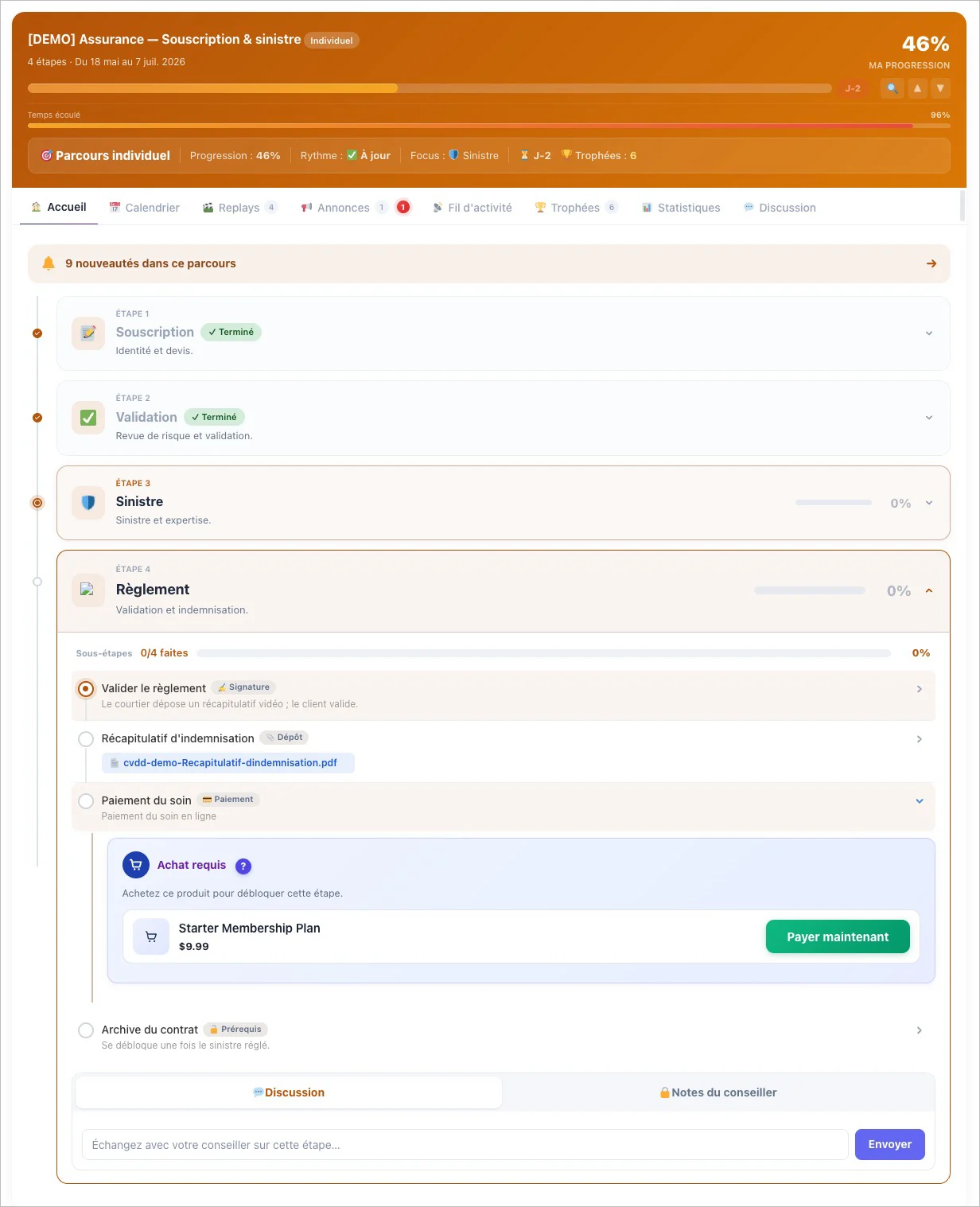
The first big piece is the e-commerce and webhook checkpoints. The first ties a step to a product: the client buys, the step opens, and if the purchase is cancelled it re-locks on its own. It's full automatic and native integration with Fluent Cart
Safeguards Universal Webhook
The second — for more technical profiles and agencies — validates a step through an inbound external call (Zapier, Make, n8n), so you plug your client's ecosystem in without coding a custom flow. And so the purchase happens without leaving the space, I added the shop widgets in the sidebar: a showcase you tune journey by journey, the client's purchases, and that badge which clearly ties the purchase to progress.
New modern design Journey
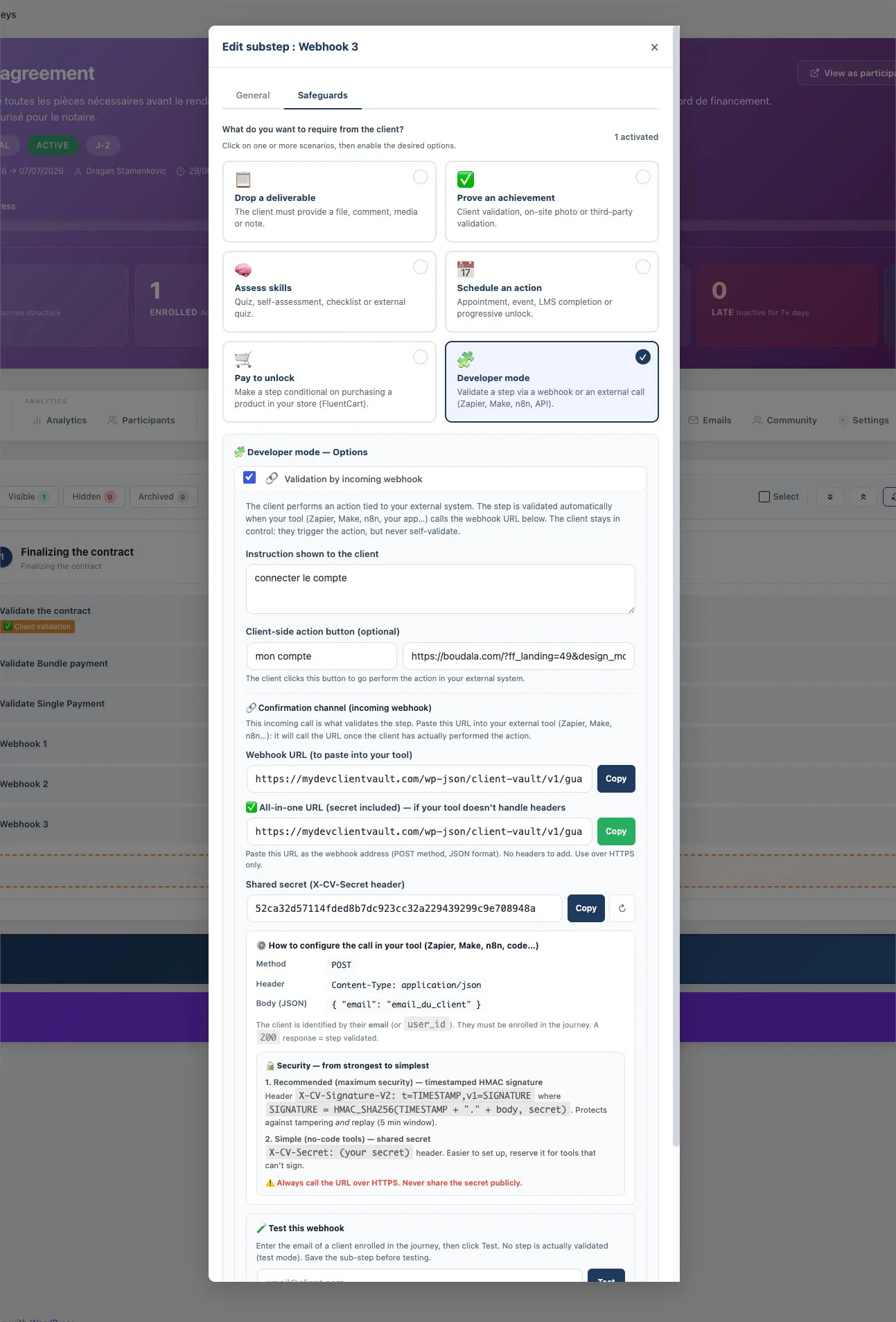
Next, I rethought the journey from top to bottom. The step cards are clean, modern, and finally take on your journey's color. Each step can have its own icon and color badge. Sessions organize long programs into collapsible blocks, and the sliding schedule anchors due dates to each person's enrollment date — two clients who signed up on different dates each follow their own calendar, with no manual setup. A life-changing bonus: the reset button now clears all of a client's progress while keeping your conversations — no more step stuck on "Purchase confirmed".
New calendar for organize your Vault and other meets
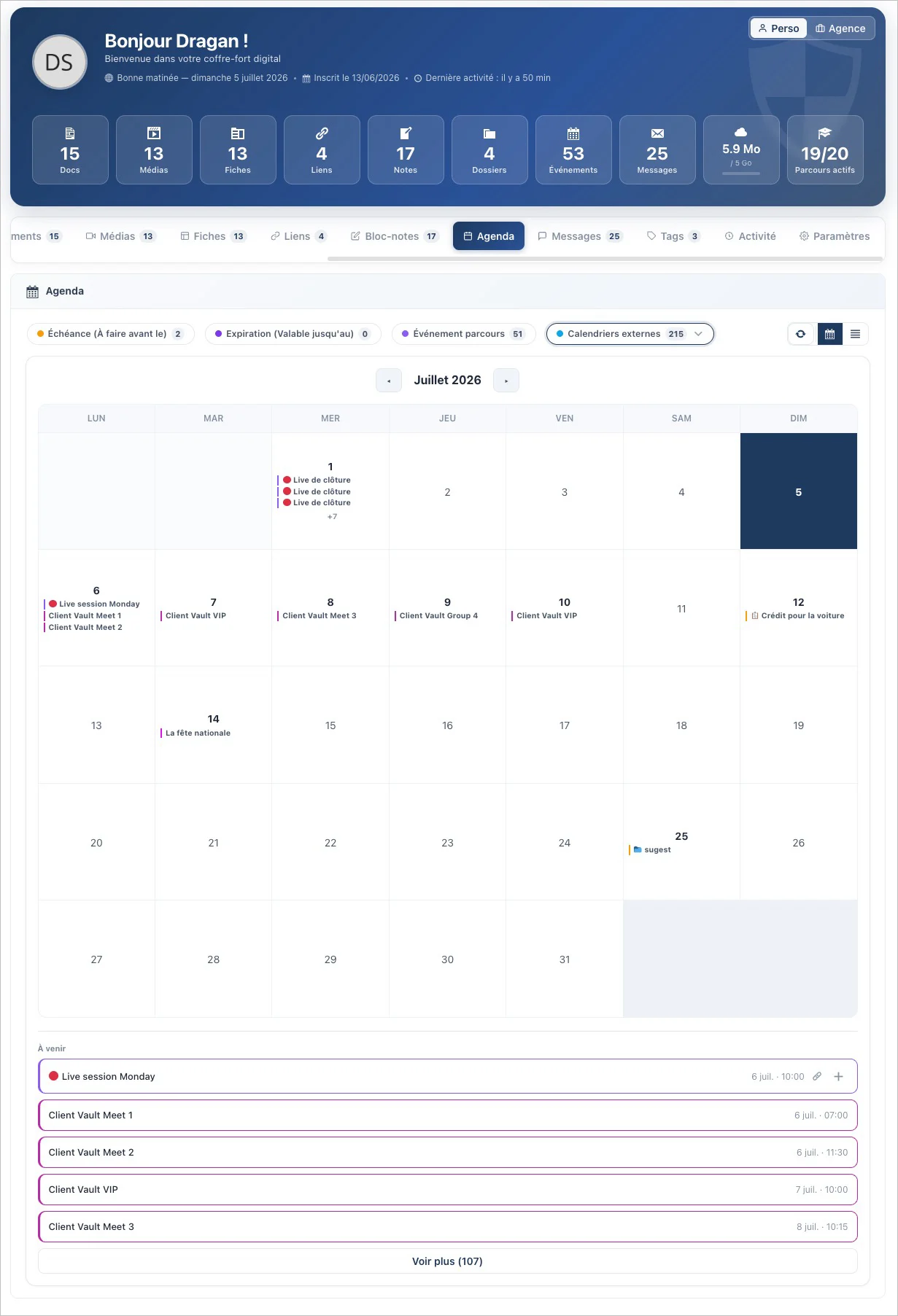
The third big project is the calendar inside the vault. A real calendar, on the same level as your Documents or Media. Every item can carry a due date and an expiry date, which flow automatically into the calendar — with an email reminder a few days before. And it syncs with Google Calendar, Apple Calendar and Outlook, true to my rule: no third-party service, the subscription link stays with you and can be revoked in one click.
I've detailed everything here:
👉 The full article: https://clientvault.pro/en/e-commerce-and-webhook-safeguards-are-revealed-the-user-journey-gets-a-refresh-and-the-scheduling-feature-arrives/
The launch offer is still running with double licenses and great discounts! It's ending soon, so hurry and take advantage of it (spaces are limited).
And for our first customers, you'll have access to the VIP Group, which offers even more exclusive deals! Trust me, it's amazing!
Finally, if you'd like a customized demo, I'm available to assist you and answer all your questions.
Finally, thank you to the entire Fluent Cart team and Shahjahan Jewel for making such a seamless integration possible. Without their vision and perfect development and API, it wouldn't have been possible to go this far and adapt Fluent Cart so perfectly to your workflow.

My client wants to start with a catalog without pricing or ordering (no cart).
1) Is this possible?
2) Best way to achieve this?
3) Later on, the complete shop functionality needs to be restored.

A smaller one today, mostly precision work with one nice new capability on top.
Ask your store what a product actually earns. If you connect an AI assistant to FluentCart via MCP, it can now go deeper than "here are your orders." It can tell you what a product truly earns after cost and discounts, which subscription payments are coming due, and read your payment and refund ledger directly. The reporting underneath grew up too: real date ranges down to the hour, live orders kept separate from test mode, and per-product margin detail. Part of free core, ships switched off. Turn it on under Settings → Features & Addons. And anything that moves money still needs a preview and confirmation first, so a view-only account stays view-only.
More in 1.5.3:
- A simpler way to show tax. A new Tax Display Style setting lets you collapse tax to a single clean line, the way most large retailers show it, with a label field so you can name it VAT, MwSt, GST, or just Tax. Follows the order everywhere: checkout, receipts, invoices, emails, and admin. Nothing changes unless you ask for it.
- Shipping and tax that always add up. Subscription shipping on Stripe, shipping tax, and per-item shipping shares now sum exactly to what was charged, with no rounding drift.
- Installment plans, counted precisely. A discount changes the amount of each payment, never the number of payments. Running plans re-sync automatically on update, and the same holds on Authorize.Net and Mollie.
- Authorize.Net subscriptions set up reliably. FluentCart now waits and retries when Authorize.Net is slow to confirm, while guarding against duplicate profiles.
Plus a few nice touches: inline tax class creation, the EU B2B reverse charge declaration now prints automatically on every document, wider translation coverage, and a solid round of fixes across reverse-charge tax display, PayPal formatting, and licensed add-on downloads.
Full write-up: https://fluentcart.com/blog/fluentcart-1-5-3/
Feedback Required:
We are doing some R&D about how we can integrate FluentPlayer with FluentCart that adds value. Please let us know some ideas so we can use those to finalize.
By the way, if you haven't gotten FluentPlayer yet, get our 2X Licenses offer right now. Ending in a few hours: https://fluentplayer.com/discount-deal
More cooking 🚀

Hi FluentCart team,
I found a possible rounding issue in the tax breakdown display for VAT-inclusive prices.
The order total is 14.90 € including 19% VAT.
Mathematically, the calculation should be:
14.90 € / 1.19 = 12.5210 € net
So the rounded values should be:
- Net amount / taxable base: 12.52 €
- VAT: 2.38 €
- Total: 14.90 €
However, FluentCart displays:
- Taxable base / Nettoanteil: 12.53 €
- VAT / MwSt.: 2.38 €
- Total: 14.90 €
This does not add up correctly, because:
12.53 € + 2.38 € = 14.91 €
So the displayed taxable base seems to be rounded incorrectly by 1 cent. The VAT amount and the total are correct, but the taxable base does not match the total.
I attached screenshots showing the issue.
Could you please check how the taxable base is calculated and rounded for VAT-inclusive prices?
Expected display:
- Taxable base: 12.52 €
- VAT: 2.38 €
- Total: 14.90 €
Current display:
- Taxable base: 12.53 €
- VAT: 2.38 €
- Total: 14.90 €
Thanks for checking this.
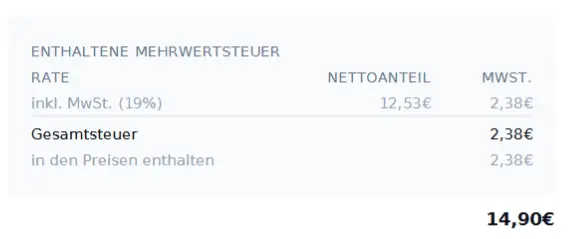

Hi!
Does anyone know if it's possible to make composite/'pick and mix' bundles on FluentCart?
I'm thinking of, say, a subscription box service where you can choose sizes/flavours/scents/colours for different items. So there's a general bundle (say, one shirt, one water bottle and one hat) and then you can choose a variation for each one?
Is there an add-on that does something like this? Or is it possible in the base plugin?
Thanks!

I want to query all the newest products based on creation date. The problem is: every edit changes the post_date. That's why querying by newest doesn't work. But is a basic requirement for a product grid/carousel.

I tried the variations gallery which I think can be improved.When we chose a variation we should only see the gallery images associated with that variation. Woo commerce has the right approach that the other variation gallery images dont show. I guess this can be easily remedied.

FluentCart already includes a terms and conditions checkbox, but sometimes you may need an additional checkbox before customers complete checkout.
For example, you may want customers to confirm:
- They reviewed selected product add-ons
- They agree to a custom refund policy
- They understand digital products are non-refundable
- They accept custom production terms
- They approve personalized order details
What We Will Build
In this tutorial, we will add a second checkbox above the Place Order button on the FluentCart checkout page.
The checkbox will:
- Appear before the Place Order button
- Use FluentCart’s checkout field styling
- Be required before checkout can continue
- Show a validation error if unchecked
- Save the confirmation value into the FluentCart order meta
here is the complete blog post
https://www.bricksultimate.com/add-custom-checkbox-above-fluentcart-place-order-button/