


Do we have any kind of gallery of all our images in our profiles? Is there an easy way to make this?
Do we have any kind of gallery of all our images in our profiles? Is there an easy way to make this?

I would love to see Content Dripping / Scheduled Content Release for Space Posts in Fluent Community.
Fluent Community already supports content dripping inside Courses, which is fantastic. However, many of us also use Spaces to deliver structured content, challenges, onboarding sequences, coaching programs, and member journeys.
Currently, Space Posts are either published immediately or manually scheduled for everyone at the same time.
What would be incredibly valuable is the ability to release posts based on when a member joins a Space.
Example
A member joins a Space today:
- Day 1 → Welcome Post
- Day 3 → Getting Started Guide
- Day 7 → Training Post #1
- Day 14 → Training Post #2
- Day 21 → Bonus Resources
Another member who joins next month would automatically receive the same sequence based on their own join date.
Why This Matters
This would help community owners:
- Create structured onboarding experiences
- Run challenges without manually publishing content
- Deliver training through Spaces instead of Courses
- Prevent information overload for new members
- Increase engagement and return visits
- Keep members progressing through content at a consistent pace
Real-World Use Cases
- Community onboarding sequences
- 7-day, 14-day, or 30-day challenges
- Coaching programs
- Accountability groups
- Membership communities
- Mastermind groups
- Step-by-step implementation programs
Why This Would Be Powerful
Many creators prefer delivering content through community discussions rather than traditional courses. Spaces are perfect for this because they encourage interaction, conversations, and accountability.
Adding drip functionality to Space Posts would allow creators to build complete member journeys directly inside Spaces while leveraging a capability that already exists within the Course module.
This would make Spaces even more powerful and help creators keep members engaged for longer periods without additional plugins or manual work.
Would anyone else find this useful?

Hi Shahjahan Jewel and team,
I would like to suggest an improvement to FluentCommunity’s member access management.
FluentCommunity already supports Active, Pending and Blocked member statuses. However, the access pages shown to Pending and Blocked members currently use fixed generic messages.
This becomes especially important when an account is temporarily restricted because of suspicious activity or a manual security review. In that situation, the member should see a clear, branded and reassuring explanation, together with a safe way to contact support. The current generic “Access denied” message does not explain what has happened or what the member should do next.
Would you consider adding:
• A dedicated “Under Review” status, separate from “Pending” and “Blocked”.
• Separate customizable page templates for Pending, Under Review and Blocked members.
• Custom title and rich-text description for each status.
• Custom primary button text and URL, for example “Contact Support” or “Open a Support Ticket”.
• An optional secondary action for logging out or resetting the password.
• The option to select an existing WordPress page or enter a custom redirect URL.
• Automatic use of the community’s logo, colors and general branding.
• Developer filters for the page title, message, buttons and redirect URL.
Ideally, placing a member Under Review or Blocked would restrict access without removing their profile, course enrolments, purchases or membership history.
A dedicated Under Review status would also help distinguish a temporary security or account verification process from a permanent block.
I believe this would improve both security workflows and the member experience, especially for communities that manage paid courses or sensitive account information.
Would you consider adding this?
Thank you!

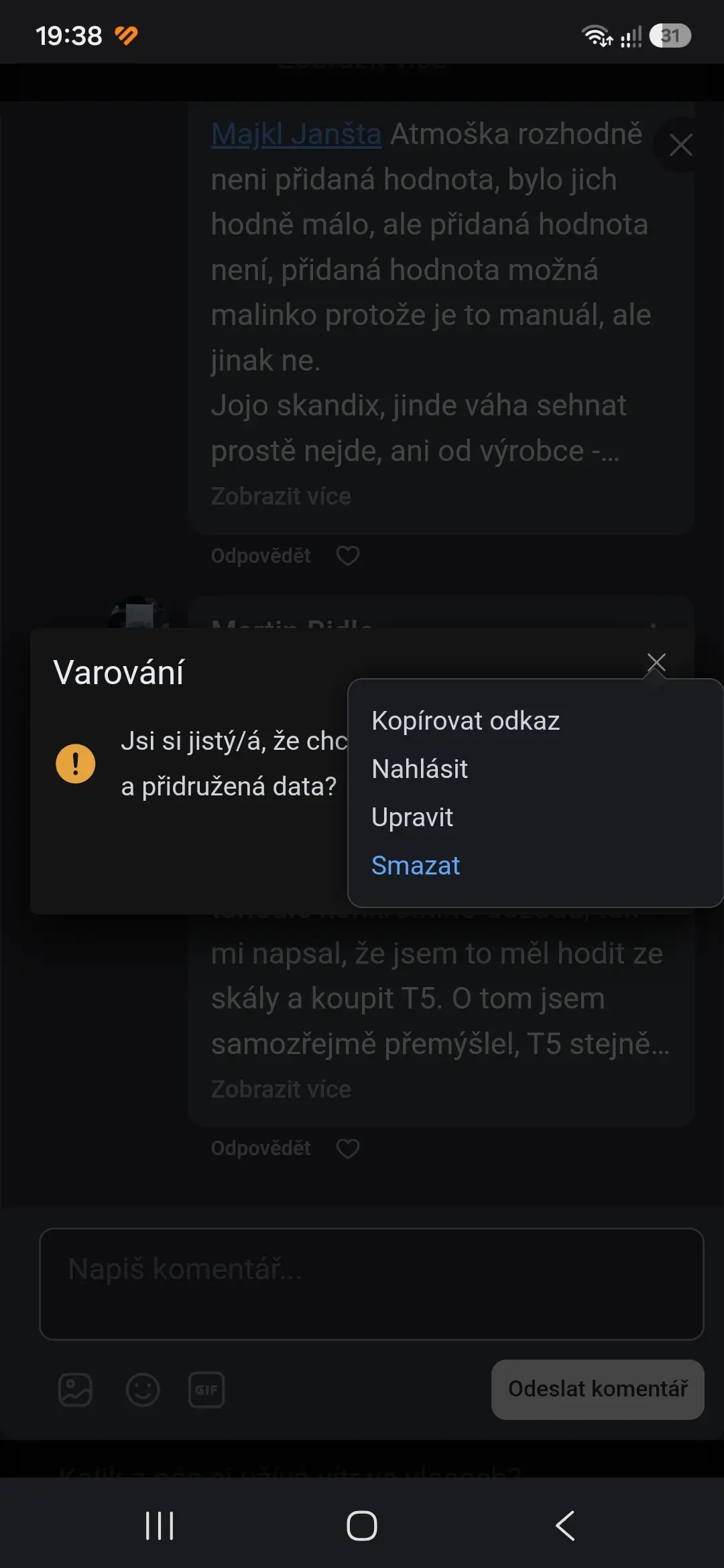
Toolbox on posts is overlaying warning window. Same will be with comments probably. When you want delete post, you can't see buttons from warning. You must tap somewhere else to hide toolbox.
Shahjahan Jewel Currently, we have an email notification drip for course sections; why not add it to course lessons also?
This is to balance the equation...

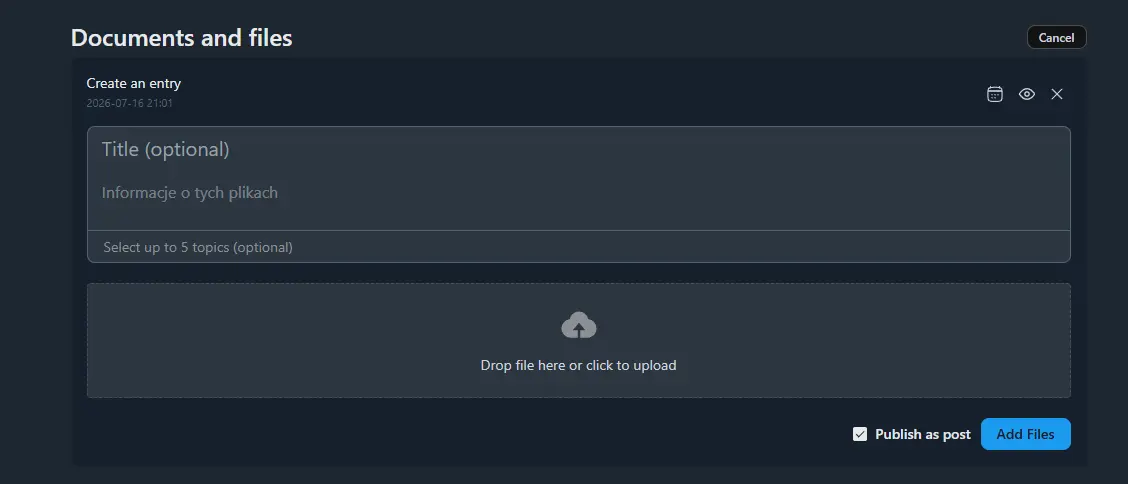
If I want to add documents to a space without creating a post and disable the “Publish as a post” option, the message “Your post has been marked as unlisted” appears, and the documents are not visible in the section.

A WORD TO THE WISE
Media only displays uploaded video files. It should also include videos that have been shared via links (e.g. YouTube, Vimeo, Loom, etc.), so all video content appears in one place regardless of whether it was uploaded or linked.
Creating high-quality videos is time-consuming and expensive, so many communities and businesses rely on externally hosted videos rather than uploading files directly to WordPress. When the Media library only shows uploaded videos, it often appears empty or incomplete, giving the impression that there is little or no video content available.

I hope this is the right place. I have a few questions which I hope you can answer. Thank you in advance.
- How customizable is the platform? Is what we are seeing now, what it looks like 'out of the box'?
- Is there a way to turn 'chat' off? I'm asking this for safety reasons really in our community. We won't want to private chat.
- Maybe I've got this wrong and this isn't an example of the actual community, but I can't see a way of adding an MP3 or wav?

I got a thounsanf of them in my debug they are silent bug but still annoying
[15-Jul-2026 06:44:04 UTC] PHP Notice:  Function _load_textdomain_just_in_time was called <strong>incorrectly</strong>. Translation loading for the <code>fluent-community-pro</code> domain was triggered too early. This is usually an indicator for some code in the plugin or theme running too early. Translations should be loaded at the <code>init</code> action or later. Please see <a href="https://developer.wordpress.org/advanced-administration/debug/debug-wordpress/">Debugging in WordPress</a> for more information. (This message was added in version 6.7.0.) in /home/dcoqam90/public_html/wp-includes/functions.php on line 6170
[15-Jul-2026 06:44:06 UTC] PHP Notice:  Function _load_textdomain_just_in_time was called <strong>incorrectly</strong>. Translation loading for the <code>fluent-community-pro</code> domain was triggered too early. This is usually an indicator for some code in the plugin or theme running too early. Translations should be loaded at the <code>init</code> action or later. Please see <a href="https://developer.wordpress.org/advanced-administration/debug/debug-wordpress/">Debugging in WordPress</a> for more information. (This message was added in version 6.7.0.) in /home/dcoqam90/public_html/wp-includes/functions.php on line 6170
[15-Jul-2026 06:44:08 UTC] PHP Notice:  Function _load_textdomain_just_in_time was called <strong>incorrectly</strong>. Translation loading for the <code>fluent-community-pro</code> domain was triggered too early. This is usually an indicator for some code in the plugin or theme running too early. Translations should be loaded at the <code>init</code> action or later. Please see <a href="https://developer.wordpress.org/advanced-administration/debug/debug-wordpress/">Debugging in WordPress</a> for more information. (This message was added in version 6.7.0.) in /home/dcoqam90/public_html/wp-includes/functions.php on line 6170
[15-Jul-2026 06:44:09 UTC] PHP Notice:  Function _load_textdomain_just_in_time was called <strong>incorrectly</strong>. Translation loading for the <code>fluent-community-pro</code> domain was triggered too early. This is usually an indicator for some code in the plugin or theme running too early. Translations should be loaded at the <code>init</code> action or later. Please see <a href="https://developer.wordpress.org/advanced-administration/debug/debug-wordpress/">Debugging in WordPress</a> for more information. (This message was added in version 6.7.0.) in /home/dcoqam90/public_html/wp-includes/functions.php on line 6170
[15-Jul-2026 06:44:12 UTC] PHP Notice:  Function _load_textdomain_just_in_time was called <strong>incorrectly</strong>. Translation loading for the <code>fluent-community-pro</code> domain was triggered too early. This is usually an indicator for some code in the plugin or theme running too early. Translations should be loaded at the <code>init</code> action or later. Please see <a href="https://developer.wordpress.org/advanced-administration/debug/debug-wordpress/">Debugging in WordPress</a> for more information. (This message was added in version 6.7.0.) in /home/dcoqam90/public_html/wp-includes/functions.php on line 6170
The new sidebar collapse feature introduced in the latest update works inside the community, but it isn't available on custom pages using the Fluent Community wrapper template (Full Width or Boxed). It would be great if this functionality were consistent across all pages using the wrapper.