Hi everyone,
I’m planning to use FluentCommunity on a Persian (Farsi) WordPress site, so I need RTL support and ideally a Persian translation for the plugin UI.
Thank you

Can FluentCart team consider adding feature which can provide discount for Products via FluentCommunity leaderboard Points? Or make some Credit System etc. Honestly I think points have huge unsused potential and are always overlooked. I think it can be big engagement boost for every community using FluentCart.

Someones knows how to make a custom page with custom film but with fluenthauth (what are the hook )
Tout ce que ej vexu est de faire en sorte que dans Wordpress, on ne voit plus le nom de l'utilisateur avec son email pcq la jarrive meme pas aa le changer nativemement

Hey Gang, I'm pulling my hair out over this, my community members are having trouble logging in, more like are being rejected even after valid credentials are provided. I checked to see if their IP was blocked and found nothing, I even white listed their IP and still no access from 3 different browsers, and 3 different devices. Please advise! Is this a known bug?

I wonder why I can't connect this community to my FluentCommunity iOS app by LazyCoders - the app you recommended when starting FluentCommunity. Shahjahan Jewel

Hi everyone!
Does anyone know of an addon or anything I can do to allow users to bookmark blog posts and custom post types? Have them save in their profiles for later?
My use case is that my website is becoming a bit of a repository for school subjects, and I have posts explaining key concepts and helping students to make choices for their futures, such as what subject options to take. I love that they can save posts from the community, but I'd like to extend that because I think it will make their experience on my site better and encourage them to engage for longer – it puts everything they need at their fingertips.
It would be even better if there was a tab for it in their profiles so other people could see what they have bookmarked.
Right now, my workaround is using the Community Comments addon made by Ross FCA so that people can bookmark the corresponding FC post that is made whenever I post something new. However, it would be nice to have an area that's separated by post type, if you know what I mean!

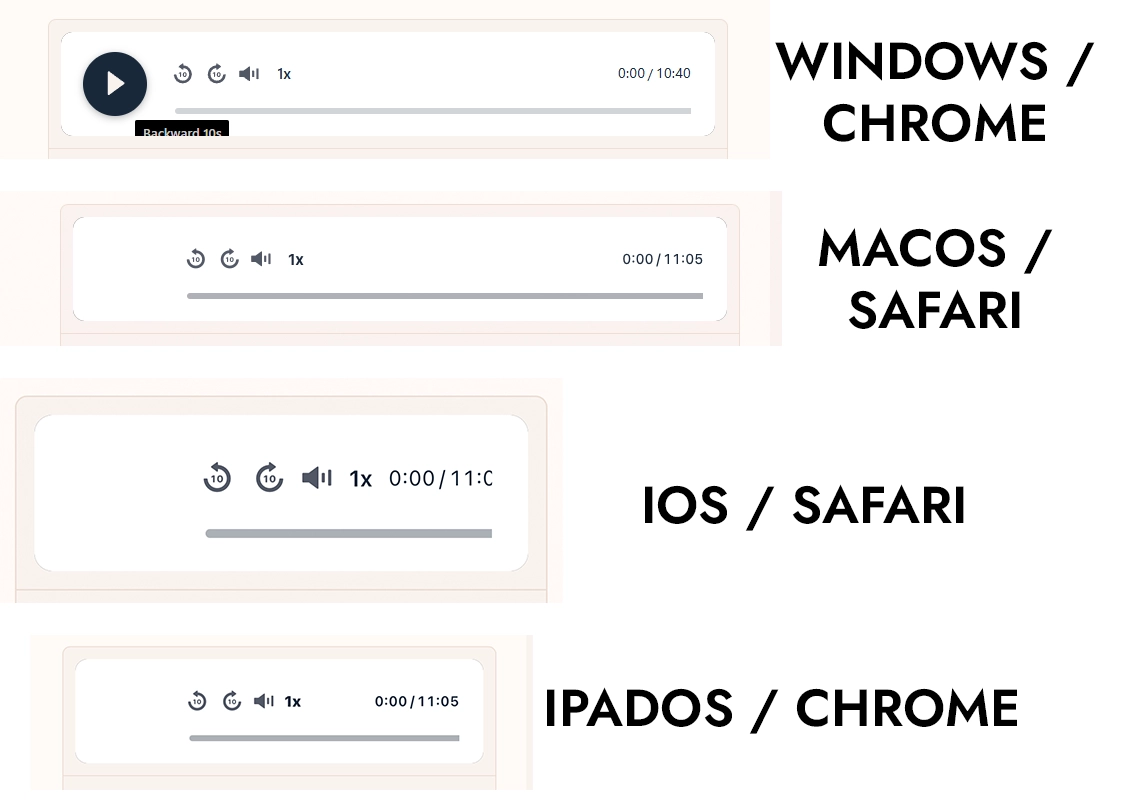
Hi there, Unfortunately I've experienced more bugs with the new FluentPlayer in my Community.
Sometimes the labels are too low and sometimes the whole play button is disappeared (in dark mode as well).
On iOS the time ux part is problematic as well.
And a question:
is there any option to costumize the look/buttons/settings of the audio player like with the video player?

Hello,
I recently posted a guide in my community rich with links, images and text.
I was getting an internal error again and again and i tried to remove the links, to remove the images and then some of the text.
The guide was posted only with text and then i tried to upload one photo and it was updated. Second photo, internal error.
Then i tried to add some text, internal error.
Then i tried to add links to some words, it was updated successfully.
Any tips?

Hi! I have a membership where members have access to all my courses.
I just created a new structured course. I also want to sell this course separately to non-members, and I already have that set up.
My problem is with the members. If I grant them access to the course, they are automatically enrolled from the beginning and start receiving the course emails.
I don't want that.
I want members to simply see the course in their library and choose for themselves when they're ready to enroll and start receiving the emails.
Is there a way to give members access to a structured course without automatically enrolling them?
Ideally, they would click a "Start Course" button when they're ready.
Or that you could add two different tags to one course.
Thanks!

Having a mobile app for your brand or business can create a much stronger digital relationship with your customers than relying only on a website or third-party social media platforms.
Key advantages of having your own mobile app
📱 1. Direct access to your customers
Your app gives customers a direct channel to your business without depending entirely on platforms such as social media or search engines.
🔔 2. Push notifications
You can communicate directly with customers about new products, services, events, offers, updates and important announcements.
🤝 3. Stronger customer loyalty
An app creates a more consistent relationship with your customers and encourages them to return regularly.
🌐 4. Your own digital ecosystem
Your app can become the centre of your brand's digital environment, connecting your website, community, content, shop, events, communication and services.
📊 5. Better customer engagement
Features such as communities, chat, live streaming, video, events, loyalty programmes and personalised content can keep customers actively connected.
💼 6. Greater brand visibility
Your brand icon is constantly present on customers' mobile devices, keeping your business visible every day.
💰 7. New revenue opportunities
You can generate income through subscriptions, memberships, e-commerce, premium content, bookings, services, partnerships and more.
🔐 8. More ownership and control
Instead of building your entire digital presence on platforms owned by others, your business can create a more controlled environment for its brand, content, community and customer relationships.
📈 9. Valuable first-party data and insights
With the right privacy and compliance framework, you can better understand how customers interact with your products and services and use those insights to improve your business.
⚡ 10. A more personalised experience
An app can provide personalised content, recommendations, offers, services and communication based on each customer's relationship with your brand.
The bigger picture
A website is an important digital presence. But a mobile app can become a daily relationship platform.
For a business like mine, the opportunity is even greater: the app can be part of a complete Hub where a brand owns its community, communication, content, customer engagement, services and mobile experience in one connected environment.
The future is not just about being found online. It is about building a digital ecosystem that people return to, engage with and become part of.