



One of my clients' sites is built on having his community members post video submissions and then he responds with a video in the comments. This is a feature that has been needed forever. Would love if you could accommodate this request. Right now I have a custom built plugin accommodating this need, but with each update I'm needing to adjust and fix the plugin. Thanks.

I integrated FluentPlayer with FluentCommunity and published a post featuring a YouTube video embedded via FluentPlayer. Everything works fine, but on a smartphone (an iPhone, in my case), there is no way to view it in full-screen mode—is the full-screen button missing? It displays correctly in desktop browsers, but not on mobile; I want to be able to watch the video in full-screen mode on my smartphone.
https://community.decoder.dev/space/ia-para-devs/post/rag-com-ia-o-que-todo-dev-precisa-saber

Hello Team,
I'm testing the Math Block and I would like to propose some improvement for the rendering of formulas.
At the moment, I'm testing this formula because I know that it is possible to have different results in rendering (in back end, it's exactly how I want it) :
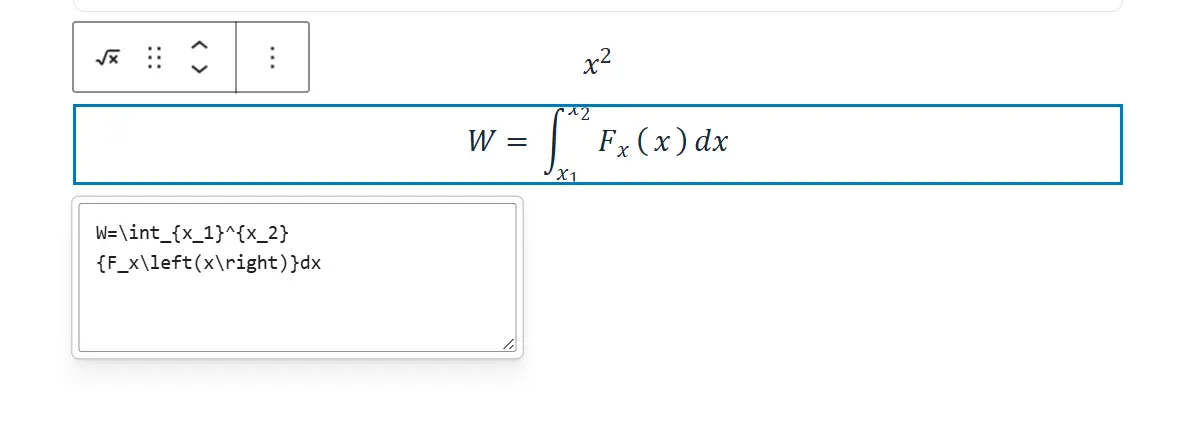
But, sadly, in front end, as you can see the integral is not rendered properly (in Chrome) :

Here is in Firefox :
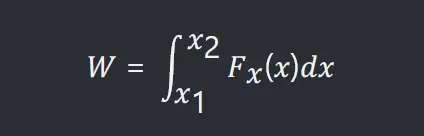
And for the reference, here is the render (whatever the browser) with KaTeX plugin for Wordpress I used all these past few years (https://wordpress.org/plugins/katex/) :
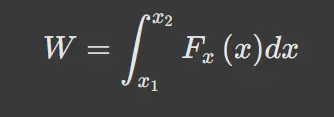
The thing is that in Math Block, we should be able to use for example "\displaystyle" to have better looking formulas.
Shahjahan Jewel Do you think it could be done ? I know it's extra work for a feature not so popular, but it would make the Math Block perfect.

Hi, I'm not sure if I've overlooked this setting somewhere, or if this feature isn't available yet. I usually visit my community once a week to catch up on new posts and updates. A few times, someone has sent me a direct message during the week, but I didn't notice it until my next visit because I don't receive any notification when a new message arrives. Is there a setting that enables email notifications for new direct messages? If not, would it be possible to add this feature? It would be really helpful, as I could visit the community right away and respond much more quickly. Thanks!

I'm thrilled to see that I can post audio with the new Fluent Player update. I toggled on the feature and I can see the audio button in posts, but when I try to upload an audio file, nothing happens. I'm trying to upload a .wav file while from the documentation should work. I've the most up-to-date plugin. What else might I be missing?

Hello community! 👋
I just wanted to share that Raiyan Marzan has confirmed that the user enumeration issue in Fluent Messaging has finally been fixed.
Since this was released as an add-on update, it's easy to have missed it, so I thought it was worth sharing. 🙂
If you were holding off on using Fluent Messaging because of this issue, you can now enable it with confidence. When configured correctly, the chat no longer enumerates your users, helping preserve the privacy of other community members and meeting users' reasonable expectations of privacy.
Again, kudos to the team for the great work!


I wonder if it would be possible to upload TIFF images via a form.

Right now, the feed is the first thing anyone sees when they visit the site. However, on a membership site where the focus isn't just on discussion but also on videos, articles, etc., this isn't ideal.
A new user doesn't know where to start, where to find things, etc. How could we replace the very first page with an onboarding page?

I don't want fluent to take over tutorlms but I want to make it the home page. How do I do this?