


So far I've tried embedding the form in a WP page, viewing from a landing page and using the short code. I always get my homepage as the result: https://sailsandgrace.com/?fluent-booking=calendar&host=sailsgrace&event=vrcoaching
This is a big issue for me, can I get some help figuring out how to correct this? I'm on version Version 2.1.2 of FluentBooking

The searing white just doesn't go with my clients more warm and rustic website...
I'm using the wp block editor and the Fluent Booking Calendar block.
I've tried doing the normal inspect and targeting elements and that's not really working (though I was finally able to change the background of just the header). I followed stuff in inspect, looked in the dev docs, did searches for style or css and there's a huge amount of nothing.
Even just turning every background transparent would work sort of work, because then I could put it in a container with matching radius on the corners and change the background on that... But ideally I'd prefer to be able to style all the individual things like the subtle hover colors and the buttons, etc.
Thanks!
-Verity
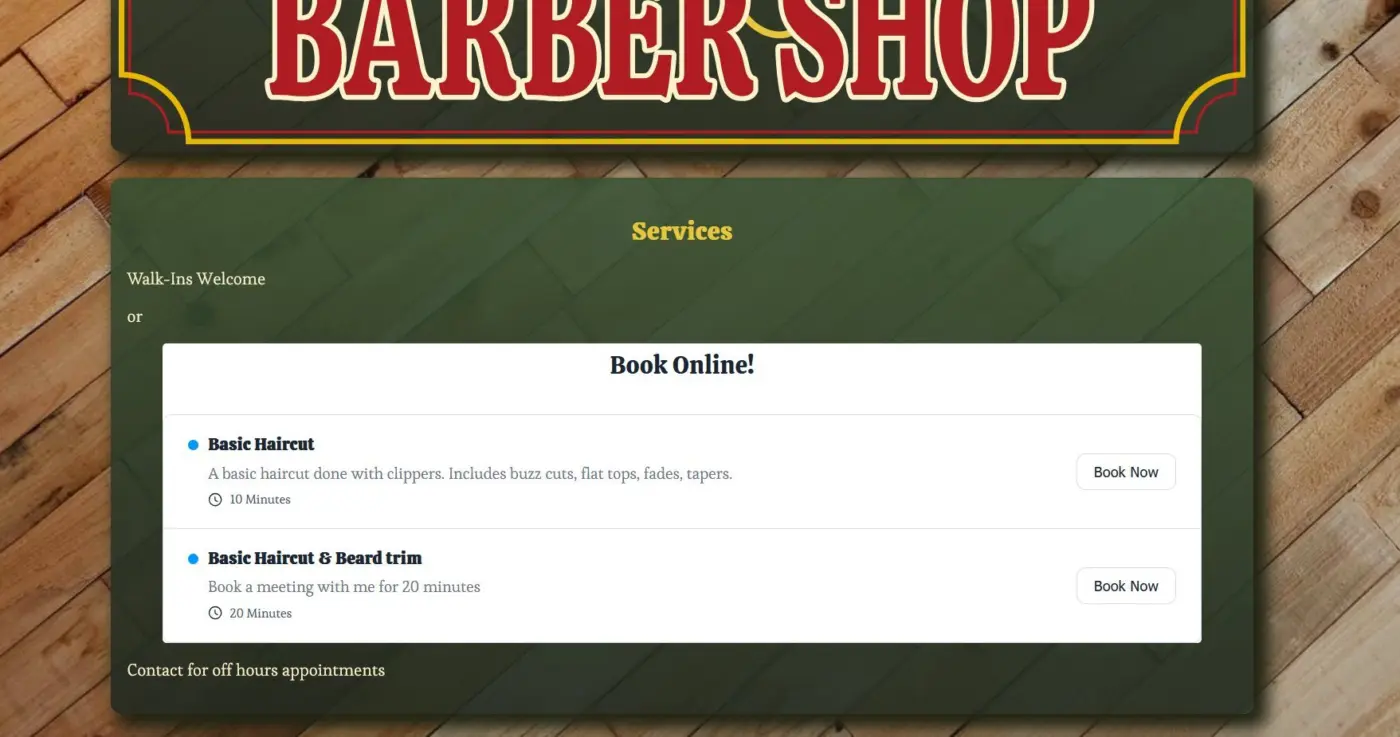
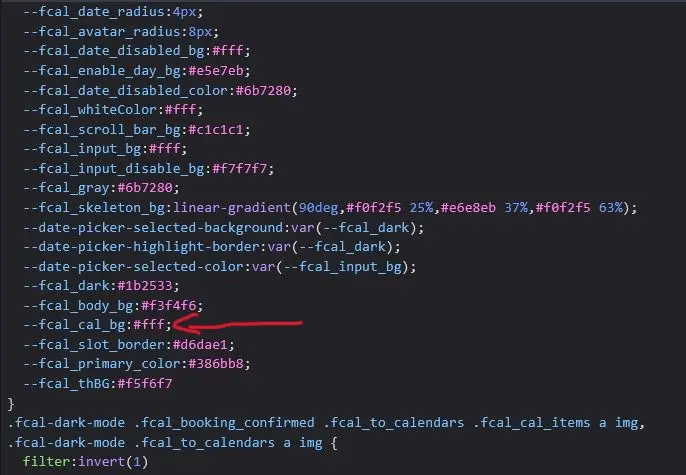

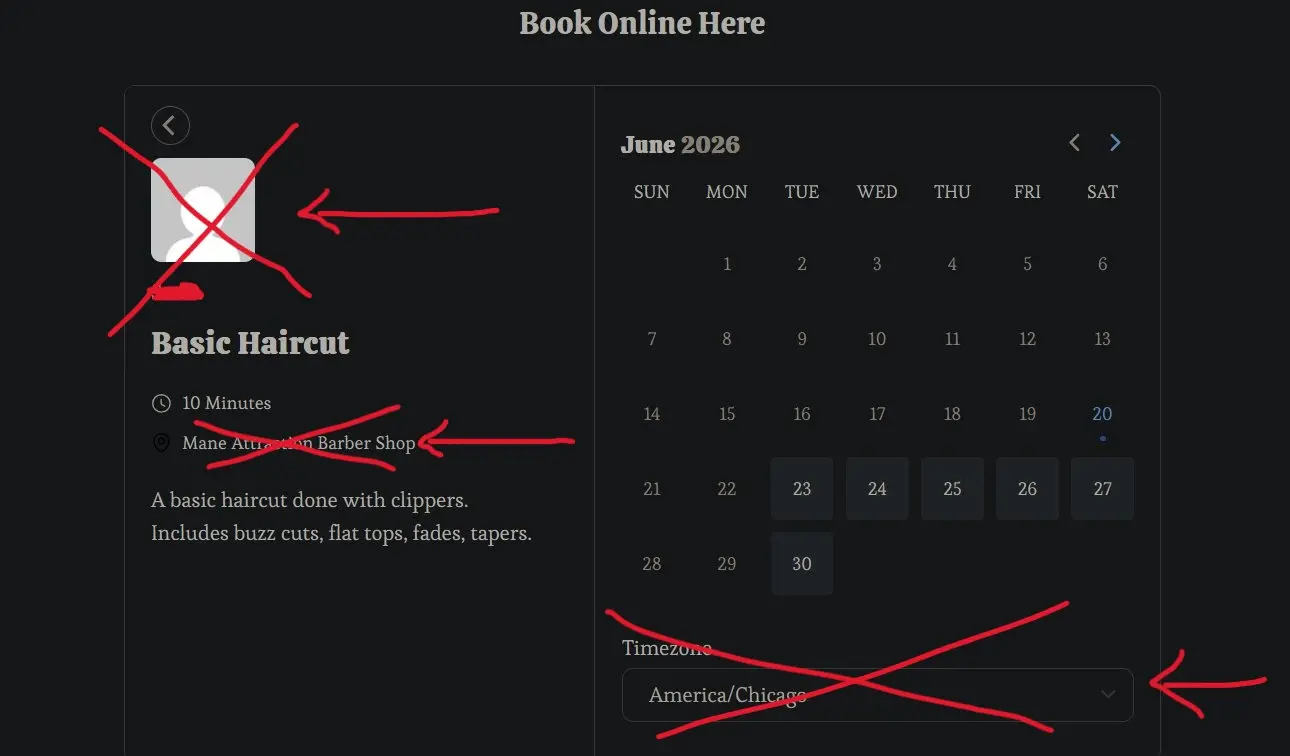
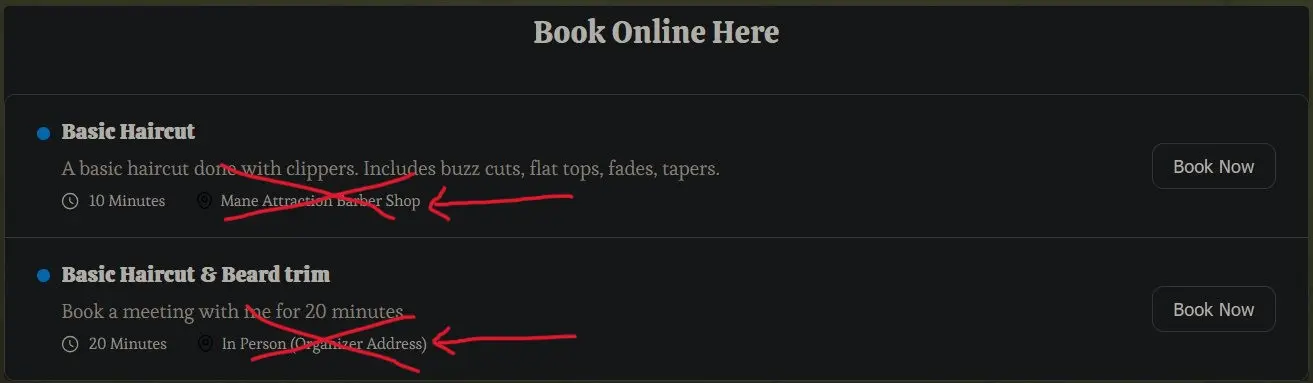
My client is a one person small barber shop who wants her clients to be able to book online. It's confusing to have the location and timezone rendering on the front end, because the location and timezone are always the same: her physical shop. Is there an easy way to remove those fields from displaying on the front end booking listings and calendar?
I have Fluent Booking Pro and I'm using the block editor 'fluent booking calendar' block, set to 'all events' and 'hide calendar info'

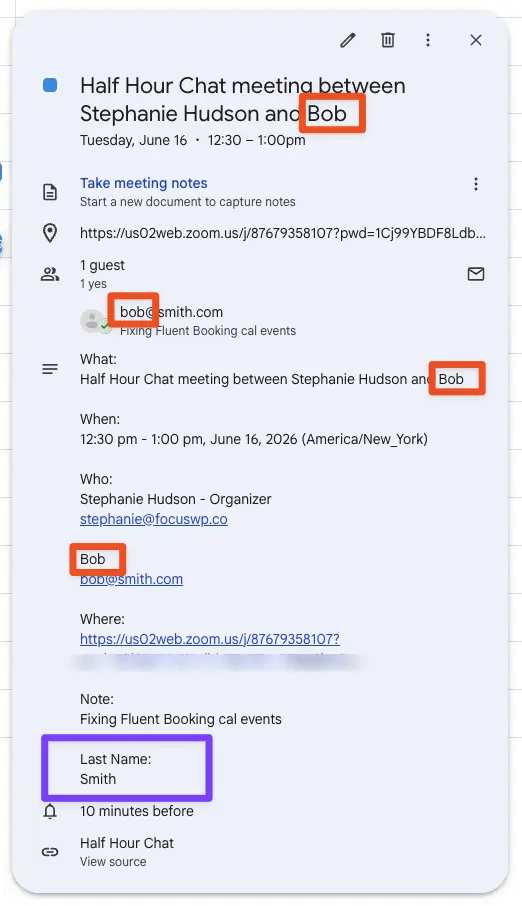
I have a request! Can we revamp the data displayed in a calendar entry? They are redundant and not in an intuitive order.
The guest's name appears four times in one cal entry. And the last name is totally separate way down at the bottom. Here are a few other thoughts (see screenshot):
What: [meeting name + attendees] <- why are attendees included here?
When: [time and date]
Who:
Stephanie Hudson - Organizer <- someone else booked this, why does it call me the organizer?
stephanie@focuswp.co
[Guest First Name] <- couldn't we put the guest's First and Last names here?
[guest email address]
Where: [zoom link] <- This is already in the calendar entry above. Is it necessary here?
Note: [note] <- Note should be at the bottom
Last Name: [last name] <- last name is separated from first name. also, it doesn't say "First Name" above (just shows the name), but it says "Last Name" here. Inconsistent.
--
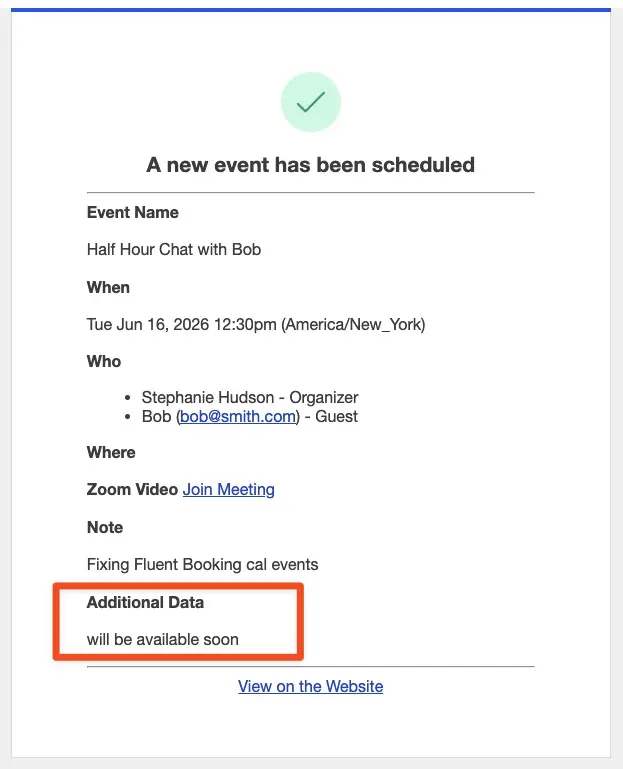
Also, what is "Additional Data: will be available soon"? (see screenshot 2)
--
PS. I don't think this is a bug exactly...but it didn't feel like a feature request or tip either 😉
PSS. This is obviously a dummy meeting, so you can join if you want, but it will be lonely. 😆

There is no way we still do not have the option to limit the number of bookings per email / user.
Limiting just by frequency, is very restricted for such an amazing product as Fluent Booking.
Consultants, creators and many other FB users need you here ;)
eg.: You sell a service, x bookings included. Fluent Booking limits feature allows you to set this up. Done.
The current picture, is a really boring workaround of credits systems, custom fields... No bueno :(
Thank you!


Quick one today. Mostly small fixes and a couple of improvements worth grabbing.
Here is what is in 2.1.2:
- Added: Placeholder option for the Multi-Select field
- Improved: WordPress 7.0 compatibility.
- Security: Group attendee export is now gated by booking access
- Fixed: Bookings block was showing empty even when bookings existed
- Fixed: Phone Location field was letting empty submissions through
- Fixed: Duplicate argument in the custom field data filter
Nothing flashy, just sharper edges. Update from your dashboard.

I would like to create 'private booking links' but still be able to use the UX of the landing page feature.
I know I can create a new page and use the shortcode or embed functions etc., but having a toggle to make a booking 'private' within the existing landing page setup would be great.
TidyCal has this very feature, and it works great.

Here is some guidance which might point you in the right direction?
Found it: FluentBooking Pro fatal error in PHP logs:
[21-May-2026 15:47:44 UTC] PHP Fatal error: Uncaught ArgumentCountError: Too few arguments to function {closure}(), 1 passed in /home/pifster/htdocs/www.pifster.org/wp-includes/class-wp-hook.php on line 341 and exactly 2 expected in /home/pifster/htdocs/www.pifster.org/wp-content/plugins/fluent-booking-pro/boot/app.php:49Root cause: WordPress 7.0 changed the hook system (apply_filters() signature), and FluentBooking Pro's closure expects 2 arguments but only receives 1.
Impact: FluentBooking Pro admin interface crashes with fatal error.
This is the same issue affecting all Fluent plugins:
- FluentCart (admin interface broken, wp.hooks undefined)
- FluentCRM (CSS 404)
- FluentBooking Pro (PHP fatal error in hook system)
Solution: Wait for Fluent vendor to release WordPress 7.0 compatible updates. All three plugins have the same root cause - WordPress 7.0 changed core APIs that the Fluent plugins depend on.

Please unlock design flexibility for Fluent/Divi fans with Modules for Fluent Booking and Fluent Forms. Divi is no longer short code based. 😀

Hi Fluent team,
I'm a Fluent Pro customer (FluentBooking Pro, FluentCRM Pro,
FluentCart Pro, Fluent Forms Pro, Fluent Support, FluentPlayer beta,
FluentCommunity, FluentKit, FluentSMTP) and I want to flag a
technical issue with FluentBooking that I believe is affecting more
users than just me.
I'm filing this here respectfully because I think it's an
architectural issue that only your team can solve, and because it
silently breaks integrations you yourselves have recommended in
the past (specifically Conversion Bridge).
\== The problem ==
FluentBooking 2.x renders its booking and confirmation pages using
template wrappers at URLs like:
/?fluent-booking=calendar&host=...
/?fluent-booking=booking&type=confirmation&meeting_hash=...
These pages do not execute the standard wp_head() / wp_footer()
hooks that WordPress plugins rely on to inject scripts. As a result,
any third-party tracking plugin (Google Analytics, Meta Pixel,
Google Tag Manager, Conversion Bridge, etc.) is completely
invisible on these pages.
This means it is currently impossible to track booking conversions
via client-side analytics on a FluentBooking site, even when all
the relevant plugins are correctly configured.
\== Evidence ==
On my live site (FluentBooking Pro 2.1.0, WordPress 6.9.4) I
inspected the confirmation page using browser DevTools:
typeof window.gtag → "undefined"
window.dataLayer.length → 0
Scripts containing google-analytics or googletagmanager → none
On the same site, on a regular WordPress page (the homepage),
gtag loads normally:
typeof window.gtag → "function"
window.dataLayer.length → 5
Scripts loaded → googletagmanager.com/gtag/js (correctly injected)
So my site's tracking setup is fine — it's specifically the
FluentBooking wrapper pages that omit the hooks.
\== Conversion Bridge confirmed this is a known limitation ==
Conversion Bridge — a plugin your team has previously recommended
to Fluent users for Google Ads / Meta / GA4 integration with the
Fluent ecosystem — confirmed in their support reply to me that
their FluentBooking integration has never actually worked in any
release because of how the plugin is built. They are working on a
new version this week to try to compensate, but they specifically
mentioned that it is "very hard to add anything to it or work with
it".
I want to emphasize: this is not a complaint about Conversion
Bridge. They've been transparent and responsive.
\== Why this matters for paying customers ==
For a clinic / service business using FluentBooking + paid ads
(Google Ads, Meta), the inability to track booking conversions
means:
- No conversion data flowing back to ad platforms
- Campaign optimization is blind (the algorithms can't learn from
bookings as conversion signals) - Reporting ROI on ad spend is impossible
- Server-side workarounds via Measurement Protocol are technically
possible but require custom PHP development per user, which
defeats the purpose of an all-in-one Fluent ecosystem
For a product that is otherwise excellent, this is a meaningful
gap.
\== Specific requests for your team ==
I'd respectfully like to ask your team to consider:
-
Make FluentBooking calendar / confirmation pages execute the
standard wp_head() and wp_footer() hooks (even minimally), so
third-party tracking can inject correctly. If there's a
technical reason this is hard, an opt-in setting ("Enable
third-party script injection on booking pages") would be
acceptable. -
Alternatively, expose documented PHP action hooks that fire
server-side when a booking is created/confirmed/completed,
with the booking object passed as argument. Common naming
conventions in WordPress would be helpful:- fluent_booking/booking_created
- fluent_booking/booking_scheduled
- fluent_booking/booking_status_completed
- fluent_booking/booking_cancelled
With these documented, plugin developers (and end users like
me) can reliably build integrations via Measurement Protocol
or webhooks.
-
Coordinate with Derek at Conversion Bridge (he's open and
responsive — I have an active support thread with him). Even a
short call between your teams would unblock a clean official
integration for the entire Fluent + Conversion Bridge user
base.
Thanks for reading. I love the Fluent suite — that's why I'm
investing time to file this thoughtfully rather than just
switching tools. Looking forward to your response.
Best regards,
Dr. Roberto Campos Arce
drcamposarce.com