


Hi fluent team, i have been using fluent suport pro for a while now. I was wondering if its possible to schedule the ticket response. I want to write all responses in evening and schedule it for next day morning.

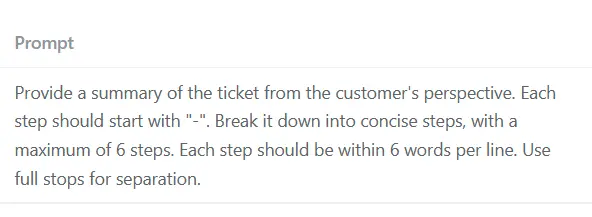
We have a way to change this standard prompt for "Ticket Summary"?

It would be really useful if there was a way to run a Workflow before email notifications are sent.
We have some annoying customers with even more annoying email autoresponders. I've got workflows set up to delete their tickets immediately if the subject is the usual "Your email is important to us" rubbish, but they and the agents still get a new ticket notification.
Or an ability to ignore email piping when certain sender/subject conditions are met.

Hello! Are you going to develop an Agent Frontend that looks like the one in Fluent Boards? It would be useful.

Is there a way to add links to the admin menu header? I'd like to use this as a portal to link to other services that we use to administer client sites, and having the links to the other services in the header would improve our workflow.


I am sending emails using Amazon SES. When the email arrives in Outlook, all I see is a red X where images should be. I have set alt text but it's not displayed. Any idea why? I can see it in Fluent's editor.

Hi, I want to change the background colour of the input text area of my form on this page: https://adhdroadmap.coach/free-consultation/ I cannot figure out how to do this. Thanks!

Can't activate license...although shows connected in dashboard

I've run into a problem creating a ticket programmatically.
Using a bitAssist support form on another website that is capturing the ticket. I've got a webhook connected to Pabbly Connect that sees the ticket information.
I can connect to Fluent Support and send the ticket, but there are a couple of problems.
-
The tickets are being managed by a separate mailbox which is being specified in the connection. The upload is ignoring that mailbox and defaulting to the default
Looking at the API, there does not appear to be a way to specify anything but the default mailbox.
-
I've tested the record being sent, but I'm now noticing that Fluent Support if it does not recognize the sender defaults to the agent.
How do I specify the mailbox I want the ticket to go? I've tried populating "Ticket Mailbox Name" and "Ticket Mailbox Email" but it continues to go to the default mailbox. 
How do I force the name and email address of the sender when they're not already customers?

I don't see any settings on the backend...just wondering if anyone has a snippet to override the default settings?