


Fluent Auth will have google recaptcha integration? or any captcha? or custom? Thanks

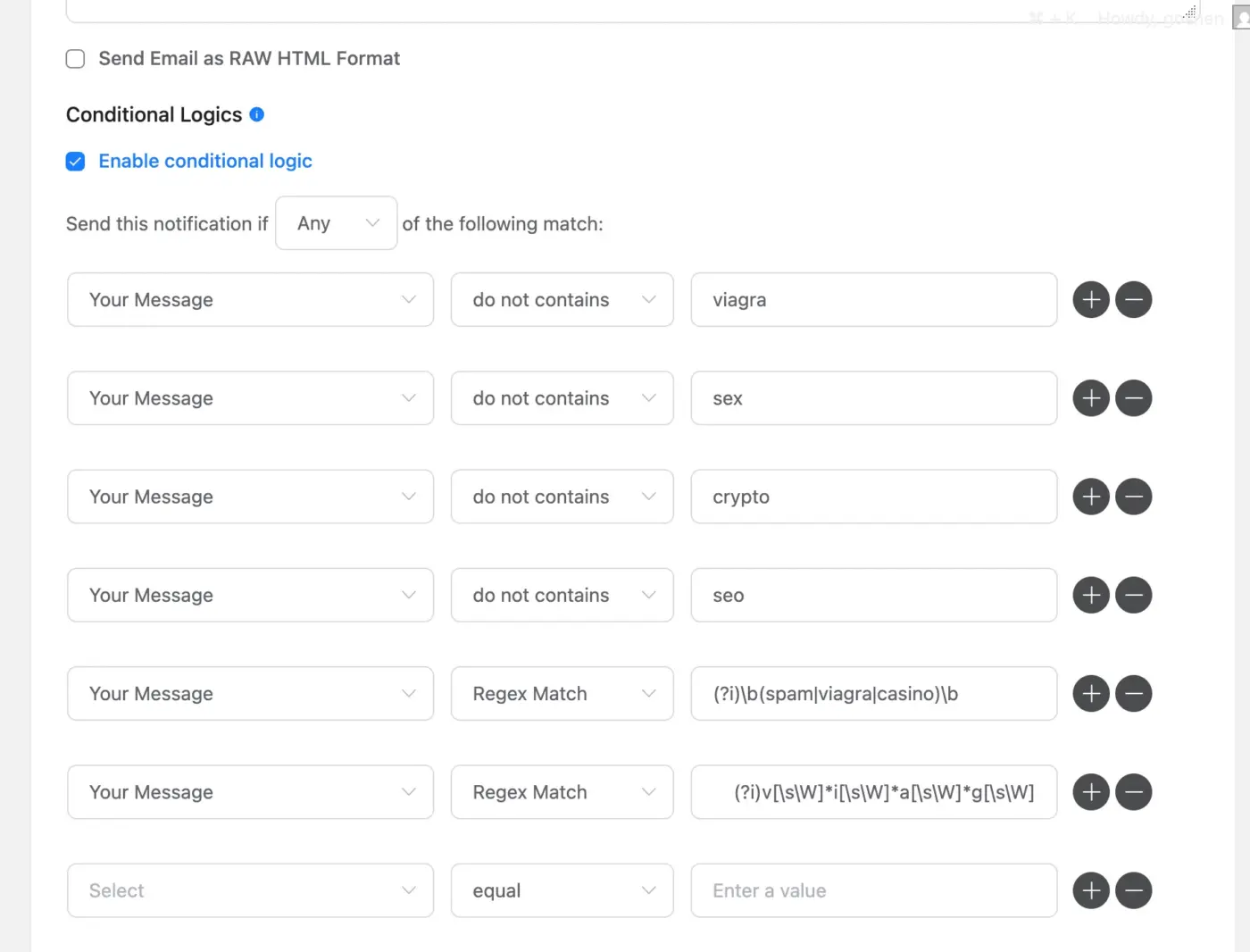
I am trying to limit spam submissions from being sent as part of admin notification in FluentForm. That way, admins only get notified of 'legit' form submissions.
Has anyone been able to create a "Regex" entry that captures most 'spam keywords? I checked the docs and there is almost no reference to that. It would be great if the amazing WPNinja team provide us sample regex recipes that we can copy and use out of the box for situations like this. Thanks

Can I use Fluent Forms to restrict viewing of a blog post to someone who has paid to view it?
Can I offer that access on a subscription basis?
I don’t want to offer the access to the blog post as a download—just viewing of it.
Thank you!

When I enable the token spam protection, all forms get error when submitting.
This happens on all sites when I enable this

OK, just figured I'd put this out there...
Word is that WPForms is launching a new field type that would enable people to upload or record a video and upload that with a form submission. Obvious usage for video testimonials. 😇
Now, I'm not a big lover of Awesome Motive. For that reason, I wouldn't want to use WP Forms. But, you gotta respect the development here.
And so... any chance of adding something similar to Fluent Forms? 😇
Funny thing is, I literally just had a client of mine come to me with some "plugin" she had ChatGPT "develop" for her. She wants my help to implement it. But, it would enable the recorder, then upload into the Media Library. No idea if it works, as I haven't tested it yet for her. But, the fact she just did this shows an obvious demand. I got clients vibe coding this stuff!
And I fully expect WP Forms to now drive some competition. And I welcome it. 😎

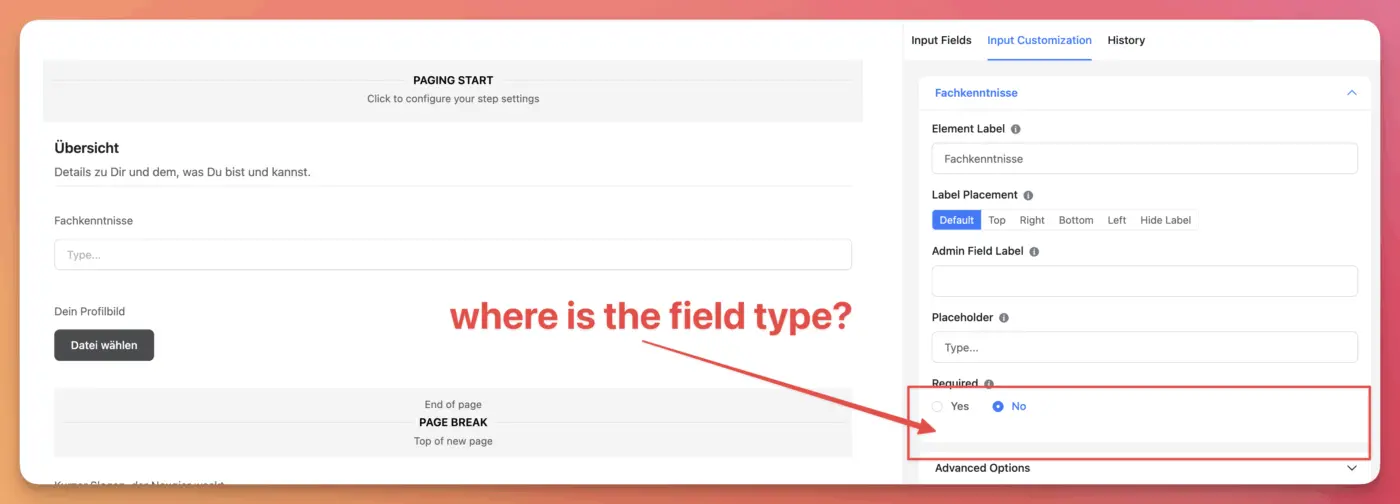
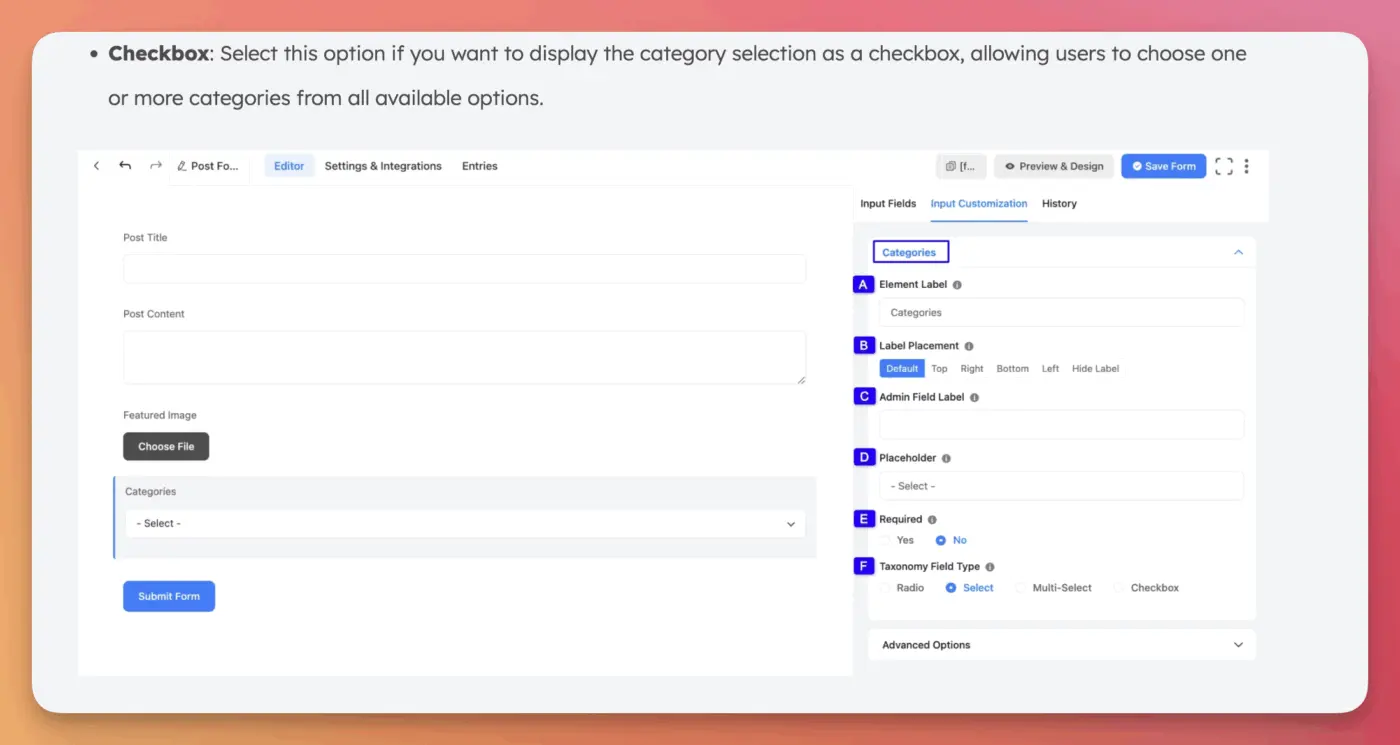
So I am replacing WS Form with FluentForms, finally. But when I try to add the taxonomy fields, the field type is missing. The docs say there should be a field (labeled F in the screenshot), but in my forms, this is missing entirely. So, how can I change the field type for a taxonomy field to checkbox?

How can we send the partial entry to the person for it to be completed?
Seems like the logical next step would be to send a reminder to the person to complete their form.

Is there a way to make the landing page URL nicer than "/?fluent-form=8" ?
Maybe a pattern like "/?ff=custom-name"?
I want this specifically because just adding the shortcode on a page often loses some of the styling, especially for conversational forms. But the Landing Page works great.
I use FluentForms Pro to add new users to a site. They are currently set with usernames = email. However, that prevents them from changing their email address. If they do and want to sign in with username/emailaddress. The username is still the old email address causing a lot of confusion. I’d rather make the user name firstnamelastname (.e.g, John Doe becomes username johndoe). However, I cannot prefill the username like that. I can use any field as the username but not a combination of two. So I can use the first name or the last name, but not both. The username in the integration does not accept merge fields either. Can this be changed, please?

There is an accessibility issue in the select item of fluent forms (pro). When inspecting the element when tabbing, I saw that the other options / checkboxes had a tabindex of -1 when the focus was on the select.
Accessessibility is mandatory for most websites in the EU and this causes a non compliancy. All companies that are using Fluent Forms (pro) and are undergoing a compliancy audit will fail (WCAG 2.1 AA non compliant )with regards to:
WCAG 2.1.1 Keyboard:
All functionality must be operable with a keyboard.
WCAG 2.4.3 Focus Order:
If a web page has a logical tab order, it must preserve the meaning and operability of the content.
WCAG 2.1.2 No Keyboard Trap:
Keyboard focus should not be trapped within a specific area of the page, preventing users from navigating away.
tabindex Attribute:
The tabindex attribute can be used to control the tab order of elements, but it should be used carefully to avoid creating keyboard traps or illogical navigation.