

Spam control - Using Conditional Logic for Admin Notification
I am trying to limit spam submissions from being sent as part of admin notification in FluentForm. That way, admins only get notified of 'legit' form submissions.
Has anyone been able to create a "Regex" entry that captures most 'spam keywords? I checked the docs and there is almost no reference to that. It would be great if the amazing WPNinja team provide us sample regex recipes that we can copy and use out of the box for situations like this. Thanks
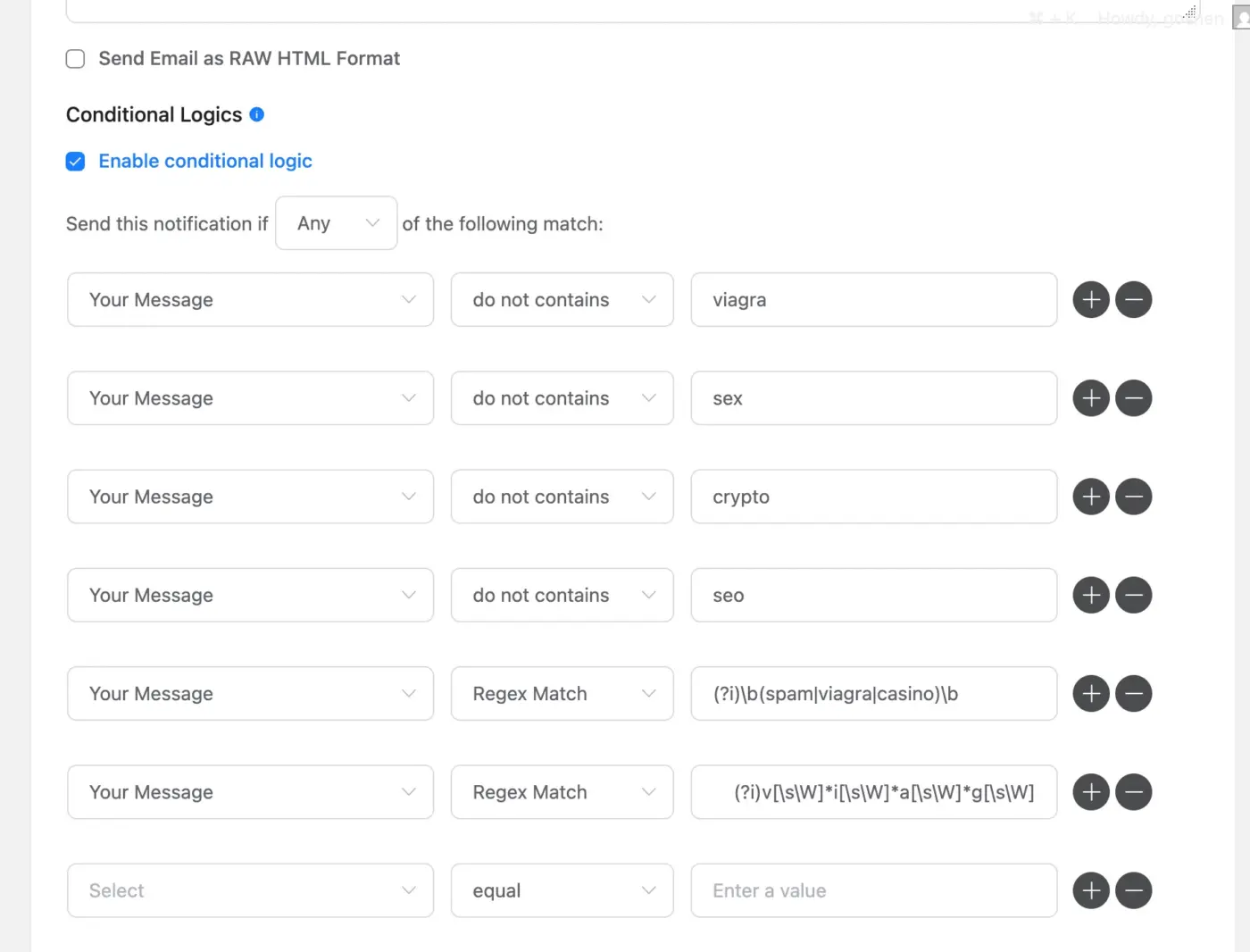

Why not activate all the spam protection Fluent Forms has? Rather than using Conditional Logic for Admin Notification for Spam control?

Nishat Shahriyar I did. Still the spam messages are significant. While i can deal with deleting them directly in the FF dashboard on the site, I am trying to avoid not having immediate admin notification emails full of spam. So adding additional layer of conditional filter make sense here.
Goshen Web can you share what spam settings you used?
Nishat Shahriyar I used several regex (OR instead of AND) in the Advanced Form Validation, country-based restriction, keyword-based restriction and invisible Turnstile, and invisible Recaptcha 3. All of the spam I get are written in Russian language even though I blocked entries from Russia, but the spammers are using different Europe and North America proxy IPs addresses.
Goshen Web This is odd, can you open a support ticket here- https://wpmanageninja.com/support-tickets/
We might need to see why this is happening.
Nishat Shahriyar i have updated the regex to reject any non english content and that seems to work. Will continue to monitor and create a ticket if issue resurfaces. Thanks

Most spam is caused by bots, so having a decent bot protection is very helpful. I use Turnstile (invisible), and I do not get a single spam comment since I enabled it.
André Daus I have turnstile invisible turned on as well, and this has not stopped the spam entries. Rather, the spam is written in Russian language, and escaping even the regex validation I added.
Goshen Web did you check the Turnstile metrics? What do they tell you (likely human vs likely bot)? There are some sites that say Cloudflare Turnstile could be easily circumvented, but not showing how this really works. Because Cloudflare constantly improves it, only advanced bots can get through. How much spam messages get through? Could it be a human adding these? Third, if it is all Russian (Cyrillic letters), you can block them with regex as well (try something like “/[А-Яа-яЁё]/u”).
Goshen Web I just re-read you settings. You send the notification if ANY of the conditions match. If it does not contain “crypto” it will send you the notification. You might want to change that to ALL instead of ANY. You need an AND logic, not OR.
Alternatively, change “do not contains” to “contains” (someone from WPManageNinja should fix that typo, Nishat Shahriyar!). Keep in mind the logic with AND/OR/NOT. Currently, it will almost always send you the notification.
André Daus if I use the 'AND" logic, wouldnt that mean for the notification to be surpressed, all conditions must be met? That will fail because the spammers use different keywords periodically.
Goshen Web It depends on how you create your rules. It is boolean logic. Right now it’s: Send notification if ANY (read: at least one) of the following conditions match. And your first rule is “does not contain the word viagra”. If someone types in a message about seo and crypto, the first rule is true and thus triggers the notification.
You need to define your rules as “does not contain” (the stop words) and require ALL rules to be true. This gives you “send me the notification only if none of the stop words is in the message body”.