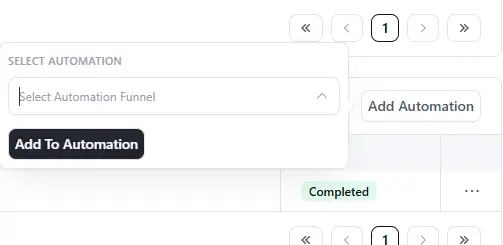
From the Contact -> Emails -> Automations there is the "Add Automation" button. However, when clicking that button the list of available automations does not populate and I can't figure out how to manually add an automation to a contact.
Note: This was requested in FCRM v2
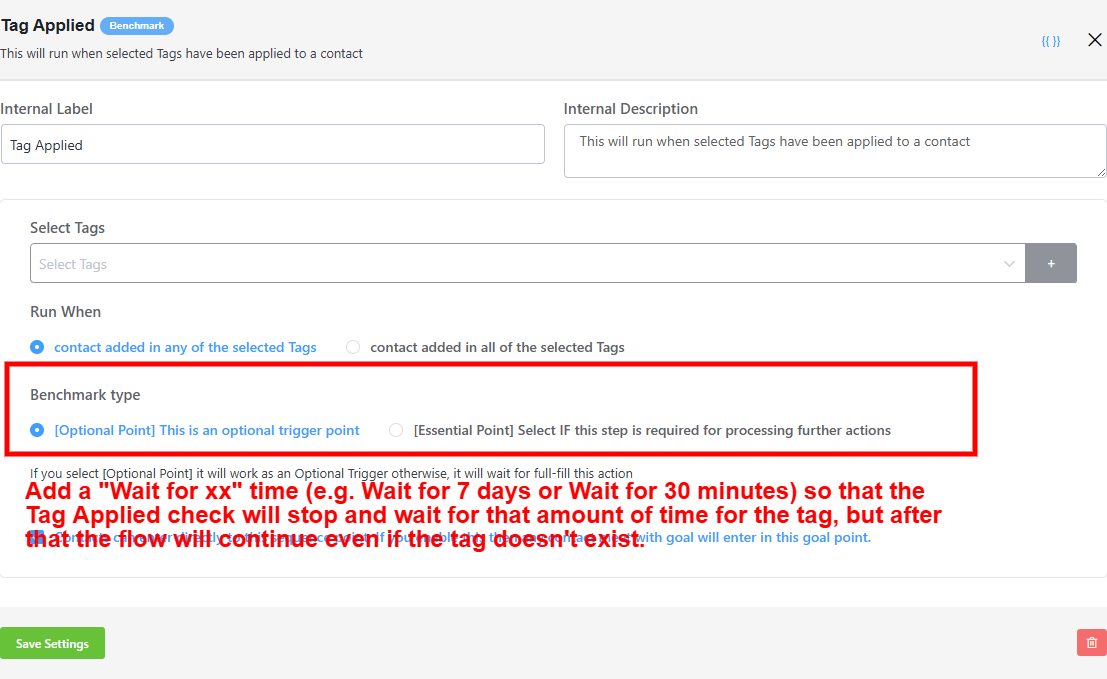
For the Tag Applied goal step, I would like to see the addition of a Wait for xx time condition. Currently there are two possible benchmarks choices - Optional (continue even if tag does not exist) or Essential (stop and wait for tag to exist). However, a third scenario needs to be added.
The scenario that is missing is to stop and wait for a period of time for the tag to exist. But if the tag doesn't exist after that period of time, then continue on anyway. For example, the automation flow might require that the flow stops and waits for 7 days for a particular tag to exist, but after 7 days the automation flow should continue on anyway.
Please add more formatting options in the custom footer editor. For example:
- Ability to insert images for things like company logo, social media icons, etc.
- Background color for the footer.
- Content separators e.g. line
- SmartLinks inserter

Hi,
I'm getting sales through FluentCart, also trough emails I send with FluentCRM. But when I look at the FluentCRM dashboard, it says 0 in Sales. How does this work? Is this also only connected to Woocommerce? Can it be connected to FluentCart?
https://entretools.nimbusweb.me/share/12375353/bpzzx8lhq27rhbvkfu6s
Bug Report Summary
The video demonstrates a bug when trying to import a default CRM email template into a campaign. Instead of importing the template directly into the campaign, the system incorrectly imports it into the email templates section, creating a new template there. However, importing from "My Templates" works as expected.
Steps to Recreate the Issue:
- Start editing a new, blank campaign.
- Click on "Use Template."
- Choose a default template from the built-in CRM templates (e.g., Black Friday email).
- Click "Import."
- Observe that instead of importing the template into the campaign, the system redirects to the email templates area and creates a new template.
- Go back to the campaign and try importing a template from "My Templates."
- Notice that importing from "My Templates" works correctly—the template is added to the campaign as expected.
Key Point:
The bug only occurs when importing from the built-in CRM templates, not from user-created templates.

(please excuse the newby question). Does the bounce handler have to be done by the SMTP provider. eg Can I use one SMTP provider, and set different service as the bounce handler? If this is possible, what kind of settings do I need to setup (return path on SMTP provider or other?).
Note: This was requested in v2
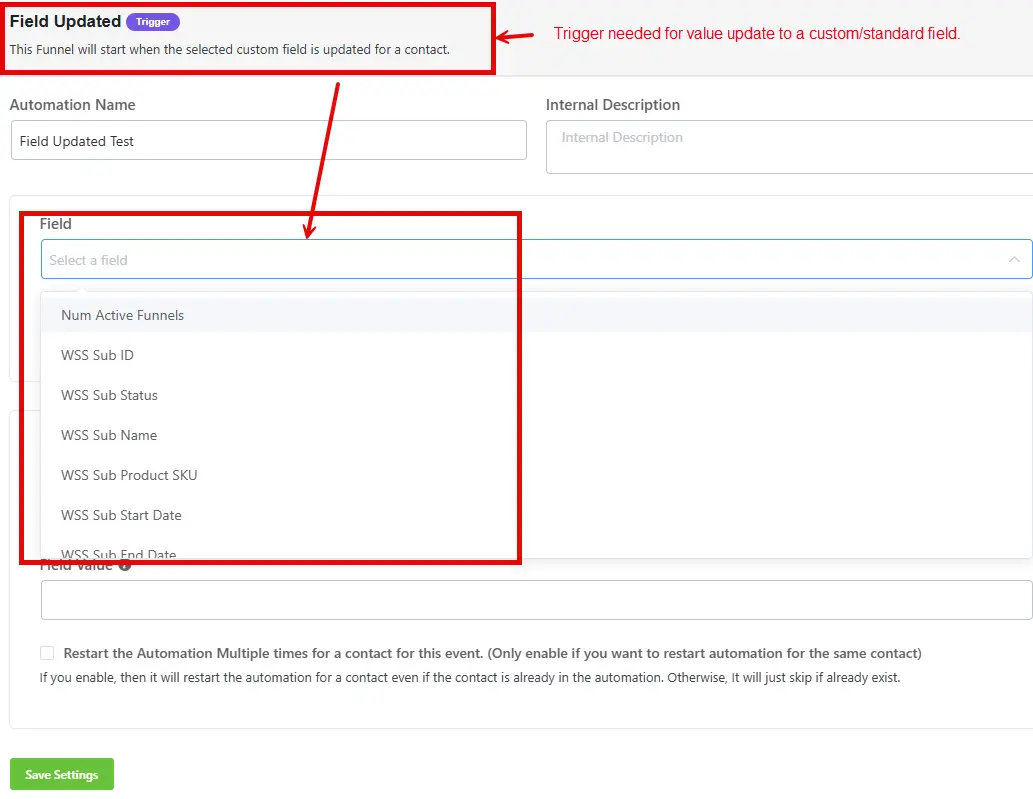
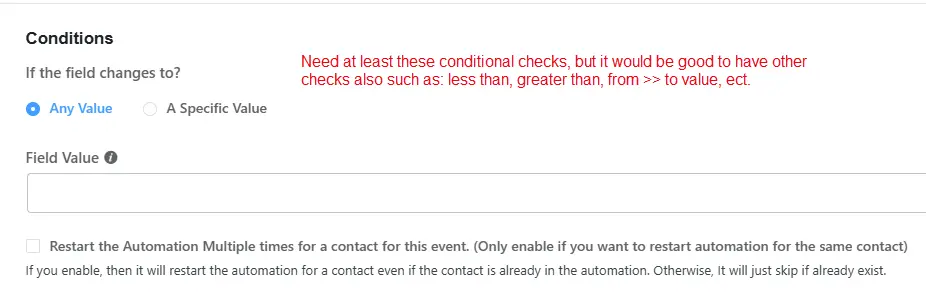
We need the ability to trigger automations based on the value of a field changing, both for standard fields and custom fields. The screenshots below are from the WP Fusion custom plugin, but this is really a trigger that should be in the core FCRM.
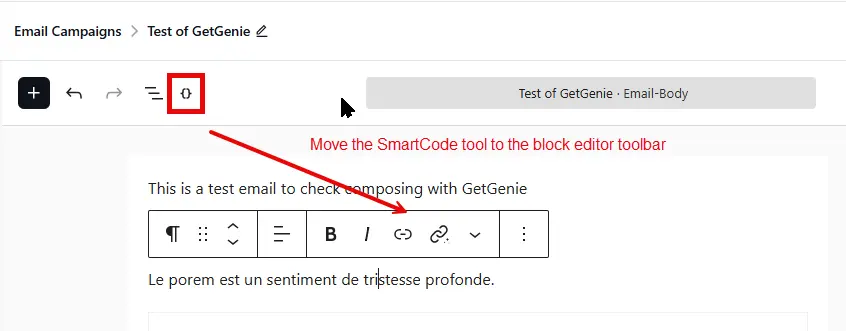
When using the WP editor, it would be nice to have a configuration option to directly insert the SmartCode at the current cursor position rather than having to click on the SmartCode (which copies it to the clipboard) and then doing a paste in the location we want to insert it.
Also, would it be possible to move the SmartCode tool {} to the block editor toolbar rather than have it located on the global top toolbar menu? It seems to me that it would be more logical and convienient to be located directly in the block editor toolbar where we are working.

I'd like to suggest a feature that would be very useful for event-based businesses: the ability to trigger a FluentCRM automation when a product has been purchased a certain number of times.
For example: when an event reaches 20 purchases, automatically trigger an automation to notify the team, send a waitlist email, or update a contact tag.
What would be helpful:
- A trigger in FluentCRM automations: "Product X has reached Y total purchases"
- From there, all existing automation actions would be available (send email, add tag, notify team, etc.)
This would allow businesses to automate capacity-based communication without manual monitoring.
Thanks for considering this!
Note: This was requested in v2. See
https://community.wpmanageninja.com/portal/space/fluent-crm/post/request-make-smartlinks-avail
https://community.wpmanageninja.com/portal/space/fluent-crm/post/feature-request-smart-link-ti
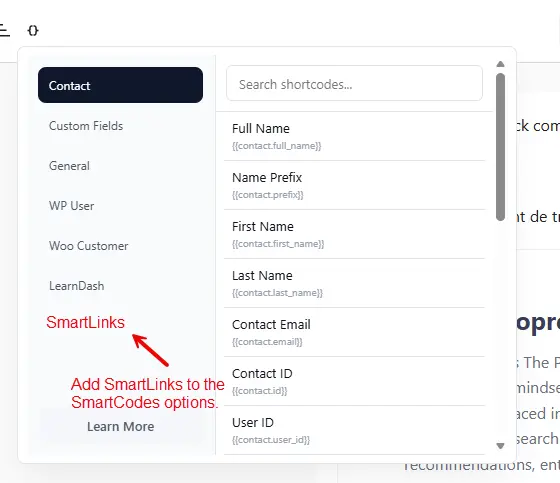
It would really be more convenient to show the SmartLinks that are available directly in the SmartCodes lookup/inserter dialog. And use the name of the SmartLink rather then the random identifier code so that it is much easier for us to determine the correct SmartLink we want to use. And as a bonus, it would be really nice if we hovered over the name of the SmartLink and it would show the SmartLink description.