


I have been genuinely surprised by how flexible the storefront and checkout experience are from a design perspective.
We have been able to adapt the product grid, store page, checkout layout, colours, spacing, backgrounds, form fields, order summary and responsive behaviour so that everything feels consistent.
There are still some small UI details and mobile refinements that can be improved, but the overall foundation is excellent.
Great work by the team. I am looking forward to seeing how the design and customisation options continue to evolve after the last update!
Hi FluentCart team,
I would like to raise an important concern regarding how Test Mode interacts with receipt and invoice numbering.
As far as I can see, FluentCart correctly stores the order mode (live or test) and uses sandbox payment credentials in Test Mode. However, test and live orders appear to share the same receipt-number counter and the same invoice prefix.
For example:
- The latest real invoice is
FC-003. - The store is temporarily switched to Test Mode.
- A sandbox purchase is completed.
- The test order receives
FC-004. - After returning to Live Mode, the next real purchase receives
FC-005.
The expected behaviour would be:
- Latest real invoice:
FC-003 - Test purchase:
TEST-001 - Next real invoice:
FC-004
Test purchases should never increment, reserve, reuse or otherwise affect the live invoice sequence.
This is not only a matter of convenience. It can create a significant accounting and tax-compliance risk:
- A test purchase may generate an official-looking invoice or receipt within the ordinary fiscal series.
- Deleting the test order may leave a gap in that series.
- If the number is later reused, two different documents may have existed with the same identifier.
- The test document may already have been downloaded, emailed, exported, sent through a webhook or received by an accounting integration.
- Deleting the FluentCart order does not necessarily remove those external records.
- This becomes especially concerning as EU member states, EU and other jurisdictions move towards stricter electronic invoicing, auditability and invoice-traceability requirements.
A separate staging database is a possible workaround, but it should not be the only safe way to test a checkout, payment gateway, product, workflow or customer journey. Store owners may need to perform controlled tests after a site is already in production.
I suggest that FluentCart implement:
- Completely independent counters for live and test orders.
- A configurable test prefix, such as
TEST-. - Test numbering starting from its own value, independently of the live minimum and next receipt number.
- A prominent TEST — NOT A VALID TAX INVOICE watermark on every test receipt and invoice.
- A guarantee that deleting test orders can never change, reuse or create gaps in the live sequence.
- Clear visual identification of test orders throughout the admin, customer dashboard, emails and PDFs.
- The
testflag being passed clearly to webhooks and integrations, so external systems cannot mistake a sandbox order for a real transaction. - A warning when enabling Test Mode on a site that already contains live orders.
- Documentation explaining exactly how test orders affect receipt numbering, exports, workflows and integrations.
Ideally, FluentCart should treat test purchases as a completely separate fiscal namespace, not merely as ordinary orders processed through sandbox gateway credentials.
Could you please confirm whether the current shared numbering behaviour is intentional, and whether isolated test numbering is already planned?
cc: Shahjahan Jewel Rasel Siddiqe
Thank you!
FluentCart should include a native price-display setting under Store Settings → Currency / Number Format to control how decimal places are displayed.
Suggested options:
- Always show two decimal places:
10.00 - Hide decimals only for whole-number prices:
10, while keeping10.50 - Optionally trim all trailing zeros
This setting should apply consistently across the storefront, product pages, cart, checkout, customer dashboard, emails, receipts and PDF invoices.
At present, displaying 10€ instead of 10.00€ requires adding the following PHP filter:
add_filter('fluent_cart/hide_unnecessary_decimals', '__return_true');This is a basic currency-formatting preference and should not require merchants to install a snippets plugin or maintain custom PHP code.
Additionally, in our testing the current filter changed a value such as 12.10€ into 12.1€, although the documentation suggests that meaningful decimal places should be preserved. The desired behaviour is:
10.00€→10€10.50€→10.50€12.10€→12.10€
A native selector would make the behaviour clearer, safer and more consistent for non-technical store owners, especially in European stores where currency-formatting conventions matter.

FluentCart is amazing, but there was one thing I kept needing while moving our store over from Shopify: a way to add my own product fields and my own checkout questions. So I built it.
Custom Meta Fields for FluentCart adds:
Product fields
- Text, textarea, number, select, checkbox, URL, email, date and color fields
- Media and repeater fields (Pro), for things like size charts, materials, dimensions and care instructions
- Values show up in the product editor, in shortcodes, in Elementor widgets (Pro) and in Google structured data (Product, Book, Breadcrumb and Organization schema)
GTIN, MPN and brand
- A GTIN (EAN, UPC or ISBN) and an MPN for every FluentCart variation, plus a brand for each product, all included in the free version
- Every GTIN is checked against the GS1 check digit, and ISBN-10 is supported too, so typos get caught before Google sees them
- Duplicate GTINs across your catalog are blocked
- Added to your structured data automatically as gtin8/12/13/14, mpn and brand, the details Google Shopping and rich results look for
- A shortcode shows the identifiers on your product page
- Bulk upload (Pro): import GTINs a WooCommerce store left behind (it reads the common GTIN plugins), or upload a simple CSV (
sku,gtin,mpn,brand). FluentCart's own WooCommerce migration carries over SKUs but not GTINs, so this fills that gap.
Cart and checkout fields (Pro)
- Ask customers anything at checkout, like engraving text, a delivery date, a gift note or an artwork upload
- Conditional logic: show a field based on another answer, country, shipping method, payment method and more
- File uploads stored in FluentCart's own storage (local, S3 or R2)
- Answers appear on the order screen, the thank-you page and in emails using
{{checkout.FIELD_ID}}or{{checkout.all}}
Built to feel native
- One settings screen that matches the Fluent suite, including dark mode
- Hooks into FluentCart's own Checkout Fields settings
- Follows FluentCart's roles and permissions
- REST API support, plus MCP support so AI assistants can read and write your fields
The free version covers the core product fields plus GTIN, MPN and brand. Pro adds media, repeaters, Elementor widgets, cart and checkout fields, and bulk GTIN upload.
Requires FluentCart 1.6+.
👉 https://upfluent.io/fluentcart-custom-meta-fields/
I'd love feedback: what fields do you wish your store had?

CartCubes Toolbox for FluentCart 1.2.1 adds a shop lineup you control, a way to send a buy button to another URL, and a way to show an account tab only to some customers.
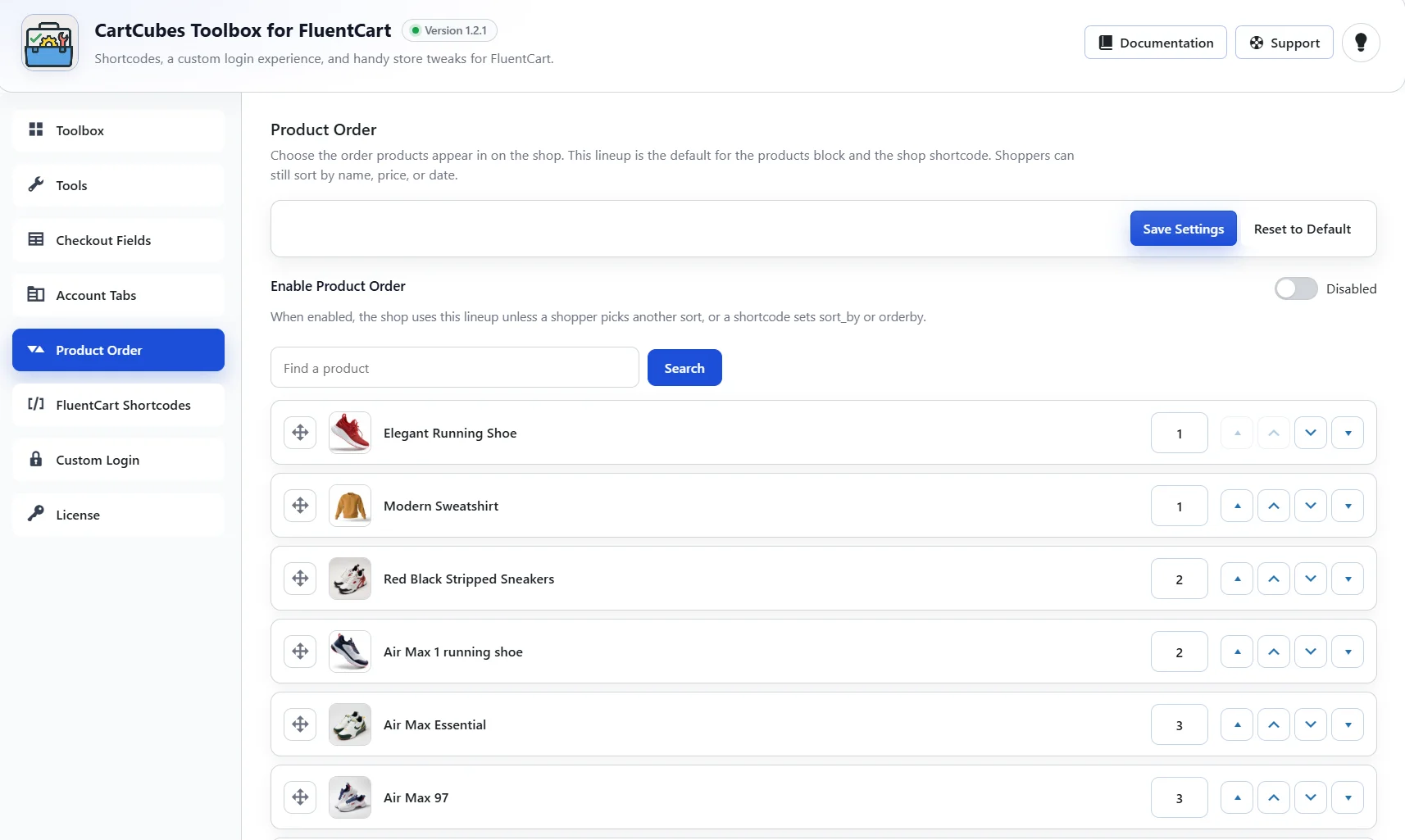
Product order
Enable Product Order and arrange the lineup. That order is the default for the shop, the products block, and the shop shortcode. Shoppers can still sort by name, price, or date.
Reorder by drag, move arrows, or an order number. Search the list by product name. Drag is off while a search is active. On the product editor, Order number uses the same lineup: a lower number shows first, and a blank value keeps that product at the end. Reset to Default turns the feature off and keeps the saved lineup.
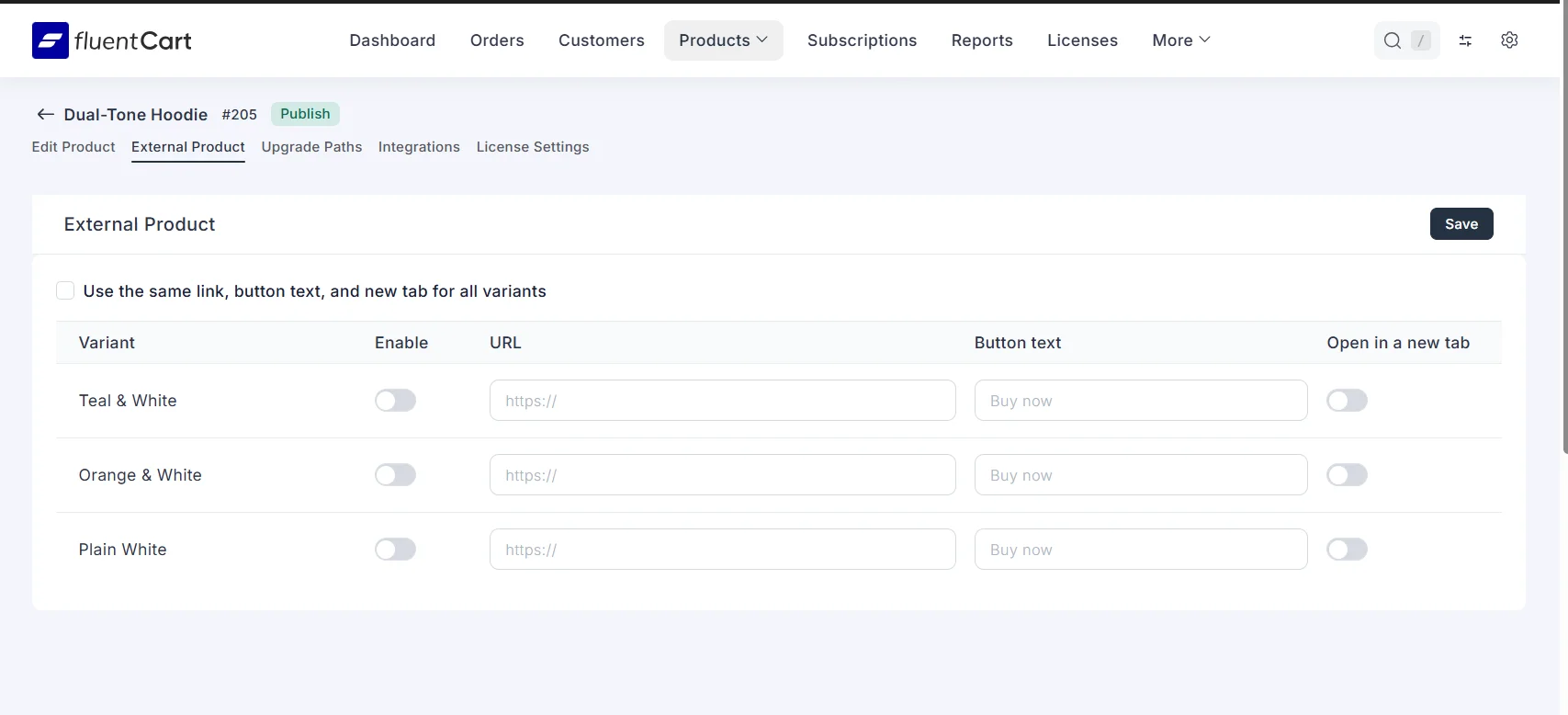
External product links
Enable External Product in Tools. Each product then has an External Product tab. Turn it on for the product or a variant, set a URL, button text, and whether the link opens in a new tab. Variants can share one link, or each variant can have its own.
The link replaces Add to Cart and Buy Now on the shop, the product page, the View Options modal, and standalone buy buttons.
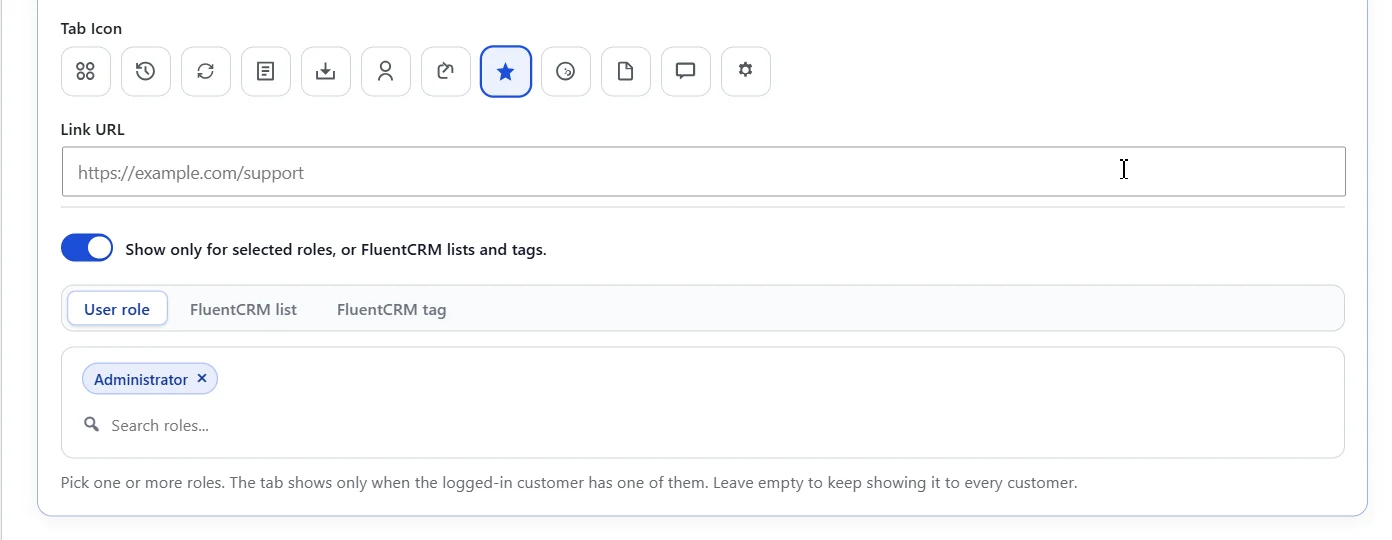
Account tabs
Each custom account tab can be limited to selected WordPress roles, or to FluentCRM lists and tags. Leave the picker empty to keep showing that tab to every customer. FluentCRM has to be active before a list or tag can be used.
Write-up: https://cartcubes.com/cartcubes-toolbox-for-fluentcart-1-2-1/

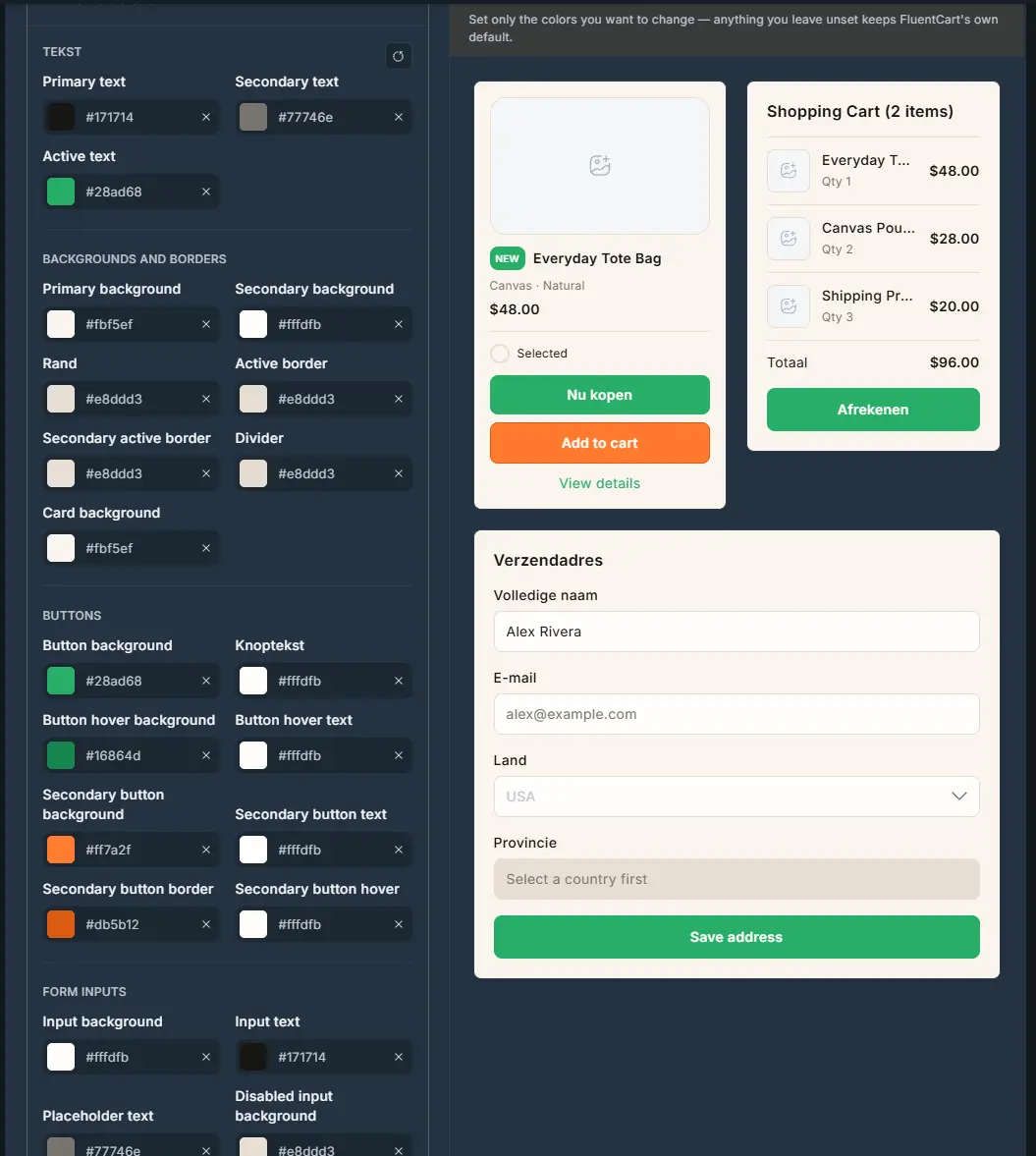
I've changed all colors in "Appearance", but the "Send confirmation email" button doesn't change color.
I've cleared all possible caches, tried hard refresh, incognito, etc.

Will it migrate only active subscriptions, or will it also migrate past orders and the customer purchase history?
If past orders are migrated, how will they be represented inside FluentCart? In particular, what happens with invoices originally generated in SureCart? Will those historical orders keep some reference to their original SureCart invoice/order numbers, or will FluentCart create/import its own references?
I’m mainly trying to understand whether, after migration, customers will still have a complete purchase history inside FluentCart, including purchases made before the migration.
Thank you!

It seems as though the shipping methods are ordered from most expensive to least expensive and the most expensive is selected by default. I can't find a way to re-order them. I definitely do not want the most expensive option to be the default. Am I missing something?
Thx!!

Meet FunnelCart, sales funnels for FluentCart
Hi Fluent family,
I'm Dragan. Those who follow me already know Client Vault and BookingLeads, two WordPress plugins built around Fluent products. Today I'm here to introduce the newest one : FunnelCart.
I'm a heavy funnel user. For a long time, I built my funnels on WooCommerce with CartFlows and FunnelKit. It works, but it's heavy: lots of plugins, lots of bugs, too technical, a real bloated machine and, worst of all, a slower site.
Then I moved to FluentCart. I love it so much! It's light, modern, and it gets better every week. But it can't do everything :) One important thing was missing: a real sales funnel, built right into it.
So from day one, I had the idea of building the best sales funnel solution for FluentCart.
After months of development and daily use on my own sites and on a few clients' sites, it's time to share it with you today.
Meet FunnelCart
This plugin turns your WordPress into a sales funnel and helps you sell 2x more. 100% compatible with FluentCart, of course!
Your funnel ready in minutes
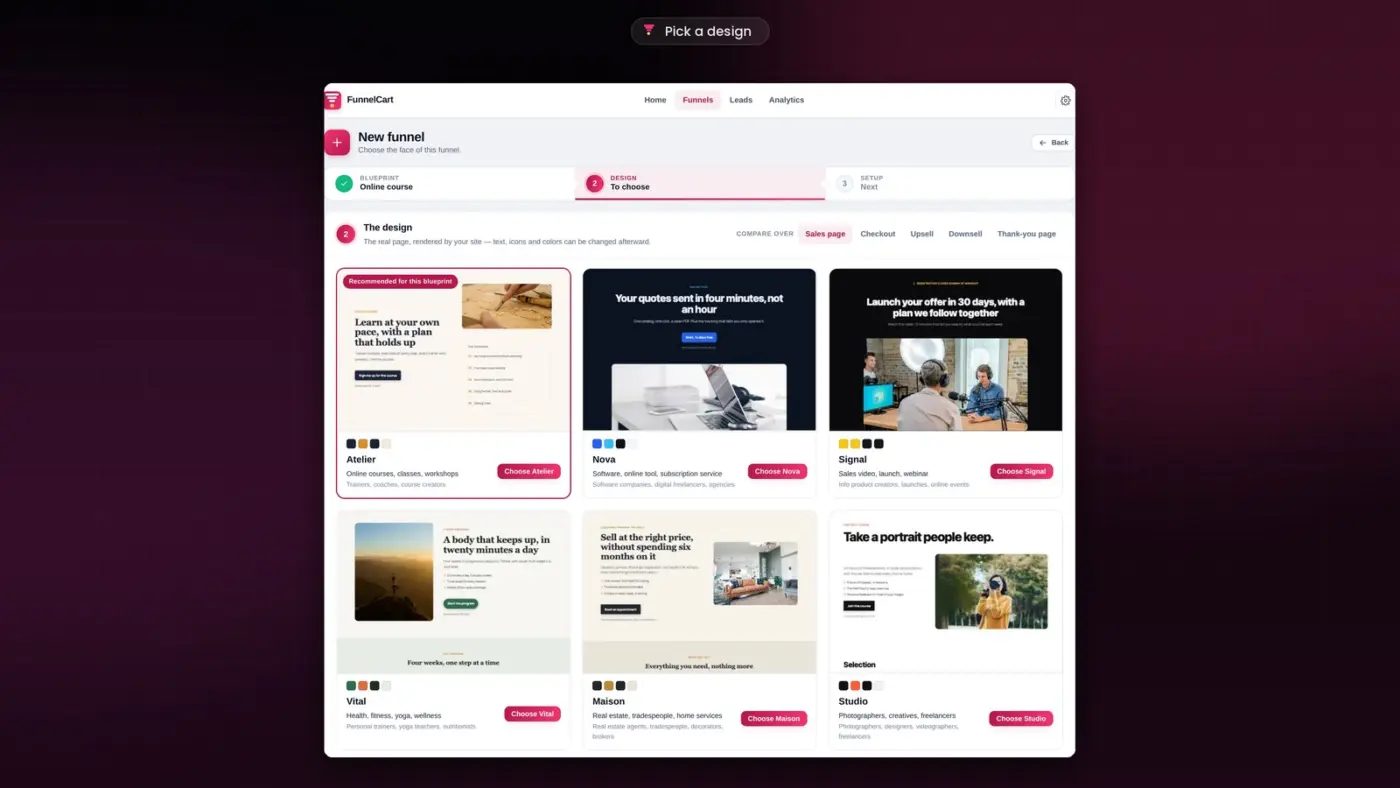
16 funnel templates and 10 ready-made themes: direct sale, webinar, waitlist, appointment, subscription, online course, and many more. Pick one, and your funnel is ready to sell in minute
Prefer to start from scratch? Build your funnel step by step, very easily.
Already have funnels on CartFlows, FunnelKit or WPFunnels? You can import them in one click.
Opt-ins built to convert
11 opt-in funnels are ready and preconfigured: free resource, webinar, waitlist, email mini-course, giveaway, quote request, appointment booking, referral, and more. You get 8 opt-in layouts to choose from.
- A built-in sign-up form, on a funnel page or in a popup on any page of your site.
- Already using Fluent Forms or another form plugin? Every submission brings the person into the funnel.
- Ready-made connectors: FluentBooking, BookingLeads, Calendly, Amelia, WPForms, Gravity Forms, Typeform, Tally, and many more, plus giveaway tools.
- A lead magnet: offer a guide or a document to download in exchange for an email address, and the file is delivered automatically.
- Every sign-up lands in FluentCRM with the right list, the right tag and the right sequence.
A visual canvas, built to sell
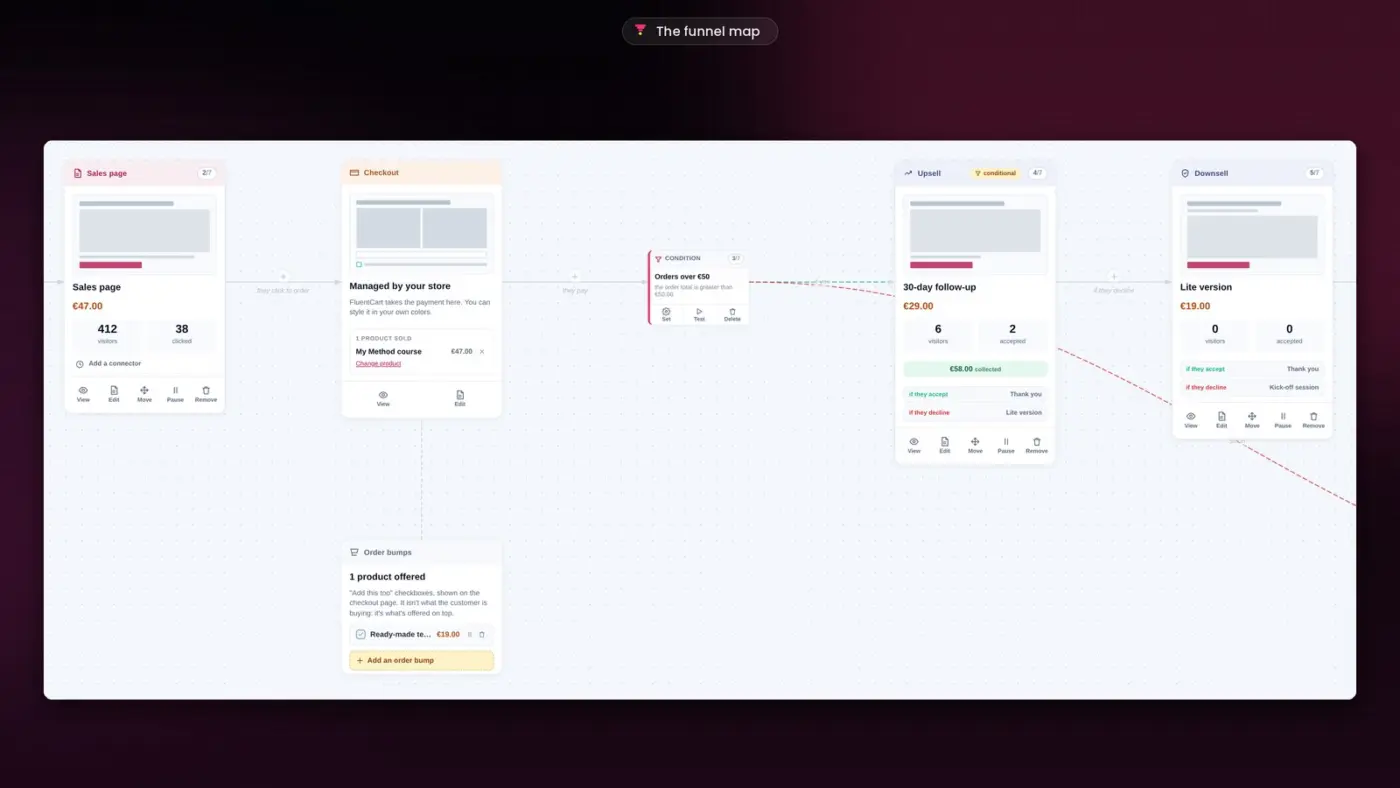
- All your steps on one canvas: opt-in, sales page, checkout, upsell, downsell, thank-you page. Each card shows its visitors and what it brings in.
- Order bump at checkout, one-click upsell and downsell: the card is already saved, the customer accepts without typing anything again.
- Routing and conditions: every visitor gets the right offer, based on their order, their choices or their answers.
- An A/B test, with up to four versions of a page, keeps the one that sells best.
- Your pages in your builder: Gutenberg, Elementor, Divi or Bricks.
- No limit on funnels, steps, tests, offers or orders.
A funnel that helps you grow
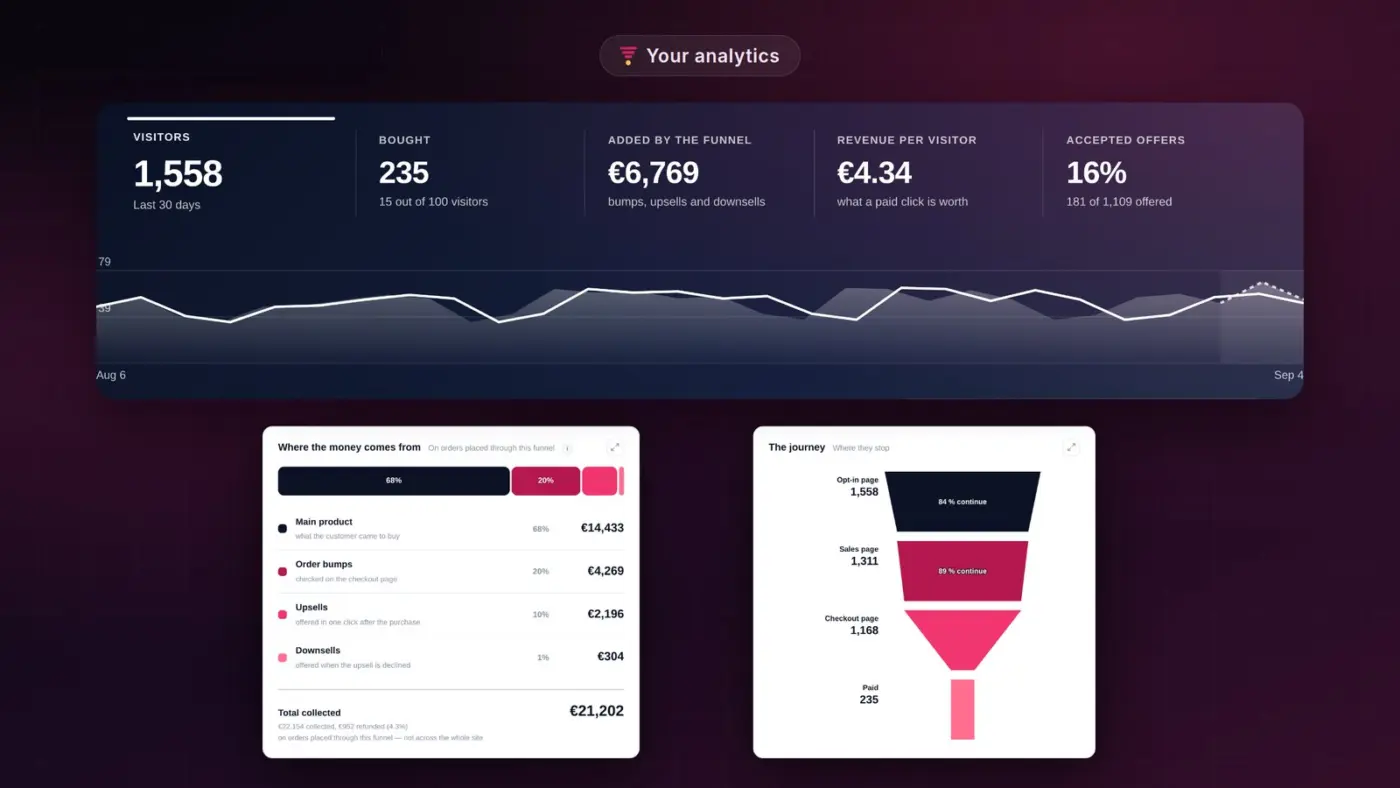
- You see which step each prospect has reached.
- You know who buys, and which channel brought them.
- You see in real time which ad is profitable.
- You know what each customer costs you and brings you.
- The funnel guides you: it shows the step to improve first and points out what to look at.
With or without a CRM
No CRM? FunnelCart does the job. Every person has a profile with all their visits, choices and purchases, in real time. Your prospects are sorted into lists: sign-ups, buyers, abandoned carts, to follow up.
Using FluentCRM? It's connected natively, with a FunnelCart tab in every contact profile. Another CRM? A webhook feeds it, directly or through Zapier, Make or n8n.
Everything is native, your data stays on your site, and you pay no commission on your sales. The free version of FluentCart is all you need.
A special launch offer
To celebrate the launch, early supporters get a very special Founder offer. It's the best moment to join the adventure.
I'd love your feedback
- How do you build your funnels with FluentCart today?
- Which feature would make the biggest difference for your business?
- What would you like FunnelCart to do next?
Every comment helps shape the product. And if you like the project, getting your license is the best way to support it and help it grow.
I put all my heart and energy into my plugins. So even if FunnelCart isn't for you right now, a little word of encouragement always means a lot.
Thanks for reading!
Dragan
PS : Thanks you all Team FunnelCart and fluent family ❤️


Hello,
After the FluentCart 1.6.5/1.6.6 update, user creation and role assignment (WP User Create/Update) after a successful purchase are no longer working correctly.
It creates the user, but fails to assign the corresponding role. Below, you can find the log records from when it previously worked (successful user/role assignment) compared to the new logs:
Additionally, users who have already completed a successful purchase and have an established account are now greeted with a "Confirm your email address" message when accessing their dashboard, which is quite frustrating.
Furthermore, I would appreciate it if you could provide some guidance on how the ideal workflow should be handled for:
Successful subscription purchase -> user creation -> role assignment -> how the user can access their account.
Right now, it is quite a mess.
FluentCart Pro v1.6.6
Payment: Paddle (sandbox)