

Introducing Custom Meta Fields for FluentCart
FluentCart is amazing, but there was one thing I kept needing while moving our store over from Shopify: a way to add my own product fields and my own checkout questions. So I built it.
Custom Meta Fields for FluentCart adds:
Product fields
- Text, textarea, number, select, checkbox, URL, email, date and color fields
- Media and repeater fields (Pro), for things like size charts, materials, dimensions and care instructions
- Values show up in the product editor, in shortcodes, in Elementor widgets (Pro) and in Google structured data (Product, Book, Breadcrumb and Organization schema)
GTIN, MPN and brand
- A GTIN (EAN, UPC or ISBN) and an MPN for every FluentCart variation, plus a brand for each product, all included in the free version
- Every GTIN is checked against the GS1 check digit, and ISBN-10 is supported too, so typos get caught before Google sees them
- Duplicate GTINs across your catalog are blocked
- Added to your structured data automatically as gtin8/12/13/14, mpn and brand, the details Google Shopping and rich results look for
- A shortcode shows the identifiers on your product page
- Bulk upload (Pro): import GTINs a WooCommerce store left behind (it reads the common GTIN plugins), or upload a simple CSV (
sku,gtin,mpn,brand). FluentCart's own WooCommerce migration carries over SKUs but not GTINs, so this fills that gap.
Cart and checkout fields (Pro)
- Ask customers anything at checkout, like engraving text, a delivery date, a gift note or an artwork upload
- Conditional logic: show a field based on another answer, country, shipping method, payment method and more
- File uploads stored in FluentCart's own storage (local, S3 or R2)
- Answers appear on the order screen, the thank-you page and in emails using
{{checkout.FIELD_ID}}or{{checkout.all}}
Built to feel native
- One settings screen that matches the Fluent suite, including dark mode
- Hooks into FluentCart's own Checkout Fields settings
- Follows FluentCart's roles and permissions
- REST API support, plus MCP support so AI assistants can read and write your fields
The free version covers the core product fields plus GTIN, MPN and brand. Pro adds media, repeaters, Elementor widgets, cart and checkout fields, and bulk GTIN upload.
Requires FluentCart 1.6+.
👉 https://upfluent.io/fluentcart-custom-meta-fields/
I'd love feedback: what fields do you wish your store had?

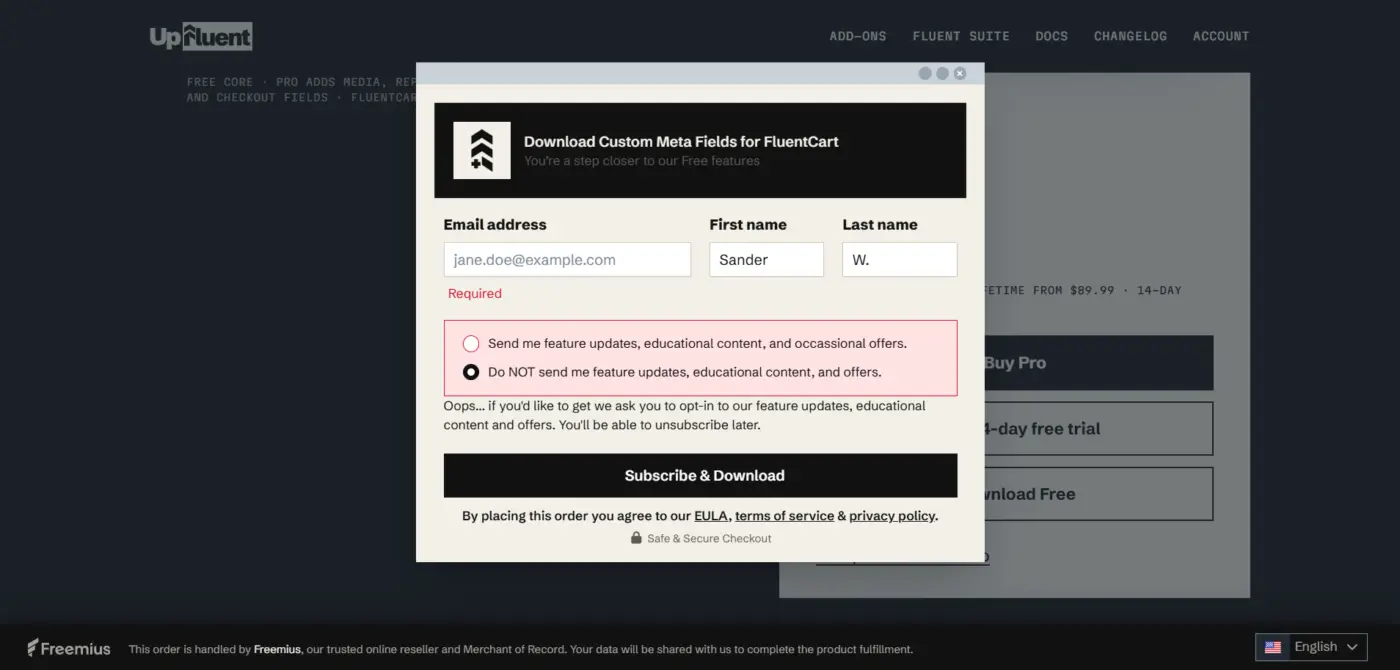
Looks great, wanted to try it out right away and give feedback, but I'm stuck at the download step: the form forces you to opt into "feature updates & offers", and if you pick the opt-out option, the form just refuses to submit. This is a GDPR violation. Worth fixing.
Separately, why Freemius for licensing instead of something native through FluentCart itself? Freemius is a dealbreaker for me personally over privacy and data sharing concerns (and I know I'm not the only one), so I'm skipping the plugin because of it. Curious if there's a reason behind that choice, or if a non-Freemius licensing option is on the table.

Vibe Code what are the dodgy practices?
Sander W. also, that is a good point about the gdpr I’ll look at that
Sander W. I was unaware that there were concerns with freemius. I’m am looking into rebuilding with fluent cart licensing now. Thank you for feedback.

Aaron Smith forcing to sign up... dodgy
Vibe Code oh gotcha. Not trying to be dodgy. I just added the direct download to the site. No email required now
Sander W. Custom Meta fields no longer use Freemius. It is 100% FluentCart license-controlled. https://upfluent.io/fluentcart-custom-meta-fields/
I’m new to licensing. What is wrong with freemius? I went with them since they would handle taxes and such. Wasn’t interested in dealing with all of that up front. I’m open to hearing your thoughts.
I'm refactoring the plugin to use FluentCart's licensing. I'll keep you updated. thank you again for your feedback.

Aaron Smith yes it makes sense to refactor the plugin to use FluentCart's licensing as you are a fluent Dev👍

Great initiative! While it’s awesome that you created a solution for this, feature requests like custom meta fields really ought to be built into FluentCart natively.
Relying on extra add-ons for essential data management quickly leads to plugin bloat and potential compatibility maintenance down the road. Core support for custom meta fields would make the platform much cleaner and more powerful out of the box!
Shahjahan Jewel Any idea if this is coming soon and if it's on the roadmap?
Great job 👍

Congratulations ! 👍
Thanks for picking up the feedback so fast. Gettijg the Freemius code out that quickly is impressive.
I still run into a few things, and they're the same things I struggle with myself on the Vue SPA, so just a tip from one dev to another.
Try to get rid of the DOM injection. FluentCart has a widget slot on the right side of the product editor. Give your fields their own widget there that only shows what's already filled in (read only), with an Add / Edit button that opens an off-canvas sidebar, like the one in FluentCarts own variation editor. You can reuse FluentCart's styling and animation, so you save extra JS and CSS. I use the same approach for my own ACF fields (private use) and it works well. It's also much less likely to break with an FluentCart update, since the current injection depends on FluentCart's markup.
Also make sure the fields are saved when FluentCart saves the product. Now there's your own Save button plus GTIN/MPN saving on blur, both separate from FluentCart's Save, so it's easy to leave with half of it saved. One save action is a much better experience.
One bug i’ve found so far: when a variation has no SKU, the GTIN row is matched by its position in the table. Reorder or remove a variation and the GTIN could end up on the wrong one. Matching on variation ID only would fix that.