


On Fluent Booking, I would like to add an specific tag or list if on the questions section the user marks a checkbox.
Basically: I want to add them to an specific list (newsletter) if they opt in for that list. If not, they go to the general, not marketing, list.
I looked for this on Fluent Booking but was not possible. Or I did not find it.
I tried looking with FCRM automations: Trigger (New Booking) > Condition --> (Checkbox true) --> But this is not an option on conditions... This is, we can not use on the condition element any booking info.
How can I achieve this?
Use case: Someone enters the calendar, marks the checkbox (A) True: enters into the default list + newsletter; (B) False: Just default.

Hello community.
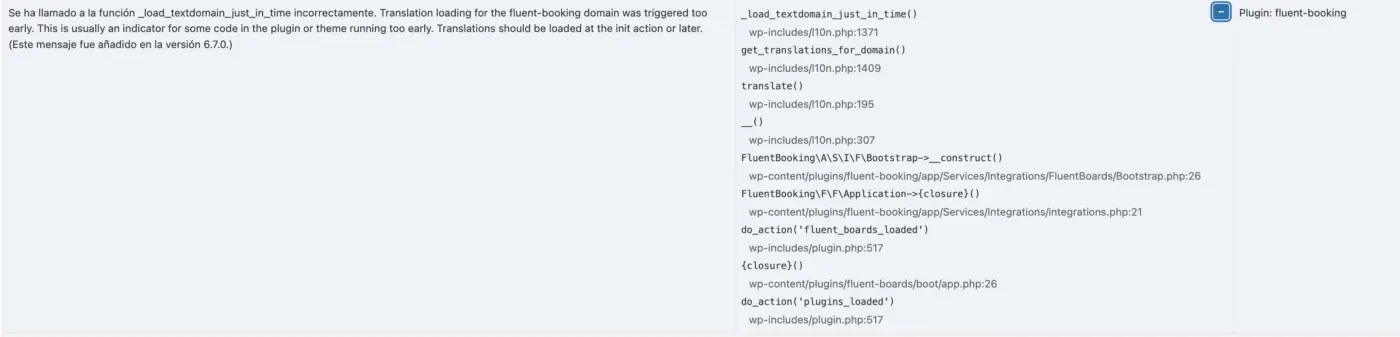
I am seeing this in the Query Monitor.
Any hint on how to fix this error?

I would like to kindly ask at what stage the ticketing system in FluentBooking is (it’s listed as “planned” on the roadmap). Are we talking about 5 years, 1 year, 2 months? I’m looking for a rough estimate—this will help me decide whether to continue investing in other ticket-sales plugins or to gradually transition into the Fluent ecosystem.

I have been trying to see what I can break on the customer side, like submitting a phone consultation without a phone number. Just purchased the pro version so I can get SMS messaging and calendar integration now that most of it is doing what I want.
- I get an incorrect error saying "Please provide a valid location for this meeting" I would like to change the error message to "Please provide a valid phone number for this appointment"
- I also get a bug when I try to skip the phone number. The country code disappears and I have to reload the page and start from scratch to bring it back. If I try to select United States, it shows a blank in the country code. If I try to toggle another country, I still get a blank country code. I would prefer to remove all the other countries since I am not making appointments in other countries anyway. Is there a php file somewhere where I could hard code that option?
I thought I saw developer documentation somewhere in the past, but can't find it now.

I just received an email from Pabbly Connect's team notifying that the integration I suggested/asked for FluentBooking is LIVE!!!


Hey all,
I had a real issue with fluenbooking. A student of mine would start the process of booking a lesson, he finished with the fluent booking form but after being redirected to the checkout page he wandered off for an hour. In the meantime - the booking was automatically cancelled after 10 minutes (as it should). But the student came back and completed the transaction! Now the booking cannot be marked as complete (and maybe even someone else took that slot in the meantime).
What's the solution? To remove the booking product from the cart after the X time set when the booking is cancelled. I wrote a code snippet for this and it works great. With regards to UX - we should add a note for the user so he'll know that the item was removed and to offer him to book again.
Shahjahan Jewel - I suggest you add this as a feature built-in to FluentBooking.
Here is the code:
(you need to change the booking_products array to match your woocommerce products that are attached to the booking; Also you can modify the time after which the products will be removed - if it's not set to 10 minutes in fluentbooking)
`add_action('woocommerce_add_to_cart', 'set_booking_cart_timestamp');`
`function set_booking_cart_timestamp($cart_item_key) {`
`if (!WC()->cart) return;`
`$cart_item = WC()->cart->get_cart_item($cart_item_key);`
`$product_id = $cart_item['product_id'];`
`$booking_products = [69653, 69646, 62528, 16820];`
`if (in_array($product_id, $booking_products)) {`
`WC()->session->set('booking_cart_timestamp_' . $cart_item_key, time());`
`}`
`}`

`add_action('wp_footer', 'expire_booking_cart_items_script');````function expire_booking_cart_items_script() {````if (!is_checkout()) return;````$booking_products = [69653, 69646, 62528, 16820];````$cart = WC()->cart->get_cart();````$cart_data = [];````foreach ($cart as $cart_item_key => $cart_item) {````if (in_array($cart_item['product_id'], $booking_products)) {````$timestamp = WC()->session->get('booking_cart_timestamp_' . $cart_item_key);````if ($timestamp) {````$cart_data[] = [````'key' => $cart_item_key,````'timestamp' => $timestamp,````'product_id' => $cart_item['product_id'],````];````}````}````}````if (empty($cart_data)) return;````?>````(function(){````const cartData = ` ```;````const expirationTime = 10 * 60 * 1000; // 10 minutes`

    cartData.forEach(item => {
        const timePassed = Date.now() - (item.timestamp * 1000);
        const timeLeft = expirationTime - timePassed;

        if (timeLeft <= 0) {
            removeItem(item.key, item.product_id);
        } else {
            setTimeout(() => {
                removeItem(item.key, item.product_id);
            }, timeLeft);
        }
    });

    function removeItem(cart_item_key, product_id) {
        const formData = new FormData();
        formData.append('action', 'remove_expired_booking_item');
        formData.append('cart_item_key', cart_item_key);
        formData.append('security', '<?php echo wp_create_nonce("remove_booking_item"); ?>');

        fetch('<?php echo admin_url('admin-ajax.php'); ?>', {
            method: 'POST',
            body: formData
        })
        .then(res => res.json())
        .then(response => {
            if (response.success) {
                location.reload();
            }
        })
        .catch(err => {
            location.reload();
        });
    }
})();
</script>
<?php
}

add_action('wp_ajax_remove_expired_booking_item', 'remove_expired_booking_item');
add_action('wp_ajax_nopriv_remove_expired_booking_item', 'remove_expired_booking_item');
function remove_expired_booking_item() {
// Verify nonce for security
if (!wp_verify_nonce($_POST\['security'], 'remove_booking_item')) {
wp_send_json_error('Security check failed');
}
```
if (!WC()->cart || !isset($_POST['cart_item_key'])) {
    wp_send_json_error('Missing cart data');
}

$cart_item_key = sanitize_text_field($_POST['cart_item_key']);
$booking_products = [69653, 69646, 62528, 16820];
$cart = WC()->cart->get_cart();

if (!isset($cart[$cart_item_key])) {
    wp_send_json_error('Cart item not found');
}

$product_id = $cart[$cart_item_key]['product_id'];
if (!in_array($product_id, $booking_products)) {
    wp_send_json_error('Not a booking product');
}

// Check if item has actually expired server-side
$timestamp = WC()->session->get('booking_cart_timestamp_' . $cart_item_key);
if ($timestamp && (time() - $timestamp) < 600) { // 10 minutes = 600 seconds
    wp_send_json_error('Item not yet expired');
}

$removed = WC()->cart->remove_cart_item($cart_item_key);
WC()->session->__unset('booking_cart_timestamp_' . $cart_item_key);

// For logged-in users, we need to update the persistent cart in the database
if (is_user_logged_in()) {
    WC()->cart->persistent_cart_update();

    // Also manually update the user meta to make sure it's saved
    $user_id = get_current_user_id();
    $cart_data = WC()->cart->get_cart_for_session();
    update_user_meta($user_id, '_woocommerce_persistent_cart_' . get_current_blog_id(), array(
        'cart' => $cart_data,
    ));
}

// Force save session data
WC()->session->save_data();

if ($removed) {
    wp_send_json_success('Booking product removed');
} else {
    wp_send_json_error('Failed to remove cart item');
}
```

}Hey All,
Is anyone here using PixelYourSite? How did you define an event when someone books a meeting?

Hey, how is it possible to use the {{add_booking_to_calendar}} in Redirect URL? I want to use a custom thank you page, but I don't know how to use Add to Calendar button on that custom page.
The URL looks like:
It's very long and it's not working with Elementor's Dynamic Tags -> Request Parameter.

#)
Hi, how can I send an invitation link in a FluentCRM campaign that automatically adds the contact as an attendee in my FluentBooking one-off event?
hi, is there an ETA on appointment bundles? https://fluentbooking.com/roadmap/idea/46/