


Issues with Time Zone Display and Reschedule Email Notifications
I'm currently testing out Fluent Booking and have run into two issues that I can't seem to resolve:
1. Incorrect Time Zone for Appointments
All appointment timestamps are being recorded and displayed in UTC, even though I'm located in the America/Toronto time zone.
- The WordPress time zone is correctly set under Settings → General.
- The server is configured to America/Toronto, as confirmed in the
php.inifile (date.timezone = "America/Toronto"). - I also verified the server time zone via SSH using the following command:
[jb@server ~]# php -i | grep "date.timezone" date.timezone => America/Toronto => America/Toronto
Despite this, Fluent Booking continues to display all bookings in UTC instead of the correct local time.
2. Reschedule Email Notifications Not Sent to Organizer
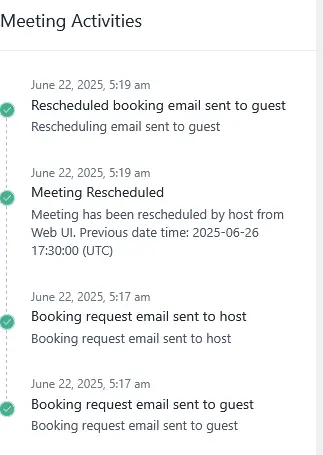
When a user reschedules an appointment, the attendee correctly receives the "Booking Rescheduled by Organizer (email to Attendee)" notification. However, the organizer does not receive the corresponding "Booking Rescheduled by Attendee (email to Organizer)" email.
This notification is enabled in the settings, but no email is being triggered when an attendee reschedules their booking.
Could you please advise on how to resolve these two issues, or let me know if others are experiencing the same problems?

I also have this problem
James Blunt Did you manage to solve it?

Will take a look. In the frontend, we always show the browser timezone.
James Blunt ewel @j
I solved the problem.
I set the Linux timezone and php.ini to UTC and the Wordpress timezone to America/Sao_Paulo