


https://dash.fluentbot.ai/

When cron runs, it reaches FluentCRM's scheduled task, that task queries a table that doesn't exist, and the whole run dies. Everything after it in the queue never executes.
No emails are being sent out by the website – I'm not sure how the table could be missing. Should I reactivate the plug-in or is there some other fix I could do? I haven't updated any plugins today

About 230 strings in FluentCRM 3.2.0 and Pro 3.2.0 stay English, whatever translation is installed. I found them while translating both plugins into German (6,188 strings, informal and formal). Everything below was measured on 3.2.0.
1. Pro messaging: 220 strings without a translation map
The SMS/WhatsApp screens look up their texts with $t(), but none of these 220 keys is in app/Services/TransStrings.php, and Pro has no map of its own. So inbox, template editor, audience selector and the message history in the contact profile stay English in every language. Examples: "Conversations", "Choose an approved template", "Add Unsubscribe Button", "Consent confirmed". Most of them sit in Inbox.js (53), TemplateEditor.js (38), OneTimeAudienceSelector.js (33), ProfileMessages.js (30), Templates.js (27) and CreateFlow2.js (26). I can post the full list.
2. Missing keys in the core map
- Plurals via
$_n(): "%d Email / %d Emails" and "%d subscriber / %d subscribers" in the sequence list, "%d field / %d fields" in the company form - "Could not import campaign", "No email templates found.", "Upgrade to FluentCRM Pro to Get Messaging Settings"
- "System Admin Tools", the only one of 23 titles in the settings menu without a map entry
3. Hard-coded English
- Dashboard period selector: "30 Days", "60 Days", … (
periodOptionsin Dashboard.js) - Default title of a new email template: "Untitled - Created at …"
4. Raw keys in the English UI
TransStrings.php passes AbCart_Opt_Out_Help_Prefix and AbCart_Opt_Out_Help_Suffix to __() as source strings, so the abandoned cart settings show the keys themselves. Probably meant: "Use the smartcode" and "to let users opt out of cart tracking."
5. Two versions of the runtime translator
One replaces /%(\d*)\$?s|%d/, the other /%(\d*)s|%d/. The second one leaves a stray $s behind when a string uses %1$s.
6. Typos in source strings
"Max Rune Time", "Compact Compact View", "may not 100% correct". One hint about FluentCart data says "FluentCRM".
7. One source string, two meanings
"Cancelled" is used for sequences and for orders, "Title" for notes and for the name prefix (Mr/Mrs) in the email preference form. German needs different words here; a msgctxt would separate them.
Happy to test fixes.
Peter

So, in Fluent CRM a campaign is actually just a single e-mail to a group of people. What I would rather see is that a campaign is a combination of different things or objects, such as
- a landingspage
- blogs
- custom urls
- e-mails
- social media posts
- whatsapp conversations
- send forms
- etc
Is that something that will be build soon?

Hello,
After last update... I've seen my campaign desapeared!
I only have the ones I sent in April and the ones from before..
None of April to taoday sendings are existing.
Even the one I created right now!
Is anyone facing the same issue?
Thanks!
Claire

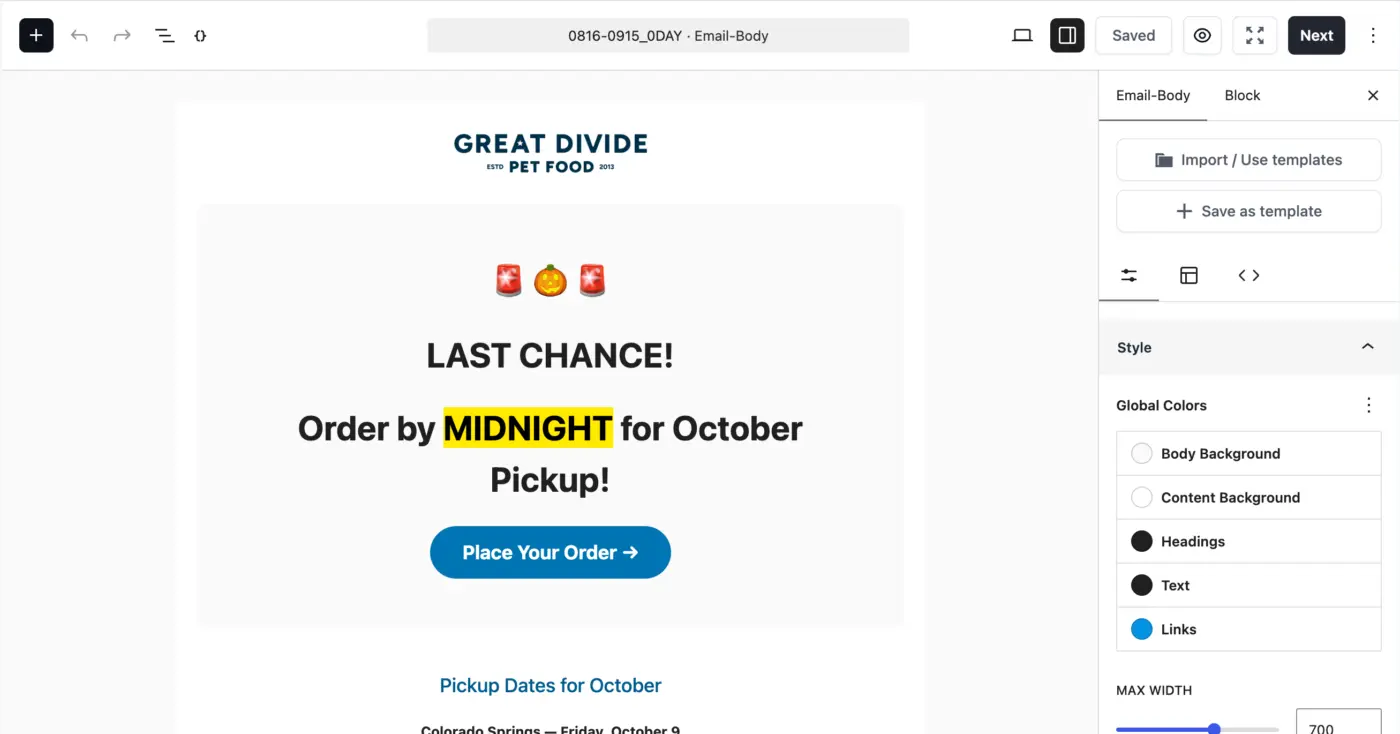
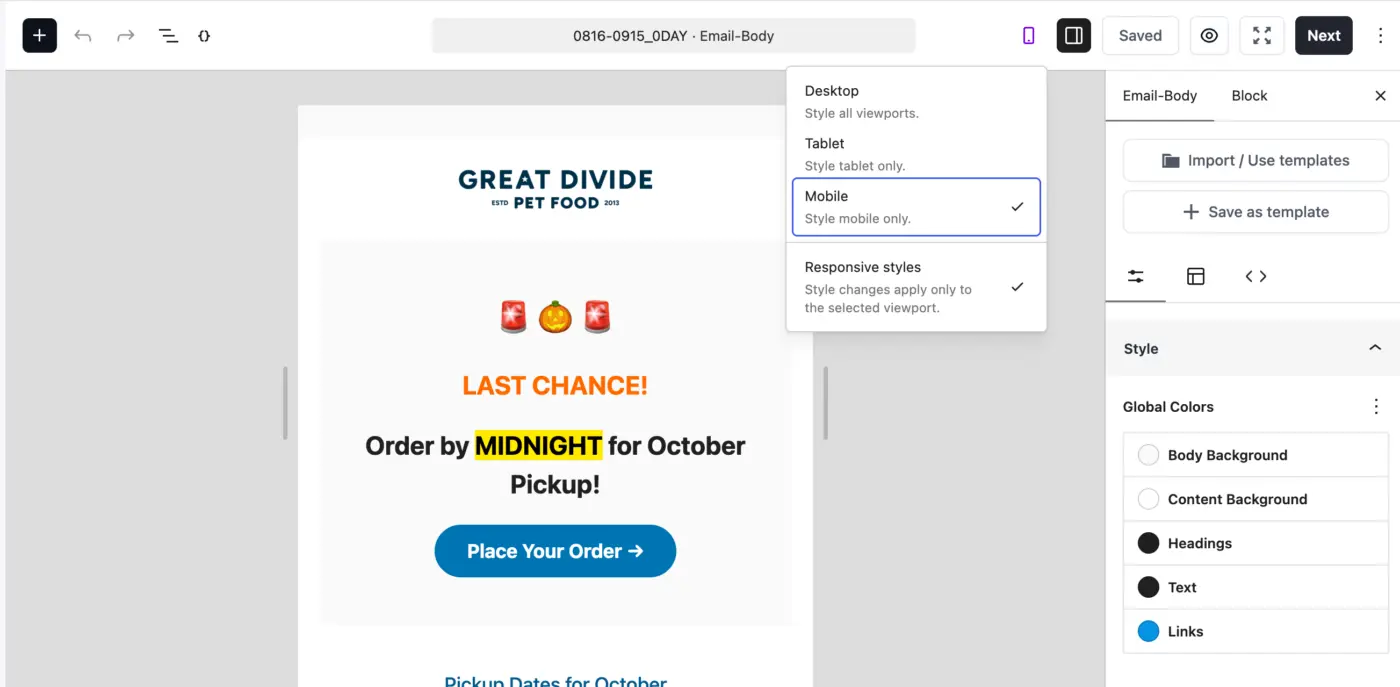
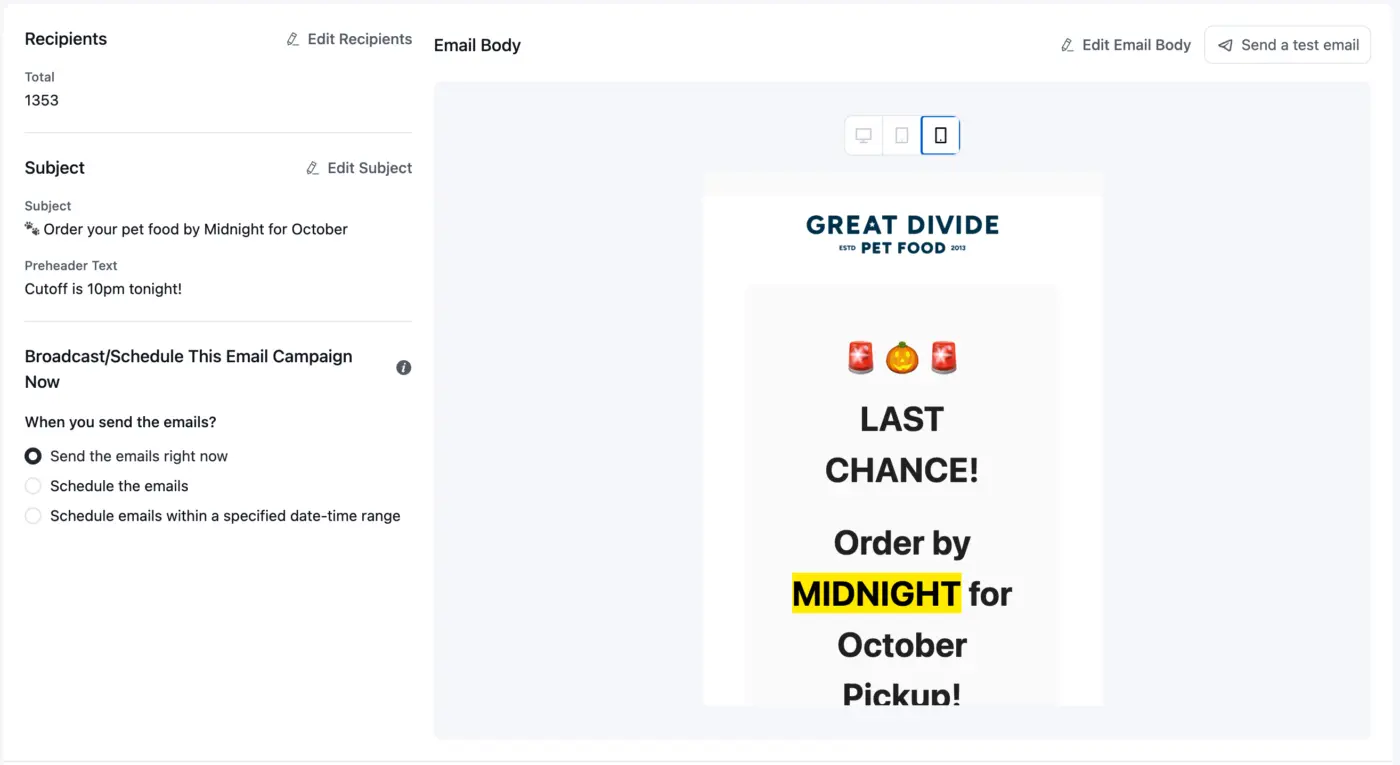
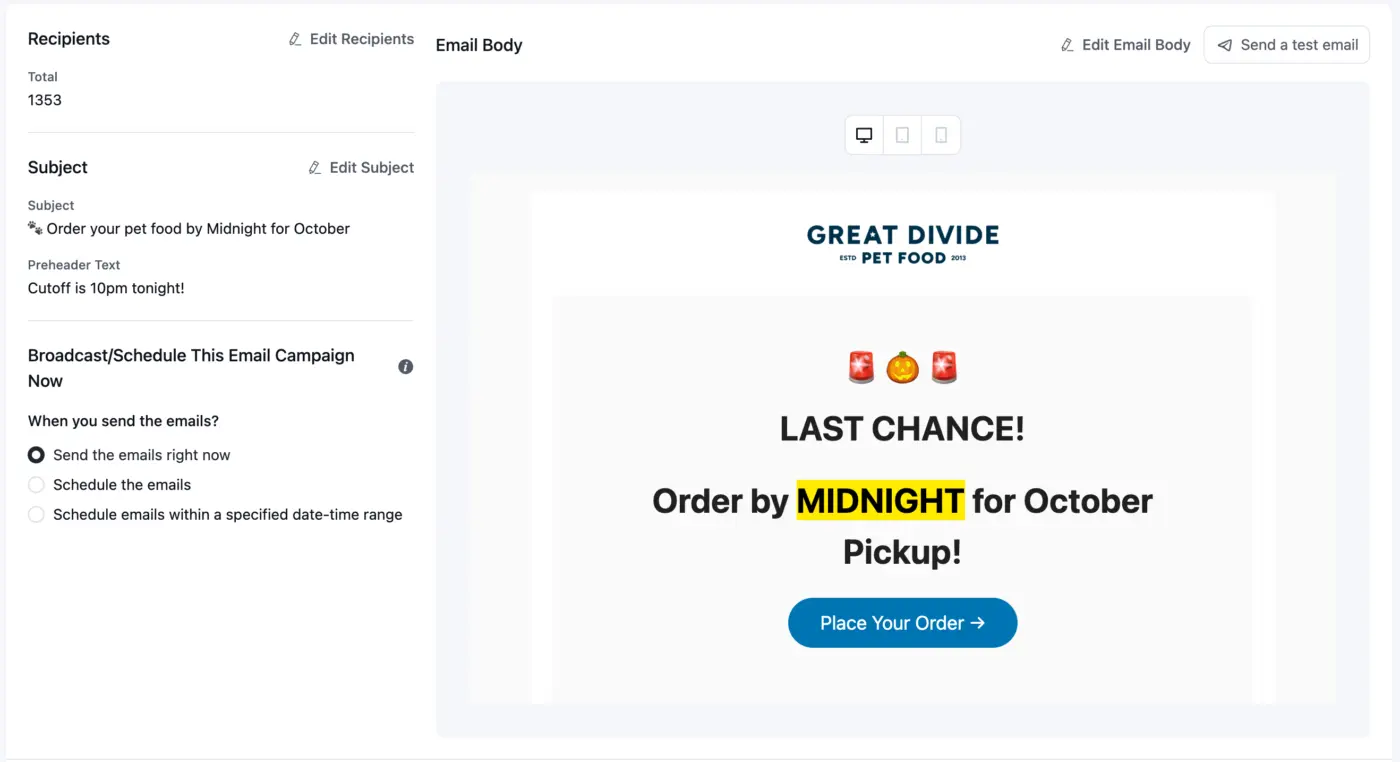
Update - I'm updating this to a bug report - when I use the responsive styles it's not even rendering the responsive styles in the step 4 preview, nor are they making it into the email that gets sent. Maybe I'm doing something wrong, but still hoping to hear from others that ARE getting this right. Thanks all!
Is anyone out there trying to do the lords work getting this gutenberg responsive function working for email? I have spent tons of time trying to convince the mobile responsive styles to load at all and am simply not seeing it in my testing. Changes that I see in the campaign editor aren't making it to the client - even simple things like mobile color change for a heading or something.
I understand that NOT styling is the best styling for email, but you try and tell an ecommerce client who came over from mailchimp or klaviyo that they can't reliably style their mobile template.
Anyone working on high-touch email template design - would love to form a working group or something to really dial in both a) deliverability and b) formatting.
Again, yes, I understand that those two are separate concerns, but i suspect many of us are dealing with both issues to some degree.
Hi everyone!
I’ve been experiencing a strange issue with images in my FluentCRM emails since an update around May or June.
The images I use in my emails are hosted on my own website — the same website where FluentCRM is installed.
Since that update, I consistently see the “Stop! This image was hotlinked” placeholder instead of the actual images when creating or previewing emails directly in FluentCRM.
What makes it even stranger is that the exact same email displays differently depending on the email provider.
For example:
– In Gmail, the images display correctly.
– In another mailbox I use, hosted by SFR, the images are replaced by the “This image was hotlinked” placeholder.
So I’m not trying to display images hosted on someone else’s website: these are my own images, hosted on my own website, and used in emails sent through FluentCRM.
I understand this may be related to hotlink protection on my server, but since the issue started after a FluentCRM update and also appears directly within FluentCRM, I’m wondering if something may have changed in the way images are retrieved or displayed.
Has anyone experienced the same issue?
And is there a recommended configuration to make sure images used in FluentCRM emails are always displayed correctly?
Thanks a lot for your help!
Claire

Came across an issue that would be worth looking into. It looks like if a user has a comma in their name. FluentCRM campaign mailer does not properly escape that. So when it gets sent into the SMTP sender with that comma, it causes a syntax issue and therefore causes delivery failure.
The issue actually could be with FluentSMTP, specifically with the Postmark handler in this particular case, not actually accommodating for that.
Just had this happen with my own site, but I've actually had it come up on a couple of my clients as well. Most of my clients are using Postmark, so this might explain it.

This week I started getting lots of emails from myself. It looks like I'm being copied on some, but not all, emails out of FluentCRM.
I have 100 copies of today's campaign, addressed to someone else and showing their email address but appearing also in my inbox. I'm not sure what the distinction is that only these 100 of 5k+ came to me.
I also have 187 "undelivered, return to sender" emails, which suggests I need to check my contact list after the latest import but also, I did not used to get these in my inbox.
I haven't changed any settings, so I don't know why this is happening. I did import a few hundred new (promo opt-in) contacts yesterday, and I sent a campaign today, but I was getting some strays before yesterday. Any ideas?
Hello :)
The French Data Protection Authority (CNIL) recently published its final recommendation regarding tracking pixels and tracked links in emails. (As Italy by the way)
According to this recommendation, consent to receive marketing emails does not automatically constitute consent to the individual tracking of email opens and link clicks, particularly when this data is used for profiling, segmentation or marketing automations.
I currently use FluentCRM together with Fluent Forms, and I need to adapt my setup to comply with these requirements.
Could you please explain how this should be managed within FluentCRM?
More specifically:
- Can I store a contact’s consent to email tracking separately from their subscription status?
- Can FluentCRM dynamically disable both the open-tracking pixel and link tracking for contacts who have not consented, while still sending them the email normally?
- Can contacts withdraw only their consent to tracking without unsubscribing from the mailing list?
- Does FluentCRM keep sufficient proof of this consent and its withdrawal, including the date and source of the consent?
- How should automations based on email opens or link clicks behave for contacts who have not consented to tracking?
- Is there a recommended procedure for managing existing subscribers and collecting or recording their tracking preferences?
If these features are not currently available natively, could you please let me know whether there is a recommended workaround or whether support for consent-based tracking is planned?
Here is the CNIL recommendation for reference:
https://www.cnil.fr/fr/recommandation-pixel-suivi-courriels
Thank you for your help.