


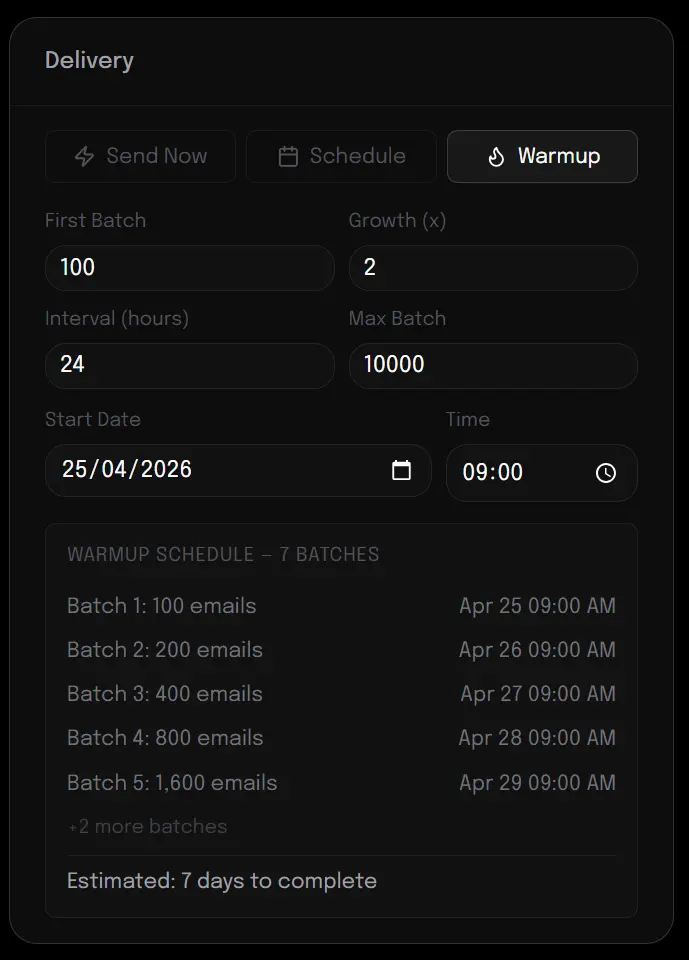
Is there any chance we can get a warmup domain feature? For example, if my domain is sending only 50 emails a day coming from automations, when sending a campaign I would want to start i.e. by sending double that amount. So I would start the campaign by sending out 100 emails and then slowly increase the amount of emails being sent each day.
(Screenshot is from another email delivery software I'm using that has domain warmup)

Hi everyone,
Posting this because it's going to land on a lot of EU inboxes in the next few weeks and I'd rather we discuss it here before panic sets in.
On April 17, 2026 the Italian Data Protection Authority published a binding opinion on email tracking pixels. The short version: the open-tracking pixel that FluentCRM (and basically every other email platform — Mailchimp, Brevo, ActiveCampaign, HubSpot, Klaviyo, Substack, all of them) injects by default into campaigns is now classified under Art. 122 of the Italian Privacy Code, which is the local implementation of the EU ePrivacy Directive. In practice this means the pixel requires prior, specific, informed, freely given consent — the same standard that already applies to non-essential cookies.
A generic newsletter opt-in is no longer enough. The user must either explicitly consent to tracking, or be given a granular way to opt out of tracking while remaining subscribed.
Three things worth knowing:
1. This is not only an Italian problem. The legal foundation is the EU ePrivacy Directive, which applies everywhere in the Union. The Italian ruling is the first explicit interpretation on pixels specifically, but other national authorities (CNIL in France, the German DPAs, the Irish DPC, etc.) tend to align quickly on this kind of interpretation. If you send newsletters to EU recipients from anywhere in the world, this concerns you.
2. There's a grace period, then real sanctions. Italian businesses have six months from publication in the Official Gazette to comply. After that, fines fall under GDPR Art. 83 — up to €20M or 4% of global turnover. This is not a "€500 slap on the wrist" regime.
3. The fix is technical, not just legal. You need (a) an updated privacy policy that explicitly names tracking pixels and the data they collect, (b) a mechanism for subscribers to opt out of tracking without unsubscribing from the newsletter, (c) the ability to actually suppress the pixel for non-consenting contacts.
On point (c), FluentCRM right now doesn't expose a per-subscriber opt-out flow or a clean filter hook to conditionally suppress the pixel at render time — I've opened a feature request ticket with the Fluent team asking for both admin-level and subscriber-level tracking controls, plus developer hooks as a minimum viable step. If this matters to your business, adding a +1 or your use case to that ticket helps it move up the roadmap.
In the meantime, a few things I'd suggest to fellow EU users:
- Audit your current opt-in flow. Does your privacy policy mention tracking pixels explicitly? If not, it needs to.
- Don't panic-send a re-consent email tomorrow. You have time. Plan it: decide who needs what (fresh opt-in vs tracking-specific re-consent vs nothing because the existing policy already covers it).
- If you rely heavily on open rates as a KPI, start now on an alternative engagement model (replies, clicks on meaningful links, conversions) — a meaningful chunk of your audience will end up in a non-tracked segment either way.
Happy to discuss specific implementation ideas if anyone has them — I'm a developer running an agency managing EU/Swiss clients, so I'm looking at this from both the compliance and the "how do we actually build it" side.
Source https://www.garanteprivacy.it/home/docweb/-/docweb-display/docweb/10241943 https://www.garanteprivacy.it/web/guest/home/docweb/-/docweb-display/docweb/10241977

Another step closer to the stable 3.0 release.
Since RC-1, we've been working through the feedback and issues you reported. This one brings a couple of nice new additions along with a solid round of fixes and polish.
What's new in RC-2
- Frontend Portal: You can now give your contacts a clean frontend view to manage their own profile and preferences. This has been a long-requested feature, and we're excited to finally ship it. You can enable that from FluentCRM -> Addons
- New Bulk Selection UX/UI: Selecting contacts and emails, and running bulk actions on them, feels a lot better now.
- Floating action bar for bulk actions in Contacts and Emails, so your actions follow you as you scroll.
- Contact pagination up to 600 per page: If you manage large lists, this one makes a real difference.
Fixes
- Synced Pattern issue
- Pattern Edit issue
- Email Global Style issue
- RTL issues
- Automation Benchmark issues
- More UI fixes across the app
Improvements
- Better bounce handling
- Other small improvements and bug fixes throughout
How to install the latest RC
- Download & Install Fluent Toolkit addon
- Activate the plugin, then go to Fluent Toolkit and install/update FluentCRM Beta and FluentCRM Pro Beta
- That’s it.
How you can help
If you can, please install RC-2 and run it against your real workflows. The more edge cases we catch now, the cleaner the stable 3.0 release will be.
Drop bugs, feedback, or general thoughts right here in this space. We read everything.

I'm using FluentCommunity and have three different memberships: teenagers, adults and professionals. I have built a custom dashboard for all of the memberships. After login, I would like to redirect people to their membership dashboard. So if you have tag teenager, you are redirected to Teenager Membership Dashboard, if you have tag Adult, you are redirected to Adult Membership Dashboard etc.
This site is using FluentCRM, FluentAuth, FluentForms, FluentCommunity and FluentCart. Is this possible with this stack?

Are automation templates available for FluentCRM? In watching loads tutorial videos where automation flows are mentioned with quick screenshots. Looks great, but then I'm finding myself looking at blank page, with all the options, and not sure what to build. 'you don't know, what you dont know' type thing.
I've built a couple flows, but I'm sure I'm only just scratching the surface. Not least because I've got nearly the full Fluent suit.
A library of automations around use case scenarios would be great.
Basics, course owners, community builders, etc.
Even better, an AI integration to plug in what tools you use, what your trying to achieve.. and vola! A list of recommend automation templates.
I'm a one man band, so im very keen to do as much as I can using automation processes. 👍

Our customer uses FluentCRM and FluentSupport together to manage WooCommerce orders. They handle order customizations through FluentSupport — when a new order comes in, a support ticket is automatically created.
Problem:
There is currently no way to automatically update the WooCommerce order status when the associated FluentSupport ticket is closed. The workflow is one-directional: an order can trigger a ticket, but closing the ticket cannot update the order back.
Requested Feature:
Add an automation action (or trigger-based option) in FluentCRM that allows updating a WooCommerce order status when a FluentSupport ticket status changes — specifically when a ticket is closed or resolved.
Example Workflow:
- New WooCommerce order → FluentSupport ticket is created automatically
- Team works on the order customization via the ticket
- Ticket is closed → WooCommerce order status automatically updates (e.g., to “Printing” or a custom status)
This would close the loop between FluentSupport and WooCommerce, making the integration significantly more useful for teams that manage order fulfillment through support tickets.

FluentCRM V2.9.87
FluentCRM Pro Version 2.9.86
Automations doesn't support WooCommerce Subscription variable subscriptions. While regular variable products are supported.
Steps to reproduce.
- Create Variable subscription product with variations
- Go to Automations and create one
- Create from Scratch
- Woocommerce → Subscription activated → Continue
- Conditions → Target Products → Select the variable subscription created on step 1 → Save setting
- Add action Check Condition → Specify Matching Conditions
- Add → WooCommerce → Purchased Product Variations
Variations doesn't appear in the field.
Accordingly, I cannot assign tags or move a CRM subscriber to lists that correspond to variation-based subscription plans.

I feel that the developer docs are hinting at it. :😅

Hello,
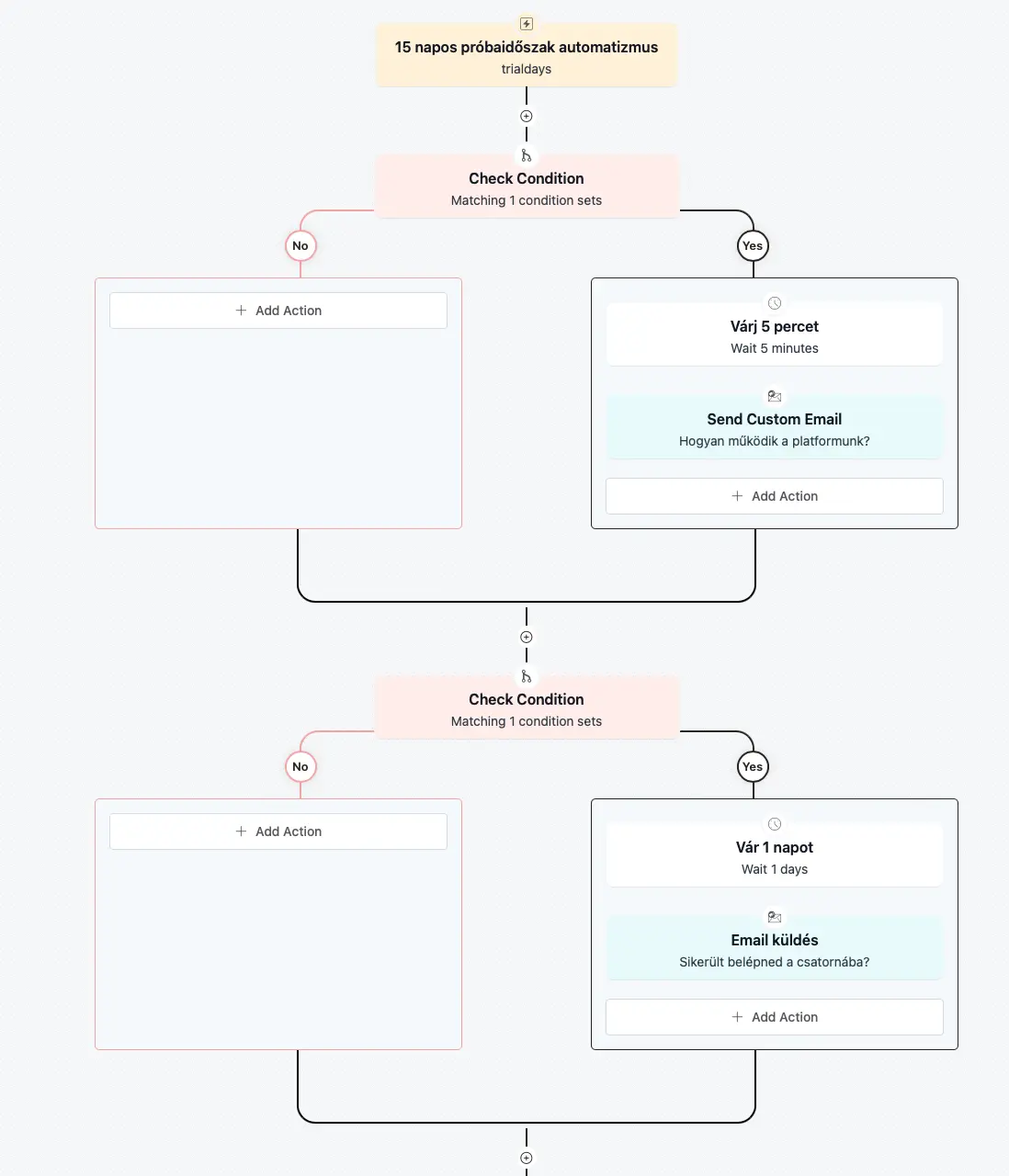
I recently purchased FluentCRM. It is incredibly good — truly brilliant — but there is something I do not understand. I also attached a screenshot of my automation.
What I would like is the following: when someone receives the Trial Days tag, they should get an email 5 minutes later, then a second email on day 1, and then another email on day 3. So basically, I want to create an email sequence.
However, what I see is that the system does not even seem to try to send these emails at all. Do you have any idea what could be causing this? What might I be doing wrong? Could you please help me with this?
I am sure the issue is not with my website, because the cron jobs are working properly. I am also using FluentSMTP, and my other emails are being sent successfully. It is specifically this automation that does not want to work.
What would you guess the problem is? What could I be doing wrong?
Thank you very much in advance for your help.

Start setting up campaign derict take visual builder. The saved template dont import. when i choose default gutenberg. and then import. It works. ;) Did not test the others