I was really excited to read all the news about FluentCRM 3.0. I have a number of clients that use it and I always recommend it for clients looking for all Wordpress solution to contact management and bulk email. It's affordable, reliable and powerful
I was especially excited to hear that the email was going to be "a truly Gutenberg-native experience" because all my clients complain about how limiting and weird the email editor is compared to what they can do when they are building posts and pages.
So I was really disappointed to give v3.0 a whirl on a client's development site and to discover that it's not, actually all that. See on my clients' Gutenberg Wordpress sites, I can install a plugin block suite like Kadence or Otter or whatever and use those their blocks when I build pages, posts etc.
But not FluentCRM emails. There are more blocks available in v3 to be sure, but none of the ones that I use to build the client's site. So I still have to hard-code the email templates to have them appear consistent with the site's branding and design.
Also, the campaign archive function still doesn't include archives of recurring campaigns. My clients want this because they need to be able to show their funders/grantors etc their ongoing email communication. But only regular email campaigns are supported.
Thank you for FluentCRM and for bringing it along. I expect version 3 will still be useful to my clients eventually.

If you build websites for clients or run your own business, you already know that email marketing is the highest-ROI channel in existence... AND yet, standard tools like Mailchimp, ActiveCampaign, and ConvertKit are quietly bleeding your cash flow dry every single month as your list grows.
*** BUY FluentCRM Get 20% OFF (Use Coupon MAK)**
BUT you don’t have to rent your marketing infrastructure from expensive SaaS companies anymore. THEREFORE, in this video, I’m showing you exactly how to build a professional, automated self-hosted email marketing system directly inside WordPress for less than $5 a month.
Stop paying the "growth tax" to external platforms. Whether you use Divi, Elementor, or Gutenberg, this complete system unlocks enterprise-level automation, hyper-targeted tagging, and flawless delivery without the monthly overhead.

Small one today with a useful little addition baked in.
New
- WP Media Library is now connected to the Email Editor footer. Pull images directly from your media library, no manual uploads needed.
- Compatibility with WordPress 7.0
Improvements and fixes
- Template import in the Visual Builder runs more smoothly now.
- Duplication issue in sequences fixed.
- Synced Pattern saving is working correctly.
- List block rendering fixed for RTL languages.
- WooCommerce single product email mobile layout fixed.
- Campaign emails table contact column overflow cleaned up.
- A few more RTL fixes underneath.
If you've been reporting bugs in this community or through support, thank you.

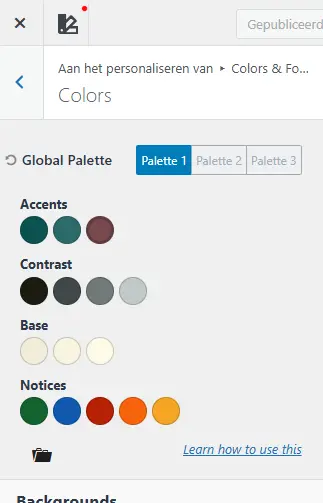
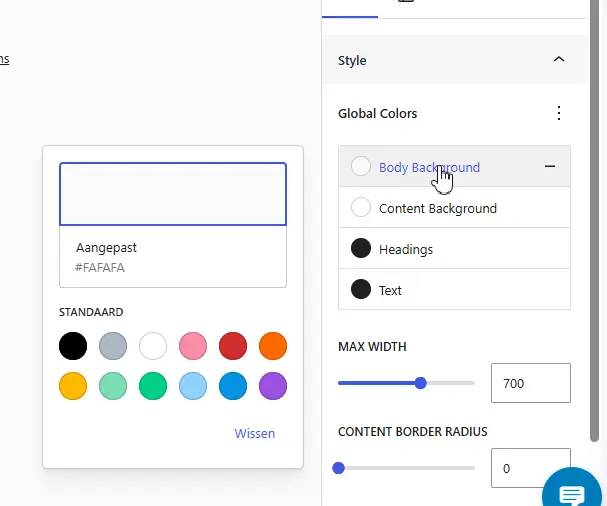
Would be great if global colors were adapted from WP global colors set in customizer

Hi FluentCRM team,
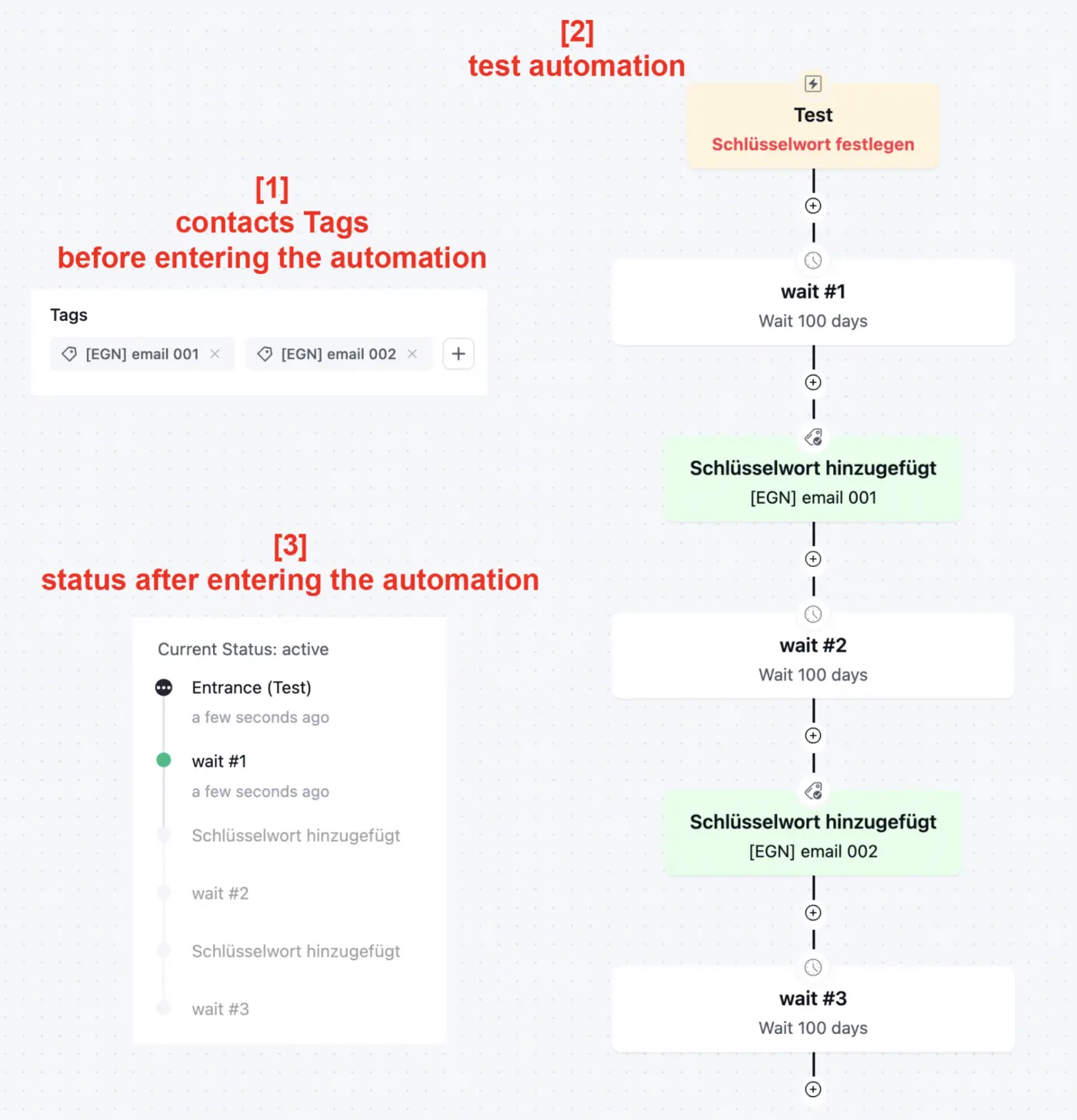
I noticed that Goals based on tags only work when the tag is added while the contact is already inside the automation.
If the contact already has the tag before entering the automation, the Goal is ignored, even with:
- “Optional Point”
- “Contact can enter directly to this sequence point”
Expected behavior:
The contact should jump directly to the Goal if the tag already exists.
Current workaround:
I have to remove tags first and use a “tag removed” Goal instead, because only changes happening inside the automation are detected.
Would be great if existing tags were also recognized on automation entry.
Thanks!
Tiny but useful one. Pushing this out today so everyone on V3 gets the smoothest experience possible.
What's fixed:
- Blank page issue affecting some server setups (this was the biggest one, worth updating right away if you hit it).
- Template import is now working correctly.
- EDD order success trigger firing as expected again.
- Email footer rendering inconsistencies.
- Recurring campaign composer issue fixed.
- A few smaller polish fixes underneath.
We are making FluentCRM better and faster in every iteration.
FluentCRM 3.0 is finally here… so I decided to do something risky.
Instead of testing it on a staging site, I updated FluentCRM directly on my LIVE business website the same website that runs Divi University, my email automations, campaigns, memberships, and community.
https://diviuniversity.com/fluentcrm
In this video, I test:
• The brand-new FluentCRM 3.0 dashboard
• The speed improvements
• The new Gutenberg email builder
• AI email writing tools
• SMS integrations
• Conditional content
• Automation updates
• Reports & analytics
• FluentCart integrations
• UI/UX improvements
I’ve been using FluentCRM for nearly 5 years, and it has completely replaced expensive email platforms for my business. If you’re using WordPress and email marketing, this update is worth seeing.

On this page Jacob Marinko posted something I found rather intriguing, but at the same time overwhelming. So I turned to chatGPT. This is its reply:
The “plugin” is not a normal AI writing assistant. It is an AI control layer for WordPress.
In plain English:
Wicked Evolutions is building a system that lets AI agents operate WordPress through structured, permission-aware “abilities” instead of random scraping, guessing, or browser clicking.
What it actually is
The docs describe a stack called Abilities for AI by Wicked Evolutions. Their homepage claims a complete reference for 740 abilities across 39 modules, connecting AI agents to WordPress through the WordPress Abilities API.
The architecture is roughly this:
- You use an AI client, for example Claude Code, Cursor, or another MCP-capable tool.
- That AI talks to a local Abilities MCP Bridge, a Node.js process.
- The bridge sends requests over HTTPS to your WordPress site.
- A WordPress plugin called Abilities MCP Adapter receives those requests.
- The adapter calls WordPress’s Abilities API.
- The registered abilities then perform real WordPress actions.
So the AI does not merely say, “Here is some PHP code.”
It can potentially say:
“Create this page.”
“Edit this block.”
“Read these CRM contacts.”
“Generate this dashboard.”
“Update this FluentCRM segment.”
“Diagnose this plugin state.”
And then actually execute structured calls.
The product suite
According to the docs, the suite has four main pieces:
Abilities for AI
This exposes WordPress core operations to AI: content, blocks, media, users, themes, settings, and related site functions.
Abilities for Fluent Plugins
This is the part that matters most for your Fluent ecosystem. It claims 382 abilities across 13 modules for Fluent plugins.
Abilities MCP Adapter
This is the WordPress plugin that translates AI/MCP requests into WordPress Abilities API calls.
Abilities MCP Bridge
This is the local bridge that connects AI clients to one or more WordPress sites. The docs describe it as multi-site capable.
Their GitHub profile also describes the project as infrastructure that makes WordPress “AI-native” by shipping ability libraries, protocol adapters, transport bridges, and a knowledge layer.
Why FluentCRM / FluentCommunity is central here
The GitHub repository list includes a project called abilities-for-fluent-plugins, described as a “first-party WordPress Abilities API translator for the Fluent plugin ecosystem,” covering CRM, Community, Forms, Boards, Booking, Cart, Affiliate, Support, SMTP, Auth, Snippets, and Messaging.
That means this is not just “AI for WordPress pages.”
It is trying to make the Fluent ecosystem operable by AI.
For you, that could eventually mean:
“Find everyone in FluentCRM who joined the Master Key community but has not bought VIP.”
“Create a FluentCRM automation for German users who clicked the Sacred Symbols iOS announcement.”
“Analyze FluentCommunity engagement and identify the most active members.”
“Draft a campaign for people who listened to chapter 7 but did not subscribe.”
“Create a dashboard of purchases, community activity, and CRM tags.”
That is the real promise.
The “Core CPT Bridge Effect”
One of the more interesting claims from their prototype docs is that AI can operate many WordPress plugins through WordPress’s own structures, especially custom post types. They call this the WordPress Core CPT Bridge Effect.
Plain English:
Many plugins store their data as WordPress posts, post meta, taxonomies, users, options, or custom database tables. If the AI can safely inspect and manipulate those structures through WordPress abilities, it may not need a custom integration for every single plugin.
That is powerful, but also dangerous if permissions and scope are not very strict.
What makes this different from ordinary AI plugins
Most AI WordPress plugins do one of these things:
They generate text.
They generate images.
They create SEO titles.
They summarize posts.
They add a chatbot.
They help write product descriptions.
This is different.
This is closer to:
“Let an AI agent use WordPress as an operating system.”
That means the AI can discover available functions, understand their required inputs, execute them, and return structured results.
The docs describe this as typed, schema-validated, permission-gated calls.
That phrase is important.
It means: the AI should not just freestyle. It should call known actions with known parameters, and WordPress should check whether the action is allowed.
The “Knowledge Layer”
Another big concept is their Knowledge Layer.
They describe it as persistent AI memory built into WordPress: the AI can read site identity and state documents, log sessions and observations, use tags, and continue work across conversations.
Plain English:
Instead of every AI session starting from zero, your WordPress site would contain a memory layer saying things like:
“This site belongs to Helmar.”
“The brand is Sacred Symbols.”
“German and English are primary languages.”
“Do not alter production CRM automations without approval.”
“The current project is the Master Key System content ecosystem.”
“These pages were edited last session.”
“These workflows are known and approved.”
That could be extremely useful.
It also means the site becomes not just a CMS, but an AI-operable knowledge environment.
Alpha / pre-alpha status
This is still early.
The public docs say v0.3.0.
The GitHub profile says Alpha launching April 2026.
The prototype repository says they are in pre-alpha, using the stack to build their own site and documenting every gap as a product improvement.
So I would treat this as:
Very promising architecture, but not yet something I would blindly trust on a production CRM.
The big opportunity for you
For your ecosystem, this could be huge.
You already have:
Sacred Symbols
FluentCRM
FluentCommunity
WordPress
Fluent/WordPress automations
Master Key System content
Audio/Music content
Possibly WooCommerce/FluentCart/Revenue-style flows later
A system like this could become the missing bridge between your ideas and the actual operational execution.
Instead of manually clicking through FluentCRM, FluentCommunity, WordPress pages, posts, tags, segments, automations, and content updates, you could eventually have an AI agent that understands:
“This is my business system. These are my users. These are my products. These are my campaigns. These are my communities. These are the rules. Help me operate it.”
That is exactly the kind of use case where “AI-native WordPress” becomes meaningful.
The big risk
The risk is equally obvious:
If the AI can operate WordPress, it can also break WordPress.
It might:
delete or overwrite content,
change CRM tags incorrectly,
send an email campaign too early,
modify automations,
touch live customer data,
misread purchase status,
change permissions,
or make a confident but wrong structural change.
This is why I would insist on:
staging-site testing first
Never start with your live Sacred Symbols or Master Key ecosystem.
read-only mode first
Let it inspect, summarize, diagnose, and report before allowing write actions.
approval gates
No sending emails, deleting data, modifying automations, or changing user roles without manual confirmation.
audit logs
Every ability call should be logged: who called it, what changed, when, and with what parameters.
strict scopes
The AI should only get access to the abilities it actually needs.
backups before write access
Especially before letting it touch FluentCRM, FluentCommunity, subscriptions, products, or user data.
My interpretation of the original Fluent post now
The Fluent community post was not merely saying:
“Here is a cool AI plugin.”
It was likely saying:
“Here is an early alpha of a WordPress AI infrastructure layer, with special relevance to Fluent users, because it exposes Fluent plugins as AI-operable abilities.”
That makes the “free LTDs for the extended Fluent Community” much more strategic. They want Fluent-heavy users as early testers because FluentCRM, FluentCommunity, FluentForms, FluentCart, FluentSupport, etc. are exactly the kind of structured business plugins where AI operation becomes valuable.
My honest verdict
This is genuinely interesting.
Not because of the marketing phrase “AI-native,” but because the architecture makes sense:
WordPress Abilities API
plus MCP
plus Fluent plugin abilities
plus a knowledge layer
equals an AI agent that can operate a WordPress business system.
For you personally, I would absolutely watch this and possibly join the alpha — but only with a staging site or a non-critical test installation first.
The best test case for you would not be “write a blog post.”
It would be something like:
“Connect to a staging clone of helmar.live, inspect FluentCRM and FluentCommunity structures, generate a read-only map of contacts, tags, spaces, posts, automations, products, and engagement flows — without changing anything.”
If it can do that cleanly, safely, and transparently, then it becomes very interesting.
Hi there,
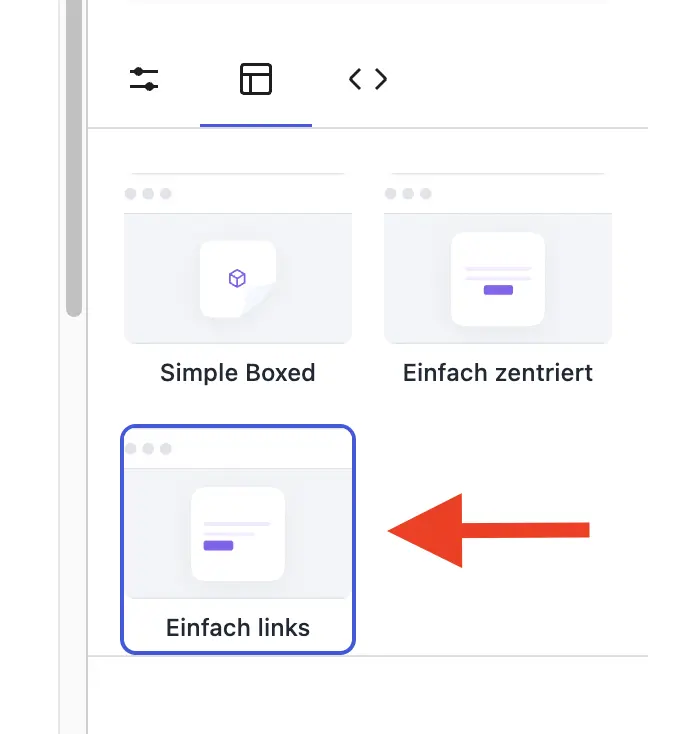
if I select “Simple Left” as the layout in the Gutenberg Editor, it switches back to centered after saving.
Thank you for fixing it.
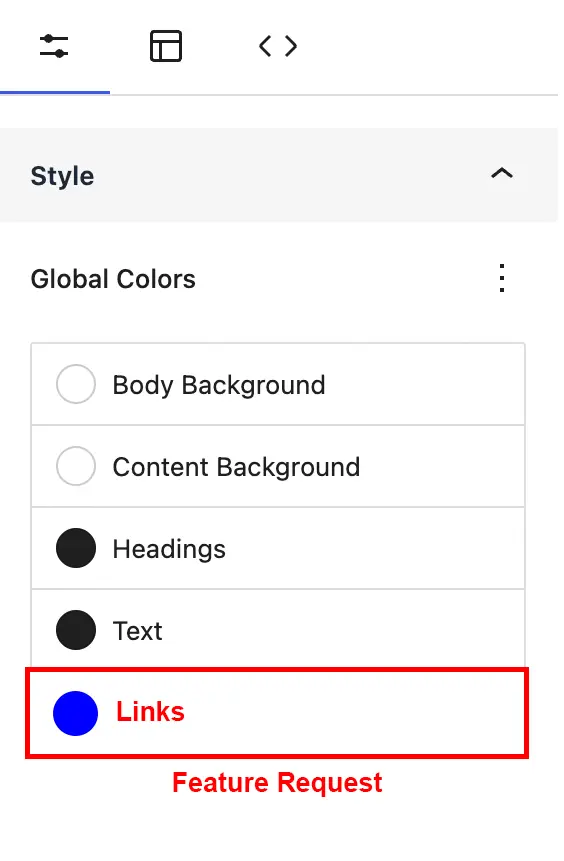
Hi there,
as the headline says, a global color option for links in the Gutenberg Editor would be great.
Maybe also add an optional underline setting/checkbox for text links.
Thank you 🙏🏼