While setting up a campaign and move through the four steps to send, I notice that the "Saved" indicator on the bottom right almost fully covers the functional button to move onto the next step. I "x out" of that indicator and move on, but it adds friction to the task. I recommend moving the functional buttons (now black) to a different place. Also, why have some of the buttons at the top and others at the bottom? Are there button location issues between mobile and desktop that they're trying to resolve?

10 days since 3.0 shipped, and you've kept the feedback coming. 3.1 is built around that feedback.
WordPress 7.0 AI support
WordPress 7 introduces a real AI infrastructure, and FluentCRM is ready for it on day one. We believe your CRM, your automations, and your AI workflows should live inside your own WordPress environment, not scattered across half a dozen disconnected tools. 3.1 plugs FluentCRM directly into that future.
AI refinements
- AI contact summaries now respect locale and language (big deal for non-English teams).
- Auto AI model handling is more reliable, with better fallback behavior.
- Gemini 3.5 Flash added to the supported model list.
Footer editing improvements
Three meaningful additions in one place after your 3.0 feedback:
- SmartCode insert menu inside the footer editor.
- Visual and Text editing modes.
- Font family selector, no CSS workaround needed.
Gutenberg, faster and steadier
- Improved asset loading and caching.
- Better automatic block recovery. This was a real source of friction after 3.0, and 3.1 handles it properly now.
- Conditional blocks no longer suppress iframe or media-only content.
Under the hood
- More reliable scheduled email processing, especially noticeable on large broadcasts.
- Searchable custom field, tag, and list dropdowns inside Advanced Filters. If you've been scrolling long lists, this one is for you.
- Plus a stack of smaller fixes across automation triggers, A/B subject validation, campaign tables, action dropdowns, and RTL rendering.
Full release notes: https://fluentcrm.com/blog/fluentcrm-3-1-0/
Keep the feedback coming. The team is cooking 👀

Does anyone know why when I create a newsletter email with Guthenberg editor in FluentCRM, then gmail client doesn't zooms the font properly? Anyone facing the same problem? How to solve?

Since Claude tells me it can’t use FCRM Templates, how does the design process work? Do I have to design everything in Claude or what is the best process?

Hey-- I think this flow could be made way simpler. I've suggested it before, and it was pretty well applauded as a quick win by the team. It hasn't made the rollout, so with alI that spectacular work on v3, maybe it's a good time for one more quick win.
Add a booking button to the user profile, just as in notes :)

Anyone know what happened to the RESTAPI? I found two different references to it in the docs, but not in the GUI?

This was requested before, but 3.0 changes things: you've shipped native SMS campaigns (many thanks for that!), yet a contact still requires email as the mandatory unique key.
We're running into exactly this right now, migrating a database where a portion of records have only a phone number and no email. Our only options today look like dropping them or creating placeholder emails, and we'd rather avoid fake addresses for deliverability reasons.
So I'm wondering: would it be possible to allow phone to act as the identifier when an email isn't available? Email could still stay the unique key wherever it's present. Thanks!

How do I configure Recurring Email Campaigns in FluentCRM to automatically send emails to subscribers when a new post is published?

Hi,
thank you for the new update and improvements in 3.0.7 🙏🏼
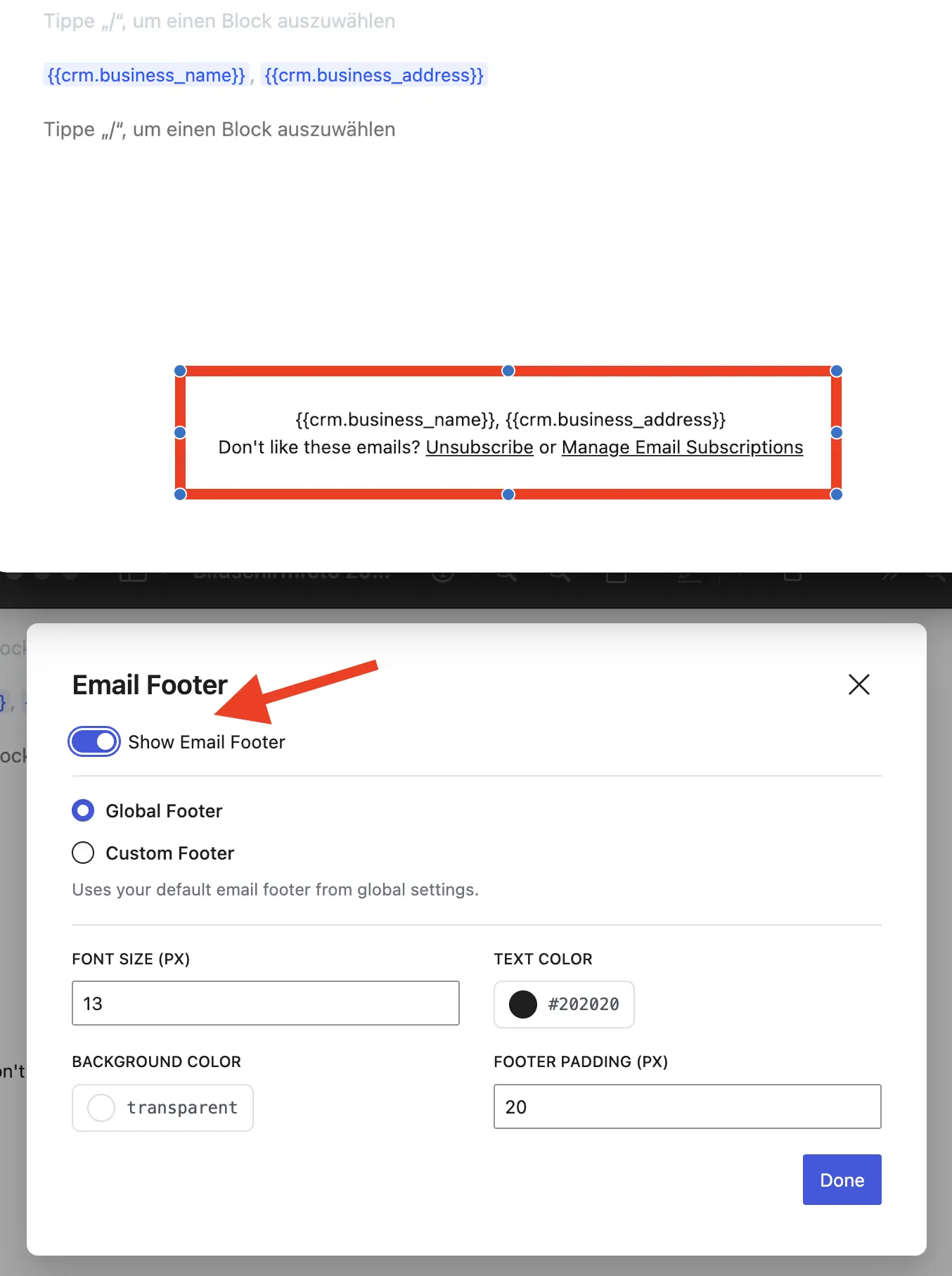
I experienced a bug with the email footer:
it is now automatically enabled again in all automations emails where I previously disabled it, and I currently cannot turn it off anymore.
The switch does not react when clicking it.
Thanks for fixing it 🙏🏼
EDIT:
I found a workaround: click "Custom Footer" > now you can turn off “Show email Footer”

I have to say that I always wait before updating plugin/tools on production sites.
Obviously, life taught me that I ALWAYS have to BACKUP before EVERY update/change...
I've been testing FCRM v3 on my staging site and I'm in love with this version.
So I decided that IT'S TIME to play with it on my main sites!!!
Honestly, I don't care about SMS stuff.
I don't do SMS campaigns, and LATAM users surely will not find value on that "new" feature...
But as a HEAVY USER of FCRM (I send thousands of emails every week to my engaged lists), I really love the "small things".
For example, I love the dark mode (I'm a dark mode person).
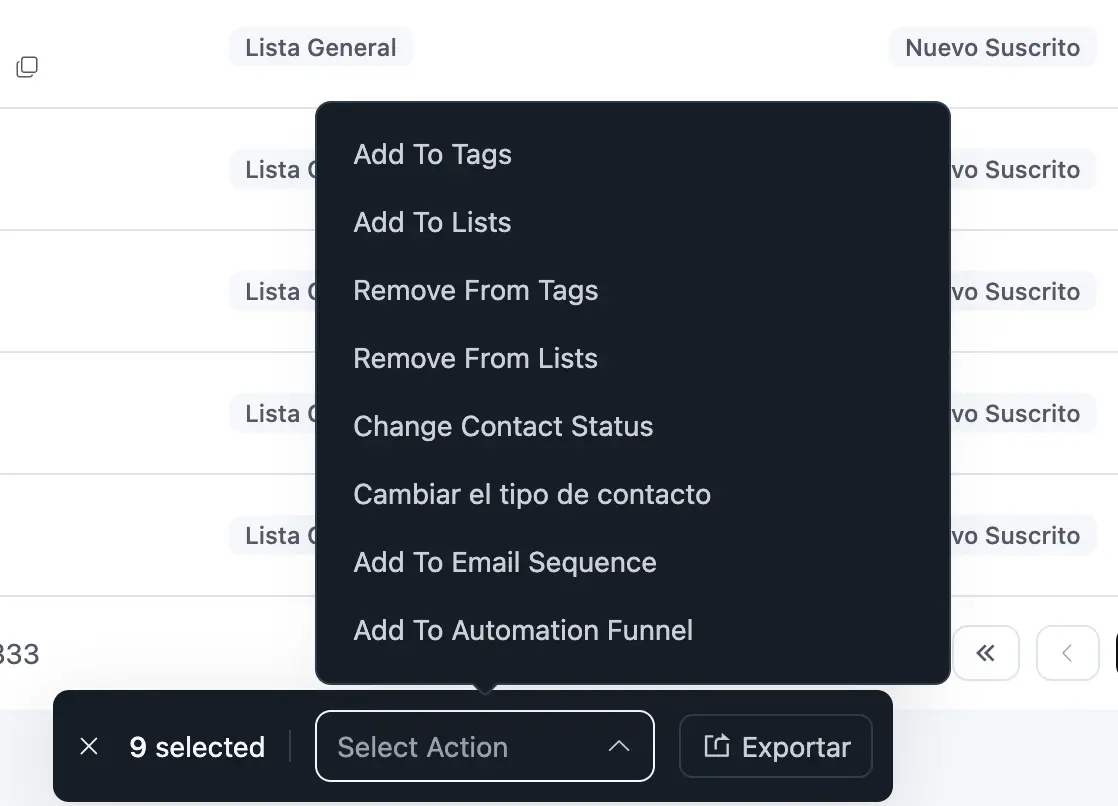
I love this new fixed "balloon" managing contacts (What a GREAT UX/UI addition)! Applauses Shahjahan Jewel and team 👏🏼👏🏼👏🏼
Honestly, I don't care about colorings and silly and bloated HTML templates that don't sell either add value to the contact (greatest email marketers sell without bloated HTML emails).
I just imported my simple black text over white background template, and still sending emails and selling...
Thanks AGAIN Shahjahan Jewel for making email marketing so easy to use and simple to making business.
As you know, every bug, feature that add value and facilitate the work for us email marketers, I'll let you know.
P.S. I'm still waiting for sales pipeline feature!!!