


Client forwarded an email generated with Fluentcrm automation, worked perfectly for years, but now, the bullet lists in the email are not sent.
Every other content is in the email, but no bullet lists.
When I send a test to myself, bullets are displayed, when I test via forms automation, lists are not in the email 🙈
Shahjahan Jewel can you take a look at this?

Have checked the instructions but not clear at all: https://fluentcommunity.co/blog/bulk-add-members-in-wordpress/
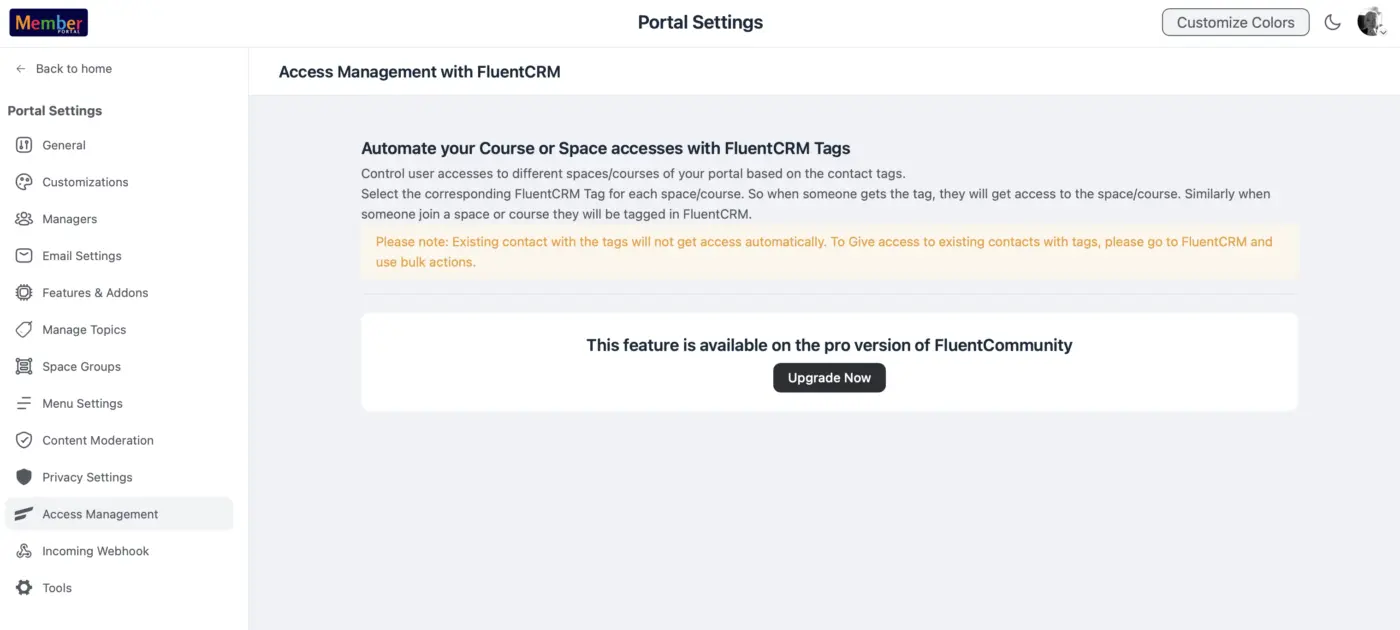
https://fluentcommunity.co/docs/access-management-through-fluentcrm-tags/
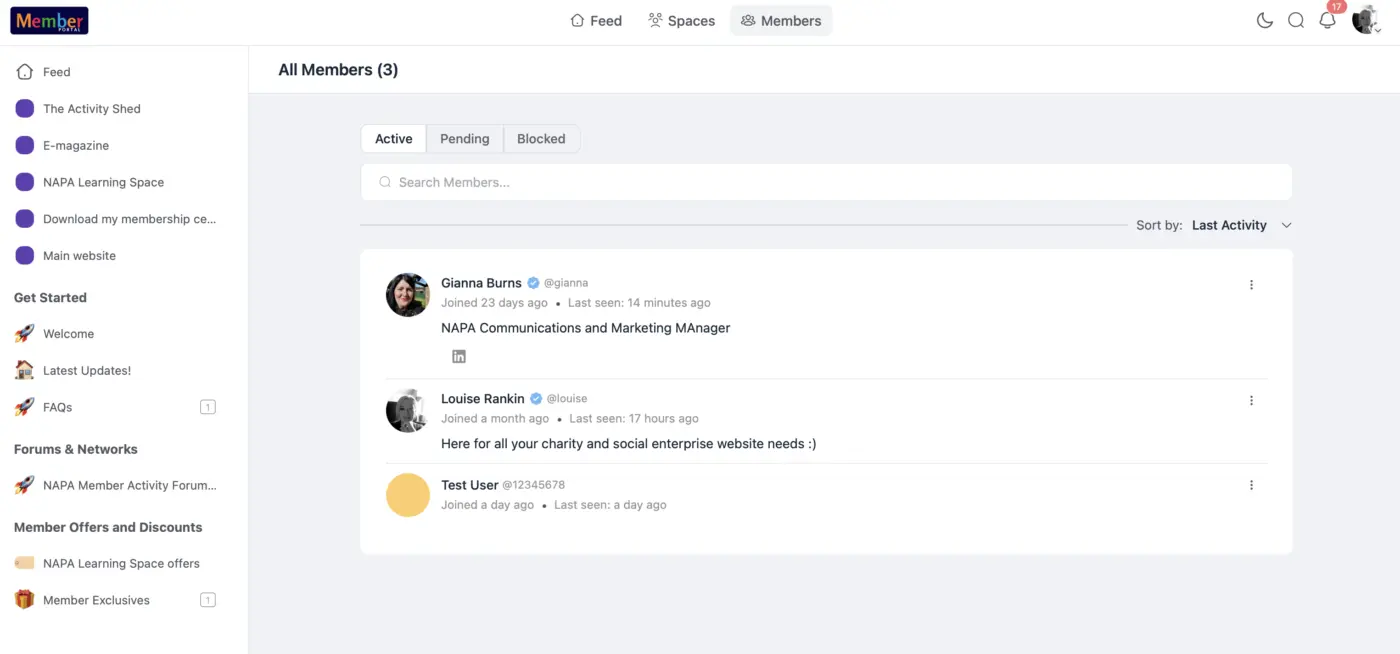
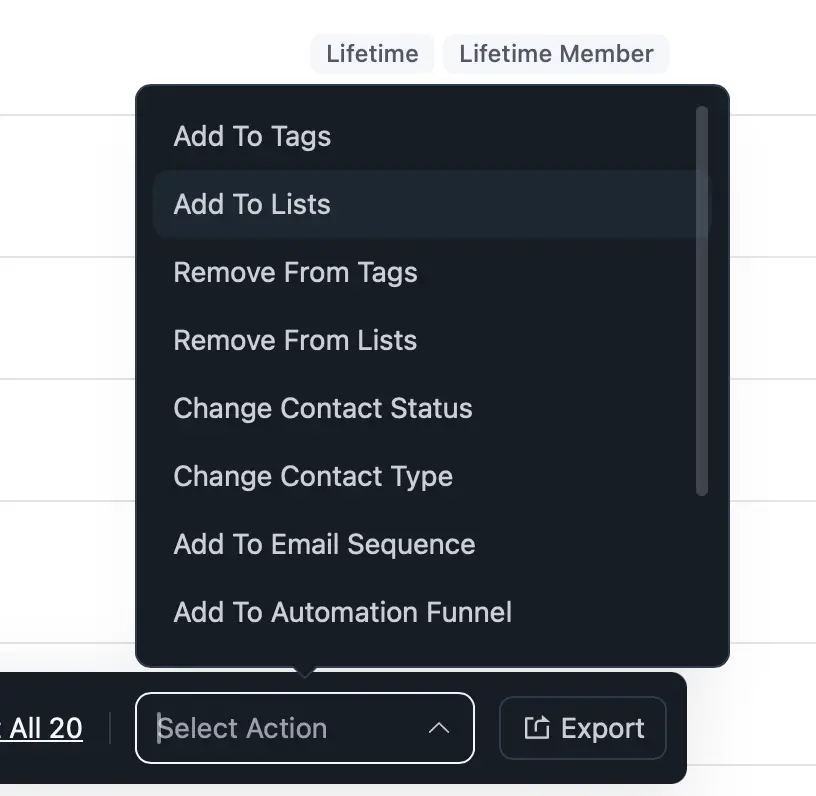
also checked bulk actions in CRM (no option to add to spaces in community), and checked member list setting in Community, nowhere to add tag in spaces either - where do I action this? Feel like I'm going in circles. What am I missing? We only have pro in CRM not community.

Has anyone else run into this?
We discovered that when contacts are actively waiting at a delay or timed step in an automation, editing that step doesn't update them. The change only applies to contacts who reach the step after you save the edit. Contacts already queued there stay locked to the original datetime — even if you change it in the automation.
Setting the funnel to Draft doesn't help either. The pending actions still fire on the old schedule regardless of funnel status.
As best we can tell, here's what's happening under the hood: when a contact enters a timed step, FluentCRM calculates the datetime and writes it as a scheduled action record in the database. Editing the automation only updates the funnel template — it doesn't touch those already-written records. So contacts in an active step are essentially hardcoded to the original date.
Future steps work fine (edits apply correctly) because their scheduled actions haven't been created yet.
The related problem: there's no bulk way to remove contacts from an automation. You can remove them one at a time from the subscriber list, but there's no bulk action. So you can't cleanly pull everyone out and re-enroll them under the corrected funnel.
Our workaround for 2,500 contacts in an automation:
Duplicate the automation with the corrected step.
Re-enroll affected contacts in the new campaign.
In the old campaign, add a "Cancel Automation" step right after the timed step — so when the old actions fire, contacts immediately exit.
It works, but it's not a great solution when you just need to shift a date on a live campaign.
Has anyone found a cleaner fix? We've also created a support ticket. If you've hit the same issue, worth replying here — the more context FluentCRM has, the easier it is for them to prioritize.

First, I am impressed with the features of FluentCRM and FluentForms, so don't let the request below taint that impression.
That said, I would love to see more support for B2B (Business-to-Business) logic, where the prospects are not actually the Contacts/Subcribers, but the Companies are the actual clients. That would mean being able to document parameters (custom fields) against the Company (this is possible), but then also use those Company custom fields in anything related to Contacts (e.g. Advanced Filter criteria for campaigns). Of course, this depends on the Primary Company being set correctly on the Contact.
But also in the Company screen, the Advanced filter does not allow custom fields to be used as filter or sorting criteria (unless I got it wrong).
In short, for the moment FluentCRM seems very much oriented to direct consumer contact, where the "company" is an add-on. Seeing things more from the Company perspective would be very valuable for a B2B approach, maybe even starting campaigns from that perspective.
Just some thougts, but do keep in mind my opening statement.
Kind regards,
Alain

First of all, a big thank you: both we and our client genuinely love FluentCRM. It works really well, the functionality is excellent, it's outstanding value for money, and it's reliable. We're grateful for everything the development team does. 🙏 The notes below are meant as constructive feedback after upgrading to 3.1.6 — to help make a great product even better.
A follow-up on the two issues I reported around 3.1.0, after testing 3.1.6 / Pro 3.1.6 on WordPress 7.0 + WooCommerce 10.8.1:
- the revenue re-sync bug, and
- ["v3 email editor cannot open legacy v2 Classic/HTML templates"](https://community.wpmanageninja.com/portal/space/fluent-crm/post/v3-email-editor-cannot-open-legacy-v2-c).
## ✅ Revenue re-sync `map('intval')` bug — FIXED in 3.1.6
The original bug: `CampaignAnalyticsController::getAttributedOrderIds()` used `->map('intval')`, and wpFluent's `Collection::map()` calls the callback with `(value, key)`, so `intval($value, $key)` used the array index as the numeric base → garbage order IDs → "Re-Sync Revenue" overwrote `_campaign_revenue` with a near-random (much smaller) value.
In 3.1.6 the code is corrected to a closure:
->map(function ($orderId) { return intval($orderId); })Verified end-to-end:
- The plugin upgrade alone (no Re-Sync) leaves the cached revenue bit-identical (no corruption on upgrade).
- Pressing Re-Sync Revenue now recomputes a correct value from the real paid orders (net of refunds), instead of corrupting it. On the very campaign that dropped from 2,350,771 → 107,903 under 3.1.0, 3.1.6 produced 2,186,354 (= sum of the 76 currently-paid attributed orders, net) — a legitimate current recomputation, not garbage.
Minor suggestion: Re-Sync recomputes from current order state, so re-syncing a historical campaign replaces the as-sent figure with the current net (refunds/cancellations since send). Not a bug, but a small tooltip/warning would help users avoid re-syncing historical campaigns expecting the original figure.
## ◑ Classic/HTML template editor — PARTIALLY improved in 3.1.6
- The legacy `_edit_type=html` template now opens in the v3 editor and renders the Classic block with table-cell background colors preserved — the white-on-white invisibility from 3.1.0 is gone. Thank you!
- BUT two related issues remain, each filed as a separate report:
1. The Gutenberg-path Classic/freeform edit popup is a ~58px thin strip on hard refresh (TinyMCE not initialized in the iframed editor) — a load-order race condition.
2. Switching an existing campaign to "Classic Editor" (`raw_classic`) does not persist — the stale `settings.template_config.design_template` overrides the user's top-level choice on save.
For our weekly newsletter we now use the dedicated "Classic Editor" mode (which renders a full TinyMCE and sends correctly), plus a small site-side mu-plugin to make the editor-mode choice persist until item 2 is fixed.
# "Select Editor" choice (design_template) not persisted for existing campaigns — stale `settings.template_config.design_template` overrides the user's selection on save
## Environment
- FluentCRM: 3.1.6
- FluentCRM Pro / FluentCampaign: 3.1.6
- WordPress: 7.0
- WooCommerce: 10.8.1
- PHP: 8.3
- Database: MariaDB 11.4
## Summary
In the campaign editor, switching the editor via "Select Editor" (Default/Gutenberg → Classic Editor / Raw HTML) and saving does not persist for an existing campaign: after save + reload the campaign opens again in the previous editor (typically Default/Gutenberg).
Asymmetry observed:
- Switching to a Gutenberg-based template (simple/plain/classic) → persists.
- Switching to `raw_classic` / `raw_html` (`use_gutenberg=false`) → does not persist.
## Root cause (diagnosed via network capture + source)
On save, the request to `POST /wp-json/fluent-crm/v2/campaigns/update-single-campaign` does carry the correct user choice as a top-level field:
design_template: "raw_classic" // correct — the user's Select Editor choicesettings.template_config.design_template: "simple" // STALEBut the server (`CampaignController::updateSingleCampaignSimulate`, ~L352–360) lets the nested value override the top-level one:
$updateData = Arr::only($data, [..., 'design_template']);   // = 'raw_classic' (correct)
if (!empty($data['settings']['template_config']['design_template'])) {
    $updateData['design_template'] = $data['settings']['template_config']['design_template']; // = 'simple' → reverts
}
Because `raw_classic` / `raw_html` use an empty `config` (see `Helper::getEmailDesignTemplates()`), the `template_config.design_template` is never refreshed when switching to them, so the stale `simple` survives and overrides the user's choice → the column is saved as `simple` → reload opens Gutenberg.
(The campaign editor loads the editor based on the `design_template` column, which is why the stale-override reverts the UI.)
## Reproduction
- Open an existing campaign that is in Default (Gutenberg) mode.
- Select Editor → Classic Editor. Save (toast: success).
- Reload / reopen the campaign.
- Observe: it opens in Default (Gutenberg) again. DB shows `design_template = 'simple'` and `settings.template_config.design_template = 'simple'`, even though the save request's top-level `design_template` was `'raw_classic'`.
## Impact
Users cannot reliably switch an existing campaign to the Classic / Raw HTML editor; the choice silently reverts. (Choosing the editor at campaign creation does persist — only post-creation switching is affected.)
## Expected
On save, the user's explicit top-level `design_template` (the Select Editor choice) should win, and `settings.template_config.design_template` should be synced to it — so the chosen editor mode persists in either direction (mode-agnostic), regardless of whether the target mode has an empty config.
## Our mitigation (site-side, until fixed)
A small mu-plugin hooks `fluent_crm/campaign_data_updated` and, when the saved `design_template` differs from the request's top-level `design_template`, restores the user's choice and syncs `template_config`. It is mode-agnostic and self-deactivating (no-op once the core override is fixed).
## Attachments
- Captured save payload (top-level `design_template=raw_classic`, `template_config.design_template=simple`).
- Before/after DB values.
Campaign Gutenberg editor: "Classic" (freeform) block edit popup is an unusable thin strip on hard refresh — TinyMCE not initialized in the iframed editor
> Follow-up to my earlier report ["v3 email editor cannot open legacy v2 Classic/HTML templates"](https://community.wpmanageninja.com/portal/space/fluent-crm/post/v3-email-editor-cannot-open-legacy-v2-c). In 3.1.6 the legacy `_edit_type=html` template now opens (good - thank you!), but editing the resulting Classic / freeform block inside the campaign Gutenberg editor is broken on a cold load.
## Environment
- FluentCRM: 3.1.6
- FluentCRM Pro / FluentCampaign: 3.1.6
- WordPress: 7.0
- WooCommerce: 10.8.1
- PHP: 8.3
- Database: MariaDB 11.4
- Theme: Astra child
- Browser: Firefox (reproduced consistently)
## Summary
When editing a campaign in the Default (Gutenberg) editor that contains a Classic / freeform block (e.g. a legacy `_edit_type=html` newsletter), clicking the block's "Edit" opens the WordPress core `block-editor-freeform-modal` — but the editing textarea is a ~58px / 2-row thin strip (the modal frame itself is ~582px). The visual TinyMCE editor is not attached, so the block is effectively unusable for non-technical users.
It is load-order / timing dependent: on a warm/soft navigation TinyMCE sometimes attaches and the editor works; after a hard refresh (Ctrl+F5) it reliably breaks into the thin strip. This intermittency = a race condition.
## Root cause (diagnosed in-browser)
The FluentCRM block editor runs the content canvas inside an iframe. We instrumented the iframe's `window`:
- `window.tinymce` → loaded (TinyMCE v4 present), `window.wp.oldEditor` / `window.wp.editor` → present.
- BUT `tinymce.editors.length === 0` and `tinymce.get(\) === undefined` → no editor instance was ever created for the freeform block's textarea.
So the capability is fully loaded in the iframe, but the freeform block's `wp.oldEditor.initialize(...)` either does not run or runs before its dependencies are ready on a cold load → the bare `\` fallback remains (the "thin strip").
This is essentially the WP 6.x iframed block editor + Classic (core/freeform) block integration problem, surfacing in FluentCRM's iframed campaign editor.
## Reproduction
-
Have a campaign whose body is a Classic / freeform block (e.g. import a legacy `_edit_type=html` template), in Default (Gutenberg) editor mode.
-
Open the campaign editor.
-
Click the Classic block → Edit.
-
Ctrl+F5 (hard refresh), reopen Edit.
-
Observe: the "Classic Editor" modal opens but the textarea is a ~58px thin strip; the visual TinyMCE toolbar/content does not render. Editing is impractical.
## Impact
Non-technical newsletter editors cannot reliably edit a Classic-block campaign in the Gutenberg editor; the broken state appears unpredictably (after refresh). This was a major part of why we delayed the 3.x upgrade.
## Workaround we use
We switch such campaigns/templates to the dedicated "Classic Editor" (`raw_classic`) mode, which does not use the iframed freeform modal and works reliably. (See separate report on `raw_classic` mode not persisting on switch.)
## Expected
On a cold/hard load, the freeform block's "Edit" modal should initialize TinyMCE reliably (await `wp.oldEditor`/`tinymce` readiness in the iframe before initialize), or render a full-height fallback textarea instead of a 2-row strip.
## Attachments
- Screenshot: the "Klasszikus szerkesztő" (Classic Editor) modal with the ~58px thin-strip textarea after hard refresh.
- Browser console probe output (tinymce present, 0 instances on the textarea).
![[Bug] Campaign Gutenberg editor: "Classic" (freeform) block edit popup is an unusable thin strip on hard refresh](https://cdn.community.wpmanageninja.com/wpmn_community/fluentcom-5RSCSNpPQHMsU6Vumbn0Hgf4ELKu0z0R-fluentcom-Classic-Editor-Campaign-FluentCRM.webp)

Right now the FluentCRM MCP server has no way to work with custom field definitions — you can't list them, edit them, or create new ones via MCP.
It would be great to have a tool for this (similar to the existing ones for tags and lists), so custom fields can be fully managed through the MCP integration instead of only in the admin UI.

Thank you for the "month" as unit in automation !!!

Hello everyone!
I wanted to share a custom integration I recently developed for a project involving Teams for WooCommerce Memberships and FluentCRM Companies.
The project required each WooCommerce Team to be represented by a corresponding record in FluentCRM’s Companies module, together with relevant membership and organizational information.
From what I found, WooCommerce can already be connected to FluentCRM Contacts through the existing integration, tags, and third-party automation tools. However, I could not find a direct or built-in solution for synchronizing WooCommerce Teams with FluentCRM Companies.
Before developing the integration, I reviewed the available options and documentation for AutomatorWP, OttoKit, WP Fusion, and Bit Integrations. These provide many useful actions involving FluentCRM Contacts, but I was unable to find an existing option that covered the Team-to-Company workflow required by the project.
The custom solution I developed can:
- Create or update the appropriate FluentCRM Company from a WooCommerce Team
- Synchronize relevant Team, membership, and organization information
- Maintain total, active, and inactive member counts
- Connect the Team owner and related members with the correct Company
- Handle matching carefully so records are not associated with the wrong organization
The result gives the project a clearer organizational view inside FluentCRM, where Companies represent WooCommerce Teams and the related Contacts represent their owners and members.
This was a fairly specialized requirement, but I thought it might be useful to share information about this type of integration in case anyone else is working with a similar WooCommerce Teams and FluentCRM setup, as I may be able to help with comparable custom integration requirements.
Has anyone else worked on similar FluentCRM customizations or needed to connect organizational and membership data with FluentCRM Companies?