


Hey friends, I know custom fonts and email are a nightmare. However, I have seen other email platforms like mailerlite manage to get fonts like “inter, playfair display, manrope, etc…” to work just fine - even in gmail and other strict email clients.
Is there any way we can get access to these fonts too?? 🥹🥹🥹🥹

Is it possible in FluentCRM to create different automations for the same calendar and event from fluent booking based on location? For example, I want to send one email to those who book an in-person appointment and a different one to those who book a virtual appointment. Currently, the automation triggers as soon as an appointment is booked, but I want to set it up so it distinguishes between in-person and virtual appointments.

Hi FluentCRM Team & Community,
I am attempting to programmatically create and configure FluentCRM Automation flows (Funnels) via REST API using an AI agent / MCP integration. However, I’ve encountered an issue where the Automation Sequences (Canvas Nodes) fail to save or be imported.
Here is a summary of the technical behavior observed:
1. POST /wp-json/fluent-crm/v2/funnels/import
When importing a full Automation JSON schema via the API endpoint, the API successfully creates the Funnel title and WooCommerce Trigger (e.g. woocommerce_order_status_processing), but completely ignores and strips out the sequences array. As a result, opening the imported Automation in the visual builder shows an empty canvas.
2. POST /wp-json/fluent-crm/v2/funnels/funnel/save-funnel-sequences
When sending a payload containing sequence nodes (e.g. action_name: "send_custom_email") to the sequence endpoint:
- Payload sent: JSON stringified array of sequence objects containing
funnel_id,parent_id,action_name, andsettings. - API Response:
{"sequences":[],"message":"Sequence successfully updated"} - Result: The API purges the sequence nodes and returns an empty
sequencesarray, leaving the canvas empty in the admin UI.
Questions / Request:
- Is there a specific REST API endpoint or required payload format to programmatically inject/save visual canvas sequence nodes (e.g.,
send_custom_email) into a Funnel? - Is the
importendpoint intended to support importing fullsequencesvia REST API, or is this a known API limitation?
Any insights or recommended code snippets/hooks to achieve this programmatically would be greatly appreciated!
Thanks in advance!

Currently, in FluentCRM → Emails, there's a toggle that lets you display the Email Registry (FluentSMTP), making it easy to view all sent emails, including transactional emails.
It would be very helpful if the state of this toggle could be remembered between sessions, or if users could choose to have it enabled by default.
At the moment, the toggle is always disabled by default, so we have to enable it every time we visit the page. While it's a small thing, it becomes repetitive for users who frequently work with the Email Registry.
A simple preference to persist the last selected state (or define the default behavior in settings) would noticeably improve the user experience.

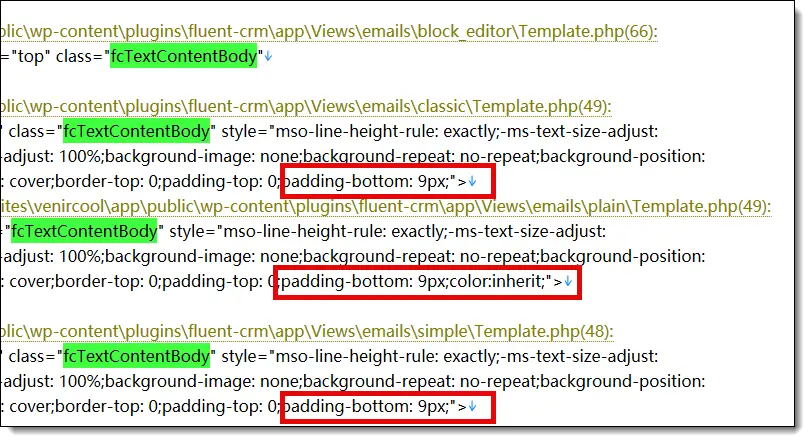
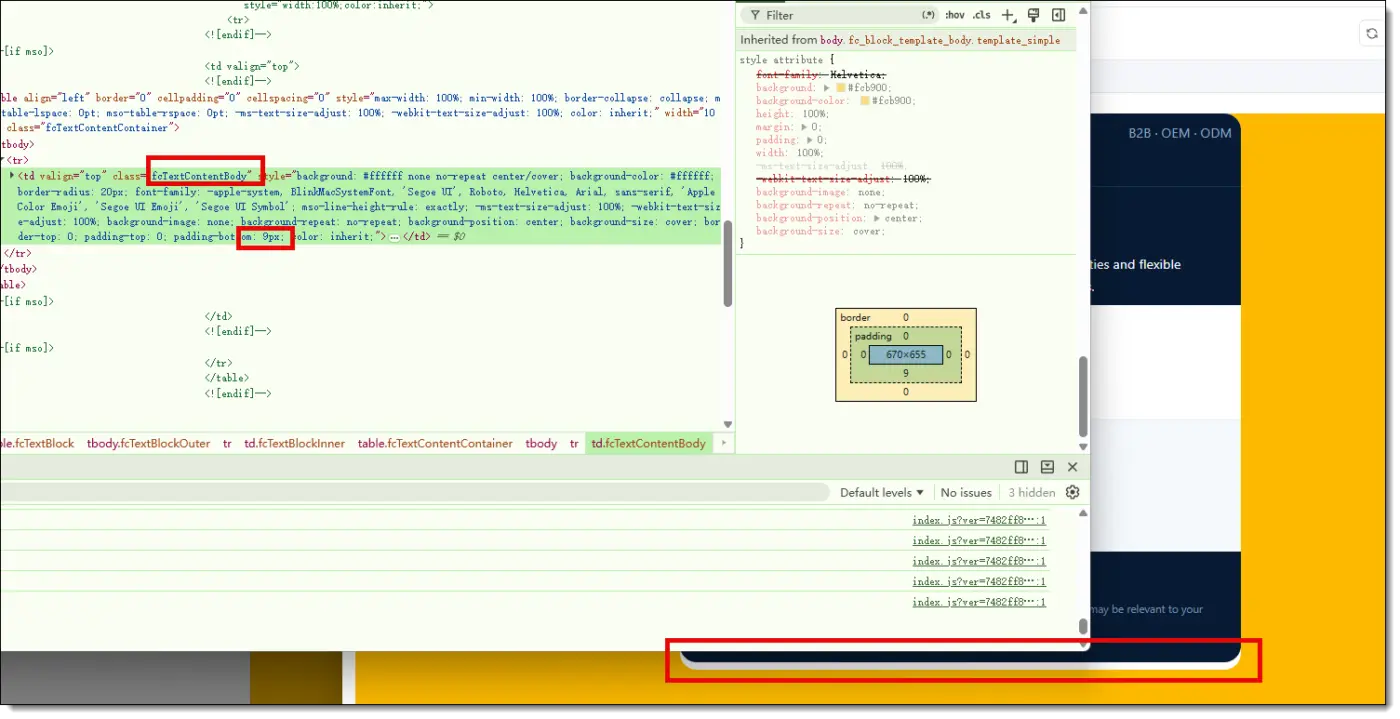
The template has a hardcoded height of 9px. This 9px gap is not visible in the design view, but it appears in both the email preview and the emails actually sent.
I suggest removing it. Although I could set the Content Background under Body Global Colors to match the Body Background, making the 9px gap invisible to recipients, this would only be a workaround rather than an ideal solution.

Behiiv just released a community feature and it looks really good. When you send a email it can be added to the feed in the community placing content in the feed for users to engage with.
They do the same with podcasts.
This is really something you wpmanageninjas should look at.
Cheers
When reviewing the email history in FluentCRM, it's easy to see who the email was sent to, but there's currently no way to see which sender account was used.
Since FluentSMTP supports multiple email providers and sender accounts, many of us route different types of emails through different SMTP connections (marketing, transactional, support, different brands, etc.).
It would be extremely helpful if the Email History included the From email address (or even the sender name) used for each email.
This would make it much easier to:
- Audit email activity.
- Troubleshoot delivery issues.
- Verify that automations are using the correct sender.
- Manage setups with multiple brands or email accounts.
- Understand historical data without having to inspect SMTP logs.
Even displaying the sender as an additional column or inside the email details panel would be a significant improvement.
It feels like a small UX enhancement that would provide a lot of value for anyone using multiple SMTP connections through FluentSMTP. Including this in the reports section will also be useful for filtering.

- I wrote a simple prompt in plain English (well in Español simple)
- 3-4 minutes waiting
- US$0.05 for DeepSeek API Tokens
- Two interactions on Visual Studio Code + Cline
- Received a GREAT and detailed report about my campaign's performance on last 365 days.
- I saved a whole morning of downloading CSVs and analyzing/crossing data.
Thanks Shahjahan Jewel and team for keep making FCRM GREAT!
P.S. Now only miss Sales Pipeline and NATIVE WhatsApp integration! 😉


I'm considering moving from FK Automations to FluentCRM, mainly because of the speed at which the Fluent team releases updates and keeps up with the speed of the industry. I love the MCP integration and the ability to have an SMS conversation right inside the contact profile.

It’s frustrating to receive a contact email and not be able to reply to it directly from the FluentCRM backend, as is the case with FluentSupport.
It would be helpful to add this feature, whether for emails received via FluentForm or when someone replies to an email sent through FluentCRM.
It quickly becomes difficult to stay on top of things when you receive several hundred emails a day, even if you’re well-organized.