


Hey Guys, just wanted to share the free version of my Custom Meta Fields plugin.
https://wordpress.org/plugins/custom-meta-fields-for-fluentcart/
Let me know what you think or if there are any features that you would like to see added.

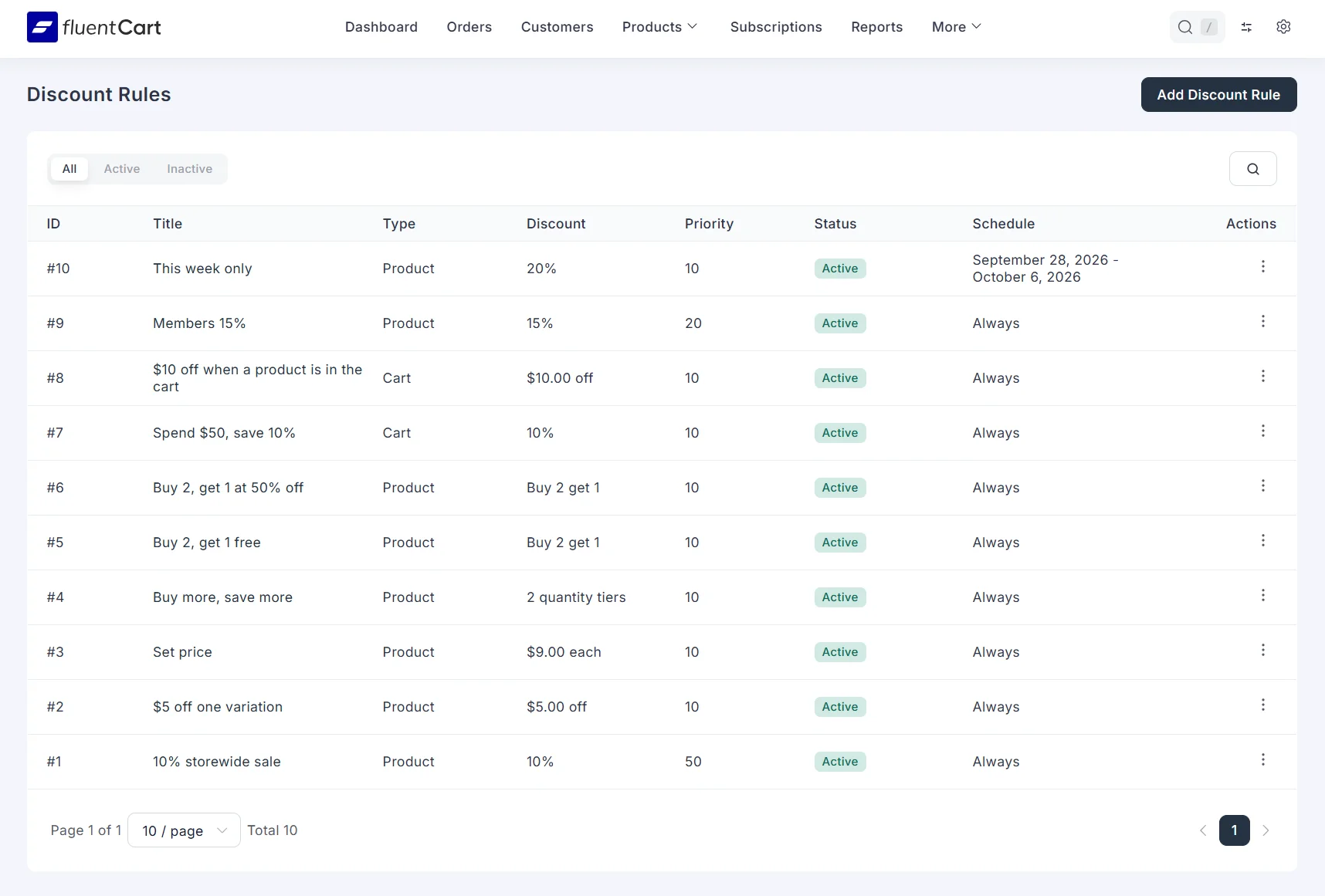
We just released CartCubes Discount Rules for FluentCart.
We spent a long time testing this before shipping it. A lot of stores moving from WooCommerce to FluentCart asked for the same thing: discounts that run on their own, without a coupon code the shopper has to remember. Black Friday is close, and that is when those requests get loud. If you have been waiting on discounts before you move the store, this is a good time.
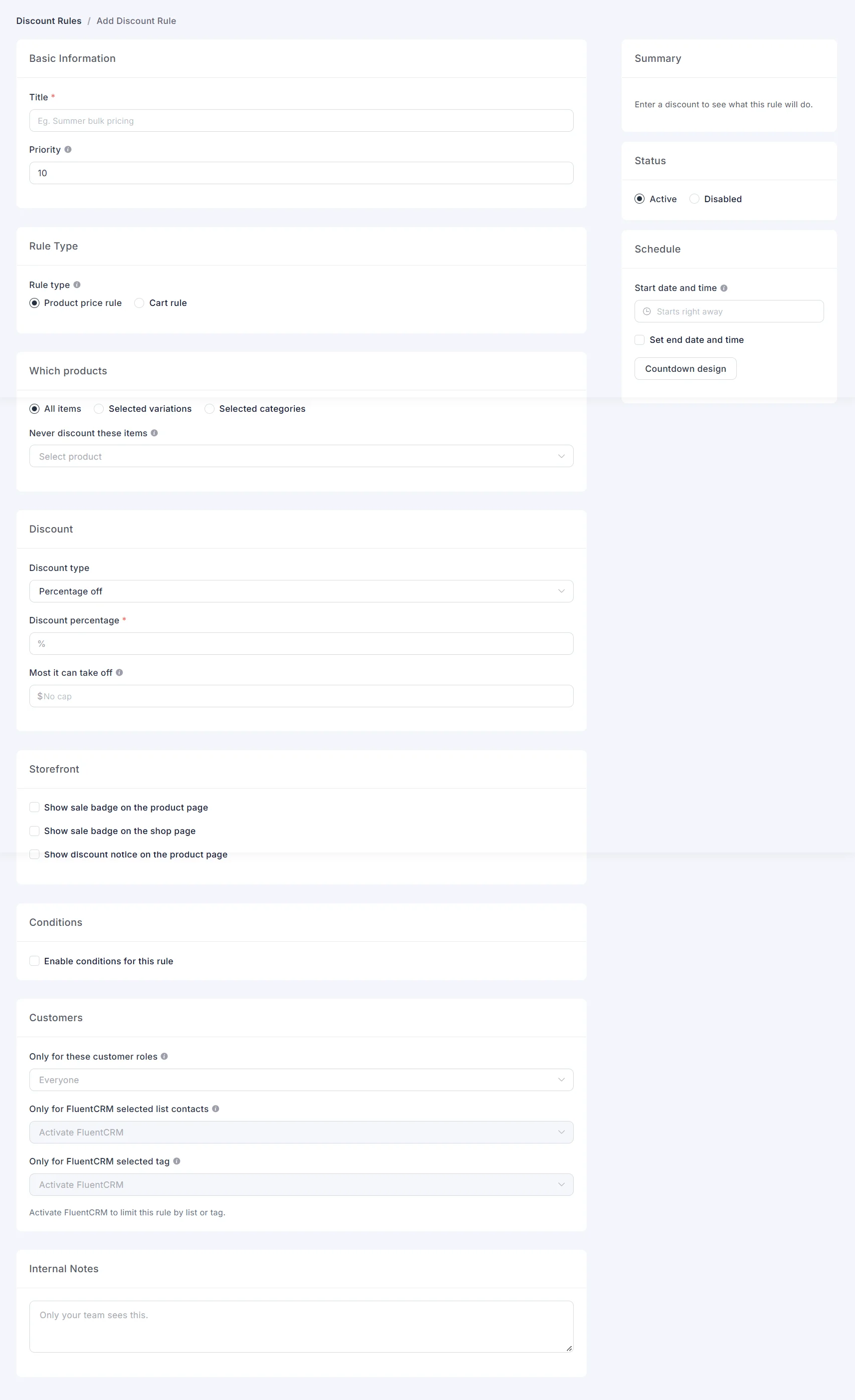
The settings live inside FluentCart. Open Discount Rules from the FluentCart menu, or from More on the top bar. It uses the same Vue admin routes as the rest of FluentCart, so it feels like a FluentCart screen, not a separate plugin page.
You can discount a whole catalog, a category, or one variation. The other colors of the same product can stay at full price.
Discount types:
- Percentage off, with an optional cap
- Fixed amount off each item
- Fixed price per item
- Quantity tiers, with a bulk price table on the product page
- Buy X Get Y: free, a percent off, or an amount off, on the same variation or another one
- Cart discounts: a percentage or a fixed amount off the cart
Conditions can get specific. Require a product in the cart, or block the discount when another product is there. Match the items subtotal. Combine rules in groups. Limit a rule to a WordPress role or a FluentCRM list or tag. Set a start and end date, with a countdown and an optional site banner. When two product rules match the same item, the lower priority number wins. A FluentCart coupon can still apply on the same order.
The discounted price shows on the shop, the product page, the cart, and checkout.
Read the launch post: https://cartcubes.com/cartcubes-discount-rules-for-fluentcart/
Walk through the examples (shop, cart, and the rule settings): https://cartcubes.com/fluentcart/discount-rules/examples/
See it on the demo store: https://demo.cartcubes.com/
Plugin page: https://cartcubes.com/fluentcart/discount-rules/
Happy to answer questions here.

"Congratulations, the plugin hosting request for ParcelBridge – FluentCart to ShipStation has been approved."
https://wordpress.org/plugins/parcelbridge
Enjoy!

I set out on an experiment: could I build a working "headless" FluentCart? I started with some really ambitious requirements: one store, branded emails, a totally static site, all "store items" coming from the WordPress install and that install shouldn't be publicly totally open i.e locked down as much as possible.
I started with a clear guideline: static, digital-only sales, and smashed it. I rebuilt what I learnt into a redeployable solution over and over again, iterating, fixing the issues, and learning as I go. The whole cart experience is delivered via API and a single JS file. You can map any HTML to almost any amount of data.
My first video on that project is here. For those of you who follow me on Twitter, I have been posting updates there, but for those who don't, I released a Video earlier in the week on the progress.
I have been working on refinement and fixing bugs, and I have made significant progress on shipping and a more cart-like experience, including pulling data from the WordPress store. My first physical goods static store is now working, and it's actually doing well: https://sunwardshades.staticsites.co.uk/. The physical store bugs have been fixed, and I continue to work on it.
It's a functionality I'd love to see become core; it fits a static market so well, and it's really impressive what can be done once you start understanding how it works.
There are limits: FluentCart doesn't support multiple payment gateways (i.e 4 Stripe accounts) it wasn't designed this way. But building stores like this, my little test installation is now supporting 7 static sites for testing and R&D All store support a mix of Paddle and Stripe (I haven't been able to test PayPal, although it's coded, because I can't get a working sandbox account for some reason)
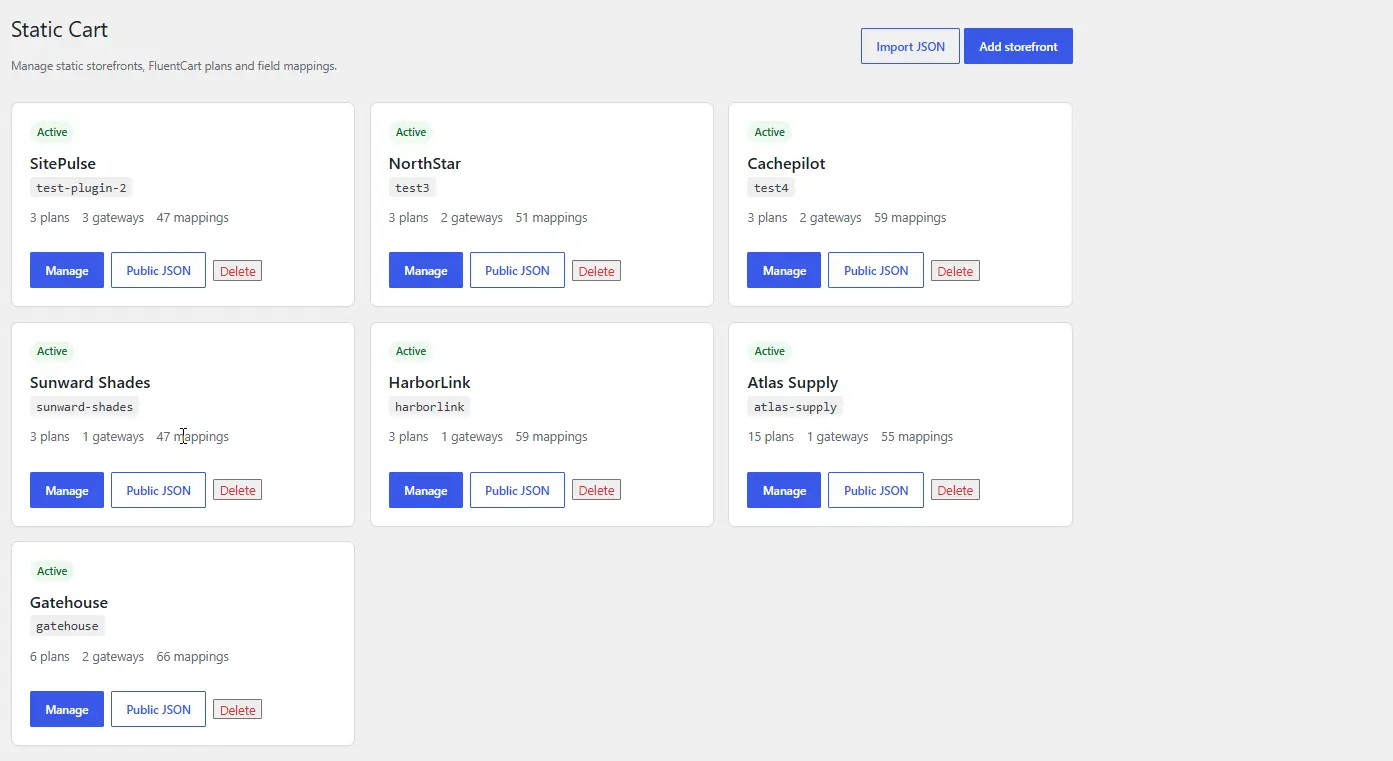
I thought I would share it here and see if anyone had done anything similar yet?
An updated video will come out later in the week once I iron out the last couple of shopping cart bugs, but I am pretty close to what I would consider a minimum viable product for this sort of thing, and I am sure I will get some use out of the work I've put in now. I have to, as it's taken me quite a lot of time to get it right.
I would love to see this in the plugin in some guise in the future too as a native solution.

Based in Switzerland, my store needs to show VAT-inclusive prices. I want the opposite for the EU and other countries (price + tax). Is there a way to implement that? Any Swiss-based businesses here? Thanks!

What we want to achieve
We are using Eventin for event booking, FluentCart for payment, and FluentCRM as the central communication and automation layer.
Our goal is to start event-specific transactional communication only after a booking has actually been paid. For example:
Event booking → successful payment → identify the booked event → apply an event-specific tag → send welcome email, preparation information, reminders, and post-event follow-up
We would like to keep this entire workflow within the native Eventin / FluentCart / FluentCRM ecosystem and avoid custom PHP code.
What we have tested
We first tested Eventin's FluentCRM webhook. This can identify the specific event and apply an event-specific FluentCRM tag.
However, the webhook fires when the booking data is submitted, before payment has necessarily been completed. For free events this is fine, because submitting the booking completes the registration. For paid events it is not sufficient, because a customer may proceed to checkout and then abandon the payment or have the payment fail.
We therefore looked at using the FluentCart Order Paid trigger in FluentCRM. This provides exactly the correct timing: the automation starts only after successful payment.
The remaining problem is identifying which Eventin event was paid for.
FluentCRM's FluentCart conditions allow us to check normal products from the FluentCart product catalog. However, Eventin tickets created through the official Eventin Addon for FluentCart are not normal FluentCart catalog products. They are added to the FluentCart instant checkout as custom order items.
The relevant information is already present in the FluentCart order item, including the item title and Eventin-specific metadata such as:
eventin_order_ideventin_ticket_indexis_eventin_ticket- item/title information
What appears to be missing is access to these current order items within FluentCRM automation conditions.
The feature we need
With the trigger:
FluentCart → Order Paid
we would like to add a condition such as:
Current Order → Order Items → Item Name contains/is [event or ticket name]
or, even better:
Current Order → Order Item Meta → eventin_order_id = [...]
This would allow the workflow to be:
Eventin booking
→ FluentCart payment
→ Order Paid
→ identify the Eventin item in the current order
→ apply the corresponding FluentCRM event tag
→ start the correct transactional communication sequence.
Why the existing product condition is not sufficient
Under FluentCart conditions in FluentCRM we can select products that exist in the FluentCart product catalog.
This works for regular FluentCart products, but not for the Eventin tickets generated during checkout, because those are custom order items rather than catalog products.
The important distinction is therefore between:
Has this contact purchased Product X at some point?
and:
Does the specific order that just triggered this Order Paid automation contain Item X?
For this use case we need the second condition.
Suggested implementation
Under FluentCRM automation conditions, make the triggering FluentCart order available as a condition group, for example:
FluentCart → Current Order
with fields such as:
- Order Item Name / Title
- Product ID
- Variation ID
- SKU
- Quantity
- Item type / custom item
- Item metadata /
other_info
It would also be useful to expose these current-order values as SmartCodes.
The key requirement is that these values refer to the specific order that fired the Order Paid trigger, not to the contact's historical purchase record.
This would solve our Eventin use case without custom code and would also be useful for any other FluentCart integration that creates custom order items.
Would it be possible to expose the current order's line items and item metadata to FluentCRM automation conditions?

Would it be possible to add GoCardless ACH Processor. This is being coming big in payments and helps cuts the cost of fees and chargebacks etc.

Under Customer Profile → Subscriptions, there is a UX issue related to translations.
Some translated terms are longer than their English equivalents, causing certain elements to overflow or become partially hidden within the interface.
I would attach a screenshot for reference, but at the moment image uploads to the community are not working due to the already reported S3 issue.
Following up on our earlier invoicing feedback, we reproduced a refund issue on staging with FluentCart Core 1.7.0. No imported orders or real funds were involved.
TL;DR
- A product-selected refund excludes exclusive VAT and prevents entering the full amount paid.
- Our €12.10 test required two local refund operations: €10 + €2.10.
- We also need clarity on separate corrective invoices and FluentInvoice’s scope and timeline.
1. Refund calculation: steps to reproduce
Setup: one product, €10 base + €2.10 VAT = €12.10 paid.
- Open Refund. The product is automatically selected.
- The refund amount and maximum are both €10.
- Enter €12.10. The field immediately resets to €10.
- Refund €10. The order becomes partially refunded, with €2.10 net paid.
- Reopen Refund. With no product selected, €2.10 is now available. Refund that amount to reach €12.10 refunded and a zero balance.
Expected: refunding the complete product should include its VAT, allowing €12.10 in one operation.
Test limitation: we completed the two operations using an offline test payment. These verify local calculations and records, not movement of funds. We are not reporting the offline gateway’s inability to send money back as a bug.
For integrations generating one corrective document per refund event, two operations could also produce two documents for one cancellation unless explicitly reconciled.
2. Customer documents after a refund
- My Account’s View Receipt / Invoice still downloads the original positive document.
- The order confirmation shows the refund and remaining balance.
- Our PDF template is customized, so its missing refund line alone is not evidence of a core bug.
Preserving the original invoice is appropriate. The separate corrective document we need is already described in our earlier request for proper credit notes / corrective invoices, including independent numbering, a reference to the original invoice, corrected base/VAT amounts and customer access.
The default refund_notice references the original order number/date and cumulative refunded amount. Can it represent individual corrective documents with independent numbering, rather than only a refund notice?
Spain requires a specific separate series for corrective invoices, e.g. FR-0001 (Articles 6 and 15). National rules may vary for some cases.
3. Questions for the team
- Refund calculation: is the VAT issue above scheduled for correction?
- FluentInvoice: will it provide corrective invoices, independent sequences and customer access? What will remain in Core or Pro?
- Gateway status: in a separate test, a blocked Stripe refund request failed while a local refund transaction appeared as Refunded. How should integrations distinguish a local/manual record from a gateway-confirmed refund?
- Compliance readiness by November–December 2026: will FluentInvoice provide a compliant Spanish invoicing solution, including VERI*FACTU, or a supported integration by then? Extension points alone would still leave stores needing an implementation. Please also clarify the scope for other national requirements.
- Mandatory producer declaration: if FluentInvoice is intended to serve as a EU invoicing system (eg.: for Spain), will WPMN provide the required "declaración responsable", accessible in the product for each version? If compliance depends on another provider, who will certify the complete solution and its components? Spain uses a producer’s declaration, not prior AEAT approval (AEAT guidance).
- Planning: what scope and delivery timeframe can stores realistically plan for in 2027? If corrective invoicing is outside your scope, should we build an external/custom integration now?
Why the timing matters
We are less than three months from 2027, and implementation takes time. Spain’s current adaptation deadlines are January 2027 for corporate income-tax taxpayers and July 2027 for other covered taxpayers, including self-employed professionals (AEAT guidance). Other countries have their own rules and dates.
Without a clear, usable solution by November–December, I fear many Spanish stores will choose another paid invoicing solution for compliance. Developing and certifying a custom adaptation is not realistic for most small businesses. Once those integrations are in place, a FluentCart migration may be deferred until January 2028 or later (if) simply because of implementation costs and planning cycles.
For accuracy, the VERI*FACTU commitment lasts until the end of the calendar year in which reporting begins once the rules apply. It is not a minimum twelve-month commitment and does not itself require staying with the same software provider (AEAT guidance).
We really like FluentCart’s flexibility. A clear scope, responsible provider and timeline would help us decide whether to migrate with native invoicing, use a supported external integration, or simply wait (if) to 2028.
Related discussions
Two important matters here:
First, subscription access timing should be customizable depending on the action.
-
Cancellation
- Immediately — useful for services billed in arrears, usage-based memberships, or cases where access should stop the moment the contract ends.
- End of billing period — the standard case for prepaid memberships, SaaS, courses, or communities where the customer has already paid for the remaining period.
-
Upsell / Upgrade
- Immediately — e.g. upgrading from a basic membership to a premium plan because the customer wants access to premium content, limits, or services right away.
- In some businesses, next billing period could also make sense — e.g. when plans are tied to monthly service quotas or deliverables and changing them mid-cycle would complicate accounting or fulfilment.
-
Downsell / Downgrade
- Immediately — useful when the lower plan simply changes future usage limits and there is no prepaid entitlement to preserve.
- End of billing period — e.g. a customer downgrades from a plan including private support or premium content, but should retain those benefits until the period they already paid for ends.
This flexibility will probably become especially important once native upsells and downsells are introduced.
Second, the current “Resume Subscription” behaviour seems problematic.
Right now, when a customer cancels a subscription, it remains active until the end of the billing period.
If the customer changes their mind during that period and clicks “Resume”, they are charged again instead of simply removing the scheduled cancellation and continuing the existing billing cycle.
Ideally, Resume should just cancel the pending cancellation when the current period is already paid.
--
cc: Rasel Siddiqe tagging you in case you guys find this feedback useful!