


I saw on the FluentCart FAQ that we can add custom fields to the Checkout using Fluent Forms. But I can't seem any documentation that shows how this is actually done.
We're trying to use FluentCart as the source for a Membership Checkout and have several fields that must be captured at the point of checkout.
How can we best approach this?

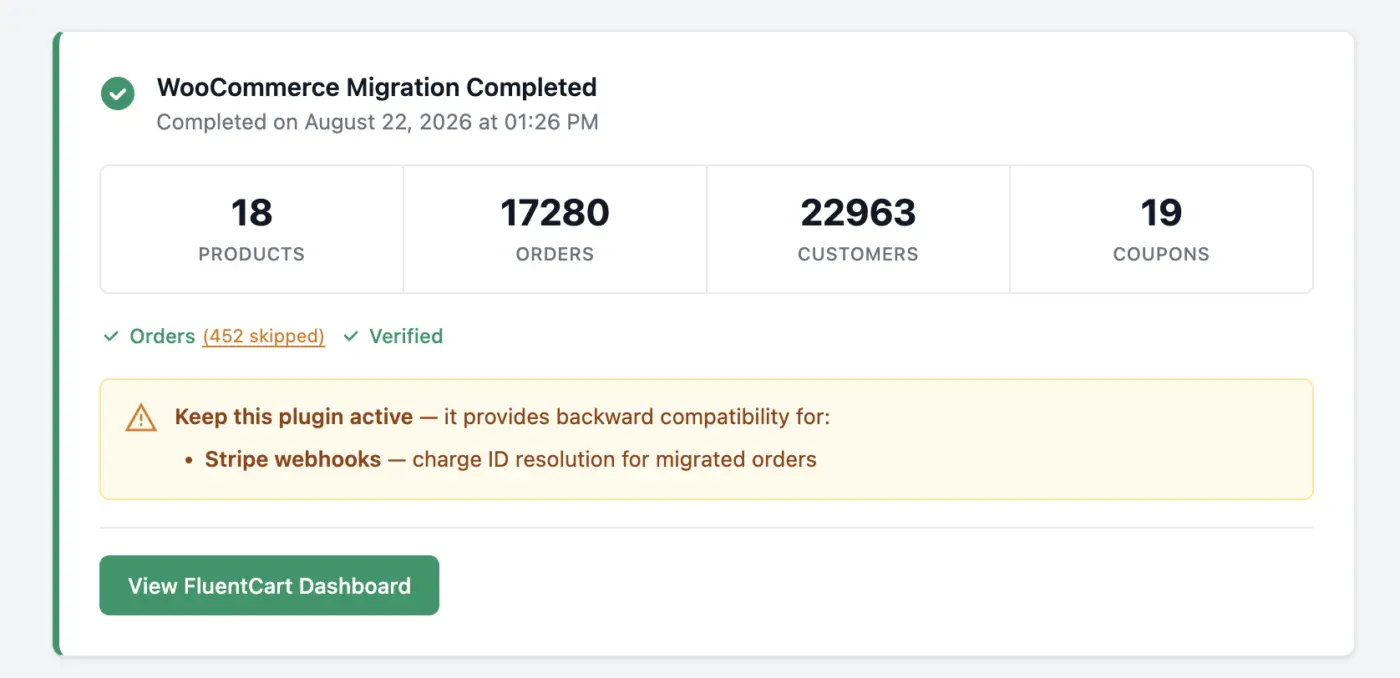
I want you to watch this if you are running a WooCommerce store and planning to migrate over to FluentCart. Paul C took a WooCommerce store and ran it through our migrator.
What comes over: every essential data like products (including variations), orders, customers, coupons, tax rates, order notes. Subscriptions come over as well if you have WooCommerce Subscriptions.
If your store is on Woo and FluentCart already does the job, this is the week to move.
https://www.youtube.com/watch?v=8BStT5F-8S8
Full guide and details here: https://fluentcart.com/blog/fluentcart-1-6-2/
Let me know if you are planning to move and if you need any help; we are one message/support ticket away.

Hi everyone,
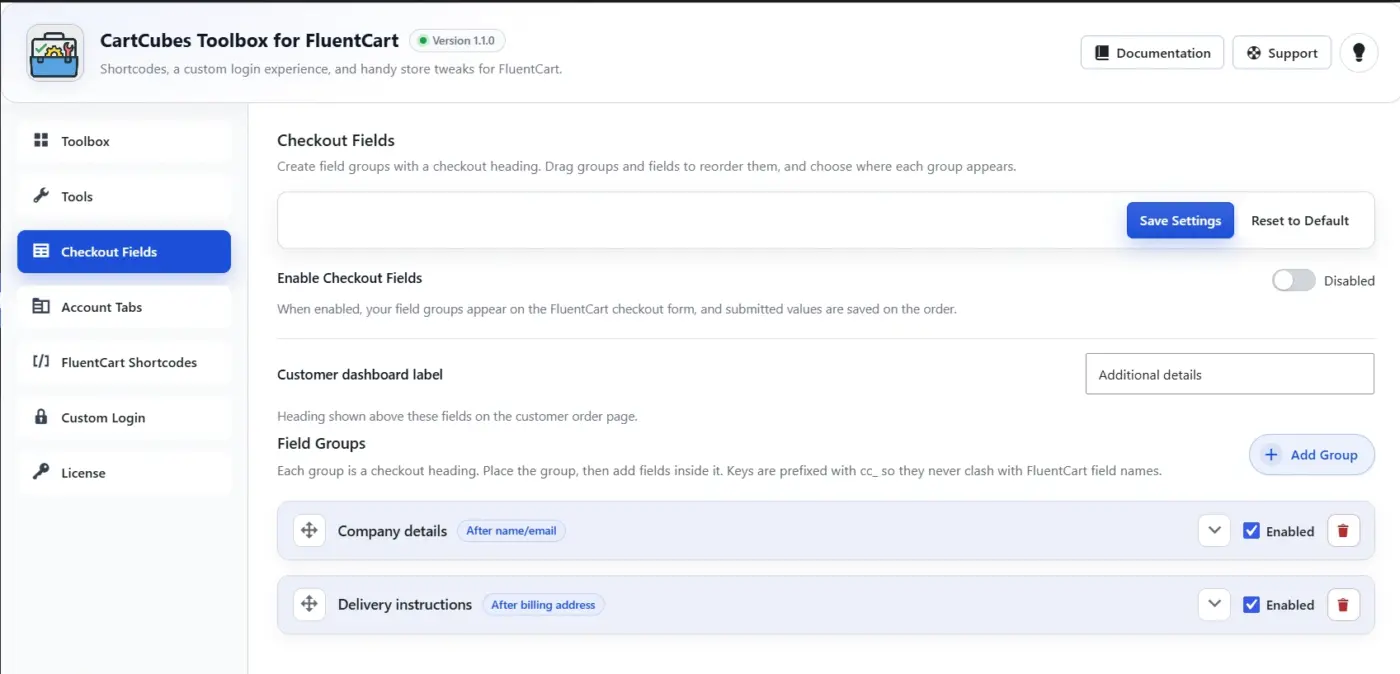
Some store owners need a few extra checkout questions, such as delivery notes, a gift message, how did you hear about us, or a marketing opt-in. They also want those answers saved on the order.
We added a custom Checkout Fields feature in Toolbox for that.
Checkout Fields
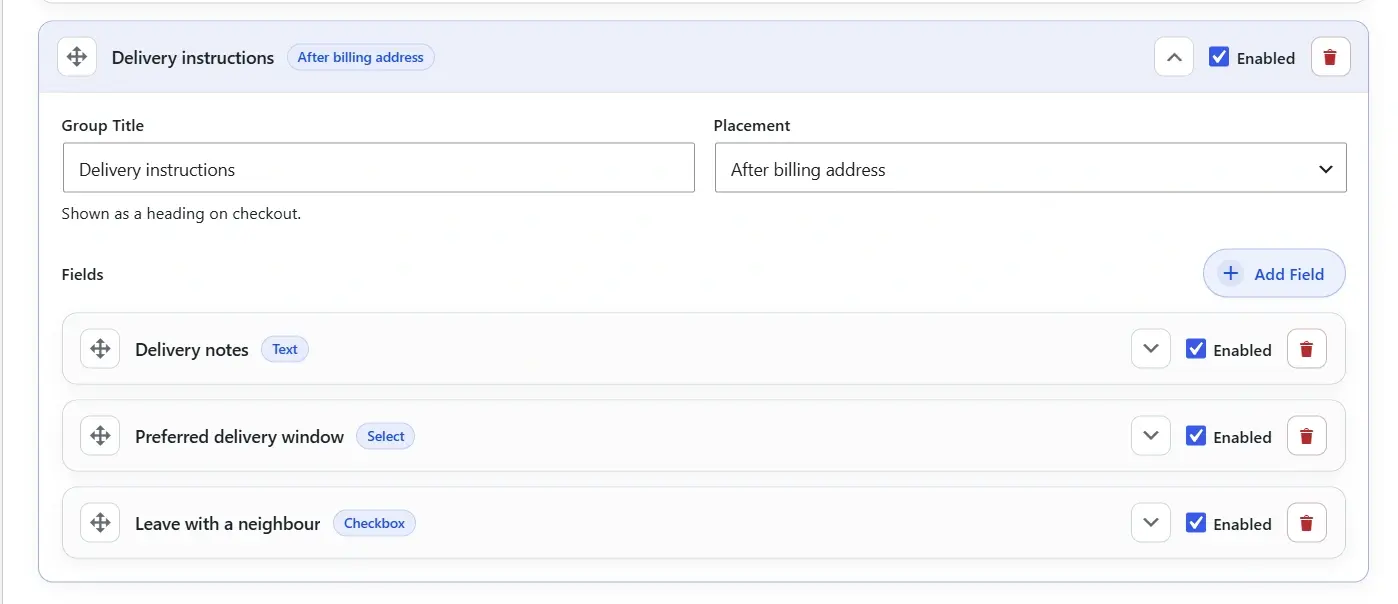
Add a group, give it a heading, and place it after name/email, after billing, or before payment.
Fields can be text, textarea, checkbox, or select. Required fields validate on submit. Answers save on the order and show in admin and on the customer order page.
You can add as many fields as you need on checkout. The data is saved on the order.
For more Details:
https://cartcubes.com/fluentcart/toolbox/checkout-fields/
We also added a few filters from the FluentCart snippet docs, so you can enable or disable them with a toggle:
- Hide unnecessary decimals on prices
- Add a short price suffix
- Hide billing fields on zero-total checkouts
- Store Stripe cards on subscriptions only
- Keep campaign / UTM data across your own domains
If those snippets are already in your theme, leave the Toolbox toggles off.
https://docs.fluentcart.com/guide/customization-and-themes/code-snippets

I want to use the Elementor Builder for the Checkout-Pages but there seem to be a bug: In mobile the Form (Shortcode) tries very hard to stay in two columns and I can't find any way to change that. Even when I set both rows to 100%, it keeps that way.
For some reason, when I use the normal Gutenberg-Builder and just add the Shortcode, it works perfectly fine. But as soon as I activate the Elementor-Builder, it gets buggy.
Here is the Checkout-Page of my Test-Product: https://online-business.club/checkout/?fct_cart_hash=7a35effa68ccbb96fff83e4a645bd553

I have been looking for this setting since yesterday.
Direct checkout page without creating a WordPress page
I can't find the settings anymore

We are currently configuring FluentCart Pro for recurring monthly membership billing for a local business networking organization. We've made good progress, but our use case is somewhat different from a conventional eCommerce store, and I'd appreciate some guidance from experienced FluentCart users and the FluentCart team.
Our members pay a fixed monthly membership fee plus 5% GST. We eventually intend to use Authorize.Net for credit card payments while retaining offline payment by Interac e-Transfer, cheque or cash when necessary.
We have successfully tested FluentCart's subscription/billing process, including:
- Monthly recurring subscriptions
- GST calculation
- Offline payments and pending orders
- Manually marking offline orders as paid
- Subscription activation, renewal dates and pausing
- Customer purchase/subscription history
- Receipt generation
- Custom invoice numbering
- Creating the invoice/receipt number when the order is created rather than waiting for payment
The underlying FluentCart billing and subscription engine appears capable of doing most of what we need.
Our challenge is primarily the customer-facing workflow.
For example, with an offline subscription payment, the member can currently encounter a workflow similar to:
Checkout → Place Order → Payment Pending → Customer Dashboard → Pay Now → Checkout again
For a membership organization, this can be confusing. The member has already received the invoice and instructions for paying by e-Transfer, cheque or cash, so a subsequent "Pay Now" action that returns them to checkout isn't necessarily appropriate.
We have successfully used WordPress filters/snippets to modify some FluentCart terminology, but before going further down that road, we'd like to understand what FluentCart officially supports for creating a custom customer-facing experience while retaining FluentCart as the billing and subscription engine.
Our ideal workflow would be:
FluentCart generates monthly billing → Member receives invoice notification → Member opens our branded invoice page → Member pays → FluentCart records payment → Member receives confirmation/receipt
We already have a custom WordPress invoice page that can display the member's name, invoice number, invoice date, due date, billing period, membership amount, GST, total due and payment instructions, with Print/Save as PDF capability.
Rather than recreating FluentCart's billing functionality, we'd prefer to have our interface consume FluentCart's data and let FluentCart remain the system of record for subscriptions, orders, taxes, payment status and transactions.
A few questions:
- Can FluentCart's default Confirmation/Payment Pending experience be replaced or redirected to a custom WordPress page without interfering with the underlying order and subscription processes?
- Is there a supported API, PHP model, shortcode or set of hooks for retrieving an order's invoice number, amount, GST/tax, payment status, billing/renewal information and subscription information for display on a custom page?
- Can a custom Pay Invoice button initiate payment against an existing unpaid FluentCart order without requiring the member to navigate the standard FluentCart Customer Portal/checkout workflow?
- Can we provide our own Print/Download Invoice and Download Receipt actions while still using FluentCart's underlying order/receipt data?
- Can FluentCart's Customer Portal be selectively customized, for example removing or redirecting Pay Now, Downloads, Purchase History or other elements that aren't appropriate for our membership application? Or would the recommended approach be to build our own member billing interface using FluentCart data?
- With Authorize.Net, can an existing unpaid subscription renewal invoice/order be paid from a custom payment page? More importantly, does FluentCart support automatic recurring charging through Authorize.Net, or must the member actively pay each renewal?
- Are there supported hooks/actions for events such as subscription paused, resumed, cancelled, renewal generated and payment received so we can trigger our own member/admin notifications?
- Most importantly, is this type of implementation within FluentCart's intended extensibility, or would replacing this much of the customer-facing interface create maintenance/update problems?
We are particularly interested in knowing which FluentCart APIs, hooks, models and endpoints are considered public/stable for this type of development, and which frontend components developers should avoid overriding because plugin updates could break those customizations.
We're not trying to replace FluentCart's billing engine. Quite the opposite. If possible, we'd like FluentCart to remain the system of record for subscriptions, orders, taxes, payments and transactions, while our WordPress site provides a simpler branded membership-billing experience to the member.
If anyone has implemented FluentCart for memberships, associations, service contracts or recurring invoicing rather than a traditional online store, I'd be very interested to hear how you approached it.
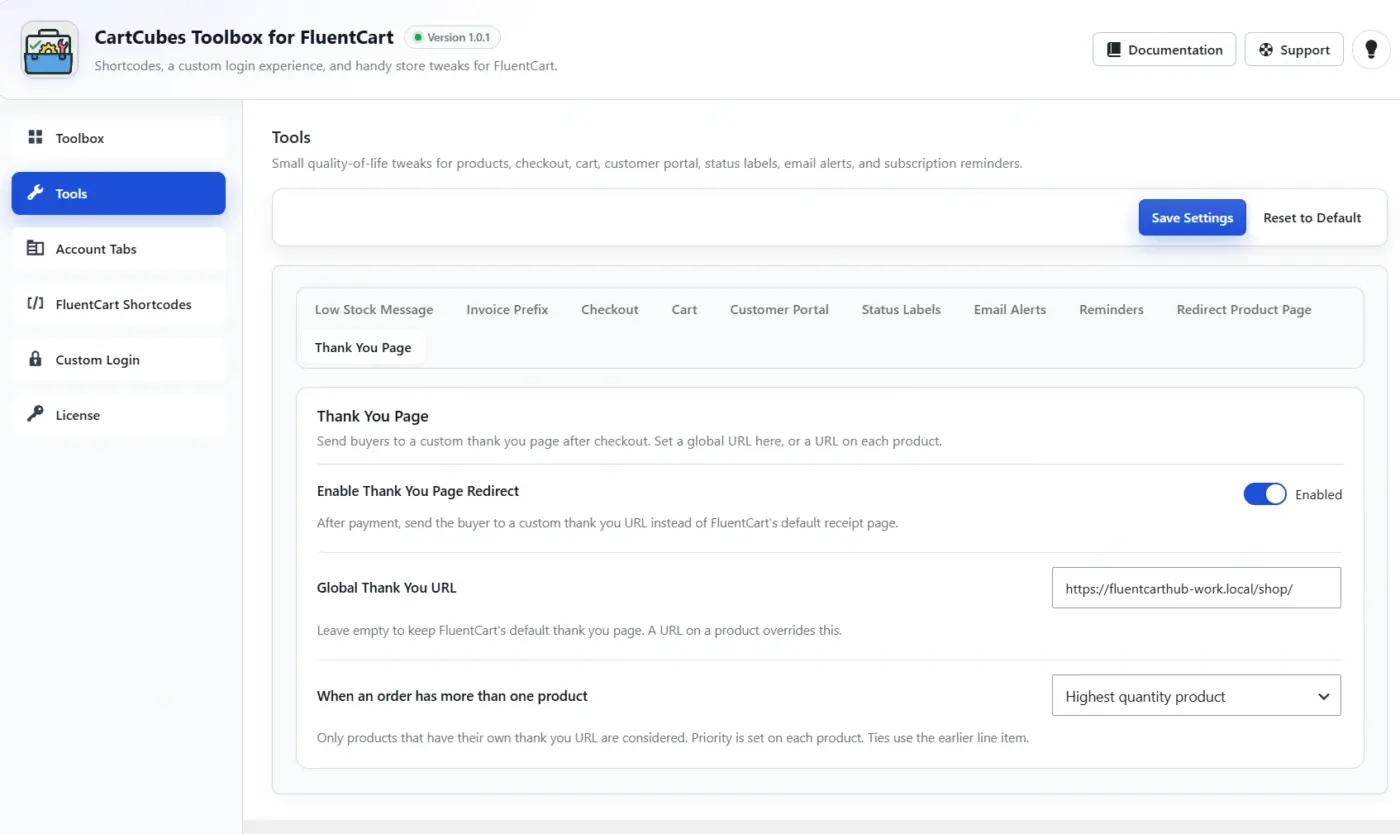
I added one more useful feature in CartCubes Toolbox: a thank you page per product.
After checkout, you can send the buyer to a custom page. Set one URL for the whole store, or a different URL on each product.
If the order has more than one product, you can choose which page to use: first product, highest amount, highest quantity, or product priority.
Turn it on in Toolbox → Tools → Thank You Page.
https://cartcubes.com/fluentcart/toolbox/

Hi everyone, I am Nikhil.
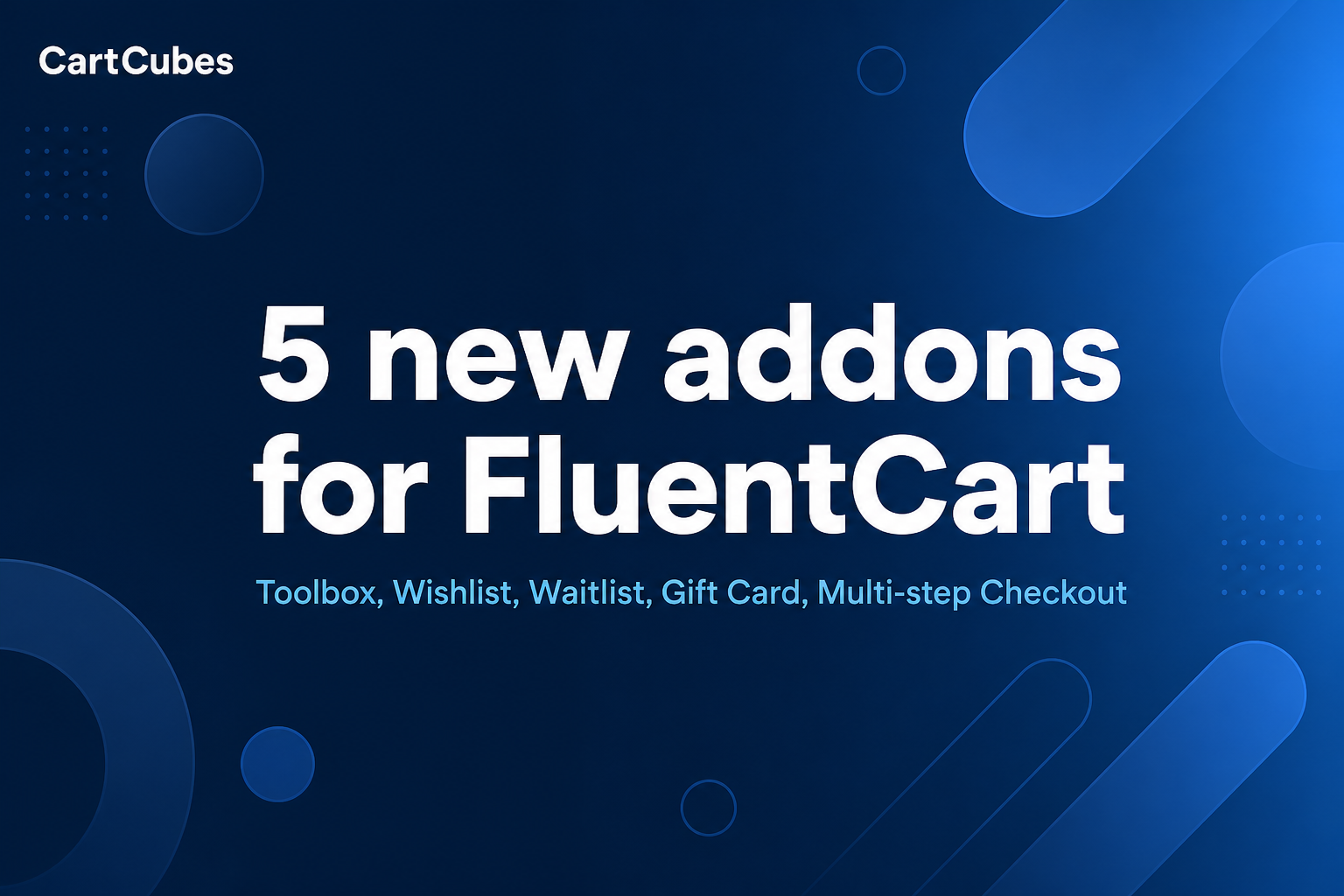
I have been building FluentCart addons and wanted to share a few tools that solve problems I kept seeing: gift cards with a real remaining balance, back-in-stock emails for the exact variant, and small store tweaks without custom code.
Gift cards
A lot of stores need gift cards that are not just a coupon. Shoppers should be able to spend part of the balance and come back later. We sell them as a normal FluentCart product, keep a balance ledger, and can schedule delivery with a PDF/QR for checkout.
https://cartcubes.com/fluentcart/giftcard/
Waitlist / restock
When Size M is sold out, the shopper should not get an email when Size S restocks. Signups are stored per product and per variation, and the restock email goes out when that exact item is back.
https://cartcubes.com/fluentcart/waitlist/
Toolbox
For stores that need extras without a pile of snippets: checkout and cart tweaks, product shortcodes, a branded customer login, and custom tabs in the customer portal. You turn on only what you need.
https://cartcubes.com/fluentcart/toolbox/
Also shipped, if useful:
Wishlist: https://cartcubes.com/fluentcart/wishlist/
Multi-step Checkout: https://cartcubes.com/fluentcart/multistep-checkout/
All five: https://cartcubes.com/fluentcart/
Happy to answer how we used FluentCart's API and hooks, or what you would want next. If you have run into gift-card balances, variant waitlists, or checkout tweaks, I would like to hear what you needed.

Hi everyone,
I run an Italian site on the Fluent suite and I needed FluentCart in Italian, so I translated it. Both plugins, at version 1.6.2:
- FluentCart (free): 9,218 of 9,218 strings
- FluentCart Pro: 923 of 923 strings
Storefront, checkout, customer area, system emails, block editor, payment methods and the whole admin. Nothing left in English.
Both files pass msgfmt -c with zero errors, zero untranslated and zero fuzzy entries. Printf placeholders and smartcodes were checked one by one against the source strings, and the translation is running on a live store, not just in a text editor.
The zip attached has both .po files, free and pro, plus a README with install notes.
Three things to know before using it
The wording was written for a real shop, and three choices are editorial rather than literal:
- I removed the emoji from the system email subjects and bodies.
- I toned down the admin notification emails. "Cha-Ching! Your Shop's Raking It In!" and "Woot Woot!" are plain sentences in Italian. The meaning is there, the fanfare is not.
- Gender-neutral wording throughout, which in Italian means rephrasing rather than using asterisks or other symbols.
All three are email texts a shop owner can rewrite from the plugin settings, so they are easy to override. If you would rather have a version that stays literal on those strings, tell me and I will produce it from the same source: the translation is generated from a JSON dictionary, so variants and updates cost me very little.
One small bug in the free .pot, while I am here
fluent-cart.pot line 18556 has a stray "#| msgid_plural "Licenses"" comment on the "License" entry, which has no plural form. msgfmt -c fails on the template as shipped:
fluent-cart.pot:18556:16: syntax error
Harmless for the plugin, annoying for anyone building a translation from it.
Two questions for the team
- Would you like to ship this with the plugin? It is free to use, modify and redistribute, including inside FluentCart itself.
- For the free plugin, would you rather I put it on translate.wordpress.org, so it reaches Italian users automatically? Happy either way, I just did not want to push it there without asking.
It is offered as is, with no warranty: anyone installing it should check the result on their own store. If something reads wrong in Italian, write it here and I will fix it.
Roberto