


Can please integrate with delivery platform for easy to handle the shipping?
Example: easy parcel malaysia etc
urgent because get a lot of order using fluent cart. Manual submit order is sucks

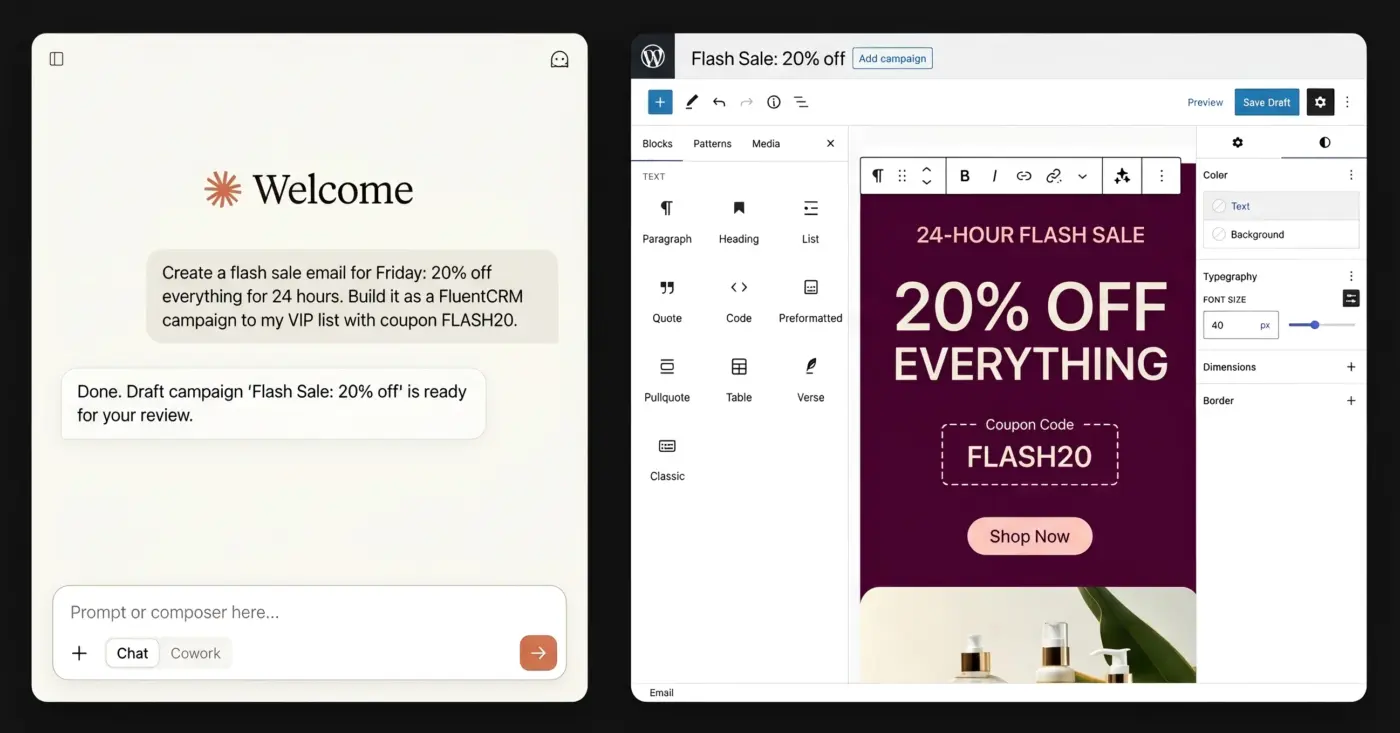
Hey everyone, I'm Aaron. I've been moving our store from Shopify to FluentCart, and I kept wishing I could just ask for things. "How did last week's sales compare?" "Tag everyone who bought X and draft a follow-up campaign." "Set up a 20% coupon for Friday." "Create a 5 Day Welcome Email sequence for new customers."
So I built All-In-One MCP for Fluent Suite. It connects Claude, or any MCP client, to:
- FluentCRM
- FluentCart
- Fluent Forms
- FluentCommunity
- WP Social Ninja
- Others Coming Soon
It covers with every documented REST endpoint, which comes to 1,290 tools. You can run it with just one of these plugins or all five. It works with the free versions, and Pro features light up when the Pro plugins are active.
Built to be safe on a live site:
- Updates merge instead of overwriting, and every write is checked afterwards.
- Every write can be dry-run first.
- 203 destructive operations (deletes, refunds, mass sends) need explicit confirmation.
- It signs in with a WordPress Application Password, so it only does what that user is allowed to do.
Nothing to install on your site. Drag the .mcpb file into Claude Desktop → Settings → Extensions and enter your site URL, username and Application Password. It can also run as a local server, or on Cloudflare Workers (Workers Paid plan) if you want it on the web and mobile.
It's free for a limited time and MIT-licensed on GitHub. I'd love feedback, bug reports, and to hear what you'd use it for.
Download: https://upfluent.io/all-in-one-mcp-for-fluent-suite/
This is an independent community project. It isn't made by or affiliated with WPManageNinja.

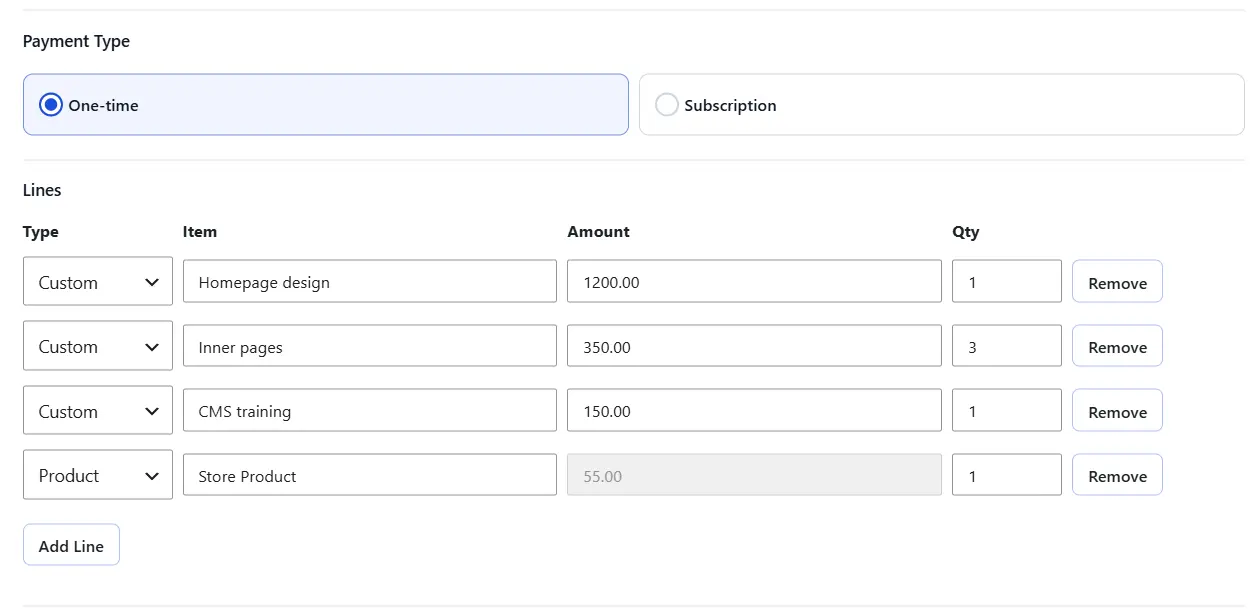
CartCubes Invoices for FluentCart 1.1.0 changes how a one-time invoice is built, and adds ways to follow up from the customer account and from FluentCRM.
A one-time invoice can mix custom lines and store products on the same Pay Now link. A product line uses the catalog price.
Duplicate is on the list and the edit screen. The copy is a new draft, so you can change the customer or the lines before you send it.
On a paid invoice, View order opens the FluentCart order from that checkout.
Show Checkout Message is per invoice, and only on that Pay Now checkout. Place it after name and email, before payment, or in the order summary.
Show Unpaid Invoices In The Customer Account is off by default. When it is on, the account lists pending invoices for the logged-in email. Each one has a Pay Now link.
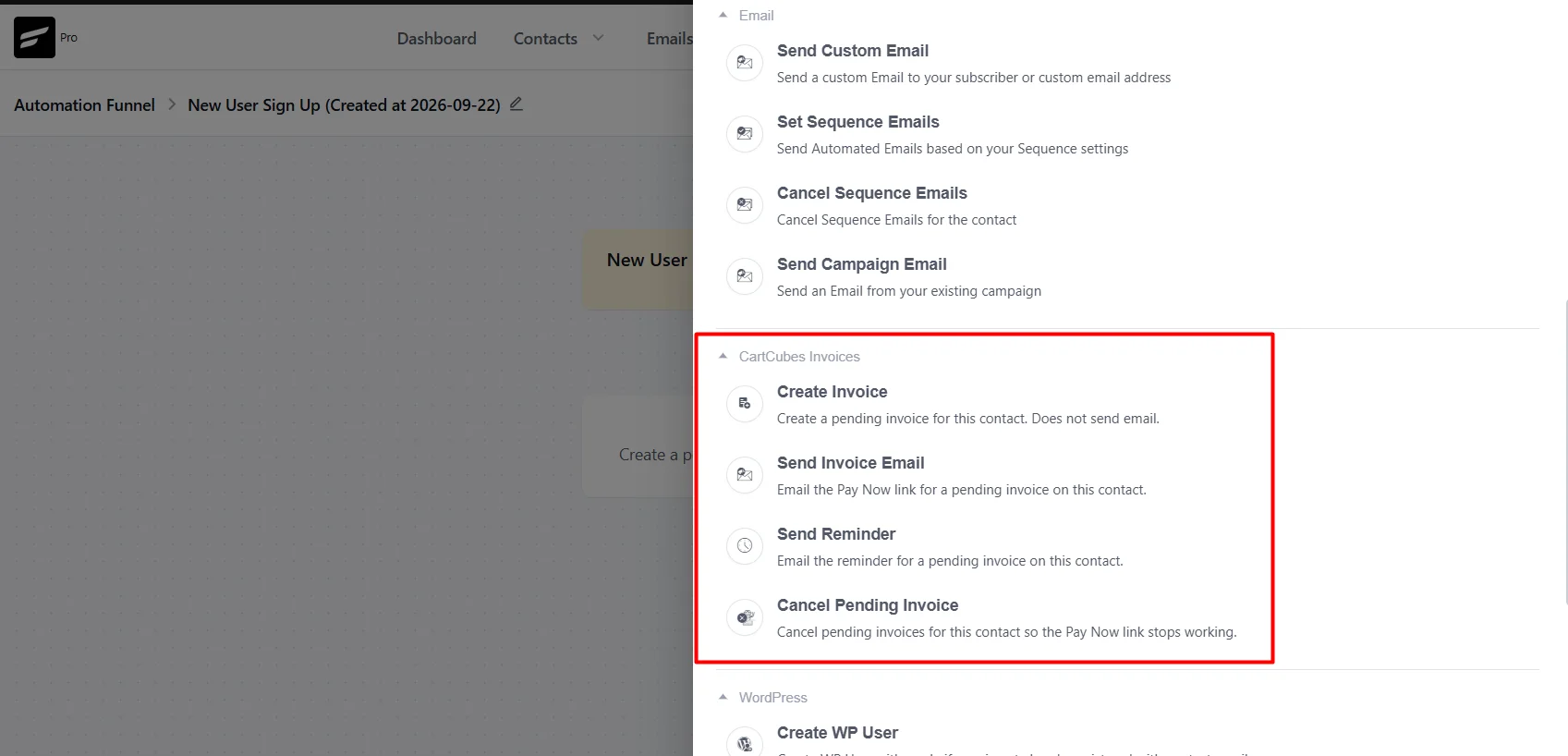
FluentCRM actions stay off until Enable FluentCRM Actions is on, and FluentCRM is active. They then show under CartCubes Invoices.
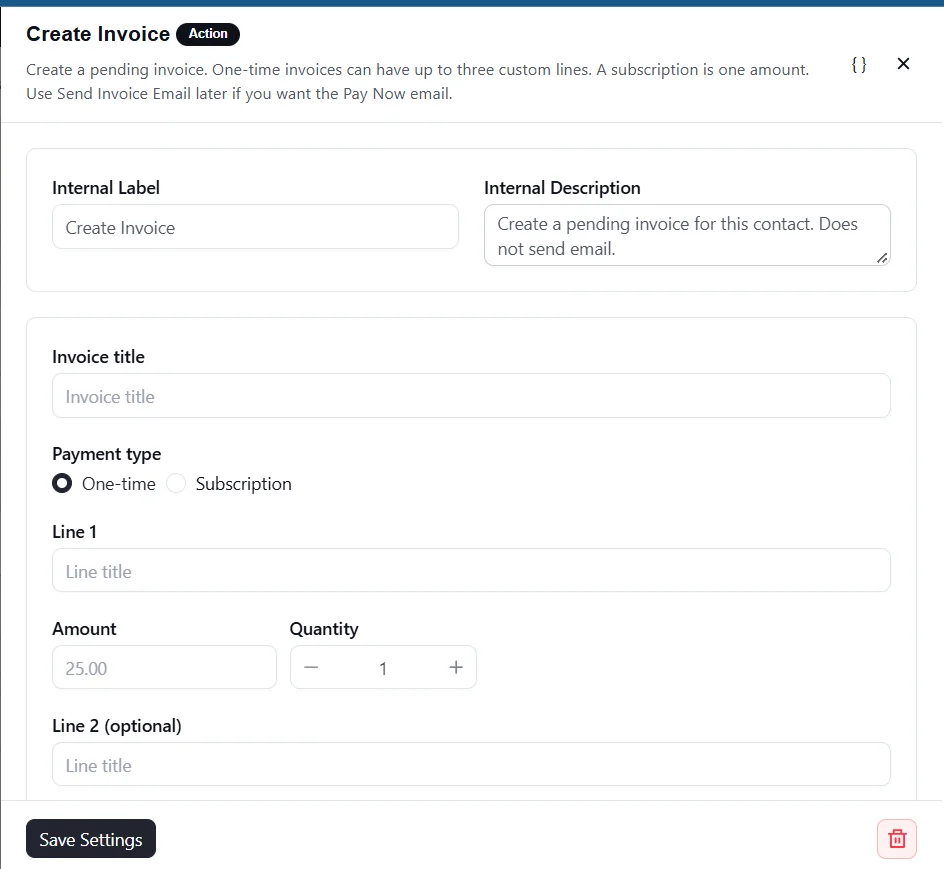
- Create Invoice makes a pending invoice and does not send email. One-time is up to three custom lines. A subscription is one amount, with an interval, trial days, and an optional signup fee.
- Send Invoice Email sends the Pay Now email for the newest pending invoice, or one with a matching title. It skips if nothing matches, or if the Pay Now template is off.
- Send Reminder uses the Reminder template and the same target.
- Cancel Pending Invoice can cancel the newest one, every pending invoice with a matching title, or every pending invoice. The Pay Now link then stops working.
Hooks in 1.1.0:
- cartcubes_fc_invoices_duplicate_data: change the duplicate before it is saved
- cartcubes_fc_invoices_checkout_message: change the checkout message. An empty string hides it
- cartcubes_fc_invoices_order_admin_url: change the admin order URL
- cartcubes_fc_invoices_account_invoices: change the unpaid list in the account
- cartcubes_fc_invoices_account_menu_item: change the account menu label and link
- cartcubes_fc_invoices_invoice_duplicated: after a duplicate is inserted
- cartcubes_fc_invoices_invoice_saved: after an invoice is created or updated
- cartcubes_fc_invoices_invoice_paid: when an invoice is marked paid
- cartcubes_fc_invoices_invoice_cancelled: when an invoice is cancelled
Full notes: https://cartcubes.com/cartcubes-invoices-for-fluentcart-1-1-0/
One-time invoices: https://cartcubes.com/fluentcart/invoices/invoices/
FluentCRM setup: https://cartcubes.com/fluentcart/invoices/fluentcrm/

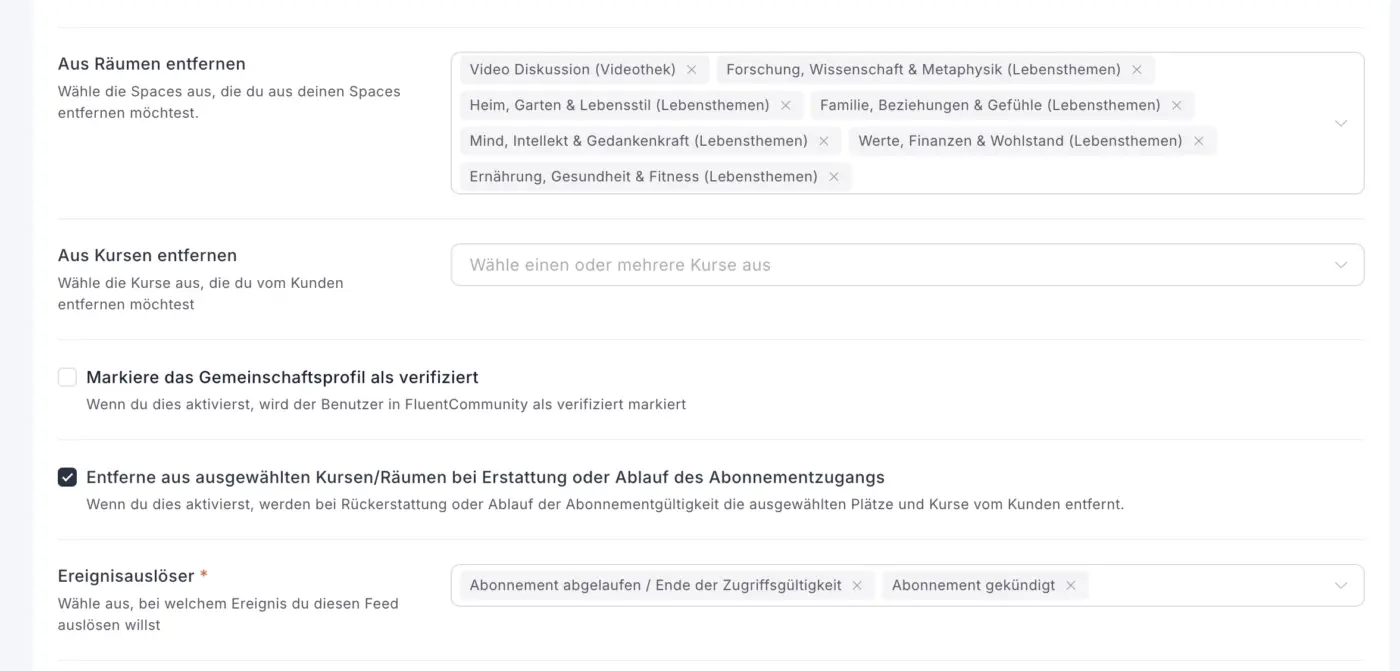
I need some help here, plus a comment/suggestion. In FluentCart we have integrations. A FluentCommunity integration allows to get added to / removed from courses and spaces. So far, so good.
... but then there's the checkbox that says "Remove from selected Courses/Spaces at reimbursement or end of subscription" (loose translation). My question: what's the point of that if I already have the removal fields further up?
And, Shahjahan Jewel or whomever, that event trigger below, shouldn't that be right at the top of this section, rather than the second last?
What do you guys think? What do I not understand here?

I’m using FluentCart with Kadence Theme and Kadence Blocks Pro.
I want to customize the single product page layout, such as adding/removing elements and changing the design and styling.
However, I can’t find any FluentCart product blocks such as Product Title, Product Gallery, Product Price, Add to Cart, etc. I also don’t see any option to directly edit or design the single product page/template.
Kadence Blocks are working normally. My question is specifically about FluentCart’s product elements/blocks and single product template.
Am I missing something, or does FluentCart currently not provide a block-based way to customize the single product page?

Hi FluentCart team,
I run an online course business in South Korea and I'm moving to the Fluent ecosystem (FluentCommunity + FluentCRM). Payments are the only blocker for adopting FluentCart, so I'd like to propose an official PortOne integration.
Why it matters
- As far as I know, Stripe doesn't support Korean-registered businesses, and Korean customers mostly pay with domestic cards and local wallets (KakaoPay, NaverPay, TossPay).
- PortOne is the standard payment layer in Korea, connecting 50+ local PGs through one integration.
- WooCommerce already has an official PortOne plugin, which is the main reason Korean sellers stay there.
Why it's a good fit
PortOne V2 offers a browser SDK, a REST API for server-side verification, and Standard Webhooks with retries and signatures. It maps cleanly to AbstractPaymentGateway. Even one-time card payments alone would cover most needs.
Quick question: KRW is a zero-decimal currency. Is ₩10,000 stored as 10000 or 1000000 in FluentCart?
I'm currently building a custom PortOne V2 gateway using your docs, and I'm happy to share notes or help beta test an official version.
Thanks!

Is there a way to rearrange (display) the products? Thanks In Advance.
Toolbox 1.2 is for a few checkout and order workflows we keep building for.
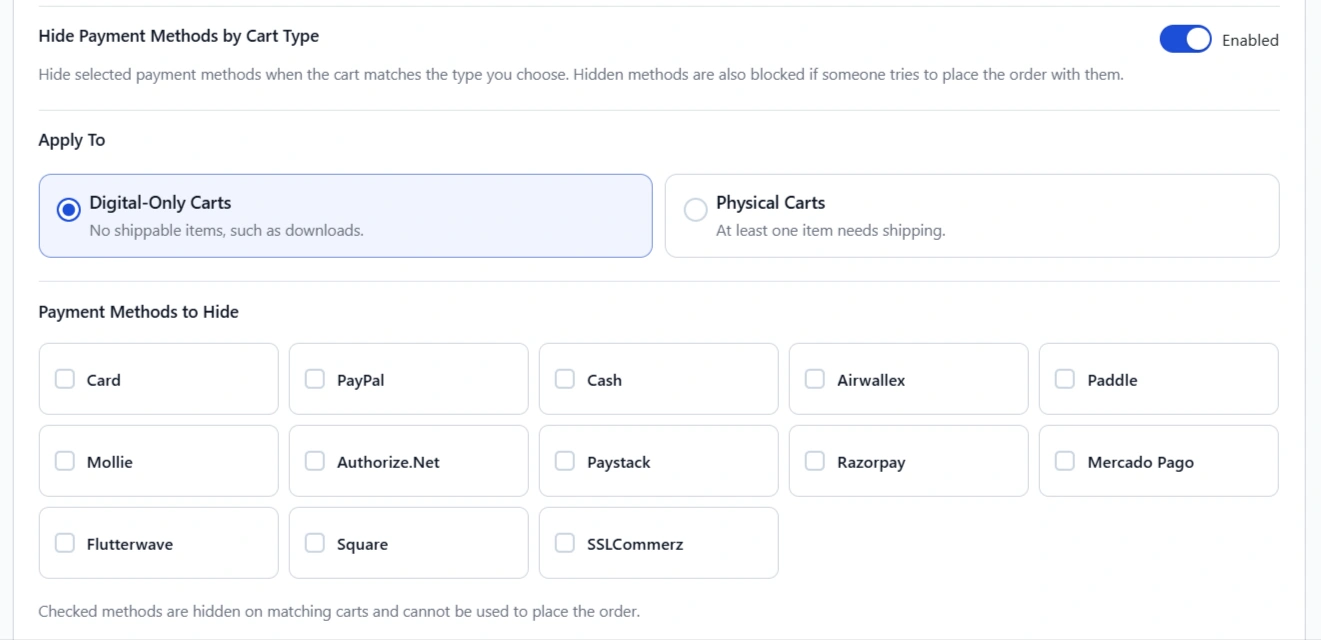
Digital cart, but you do not want Cash on Delivery
If the cart is download-only, you can hide selected payment methods by cart type: hide COD on digital-only checkouts, or hide a method on physical carts. Place order uses the same rule, so a hidden method cannot be posted.
Use this when you sell ebooks next to shipped products, and a digital order should not go out as cash on delivery.
Checkout is open in one tab, and the cart changes in another
If the form is empty, checkout refreshes by itself. If the shopper already typed a name or address, a banner with a reload button is shown so those details are not lost.
Use this when someone compares products in two tabs, then comes back to pay.
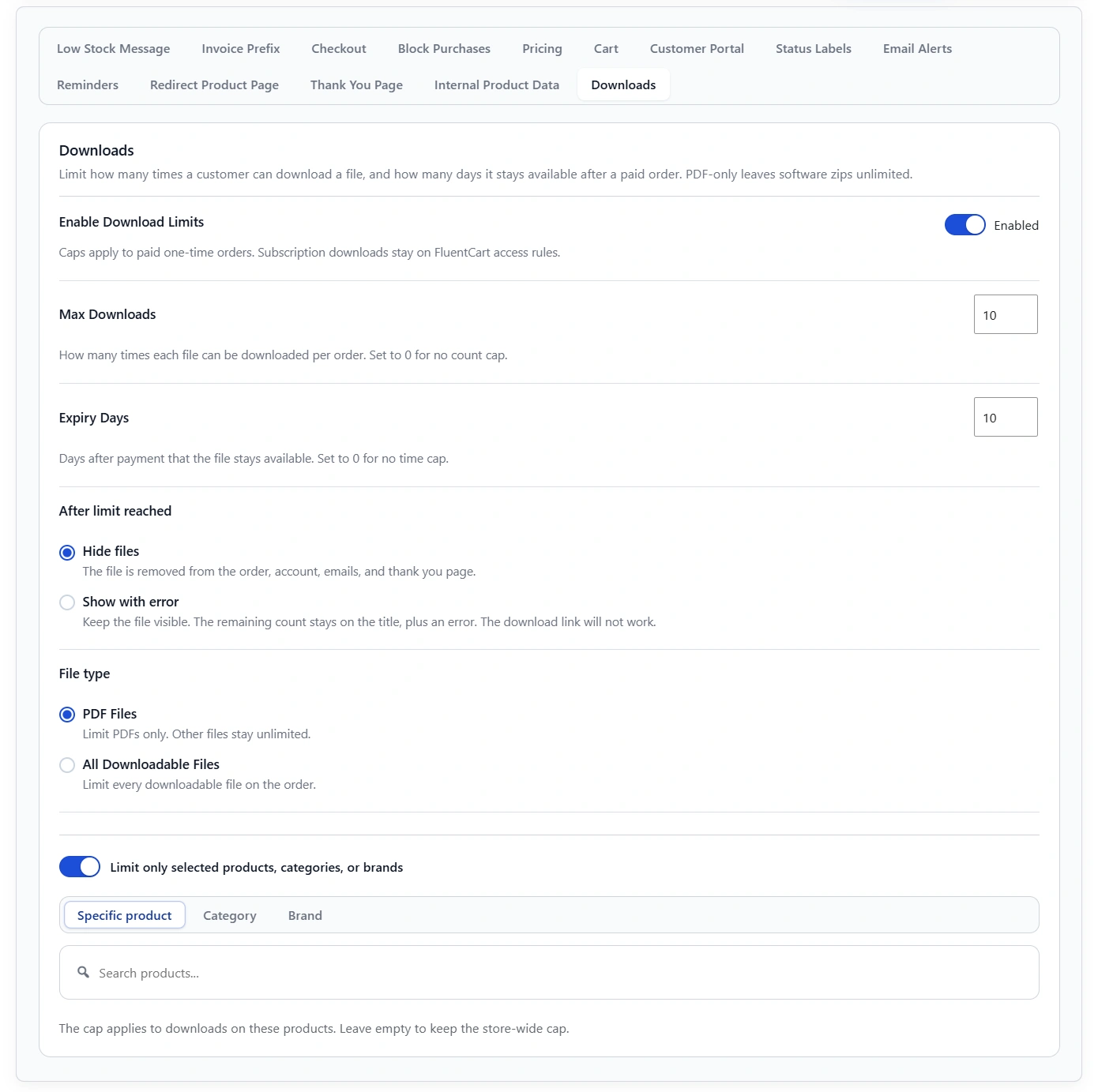
A paid file should not stay downloadable forever
For paid one-time orders, you can cap how many times a file can be downloaded and how many days it stays available. Remaining count and expiry show on the customer order, the account download list, and the WP admin order view. Limit PDFs or all files, store-wide or for selected products, categories, or brands. After the limit, hide the file or keep it visible with an error. The download link will not work.
Use this for a course PDF or an ebook you want to limit.
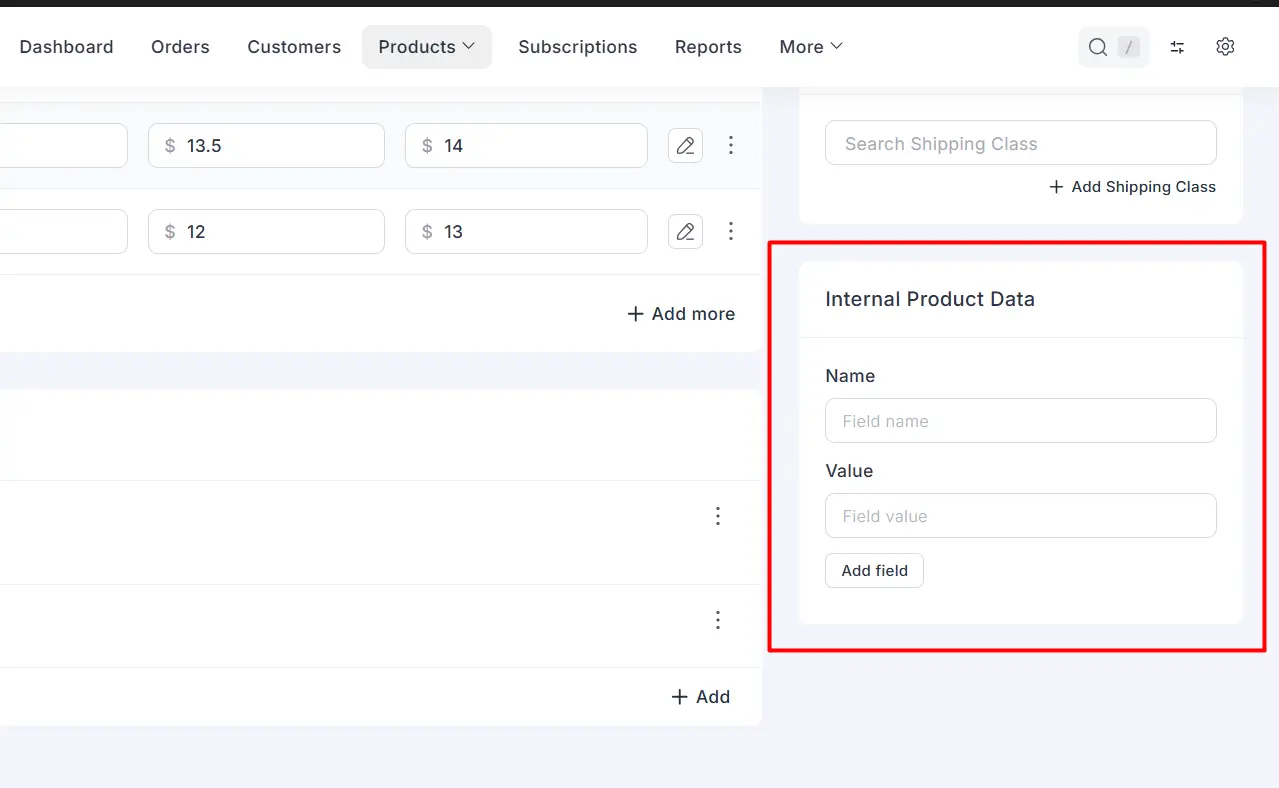
Staff need an ERP or External ID on the order, not on the shop
Internal Product Data adds staff-only name and value rows on the product editor. They stay off the storefront. When the product sells, the same pairs copy onto the order so staff and an API can match the sale.
Use this when fulfillment needs a code shoppers should never see.
You already know who should not be able to buy
Block purchases by email, IP, WordPress role, or FluentCRM list and tag. Each rule has its own toggle and message. Matching shoppers cannot place the order.
Use this for a known fraud email, a role you do not sell to, or a FluentCRM list or tag you want to keep out of checkout.
You need a date on the order
Checkout fields can be a Date picker. The shopper picks a date, it stores on the order, and staff and the customer see it in the site date format.
Use this for a preferred delivery date, a class date, or an appointment.
A field should only appear for wholesale or a CRM segment
You could already show a field group only for selected products, categories, or brands. You can also show it only for selected WordPress roles, or FluentCRM lists and tags.
Use this for a tax ID that only a wholesale role should see, or a note that only a VIP list should get.
Screenshots and the full notes are here:
https://cartcubes.com/cartcubes-toolbox-for-fluentcart-1-2/
https://cartcubes.com/fluentcart/toolbox/
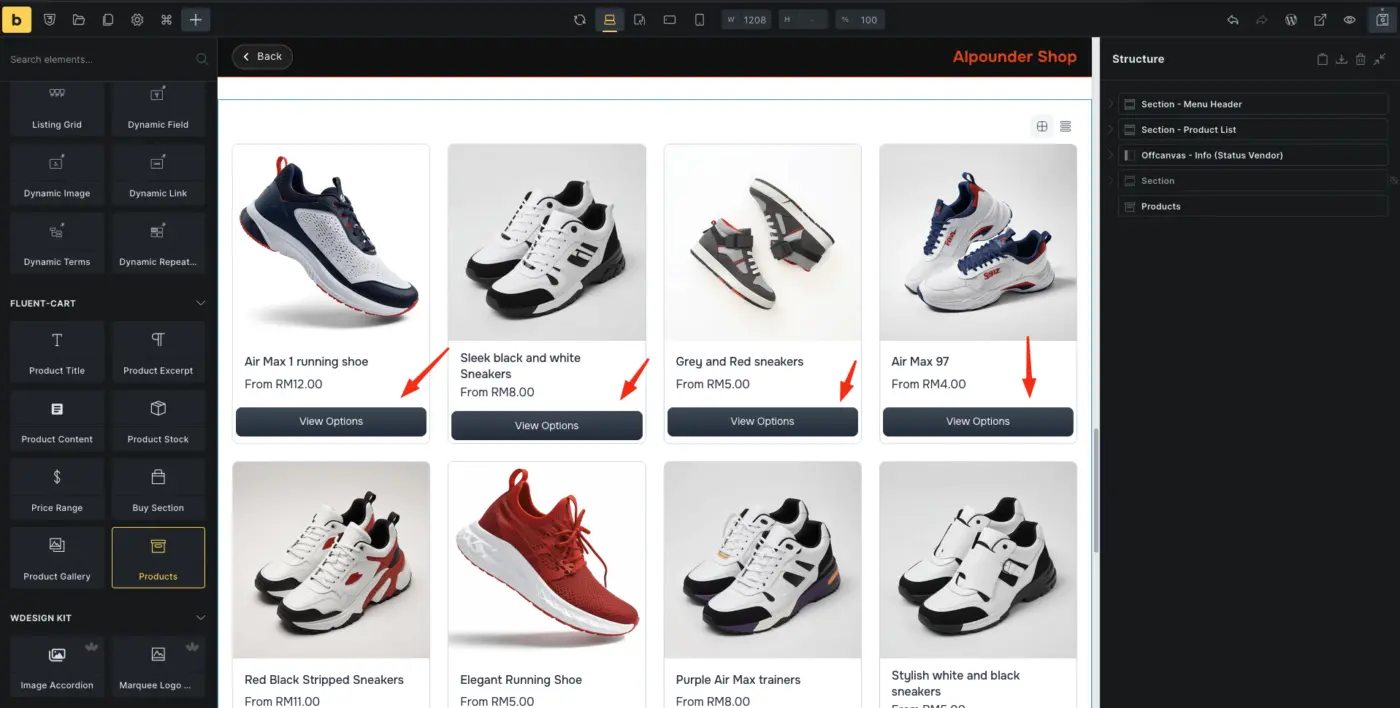
were can get this button.
if i click the button, the product popup button show and just add to cart the product. (easier for add to cart more product).
But in bricks does't have that button elements.

FluentCart supports a separately assigned shop_page_id and independently provides fluent_cart/front_url_slug for controlling the fluent-products permalink base. However, when the configured product URL base matches the assigned Shop page's slug, the CPT archive claims the bare base URL and prevents the configured Shop page from resolving.
The developer documentation does not expose an archive-base setting or routing-precedence hook to resolve this collision. Ideally, when the bare product base matches the configured shop_page_id permalink, FluentCart should reserve the exact base URL for the Shop page while continuing to resolve /base/product-slug/ as single products.