

How To Display Resources Like This?
Ive a load of PDF worksheets and assessments that I have made available to subscribers and site visitors, some paid, some free based on subscription. I wondering how I can get the same effect with FluentCommunity. The display is important so as to convey value.
Anyone any thoughts on how I can achieve this?
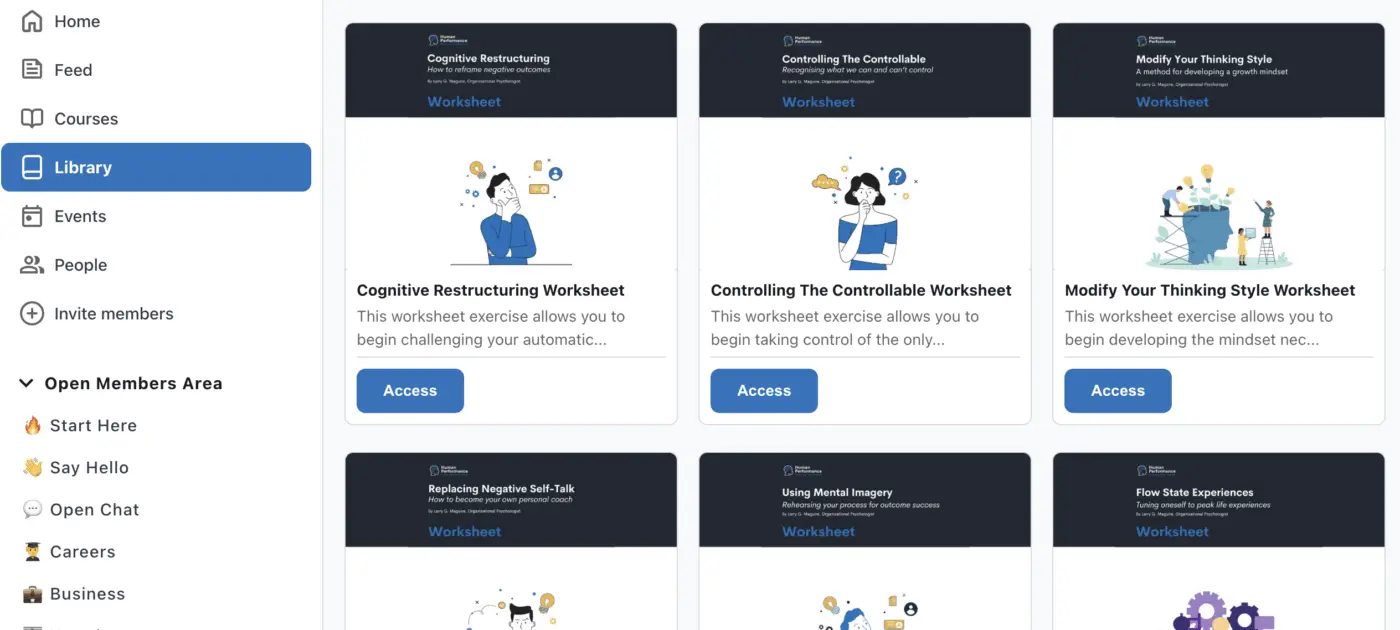

In Fcom, it's almost the same as in your screenshot. What exactly didn't work for you?

Artur Abakarov Really? How did I miss that setting? Please point me in the right direction because I just see "timeline" and "list" options in the space settings.
Larry Maguire, I admit my English is poor, and I still don't understand what you want, but other users seem to have already helped you.

Sure.
Those are probably CPTs.
Check this: https://community.wpmanageninja.com/portal/space/community-meta/post/new-cpt-for-community
- Please check this team and Shahjahan Jewel
I am pretty confident this is super needed and would be incredibly handy.
Btw, Larry Maguire , you can always create CPTs using something like ACF. And then put them on display in a page.
The only problem atm with FC is that custom post types will also have an archive template + single page template. Non of them works well with fluent community theme template.
But maybe if this never comes to core (hopefully we can see it as it’s becoming pretty basic in communities) I invite you to follow Ross FCA add ons. I’ve not tried them personally yet, but he mentioned that the add ons he create it allow one type of CPT (/pages) at the time. So, if it brings new CPTs at demand or allow the users to create them as suggested in the proposed roadmap idea, it will probably fit in a coherent way on your FC site.
ATM, I tried it the CPT approach. But as I said both archive and single pages will remain on your theme and FC appears not to work with it. So, the “UX” of having all your CPTs under the same style it’s not possible currently - to my knowledge, of course.
Please , do not hesitate to up vote for this on the roadmap. And also, check Ross work!
Jorge de los Reyes thanks for the detail...defo something I need and if I can't make it happen I'll have to go with GroupApp. Regrettably because I wanted functionality on my primary domain. Let's see where it goes
Larry Maguire we already have /courses .
And other similar community plugins are planning to launch this.
It’s something we all use / want to use on our communities.
Something similar was created here in FC (docs repositories). You may want to check that. Is basically create a space and allow documents sharing.
But being able to create custom CPTs like /guides /resources or so; will cover many use cases 😄
Let’s hope the ninjas read this 💪

Jorge de los Reyes the ninjas have a super simple code snippet to solve this for CPTs!
https://github.com/WPManageNinja/fluent-community-docs/blob/master/theme-compatibility.md#using-code-snippets
Stuart McKelvie wow! Thank you Stuart: this is super handy!
I’ll then try creating a display of CPT’s on a page and add this snippet for those single posts 💪
I’d prefer a native feature tbh: but this seems like a fun experiment!
Thank you for the guidance!

I did something similar with regular WordPress pages that are configured to use the FC full width page template. The code shows a box for each subpage that the logged in user has access to (I use the Members plugin for creating/assigning roles).
Something like this may work for you. Code could be written to pull from the media library or a custom post type.
Thomas Oates exactly what we’re looking for!
Even, you got a really alike feel to FC Thomas: congrats!
On my side, I got stuck with the fact that CPTs (ACF) are using by default theme templates. I’ll have to research on how to un-assign that, and also have them as pages so as to being able to assign the FC full frame template.
ATM, every single post is still using the theme template 😔.
Before FC, we were using Thrive Themes. And also, using it for role access control.
I’d definitely love to see this natively on the option of “Add new” (space, link… resource).
Thomas Oates This looks good...might work for me.
Jorge de los Reyes Oh yeah, I forgot that I had problems with programmatically using the FC page template. We don't have a ton of pages so setting it on each page isn't too bad. I may look at it again because it would be nice to use for regular posts or CPTs.
Thomas Oates keep us updated with your findings!
It could definitely be a good alternative if CPT compatibility is not added to the core 😄

Thomas Oates this is what I want
Jorge de los Reyes I got it working to use the FC template for posts and CPTs. However, since it is a page template, the only part of the CPT that is displayed is the title (need to dig deeper on how to work better with CPTs). It does seem to work for posts fine though (only showing title and content). And it now doesn't require setting pages to the FC page template.
Here is some filter code that does the magic.
    add_filter( 'template_include', function( $template ) {
        if ( is_page() ) {
            global $post;

            // Get the manually-set page template (if any)
            $manual_template = get_post_meta( $post->ID, '_wp_page_template', true );

            // If no template is set OR the template is set to 'default', use plugin template
            if ( empty( $manual_template ) || $manual_template === 'default' ) {

                $themeName = get_option('template');
                (new \FluentCommunity\Modules\Theming\TemplateLoader())->loadBlockBasedTemplateAssets($themeName);

                $custom_template = WP_PLUGIN_DIR . '/fluent-community/Modules/Theming/templates/fluent-community-frame-full.php';

                if ( file_exists( $custom_template ) ) {
                    return $custom_template;
                }
            }
        }

        // --- Handle Posts ---
        if ( is_single() && get_post_type() === 'post' ) {

            // Call the FC function to load all the template assets
            $themeName = get_option('template');
            (new \FluentCommunity\Modules\Theming\TemplateLoader())->loadBlockBasedTemplateAssets($themeName);

            // Set page/post template to the FC template
            $custom_template = WP_PLUGIN_DIR . '/fluent-community/Modules/Theming/templates/fluent-community-frame-full.php';

            if ( file_exists( $custom_template ) ) {
                return $custom_template;
            }
        }

        // --- Handle calendar plugin event custom post type
        if ( get_post_type() === 'r34icspro_event' ) {

            // Call the FC function to load all the template assets
            $themeName = get_option('template');
            (new \FluentCommunity\Modules\Theming\TemplateLoader())->loadBlockBasedTemplateAssets($themeName);

            // Set page/post template to the FC template
            $custom_template = WP_PLUGIN_DIR . '/fluent-community/Modules/Theming/templates/fluent-community-frame-full.php';

            if ( file_exists( $custom_template ) ) {
                return $custom_template;
            }
        }

        return $template; // Fall back to normal page.php or chosen template
});Thomas Oates awesome Thomas!
Thank you very much!
I’ll also dig deeper on this.
I really appreciate your insights!
Thanks for your input on this one everyone... I enabled Fluent Community page template and I'm experimenting on how to display resources on a page. Aside from adding resource images with links in columns (seems like too much work), anyone have suggestions on an efficient way to display resources on the FC custom page?

I've used Elementor to build the pages and add sections. I'll test it to see if it works with dynamic pages and show it here.