


I have had this tutorial on hold for a while and now I have finished the first version. I asked for additional tips from support and if anyone has anything I should add to it let me know. https://easywebdesigntutorials.com/how-to-protect-fluent-forms-from-spam/
The less words the better. This is a bit wordy though. But it goes through what I believe are the most important spam protection areas of Fluent Forms.

The recent update (v.6.2.3) is excellent. But...
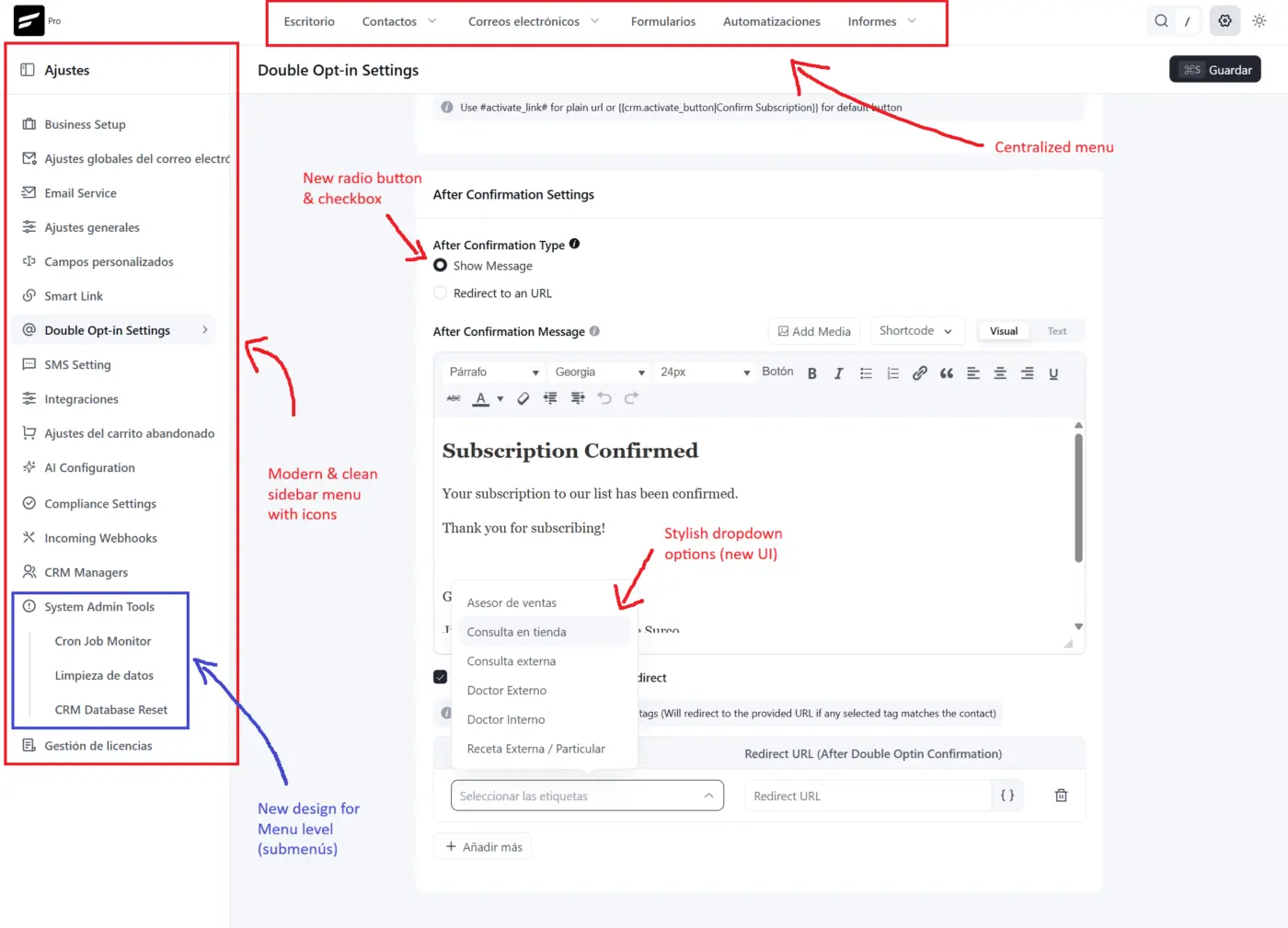
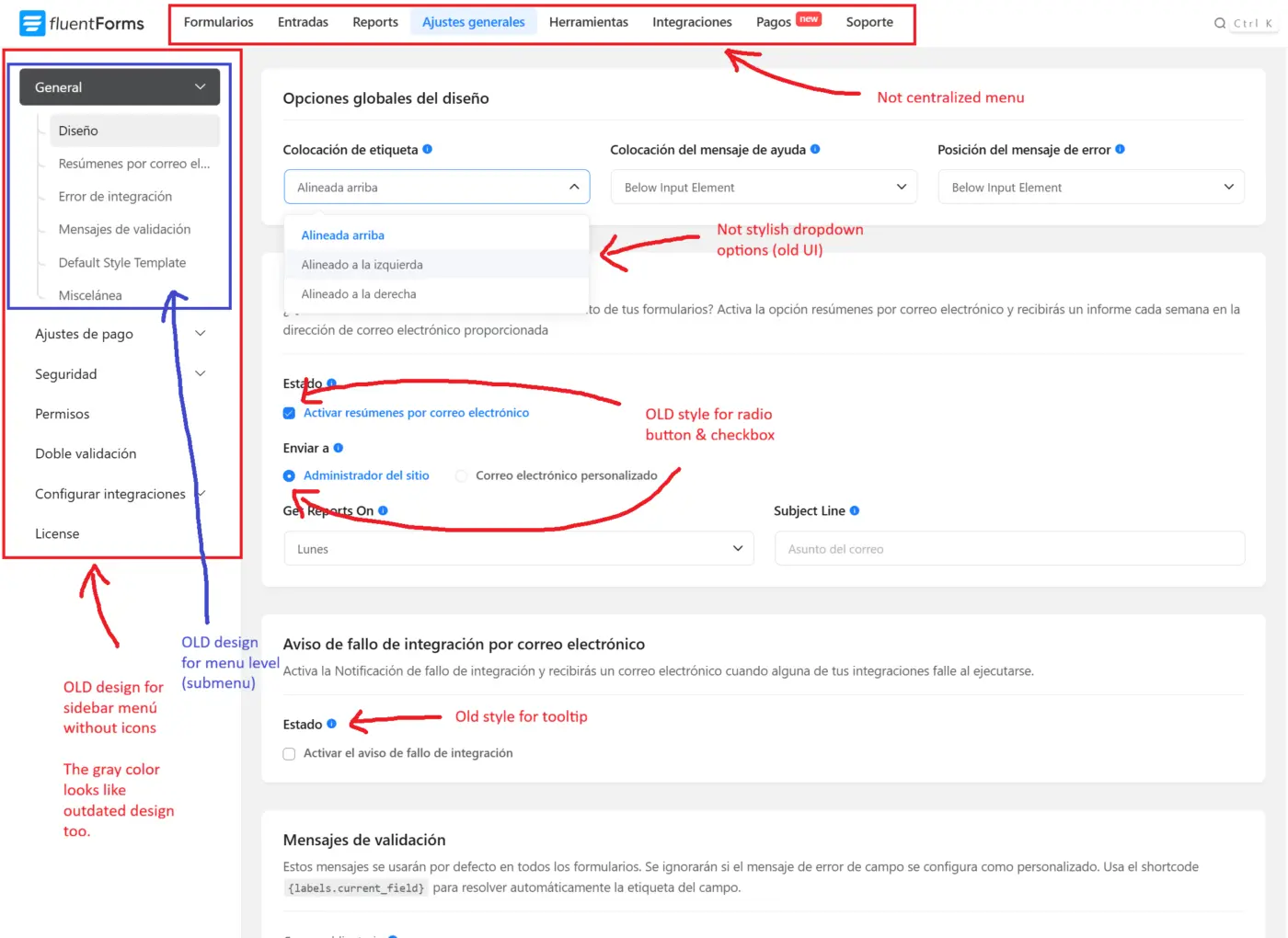
I have a question: do you plan to do a full UI/UX upgrade for Fluent Forms soon?
I see that it doesn't yet fully follow the modern design language like FluentCRM, Fluent Affiliate, and Fluent Cart.
I've attached a comparison with the new FluentCRM 3.0 design (I'm focusing on the settings section for now, but it applies to almost everything).

We’ve rolled out Fluent Forms 6.2.3 for both Free and Pro, bringing smoother form building, better entry management, improved accessibility, and powerful new Pro features.
- Step Tab Navigation: multi-step forms finally get clickable tabs (Top or Left layout) instead of just that linear progress bar. If you've ever built a long application form, you'll get why this was overdue.
- Ranking field: drag-to-rank, works in quizzes, plays nice with the Reports module out of the box. Been a top request forever.
- Image cropping on uploads: set a ratio (1:1, 4:3, anything custom) or exact dimensions, and the respondent crops before the file ever hits your entries. No more wonky profile pics. Server-side validated too, so it's not just frontend window dressing.
- PayPal Checkout v2: we migrated the entire PayPal path to the new Orders + Subscriptions v2 APIs with proper webhook signature verification. Existing forms keep working, no reconfig. PayPal's been deprecating the old endpoints, so this gets everyone safely onto the supported path. Your legacy API will still work.
- Pretty share URLs: landing pages and conversational form share links are now clean slugs instead of
?fluent-form=42&token=.... Way better for QR codes and printed material. - Dropdown option grouping: toggle on grouping for Dropdown / Multi-Select, label your clusters, ships native
<optgroup>on the frontend. Great for country lists, product catalogs, anything taxonomy-heavy. - HubSpot moved to CRM v3 + Lists v3: the old endpoints are gone. Existing feeds keep working via a legacy mapping layer, and errors now show the actual API response instead of a generic "failed".
- Security Improvements on save-and-resume form entries.
Full write-up with screenshots: https://fluentforms.com/fluent-forms-6-2-3/
Happy form building 👋

Would be great if Multi-Step forms had the option of skipping steps based on entries in previous steps.
My immediate use case would be on forms to access gated content eg.
Step 1: User enters email
Step 2: additional details (name, business etc.) requested ONLY IF a specific tag is not present for that user in the CRM.
Based on one forum comment I thought this was possible but I can't find any 'advanced settings' for steps.
Does anyone have any experience of using browser localstorage snippets to prefill a form for returning visitors?
Is it possible using regex match in conditional logic to identify if a field is blank? I have a radio question with 2 options and (my own) other. When other is selected a conditional text box appears. The submit button appears if either of the two first radio options is selected or the text box has content in it.
So I need to check the text box is not empty. There is no native condition for 'blank field'.

Divi 5 is huge and there is no reason that Fluent Forms should still integrate with shortcodes since Divi has moved on from shortcodes. Please unlock design flexibility for Fluent/Divi fans with Modules for Fluent Forms and Fluent Booking. I see that it's already in the works for Fluent Cart 👍😀
I am using a form at the start of Presto Player to check the identity of the viewer. It has an email field which is pre-populated from a url parameter. I am wondering how people handle shared links? Say someone passes a link to a colleague, or worse still it gets posted online with an email address in it, then that email is in the url and on the form as the video loads.
Basically the video will be part of a funnel process and I've been advised against getting prospects to fill in their email wherever possible if I already have it, just prepopulate wherever possible.
If someone lands on the video organically the form will not populate and they will have to enter their email.
I'm just wondering what standard practice is for this type of scenario - is it OK to ping email addresses around in url parameters, is it on the user if they share a personalised link etc?

 Hello team,
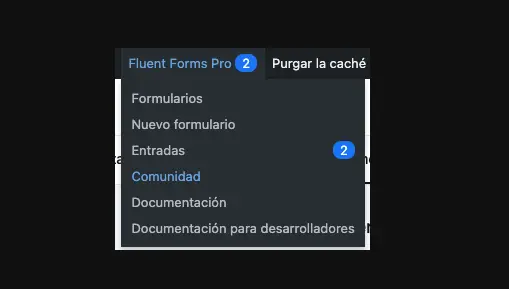
Just a heads up: the Wordpress dashboard fluent forms tabs, still redirects to the old Facebook community instead to this one :)

Just wanted to share this here. Multilingual Fluent Form with Polylang , you can try it from here.