


`Has anyone else had GA4 showing a higher lead count than the actual Fluent Forms entries?
I kept running into this on a few sites, especially where GTM was also firing a thank-you page conversion. That was creating duplicate lead counts and making the reports unreliable.
I ended up building a plugin for this exact problem so only confirmed Fluent Forms submissions are counted, with duplicate fires removed and GA4 aligned much more cleanly with the real entries. - https://drive.google.com/file/d/1t-sYZ9FTYKfRjmuTOfyreBpBtBPEy1XF/view?usp=sharing
Curious how others are handling this:
- Fluent Forms success event only
- GTM thank-you page only
- Both together
If you’ve solved this in a cleaner way, I’d love to hear it.`
If you want, I can also make it:
- more technical
- more community-friendly
- more bold/attention-grabbing

What is the workflow with file uploads?
Since it seems i can't use something like Dropbox, how do i keep my server clean regarding the amount of uploaded files? Is there an automation like "delete file after...." or do i have to delete them manually?

We created a new Full Fluent Forms overview video. Watch here:
New video is up on the new Fluent Forms YouTube Channel. Like and Subscribe pls!
Susbcribe here - https://www.youtube.com/@fluentforms
We will be uploading Fluent Forms related content here regularly!

I would like Google Sheets to be able to send/submit data to a FluentForm without using Zapier. Is that possible?
I have tried to connect Integrately, Make, AutomatorWP and a few others, but none seem to be able to send from Google Sheets TO a FluentForm.
I guess I am stuck on how does one submit data to a form without entering it manually. I have FluentForms Pro.

So, simple thing. But, in many other "Fluent" products, we've got the Label option to group things together. FluentCRM, for instance, uses it on automations. It is useful when you have a lot of them.
Fluent Forms needs this, too. For forms. When you have a lot of different forms, the list gets kinda unwieldy. It is weird that there isn't any real organizational options for a lot of forms. Seems like a basic thing.

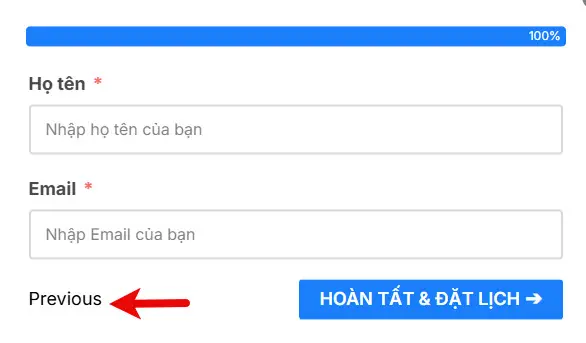
I translated 100% of the string, but with the "Previous" at the end, it still displays English instead of Vietnamese. Did you miss something?

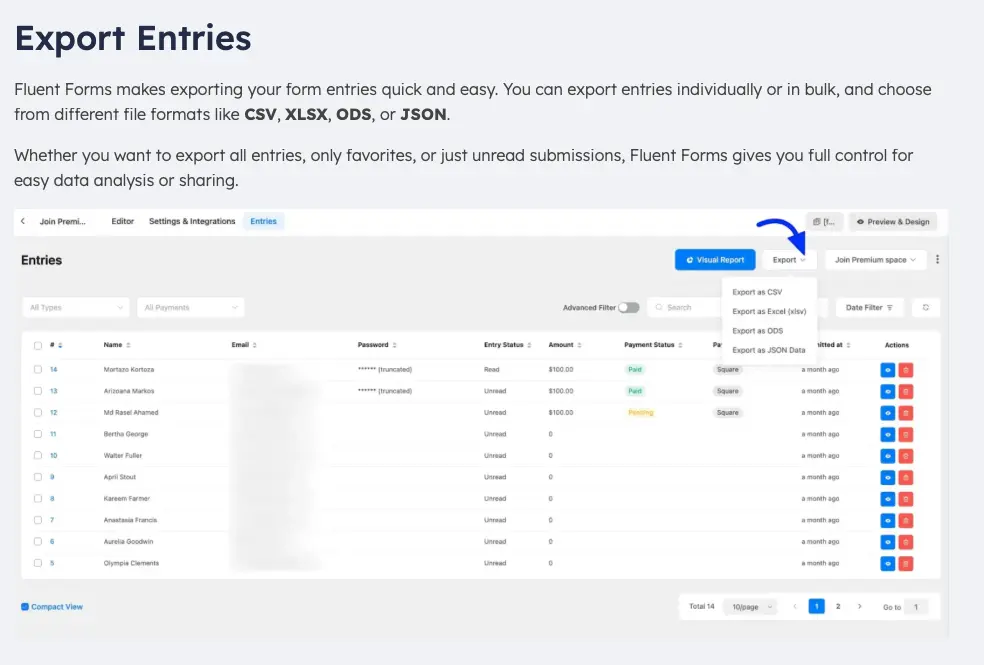
Been looking at this tutorial post but my screen is not showing an option to export at all... https://fluentforms.com/docs/managing-entries-in-fluent-forms/ Has this disappeared in an update?

One feature I'd absolutely love to see in Fluent Forms is the ability to create dedicated landing pages for multi-step forms, with a persistent step navigation displayed on the left side, similar to many modern onboarding flows.
Something like this mockup:
Why I think this would be valuable:
-
It immediately gives users context about where they are in the process.
-
Long forms feel much less overwhelming.
-
It creates a much more polished and premium experience.
-
Perfect for onboarding, applications, KYC, client intake, insurance, banking, HR, memberships, consultations... basically any workflow that spans multiple steps.
This will also be beautiful for community onboarding...
Some ideas that could make it even better:
- Optional vertical or horizontal progress navigation.
- Clickable or locked future steps (configurable).
- Custom icons for each step.
- Ability to show completed/current/upcoming states.
- Responsive behavior on mobile (collapse into a progress indicator).
- Full landing-page mode without relying on the active WordPress theme layout.
I quickly mocked up an example to illustrate the concept. (The content itself is just placeholder text -the important part is the overall layout and navigation.)
Is something like this already possible and I've simply missed it? If not, I think it would be a fantastic addition to Fluent Forms.
cc: Shahjahan Jewel


Wondering if anyone is using a monitoring service or if WPManageNinja has a solution in the workings for monitoring form submission failures?