


Fluent Forms already collects signatures, but there appears to be an opportunity for a complete self-hosted document execution system within the Fluent ecosystem: reusable agreement templates populated from Fluent Forms, multiple signers, sequential signing, signer authentication, immutable audit trails, tamper-evident completed PDFs, certificates of completion, automatic FluentCRM tagging/automation, reminders, expiry, and secure document storage. Existing WordPress solutions such as ApproveMe are relatively expensive and don't integrate naturally with Fluent Forms, while newer competitors are now specifically targeting Fluent integrations. A native Fluent solution could keep the entire agreement workflow inside the WPManageNinja ecosystem. 💡 Shahjahan Jewel

1...
There are two very different Entries. Going to the top level Entries one sees.
Submission ID, Form (name), Status, Browser, Time and Action.
2...
Now going first directly to a form and then hovering the title and then selecting Entries one sees a much more useful list:
Submission ID (hashtag) then the fields that are added....
It would be great to have a kind of standard Entries area showing the fields in the form. It is a bit cryptic going to Entries in different ways and having two different ways to show entries.
I would likely think through how these Entries are being used. Merge the two views and just have the selection of columns to where one can choose which columns to have seen. Columns also need to adapt to the content inside. So some columns are much wider then they need to be.

I apologize if this request is already been made. But it would be great to be able to copy / paste fields between different forms as an alternative to duplicating the whole form. It would be very useful if we could select one or several already edited fields to copy them and after paste them in another form in the same web or another website.
I would also love to have the option to change the selected form in the FF block inside the block editor. Currently, once you insert the block and select the form, it's impossible to change your selection. You have to delete the block and insert a new one.
Thnaks!

Important security notice for Fluent Forms Pro and Ninja Tables Pro users.
On 31 July, tampered versions of Fluent Forms Pro 6.2.7 and Ninja Tables Pro 5.2.11 were served through an old server of ours that should have been shut down long ago. The bad files were live for about five hours, 14:00 to 19:00 UTC. If either plugin updated on your site in that window, including auto-updates, it may have pulled files with code we did not write.
We emailed 1,368 customers, everyone whose site downloaded either plugin on 30 or 31 July. Our checks indicate that around 295 accounts actually received the tampered files, but we have extended the timeframe just to make sure, we are not missing anyone to send the notice. If you did not get an email from us, your site is very likely not involved.
What to do:
-
Move to the clean builds: Fluent Forms Pro 6.2.8 and Ninja Tables Pro 5.2.13.
-
Delete the plugin and install a fresh copy from your account. Do not just deactivate. Your forms, entries, tables and settings live in the database, so nothing is lost.
-
Check for admin users you did not create, unknown .php files in wp-content/uploads, and cron events you do not recognise.
I have written up the whole thing: what happened, who is affected, and what we have already fixed: https://wpmanageninja.com/security-incident-on-31-july-2026/
If you want help cleaning up a site, email contact_support [at] wpmanageninja.com. We will move you to the front of the queue.
We let you down here, and I am sorry. We are fixing the things that made this possible, and I would rather tell you about it plainly than quietly move on.

Dear Fluent Forms Support Team,
I hope you are doing well.
I am a Fluent Forms Pro user and would like to build an automated certificate issuance system using the existing features available in Fluent Forms.
My objective is to create the following workflow:
- A participant submits a registration or attendance form.
- A unique certificate number is generated automatically.
- A professionally designed certificate is generated as a PDF using a custom certificate layout.
- The certificate is automatically emailed to the participant.
- Different certificate templates can be used for different events or forms.
- Certificates can be re-generated or re-sent from the admin panel when required.
While exploring the PDF module, I noticed that it primarily uses HTML/CSS templates. I was wondering if there is any existing functionality or recommended approach to achieve the following without relying on custom coding:
- Upload a certificate background designed in Canva and place dynamic fields visually.
- Create or manage multiple certificate templates.
- Automatically position participant details, event details, dates, and certificate numbers on the certificate.
- Generate sequential certificate numbers.
- Trigger certificate generation only after specific conditions are met (such as payment completion or admin approval).
If these capabilities are already possible using Fluent Forms Pro, I would greatly appreciate any documentation, tutorials, or best practices that you can share.
[fluentform id="21"] is the shortcode of the form we re working on my site servicejournal.org
If some of these features are not currently supported, I believe a built-in Certificate Builder with a visual drag-and-drop designer would be an excellent addition to Fluent Forms, as it would benefit event organizers, NGOs, educational institutions, trainers, and membership organizations who already rely on Fluent Forms for registrations.
Thank you for your support. I look forward to your guidance on the best way to implement this using the existing Fluent Forms platform.
Kind regards,
Rajesh Salian
Founder, www.servicejournal.org

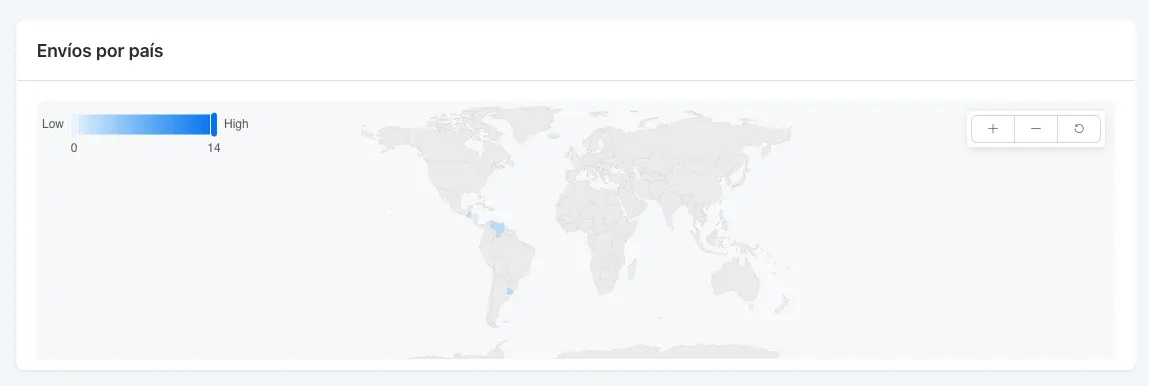
Since the updated Fluent Forms Reports section was released, I assumed the global map would start displaying the countries where form submissions are coming from.
However, it's not showing any of the countries we're actually receiving submissions from. In fact, it's displaying countries where we're not even getting any traffic.
Is anyone else experiencing the same issue?
P.S. While we're on the topic, it would be fantastic if country detection could eventually become a native feature in FluentCRM as well. We've been relying on a third-party IP geolocation service for years just to determine a contact's country and segment our audience accordingly. Having a built-in integration between Fluent Forms and/or FluentCRM for country detection would remove the need for external services and make geographic segmentation much easier.

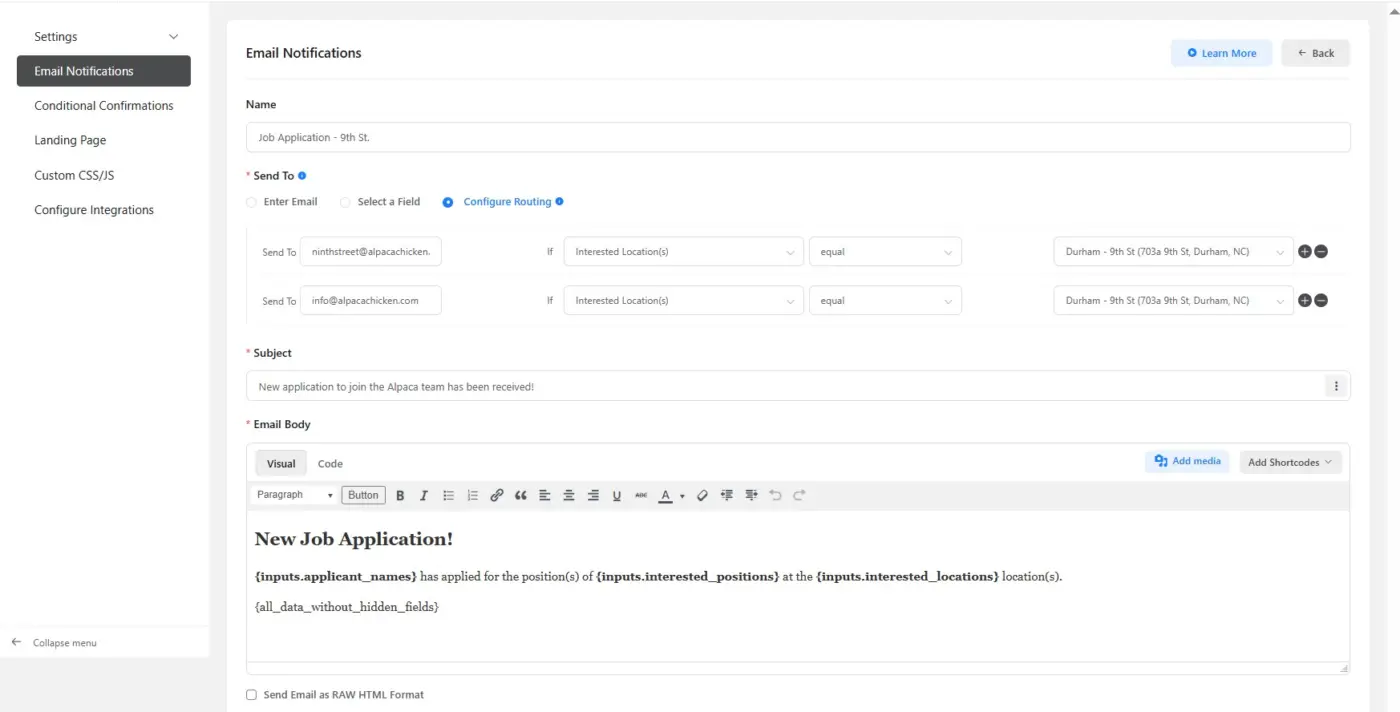
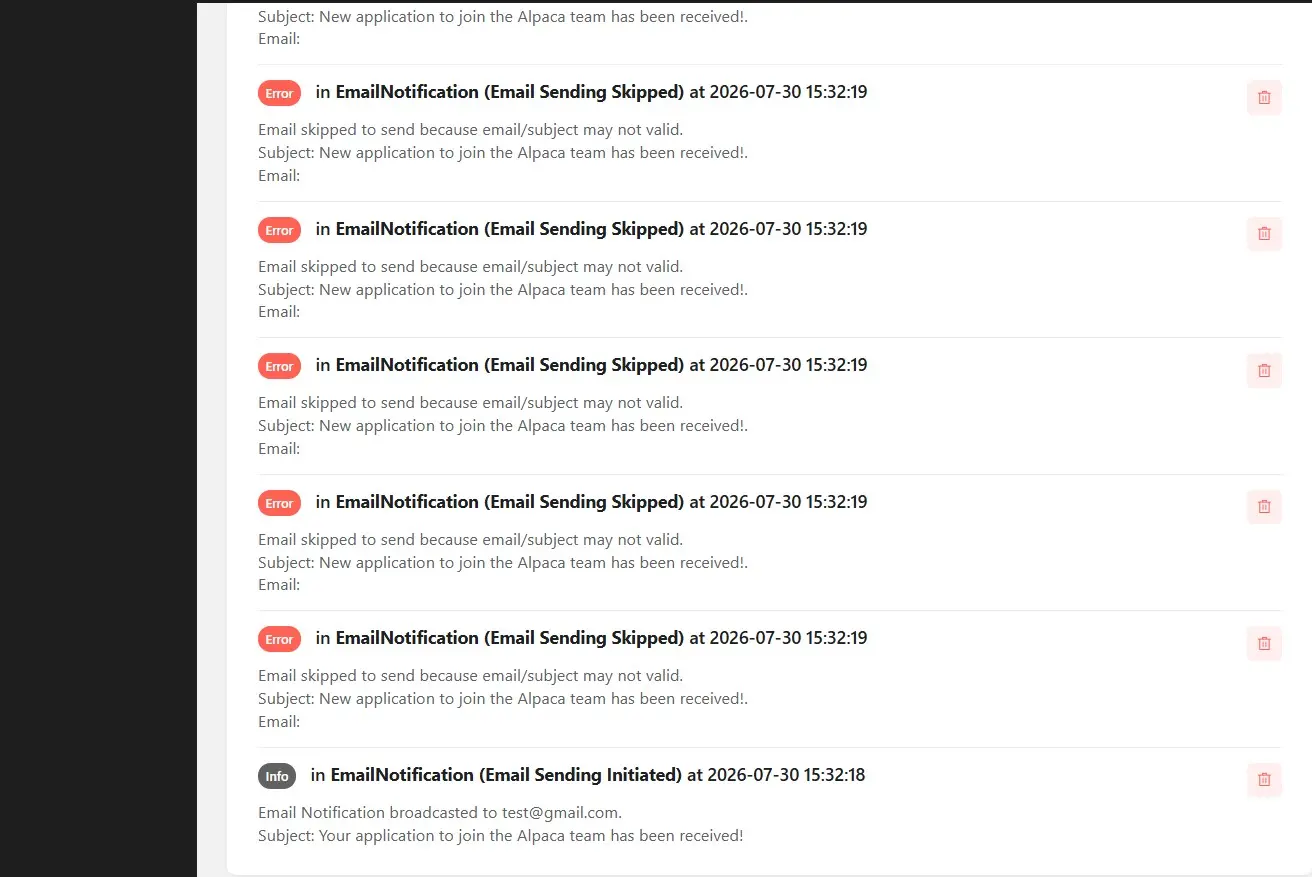
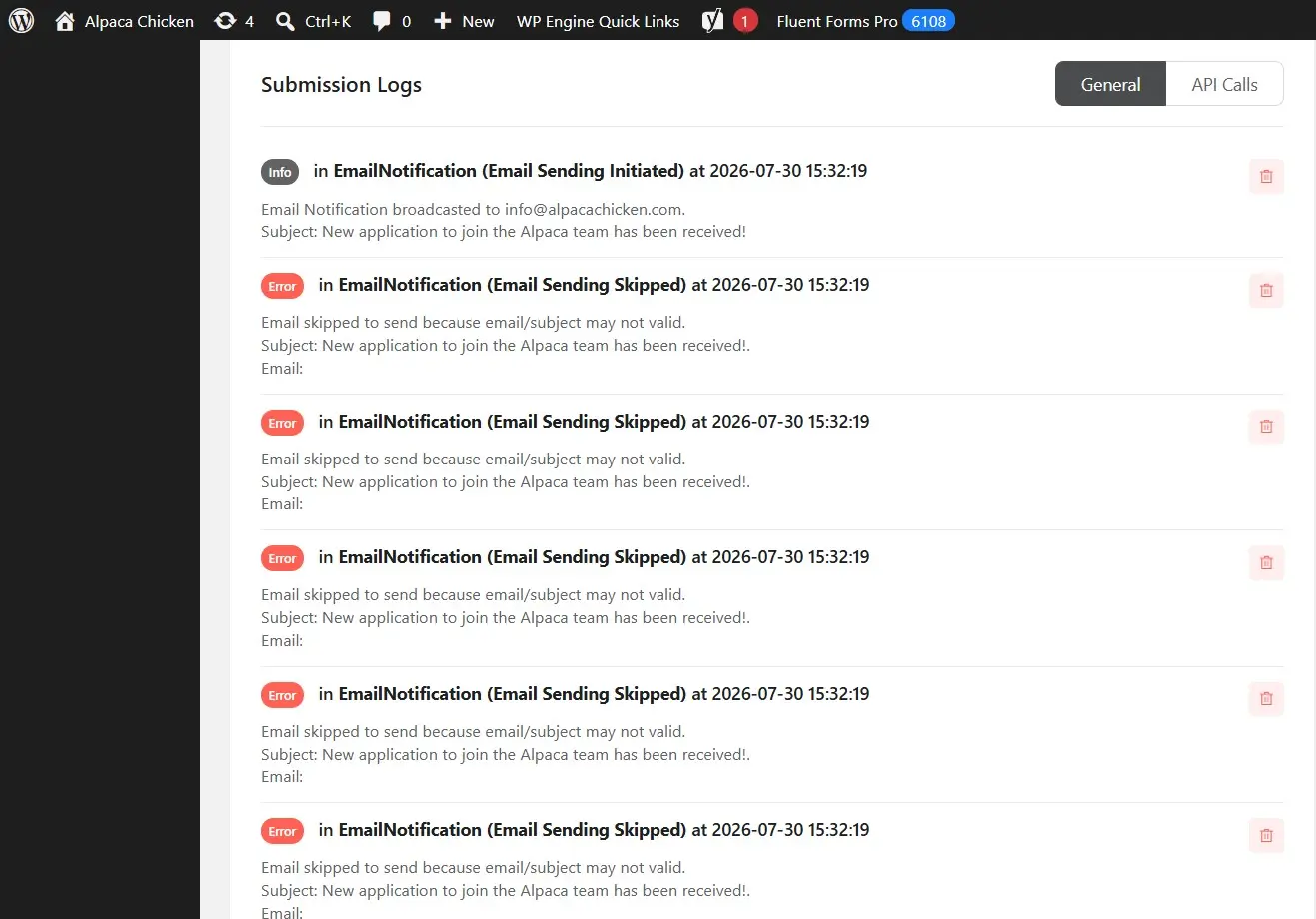
We had set up FluentForms Pro to email our store along with our main admin emails when a job application is submitted to a specific location. This was working up until early this month. We receive the following error when checking submission logs. How can we address this issue? I have attached how the email notifications are configured.

just tested the "Create with AI" feature to build a multi-step, scored lead quiz (a "Which dog fits your lifestyle?" quiz with calculation values and a score aggregation field.
AI generated everything, assigned calc values and even configured the formula inside the Numeric Calculation filed. Awesome!
However, the character limits in the AI prompt modal (2,000 chars / 1,000 chars) are quite restrictive once you want to pass detailed scoring logic, step structures or longer questionnaire content. I had to heavily compress and strip down my context to make it fit.
Are there plans to increase or remove the character limit in the AI prompt builder for users who want to feed richer context? or will the AI Prompt Builder be obsolete when/ if there's an MCP Integration?

File: app/Hooks/actions.php, the enqueue_block_assets callback (~line 1250).
add_action('enqueue_block_assets', function() {
    if (!is_admin() && !wp_is_block_theme()) {
        return;
    }
    ...
    wp_enqueue_style('fluent-forms-public', ...);
    wp_enqueue_style('fluentform-public-default', ...);
});
The early return only happens when we are NOT in the admin AND the theme is NOT
a block theme. But enqueue_block_assets also fires on the front end, and there
wp_is_block_theme() is true for every block theme, so the guard never bites:
both stylesheets are printed on every front-end page, whether or not the page
contains a form.
Impact on our site (WordPress 7.0.2, block theme, ~130 pages, exactly one page
with a form): 47 KB uncompressed / 8.8 KB gzipped and two extra render-blocking
requests on every page that has no form at all.
How to reproduce: on a block theme, open any front-end page without a form and
view the source. You will find the handles fluent-forms-public-css and
fluentform-public-default-css. The handle name is what identifies the source:
the legitimate render path in app/Modules/Component/Component.php registers the
same file under fluent-form-styles.
Suggested fix: the iframed block editor introduced in WP 6.3 still runs inside
an admin request, so the admin check alone should be enough:
if (!is_admin()) {
    return;
}
Workaround we use, in case it helps other block-theme users: dequeue both
handles on enqueue_block_assets at priority 999, but only when
wp_style_is('fluent-form-styles', 'enqueued') is false. That flag tells us a
form really did render. The condition matters: in a block theme the template
renders BEFORE wp_enqueue_scripts fires, so an unconditional dequeue removes
the style preset that the shortcode had already enqueued, and the form then
renders with browser-default input borders.

I need to create a dashboard and query system for the membership team of a charity organization. which tool should i use FLuentForms, FLuentCRM, or ?? Team members will need to view and update membership payments, status and renewal date.