


EDIT: FluentWP to the rescue!!!!
I have some clients who don't want to process payments on their forms on certain days, like the Sabbath. It is not just a particular day, but a timeframe from one day to the next. It would be nice to disable the form with payments on a repeated schedule. I'll give an example.
Disable the form from 4pm EST on Fridays and enable it back at 9pm EST on Saturdays. The same could go for Saturday to Sunday, or any other timeframe for that matter.
BTW... this would be a GREAT feature for FluentCart as well.
FF support says they do not have a way to hide the Credit Card field on subscriptions (I have four subscription options to choose from) when a coupon is applied and the amount equals to $0. I have been told by support that this is normal, but my experience with other forms is that the CC field can be hidden when the price is $0. I can do this easily with GF without writing any code.
FF support told me that I can write some custom JS to hide the CC field if the amount is $0 or explain in an HTML field to ignore the CC field if the amount is $0. For one, that is a bad user experience to have to explain this and secondly, I do not write JS.
Overview: I have four yearly subscriptions - $20, $30, $50, $100 and the coupon is for $20 off. If the first one is chosen and the coupon is applied, it should be $0. I don't want the CC field to show when it is $0.
Has anyone here done this already with their site that has the JS code? Any other ideas? It has to be a subscription. Thank you in advance.

Hey everyone 👋
I’ve been working on something big for Fluent Forms power users, something I personally needed for my own lead-gen funnels.
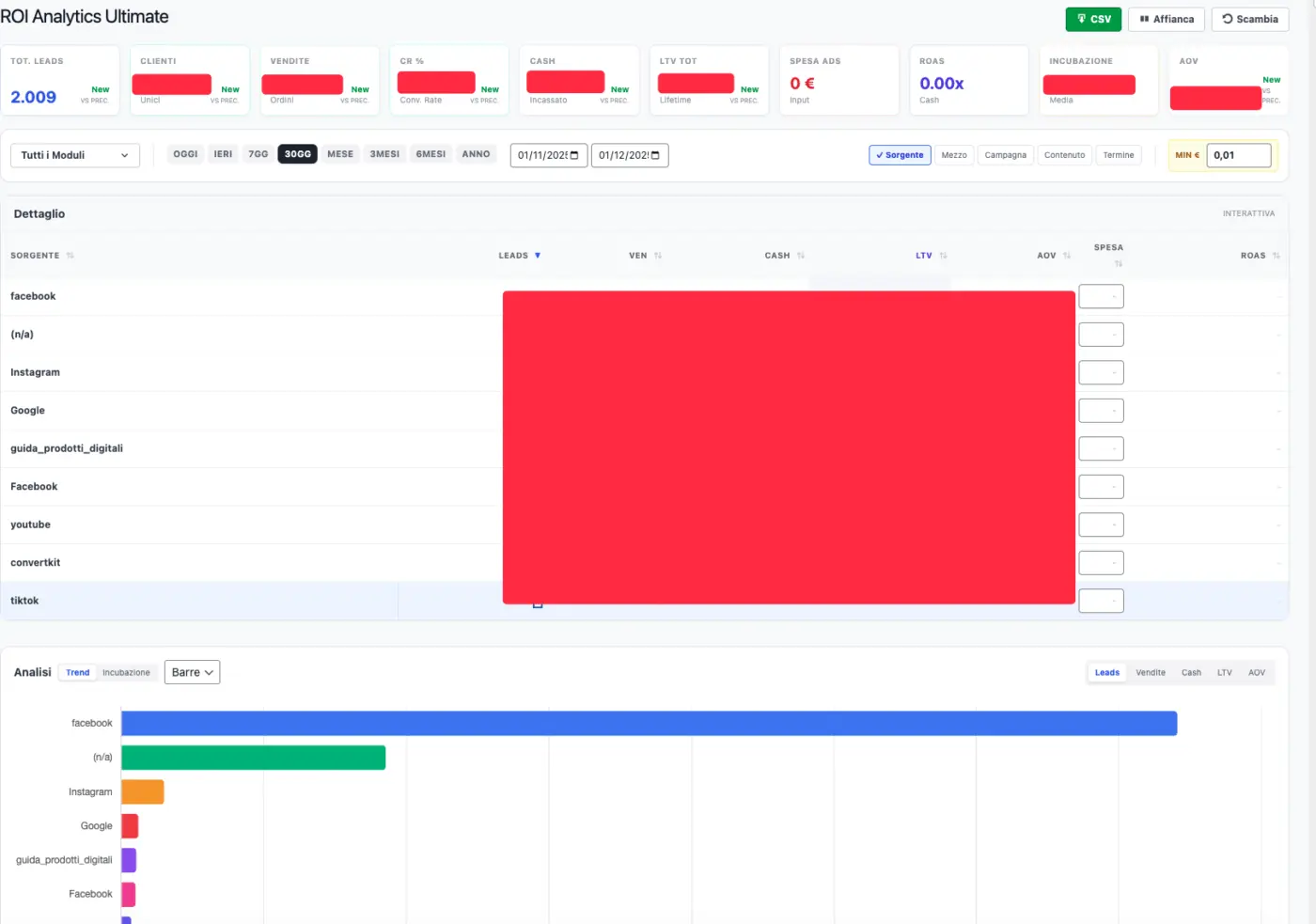
I built a complete ROI Analytics Dashboard that connects Fluent Forms → WooCommerce → FluentCRM, with LTV, ROAS, CR%, incubation time, per-UTM breakdown, and drilldown views.
The name is provisional (currently calling it “Fluent ROI – Analytics Ultimate”), because this is still a private build.
Before finalizing branding, pricing, or launch, I want to understand if the community actually wants this.
Here’s what the plugin does 👇
🔍 What this plugin actually does
It turns your Fluent Forms submissions into a full marketing & revenue intelligence dashboard, directly inside WordPress.
You can:
-
Track Leads → Customers → Sales → Cash → LTV in one unified flow
-
Analyze performance by UTM source / medium / campaign / content / term
-
Calculate real ROAS by entering ad spend per source
-
Drill into:
- WooCommerce Orders (filtered by that exact source)
- Fluent Forms leads (per-source entry logs)
- FluentCRM subscribers (customers generated in that period)
No SaaS, no external tools, no monthly fees — just a WordPress plugin.
📊 Main Dashboard – ROI Analytics (Name still TBD)
The dashboard is built with React + Tailwind and includes:
🔹 KPI Bar (with full tooltips + previous period comparison)
For any date range, it shows:
- Total Leads
- Customers (unique buyers; link to FluentCRM)
- Sales (WooCommerce orders; clickable)
- CR% – Conversion Rate
- Cash – cash collected in the selected period
- LTV Total – lifetime revenue generated by leads captured in that period
- Ad Spend – manual + fallback CPL
- ROAS – Cash / Ad Spend
- Incubation – average days from form submission to first purchase
- AOV – Average Order Value
All metrics include:
- Precise formulas
- Plain-English explanations
- Trend comparison vs previous period (+%, −%, or “New”)
📅 Date range logic
Built-in quick filters:
- Today, Yesterday
- Last 7 / 30 days
- This month
- Last 3 or 6 months
- Year to date
Plus fully custom ranges.
For every range, the plugin automatically computes the previous equivalent period to compare numbers.
🎯 UTM-based analytics
You can slice your data by:
- utm_source
- utm_medium
- utm_campaign
- utm_content
- utm_term
Use one or multiple at once (e.g. Source / Campaign combined).
Per each segment, you get:
- Leads
- Sales
- Cash
- LTV
- AOV
- Ad Spend (manual OR estimated via fallback CPL)
- ROAS
🧾 Per-source table (with drilldown)
Each row represents a traffic segment.
You get:
- Source label
- Leads → opens Leads View
- Sales → opens WooCommerce orders filtered
- Cash (period)
- LTV (all future orders from those leads)
- AOV
- Ad Spend input
- ROAS (color-coded)
The table supports:
- Sorting on all columns
- Auto-formatting
- Clean placeholders when data is missing
- Fallback CPL highlighting when spend is estimated
- CSV export of all rows
📈 Charts: Trend & Incubation
Trend Charts
Pick any metric:
- Leads
- Sales
- Cash
- LTV
- AOV
Choose the chart type:
- Horizontal bars
- Pie chart
Incubation Chart
Shows how long it takes for a lead to buy:
- Within 24h
- 1–7 days
- 7–30 days
- 30+ days
Super useful to understand customer buying cycles.
🔮 Forecast Simulator
Enter an “extra ad budget” (e.g., +€100, +€1,000) and the plugin estimates:
- Additional leads
- Additional sales
- Additional revenue
- Expected ROAS
Based on global CR%, AOV, and CPA.
🧩 Integrates all three Fluent tools
Fluent Forms
- Reads submissions
- Reads UTMs + email
- Filter by specific forms, whitelist, or blacklist
WooCommerce
-
Matches billing email to all valid orders
-
Computes:
- Period revenue
- LTV
- Sales count
- AOV
FluentCRM (optional)
-
When installed, you can:
- Open CRM Contacts View of all customers generated
- See customer details + link to their profile
👤 Dedicated Leads View
When clicking on Leads count:
-
Table showing:
- Name, email, phone
- UTM data
- Date, status
-
Direct link to Fluent Forms entry page
⚙️ Settings Page
Full control:
- Access roles
- Valid WooCommerce statuses
- Minimum order threshold
- Form whitelist
- Form blacklist (if no whitelist is set)
- Fallback CPL
- Default dashboard range
All settings saved as standard WordPress options.
🧱 UI/UX Features
- Split layout with draggable resize
- Stacked layout for laptops
- Responsive design
- Detailed tooltips with definitions & formulas
- CSV export
- Clean Tailwind design
- Smooth transitions, hover states, shadows
🤝 Why I’m sharing this now
The plugin is complete and working, but:
- The name is temporary
- No branding yet
- No pricing decided
- Not publicly released
- I'm not sure i'll sell it, i created it only for my personal use actually.
Before I go further, I want to hear from Fluent Forms users.
❓Questions for the community
Would this help your workflow?
-
Would you use/buy a plugin like this?
-
Anything missing from your ideal ROI dashboard?
-
Would you prefer:
- Lifetime license, or
- Yearly updates/support?
If there’s real interest, I’ll share a video demo and early-bird access for commenters.
Let me know! 👇
p.s. the plugin is actually in Italian, i'll translate it in english if i'm gonna sell it
p.p.s. if the post is against space rules plz let me know i'll remove it

Is it possible to integrate FluentForms with Vocal, https://vocal.email/? I had a client recently injured their hand and they could not type so we sent voice messages and it would be great to increase accessibility by including the option for a voice message; a leave voice message option perhaps. I am looking at expanded the capability of a single form without having to clutter a page with, as my nan would say, “bits and bobs.”

Is there an option to upgrade a FluentForm plan from 5 to unlimited? When I press upgrade in my account it says “No upgrade found for this purchase”.

Is there a way I can connect FluentForms to Stripe payments using API keys rather than using Stripe Connect?
I know there is with FluentCart, hoping similar exists 😊

Does anyone had an issue with images on PDF Generator?
Apparently there is a security task that changes the link from "a href="https..." to "a%20href=https..."
I'm using Hostinger and its ModSecurity service is one of the suspects.

Hello everyone!
I recently purchased FluentForms and built a Buzzfeed-style quiz (yes, of all possible use cases, that one 😅). I’d like to know the best way to implement a feature that allows users to share their quiz results directly on social media — including an image and description — similar to how results are displayed in Conditional Confirmations.
Using the Front End Entry View, I can only display the Quiz result and not all the data (description and image) that I configured in Conditional Confirmations
Any guidance or recommended approach for configuring this within FluentForms would be greatly appreciated.
Thank you in advance for your help!

I'm working with a client who processes Protected Health Information (PHI) and needs a way for clients to submit their blood data on a regular basis. I see that Gravity Forms has an add-on for this feature, but I don't see anything like that for Fluent Forms.
One of the cases could be resolved using Fluent Forms to collect and pass the data on to a HIPAA compliant storage. Hope you give this some thought.

Unable to add a {if:...} shortcode properly in the PDF editor, because it auto-wraps it with a
tag. I tried a few suggested workarounds, and nothing is working. Do you have a way around to do this? I ned to customize our forms to be legal, and I do not want to include blank fields in the output. Please advise!