


Illegal mix of collations (utf8mb4_unicode_ci,IMPLICIT) and (utf8mb4_unicode_520_ci,IMPLICIT) for operation '=' (SQL: select count(*) as aggregate from `wp_fc_subscribers` where `status` = 'subscribed' and `email` in (select `wp_wc_customer_lookup`.`email` from `wp_wc_customer_lookup` inner join `wp_fc_subscribers` on `wp_fc_subscribers`.`email` = `wp_wc_customer_lookup`.`email`))
can you please help?

I have 14k subscribers on my email list. I have used Amazon SES to send. My server is a Premium Cloudways server with 8GB of RAM, SSD drive (less than half used) and 4 CPUs. I have noticed that the send process consumes almost 100% of my CPU for about 90 minutes as I send my emails. I initially assumed there would be some kind of 'send rate' control, but there doesn't seem to be one. I could throw more server hardware at this, but it's starting to get quite expensive. Is anyone else having this kind of issue, or found a solution? Thanks!
#performance

Sure Members is a bit simplistic, but that's why we use it.
I need to add registrations to a Sure Members group.

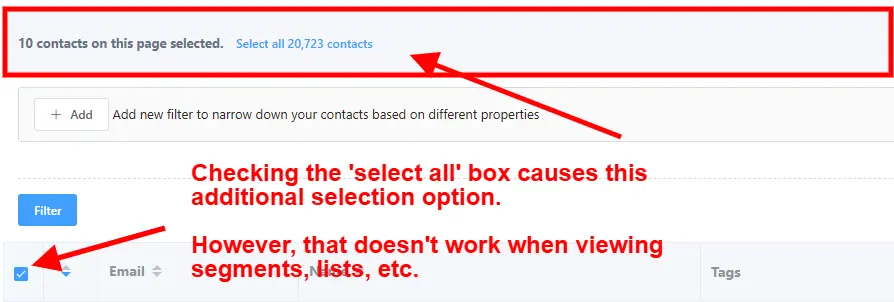
When viewing the contacts list I can check the select all box and then I'm presented the option to 'select all contacts'.
That capability only exists when viewing the raw contacts list, but it isn't available when viewing lists or segments. Therefore, I have to recreate the lists or segments in a one-time contact filter in order to have the option to select all.
For example, say I have a segment defined that results in 13,000 contacts and I want to add all those contacts to an automation. I can't do that just by viewing the segment and selecting all contacts. Instead, I have to recreate the segment using contact filters and then do a select all.
Please add the ability to select all contacts to lists, segments, etc.
#request #idea

I am importing multiple new users at once using the "Import and Export Users and Customers" plugin in WordPress. I attempted to trigger FluentCRM automations by firing the user_register hook after user creation, but the automation does not seem to run. Is the user_register hook the correct one FluentCRM listens to for new user creation? Or is there another hook or recommended way to trigger automations for users imported via an external plugin? I would appreciate clear guidance on the exact function or hook to use. Thanks in advance!

I have a client with 600 members at the moment, may go to 1000 within a year, looking to use Fluent CRM. May send one broadcast per week. Should I just set up an SMTP email connected to Fluent SMTP? Or go with a transactional email provider, like SendGrid etc?

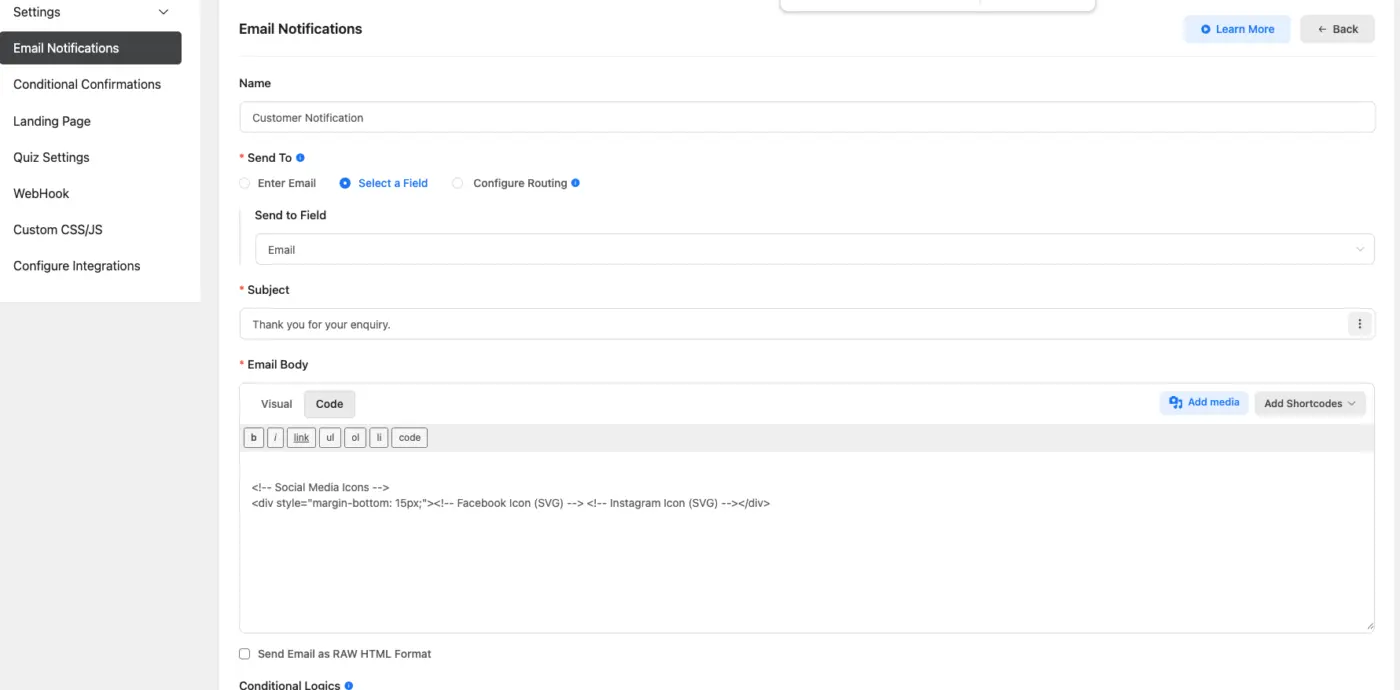
Could you please add SVG icon support in the email notification :
I am not able to make the following code work: it gets converted to
<!-- Social Media Icons -->

<div style="margin-bottom: 15px;"><!-- Facebook Icon (SVG) --> <!-- Instagram Icon (SVG) --></div>
*\<!-- Social Media Icons -->* \<div style="margin-bottom: 15px;"> *\<!-- Facebook Icon (SVG) -->* \<a href="https://www.facebook.com/abc/" style="display: inline-block; margin: 0 10px;"> \<svg xmlns="http://www.w3.org/2000/svg" width="24" height="24" viewBox="0 0 24 24" fill="none" stroke="#333333" stroke-width="2" stroke-linecap="round" stroke-linejoin="round"> \<path d="M18 2h-3a5 5 0 0 0-5 5v3H7v4h3v8h4v-8h3l1-4h-4V7a1 1 0 0 1 1-1h3z">\</path> \</svg> \</a> *\<!-- Instagram Icon (SVG) -->* \<a href="https://www.instagram.com/abc" style="display: inline-block; margin: 0 10px;"> \<svg xmlns="http://www.w3.org/2000/svg" width="24" height="24" viewBox="0 0 24 24" fill="none" stroke="#333333" stroke-width="2" stroke-linecap="round" stroke-linejoin="round"> \<rect x="2" y="2" width="20" height="20" rx="5" ry="5">\</rect> \<path d="M16 11.37A4 4 0 1 1 12.63 8 4 4 0 0 1 16 11.37z">\</path> \<line x1="17.5" y1="6.5" x2="17.51" y2="6.5">\</line> \</svg> \</a> \</div>

I really appreciate being able to see which links people click on but since I almost always use smartlinks for everything (it's how I customize experiences and future emails). Having the title of the smart link in the campaign link activity would be really useful.

Will it be possible to add API to create edit and launch, campaigns, emails, etc? thanks!

Hi everyone!
Just wanted to share a quick update that might be useful for those running multilingual WordPress sites and use FluentCRM.
Linguise – WordPress-friendly translation tool – now automatically translates FluentCRM emails based on each contact’s language. Super handy if you want to send the right message in the right language, without extra work. Just flip the toggle in your Linguise dashboard, and new emails will match your contacts’ language settings automatically. This applies to new contacts added after the feature is enabled.
You can find more details and setup guide here.
Give it a try and let me know what you think!